INVITE-ONLY SCRIPT
DiNapoli Control Panel Compact
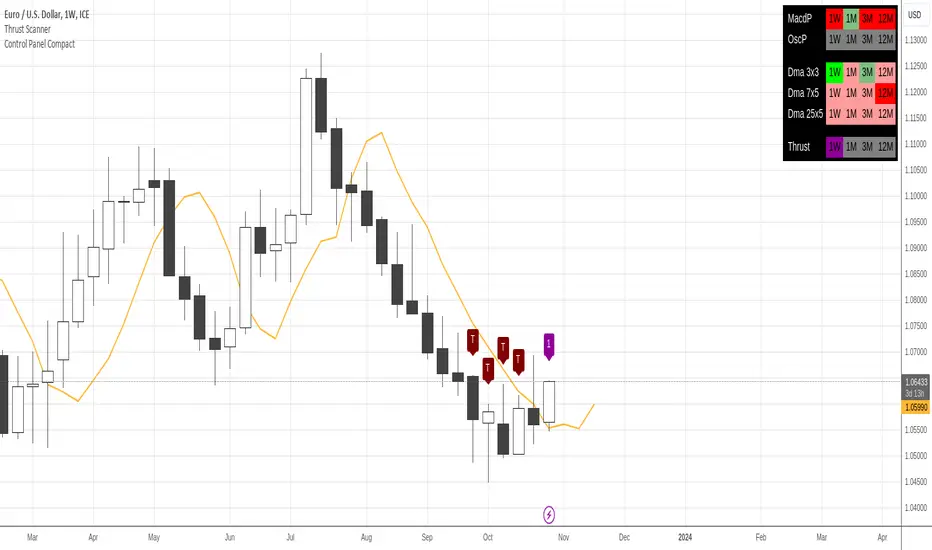
This is a compact more customizable control panel to display the overall state of Dinapoli related indicators.
This indicator displays a matrix containing a customized set of Dinapoli indicator states from Higher Timeframes. It works as a Control Panel to properly monitor multiple layers of the market at an eye glance.
It can print the multi time frame state of the following indicators:
In order to aid a custom display, it's designed to only supply color states in multiple time frames. This one doesn't provide the value reading of the indicators.
Only Higher Timeframes states do appear in the table. Lower Timeframes are hidden due to inability to get reliable results for such behaviour in current Tradingview environment.
By default only 5 timeframes get activated: 1H, 4H, 1D, 1W and 1M. But many more are available to be displayed throught the Input Tab.
The sorting of the rows and the position of the table can be customized through the input panel.
This indicator displays a matrix containing a customized set of Dinapoli indicator states from Higher Timeframes. It works as a Control Panel to properly monitor multiple layers of the market at an eye glance.
It can print the multi time frame state of the following indicators:
- Macd Predictor
- Oscillator Predictor
- Stochastic Predictor
- Trusht: Its presence and state of maturity
- DMAs: 3x3, 7x5 and 25x5
In order to aid a custom display, it's designed to only supply color states in multiple time frames. This one doesn't provide the value reading of the indicators.
Only Higher Timeframes states do appear in the table. Lower Timeframes are hidden due to inability to get reliable results for such behaviour in current Tradingview environment.
By default only 5 timeframes get activated: 1H, 4H, 1D, 1W and 1M. But many more are available to be displayed throught the Input Tab.
The sorting of the rows and the position of the table can be customized through the input panel.
仅限邀请脚本
只有作者授权的用户才能访问此脚本。您需要申请并获得使用许可。通常情况下,付款后即可获得许可。更多详情,请按照下方作者的说明操作,或直接联系gliderfund。
TradingView不建议您付费购买或使用任何脚本,除非您完全信任其作者并了解其工作原理。您也可以在我们的社区脚本找到免费的开源替代方案。
作者的说明
This is an indicator that only displays the control panel.
To display the lines and indications on the chart, you must add the dedicated indicator to your study (i.e. Thrust Scanner, MACD Predictor, etc...),

I develop indicators meant to be useful, profitable and good looking.
免责声明
这些信息和出版物并非旨在提供,也不构成TradingView提供或认可的任何形式的财务、投资、交易或其他类型的建议或推荐。请阅读使用条款了解更多信息。
仅限邀请脚本
只有作者授权的用户才能访问此脚本。您需要申请并获得使用许可。通常情况下,付款后即可获得许可。更多详情,请按照下方作者的说明操作,或直接联系gliderfund。
TradingView不建议您付费购买或使用任何脚本,除非您完全信任其作者并了解其工作原理。您也可以在我们的社区脚本找到免费的开源替代方案。
作者的说明
This is an indicator that only displays the control panel.
To display the lines and indications on the chart, you must add the dedicated indicator to your study (i.e. Thrust Scanner, MACD Predictor, etc...),
I develop indicators meant to be useful, profitable and good looking.
免责声明
这些信息和出版物并非旨在提供,也不构成TradingView提供或认可的任何形式的财务、投资、交易或其他类型的建议或推荐。请阅读使用条款了解更多信息。