INVITE-ONLY SCRIPT
CSI Indicator
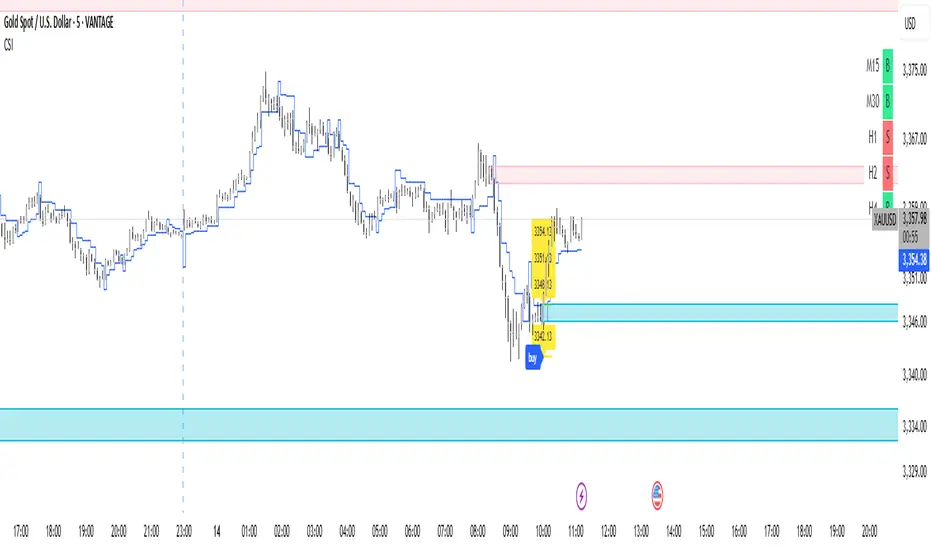
This script provides a visual trend dashboard that may assist scalpers and day traders in identifying potential setups by aligning multiple timeframes.
✅ Trend Dashboard
Located at the top-right corner of the chart, the dashboard includes two key components:
1. CMP (Current Market Price) :
Shows the primary trend signal and current directional bias.
2. VCS (Verified Confirmation Signal) :
Confirms the trend's strength and alignment across higher timeframes.
✅ Basic Entry Rules For :
1. Scalper Trader
* CMP timeframe: M15
* VCS timeframe: M30
* Only enter when CMP = VCS
* If not aligned: Follow display on M15
2. Day Trader
* CMP timeframe: H1
* VCS timeframe: H2
* Only enter when CMP = VCS
* If not aligned: Follow display on H1
✅ Risk Management & Stop Loss (SL)
* Use the blue line as a dynamic SL.
* Consider not placing SL too close, as the line adapts dynamically to price action.
✅ Customize Chart With Optional Tools
* Tiered Take Profit Level
* Custom Stop Loss Level
* Display Order Block Zone
✅ Trend Dashboard
Located at the top-right corner of the chart, the dashboard includes two key components:
1. CMP (Current Market Price) :
Shows the primary trend signal and current directional bias.
2. VCS (Verified Confirmation Signal) :
Confirms the trend's strength and alignment across higher timeframes.
✅ Basic Entry Rules For :
1. Scalper Trader
* CMP timeframe: M15
* VCS timeframe: M30
* Only enter when CMP = VCS
* If not aligned: Follow display on M15
2. Day Trader
* CMP timeframe: H1
* VCS timeframe: H2
* Only enter when CMP = VCS
* If not aligned: Follow display on H1
✅ Risk Management & Stop Loss (SL)
* Use the blue line as a dynamic SL.
* Consider not placing SL too close, as the line adapts dynamically to price action.
✅ Customize Chart With Optional Tools
* Tiered Take Profit Level
* Custom Stop Loss Level
* Display Order Block Zone
仅限邀请脚本
只有作者授权的用户才能访问此脚本。您需要申请并获得使用许可。通常情况下,付款后即可获得许可。更多详情,请按照下方作者的说明操作,或直接联系nusantaraacademy。
TradingView不建议您付费购买或使用任何脚本,除非您完全信任其作者并了解其工作原理。您也可以在我们的社区脚本找到免费的开源替代方案。
作者的说明
Got a question? Reach out to us at:
media.nusantaraacademy@gmail.com

免责声明
这些信息和出版物并非旨在提供,也不构成TradingView提供或认可的任何形式的财务、投资、交易或其他类型的建议或推荐。请阅读使用条款了解更多信息。
仅限邀请脚本
只有作者授权的用户才能访问此脚本。您需要申请并获得使用许可。通常情况下,付款后即可获得许可。更多详情,请按照下方作者的说明操作,或直接联系nusantaraacademy。
TradingView不建议您付费购买或使用任何脚本,除非您完全信任其作者并了解其工作原理。您也可以在我们的社区脚本找到免费的开源替代方案。
作者的说明
Got a question? Reach out to us at:
media.nusantaraacademy@gmail.com
免责声明
这些信息和出版物并非旨在提供,也不构成TradingView提供或认可的任何形式的财务、投资、交易或其他类型的建议或推荐。请阅读使用条款了解更多信息。