INVITE-ONLY SCRIPT
已更新 Support/Resistance Zone Auto [PRO]
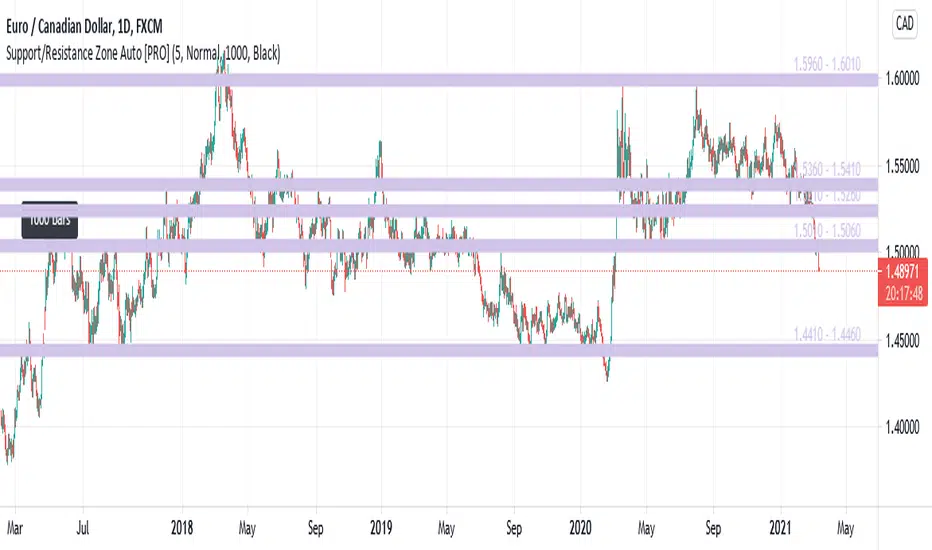
This is an indicator that automatically detects and displays support / resistance zones.
It displays up to 5 zones with a large number of reversals.
<Description of Input>
- Zone Color : Set the zone color.
- Number Of Zones : Set the number of zones to display. Can be set from 1 to 5.
- Zone Width : Set zone width. Selectable from "Very Wide", "Wide", "Normal", "Narrow", "Very Narrow".
- Number Of Reference Bars : Set the number of bars to reference. Selectable from "500", "1000" and "1500". When "1000" is set, the past 1000 bars are referenced from the latest bar (current bar) to investigate the reversal status.
- Reference Point Label : Set the color of the label displayed at the reference start position. Selectable from "Black", "White", and "None". If this parameter is "Black" and the "Number Of Reference Bars" parameter is "1000", a black label with "1000 bars" will be displayed 1000 bars before the current bar.
<Difference from [FREE] version>
- Increased maximum zone display from 3 to 5.
- Zone color can be set with Input.
- Display the price range of the zone (eg 1.5600 - 1.5650)
- Display Reference Point Label.
It displays up to 5 zones with a large number of reversals.
<Description of Input>
- Zone Color : Set the zone color.
- Number Of Zones : Set the number of zones to display. Can be set from 1 to 5.
- Zone Width : Set zone width. Selectable from "Very Wide", "Wide", "Normal", "Narrow", "Very Narrow".
- Number Of Reference Bars : Set the number of bars to reference. Selectable from "500", "1000" and "1500". When "1000" is set, the past 1000 bars are referenced from the latest bar (current bar) to investigate the reversal status.
- Reference Point Label : Set the color of the label displayed at the reference start position. Selectable from "Black", "White", and "None". If this parameter is "Black" and the "Number Of Reference Bars" parameter is "1000", a black label with "1000 bars" will be displayed 1000 bars before the current bar.
<Difference from [FREE] version>
- Increased maximum zone display from 3 to 5.
- Zone color can be set with Input.
- Display the price range of the zone (eg 1.5600 - 1.5650)
- Display Reference Point Label.
版本注释
Updates:Fixed an issue that caused errors in some currency pairs.
仅限邀请脚本
只有作者授权的用户才能访问此脚本。您需要申请并获得使用许可。通常情况下,付款后即可获得许可。更多详情,请按照下方作者的说明操作,或直接联系HarmonicLab。
TradingView不建议您付费购买或使用任何脚本,除非您完全信任其作者并了解其工作原理。您也可以在我们的社区脚本找到免费的开源替代方案。
作者的说明
If you would like to use this script, please see here:
https://harmoniclab.info/srzone.html

Contact : harmoniclab.info/
免责声明
这些信息和出版物并非旨在提供,也不构成TradingView提供或认可的任何形式的财务、投资、交易或其他类型的建议或推荐。请阅读使用条款了解更多信息。
仅限邀请脚本
只有作者授权的用户才能访问此脚本。您需要申请并获得使用许可。通常情况下,付款后即可获得许可。更多详情,请按照下方作者的说明操作,或直接联系HarmonicLab。
TradingView不建议您付费购买或使用任何脚本,除非您完全信任其作者并了解其工作原理。您也可以在我们的社区脚本找到免费的开源替代方案。
作者的说明
If you would like to use this script, please see here:
https://harmoniclab.info/srzone.html
Contact : harmoniclab.info/
免责声明
这些信息和出版物并非旨在提供,也不构成TradingView提供或认可的任何形式的财务、投资、交易或其他类型的建议或推荐。请阅读使用条款了解更多信息。