PROTECTED SOURCE SCRIPT
Chingas EMA/MA - White Background
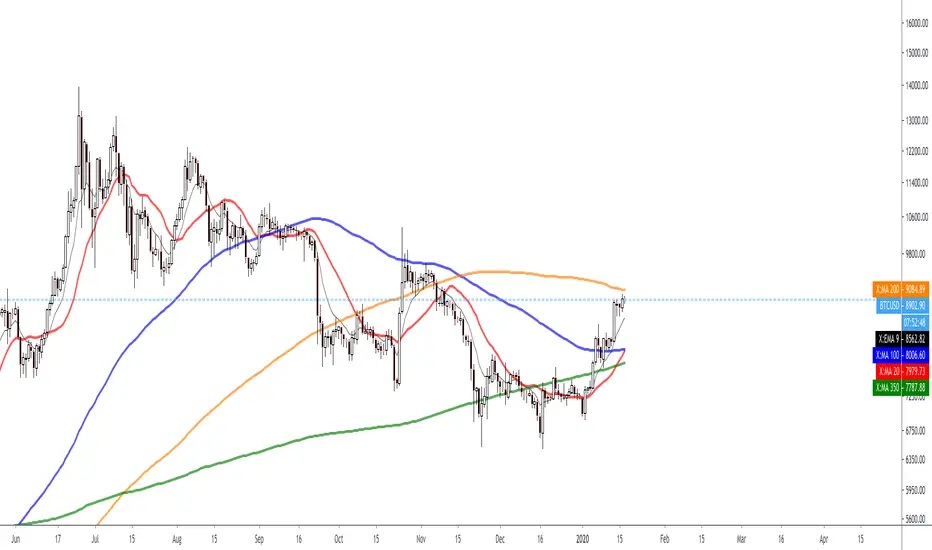
I use a lot of Black Background as well as a lot of White background charts. Therefor when I made the Black Background version, I'd have to change all the settings when I was on a White Background. And thus, the White Version was born!

Those who love their Dynamic Support and Resistance will hopefully find some value with this indicator.
This is not the end all be all EMA/MA but something that I wanted for myself and figured some other traders may like to use it as well.
I have one for BLACK Background as well and that has already beed posted.
By Default I have the following EMAs:
9
21
50
70
100
200
By default I have the following SMAs:
20
50
100
200
350
https://www.dropbox.com/s/dlnwpd8983p153q/Screenshot%202020-01-18%2010.40.58.png?dl=0
https://www.dropbox.com/s/88rujksc24b4zxo/Screenshot%202020-01-18%2010.40.46.png?dl=0
If you go into your settings and select
INDICATOR NAME LABEL and
INDICATOR LAST VALUE
then you will be able to see a super easy and super clean representation on your scale for exactly which EMA/MA you want the value of.
https://www.dropbox.com/s/wn9scgakfquyq1f/Screenshot%202020-01-18%2010.44.31.png?dl=0

Obviously you can change the colors to whatever you want and you can change the source to whatever you want.
You can also change the length to whatever you want but the names are coded in. In other-words if you want to use a 99 EMA instead of a 100, you can change it to 99 from 100 BUT the name will always be 100.
Enjoy.
Those who love their Dynamic Support and Resistance will hopefully find some value with this indicator.
This is not the end all be all EMA/MA but something that I wanted for myself and figured some other traders may like to use it as well.
I have one for BLACK Background as well and that has already beed posted.
By Default I have the following EMAs:
9
21
50
70
100
200
By default I have the following SMAs:
20
50
100
200
350
https://www.dropbox.com/s/dlnwpd8983p153q/Screenshot%202020-01-18%2010.40.58.png?dl=0
https://www.dropbox.com/s/88rujksc24b4zxo/Screenshot%202020-01-18%2010.40.46.png?dl=0
If you go into your settings and select
INDICATOR NAME LABEL and
INDICATOR LAST VALUE
then you will be able to see a super easy and super clean representation on your scale for exactly which EMA/MA you want the value of.
https://www.dropbox.com/s/wn9scgakfquyq1f/Screenshot%202020-01-18%2010.44.31.png?dl=0
Obviously you can change the colors to whatever you want and you can change the source to whatever you want.
You can also change the length to whatever you want but the names are coded in. In other-words if you want to use a 99 EMA instead of a 100, you can change it to 99 from 100 BUT the name will always be 100.
Enjoy.
受保护脚本
此脚本以闭源形式发布。 但是,您可以自由使用,没有任何限制 — 了解更多信息这里。

免责声明
这些信息和出版物并非旨在提供,也不构成TradingView提供或认可的任何形式的财务、投资、交易或其他类型的建议或推荐。请阅读使用条款了解更多信息。
免责声明
这些信息和出版物并非旨在提供,也不构成TradingView提供或认可的任何形式的财务、投资、交易或其他类型的建议或推荐。请阅读使用条款了解更多信息。