PROTECTED SOURCE SCRIPT
Fibonacci ORB scanner
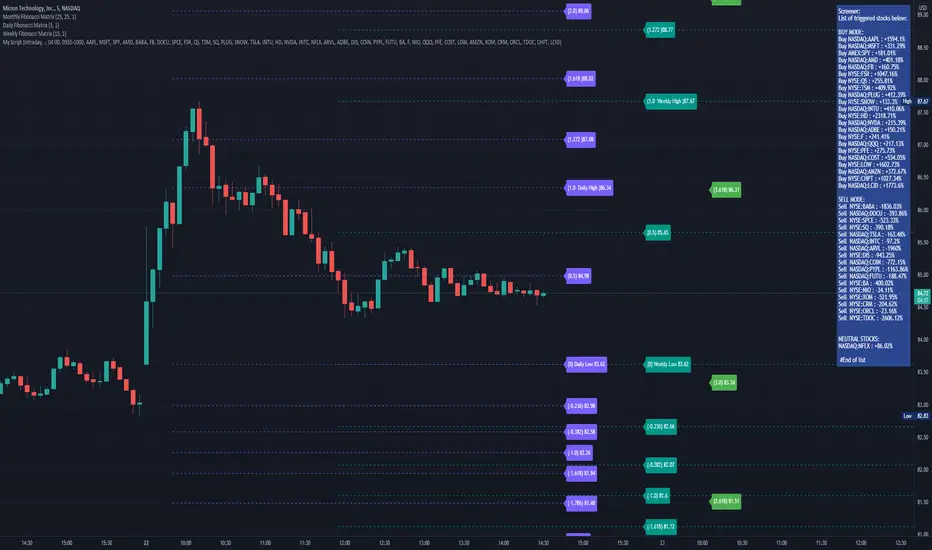
The Fibonacci ORB scanner allows users to monitor Fibonacci Levels as defined by a user-defined time range.
The 0 Fibonacci and 1 Fibonacci will be defined by the lowest and highest price points during the defined time period.
The scanner can be set to intraday settings or any user-defined time-frame ("Delivery" settings).
A common way to use the scanner is to set it to the first 15 - 30 minutes of the day.
When prices are above the opening range set by the user, the ticker will enter the "Buy" column.
When prices are below the opening range set by the user, the ticker will enter the "Sell" column.
When prices are contained within the opening range set by the user, the ticker will enter the "Neutral" column.
The "Delivery" settings can be used to define an opening range that exceeds standard ORB levels.
One way to use the Delivery settings is to set them to first week of the month.
The scanner will then show "buy" for any ticker that is above the first week's high, and show "sell" for any stock that is below the first week's low.
The scanner is meant to be used in conjunction with my Fibonacci Matrix system, which gives users pre-defined fibonacci levels for each day, week, month, and quarter, each designed for a different type of trader.
You can DM me for access to my full suite of Fibonacci Matrix indicators.
The 0 Fibonacci and 1 Fibonacci will be defined by the lowest and highest price points during the defined time period.
The scanner can be set to intraday settings or any user-defined time-frame ("Delivery" settings).
A common way to use the scanner is to set it to the first 15 - 30 minutes of the day.
When prices are above the opening range set by the user, the ticker will enter the "Buy" column.
When prices are below the opening range set by the user, the ticker will enter the "Sell" column.
When prices are contained within the opening range set by the user, the ticker will enter the "Neutral" column.
The "Delivery" settings can be used to define an opening range that exceeds standard ORB levels.
One way to use the Delivery settings is to set them to first week of the month.
The scanner will then show "buy" for any ticker that is above the first week's high, and show "sell" for any stock that is below the first week's low.
The scanner is meant to be used in conjunction with my Fibonacci Matrix system, which gives users pre-defined fibonacci levels for each day, week, month, and quarter, each designed for a different type of trader.
You can DM me for access to my full suite of Fibonacci Matrix indicators.
受保护脚本
此脚本以闭源形式发布。 但是,您可以自由使用,没有任何限制 — 了解更多信息这里。

免责声明
这些信息和出版物并非旨在提供,也不构成TradingView提供或认可的任何形式的财务、投资、交易或其他类型的建议或推荐。请阅读使用条款了解更多信息。
受保护脚本
此脚本以闭源形式发布。 但是,您可以自由使用,没有任何限制 — 了解更多信息这里。
免责声明
这些信息和出版物并非旨在提供,也不构成TradingView提供或认可的任何形式的财务、投资、交易或其他类型的建议或推荐。请阅读使用条款了解更多信息。