OPEN-SOURCE SCRIPT
已更新 Current Candle
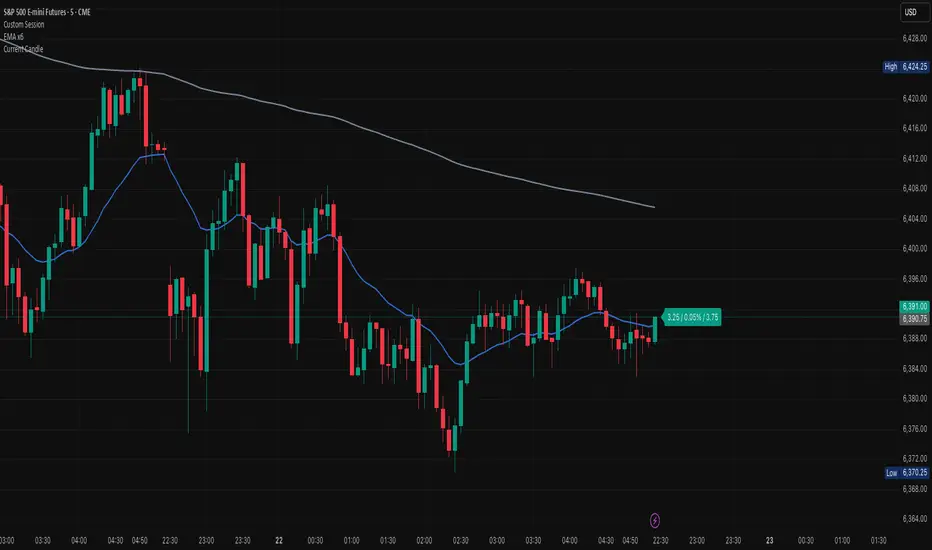
### Overview
The **Current Candle** indicator displays live information about the active bar. It shows the price change, percentage change, and candle range (high–low), conveniently placed to the right of the current candle.
### Features
• Shows absolute price change from the previous close
• Shows percentage change (%)
• Shows candle range (high–low)
• Customizable bull and bear colors (default TradingView candle colors: green = rgb(8,153,129), red = rgb(242,54,44))
• Toggle on/off Value, Percentage, and Range individually
• Always updates on the latest candle only, keeping charts clean
### How to Use
1. Add the indicator to your chart.
2. Adjust the “Right offset (bars)” to position the label.
3. Enable or disable Value, Percentage, or Range via checkboxes.
4. Customize bull/bear colors to match your chart theme if desired.
### Notes
• Label is plotted only on the latest candle (`barstate.islast`) to avoid clutter.
• Colors cannot be automatically synced to your TradingView chart theme — use the color inputs to match them manually.
• This script is designed for clarity and quick reference without altering your chart’s candles.
---
*Stay focused on the current candle — see change, percentage, and range at a glance.*
The **Current Candle** indicator displays live information about the active bar. It shows the price change, percentage change, and candle range (high–low), conveniently placed to the right of the current candle.
### Features
• Shows absolute price change from the previous close
• Shows percentage change (%)
• Shows candle range (high–low)
• Customizable bull and bear colors (default TradingView candle colors: green = rgb(8,153,129), red = rgb(242,54,44))
• Toggle on/off Value, Percentage, and Range individually
• Always updates on the latest candle only, keeping charts clean
### How to Use
1. Add the indicator to your chart.
2. Adjust the “Right offset (bars)” to position the label.
3. Enable or disable Value, Percentage, or Range via checkboxes.
4. Customize bull/bear colors to match your chart theme if desired.
### Notes
• Label is plotted only on the latest candle (`barstate.islast`) to avoid clutter.
• Colors cannot be automatically synced to your TradingView chart theme — use the color inputs to match them manually.
• This script is designed for clarity and quick reference without altering your chart’s candles.
---
*Stay focused on the current candle — see change, percentage, and range at a glance.*
版本注释
### OverviewThe **Current Candle** indicator displays live information about the active bar. It shows the price change, percentage change, and candle range (high–low), conveniently placed to the right of the current candle.
### Features
• Shows absolute price change from the previous close
• Shows percentage change (%)
• Shows candle range (high–low)
• Customizable bull and bear colors (default TradingView candle colors: green = rgb(8,153,129), red = rgb(242,54,44))
• Toggle on/off Value, Percentage, and Range individually
• Always updates on the latest candle only, keeping charts clean
### How to Use
1. Add the indicator to your chart.
2. Adjust the “Right offset (bars)” to position the label.
3. Enable or disable Value, Percentage, or Range via checkboxes.
4. Customize bull/bear colors to match your chart theme if desired.
### Notes
• Label is plotted only on the latest candle (`barstate.islast`) to avoid clutter.
• Colors cannot be automatically synced to your TradingView chart theme — use the color inputs to match them manually.
• This script is designed for clarity and quick reference without altering your chart’s candles.
---
*Stay focused on the current candle — see change, percentage, and range at a glance.*
版本注释
### OverviewThe **Current Candle** indicator displays live information about the active bar. It shows the price change, percentage change, and candle range (high–low), conveniently placed to the right of the current candle.
### Features
• Shows absolute price change from the previous close
• Shows percentage change (%)
• Shows candle range (high–low)
• Customizable bull and bear colors (default TradingView candle colors: green = rgb(8,153,129), red = rgb(242,54,44))
• Toggle on/off Value, Percentage, and Range individually
• Always updates on the latest candle only, keeping charts clean
### How to Use
1. Add the indicator to your chart.
2. Adjust the “Right offset (bars)” to position the label.
3. Enable or disable Value, Percentage, or Range via checkboxes.
4. Customize bull/bear colors to match your chart theme if desired.
### Notes
• Label is plotted only on the latest candle (`barstate.islast`) to avoid clutter.
• Colors cannot be automatically synced to your TradingView chart theme — use the color inputs to match them manually.
• This script is designed for clarity and quick reference without altering your chart’s candles.
---
*Stay focused on the current candle — see change, percentage, and range at a glance.*
版本注释
### OverviewThe **Current Candle** indicator displays live information about the active bar. It shows the price change, percentage change, and candle range (high–low), conveniently placed to the right of the current candle.
### Features
• Shows absolute price change from the previous close
• Shows percentage change (%)
• Shows candle range (high–low)
• Customizable bull and bear colors (default TradingView candle colors: green = rgb(8,153,129), red = rgb(242,54,44))
• Toggle on/off Value, Percentage, and Range individually
• Always updates on the latest candle only, keeping charts clean
### How to Use
1. Add the indicator to your chart.
2. Adjust the “Right offset (bars)” to position the label.
3. Enable or disable Value, Percentage, or Range via checkboxes.
4. Customize bull/bear colors to match your chart theme if desired.
### Notes
• Label is plotted only on the latest candle (`barstate.islast`) to avoid clutter.
• Colors cannot be automatically synced to your TradingView chart theme — use the color inputs to match them manually.
• This script is designed for clarity and quick reference without altering your chart’s candles.
---
*Stay focused on the current candle — see change, percentage, and range at a glance.*
开源脚本
秉承TradingView的精神,该脚本的作者将其开源,以便交易者可以查看和验证其功能。向作者致敬!您可以免费使用该脚本,但请记住,重新发布代码须遵守我们的网站规则。

免责声明
这些信息和出版物并非旨在提供,也不构成TradingView提供或认可的任何形式的财务、投资、交易或其他类型的建议或推荐。请阅读使用条款了解更多信息。
开源脚本
秉承TradingView的精神,该脚本的作者将其开源,以便交易者可以查看和验证其功能。向作者致敬!您可以免费使用该脚本,但请记住,重新发布代码须遵守我们的网站规则。
免责声明
这些信息和出版物并非旨在提供,也不构成TradingView提供或认可的任何形式的财务、投资、交易或其他类型的建议或推荐。请阅读使用条款了解更多信息。