OPEN-SOURCE SCRIPT
已更新 XT Basic MA Crossover
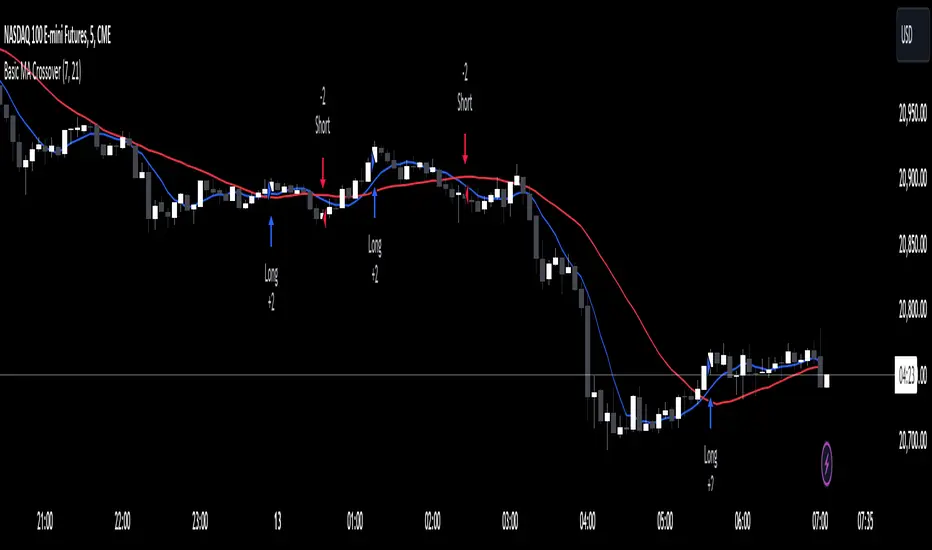
The XT Basic MA Crossover is designed to introduce the use of dynamic variables to your alert messages. Unlike the XT Up/Down Bar Indicator, which preloads the payload into the TradingView alert Message field, strategies do not support this functionality.
You will need to copy and paste into the message window for the alert to work using the strategy actions.
Example Alert Message:
```
key=Your CrossTrade Secret Key;
command=PLACE;
account=sim101;
instrument=ES 12-24;
action={{strategy.order.action}}
qty={{strategy.order.quantity}};
order_type=MARKET;
tif=DAY;
flatten_first=true;
```
You'll need to add your secret key to the message between = and ;
Correct: key=123456789123456789;
Incorrect: key=Your CrossTrade Secret Key123456789123456789;
You'll also need to add your webhook URL to the Notifications tab on the alert.
Visual Signals: The strategy is a simple moving average crossover using a 2 period MA to simulate a lot of frequent trades.
You can also add stops and targets to your strategy alerts by adding "take_profit" and "stop_loss" values to the message. This can be supplied as numerical values, percentages, or tick based values. Learn More.
If you need help: Here is a LINK to our TradingView alerts Help Doc.
Disclaimer: This indicator is designed and offered purely as an educational resource to showcase how to structure your alert messages. We do not suggest, advise, or recommend using this indicator in production with live capital.
You will need to copy and paste into the message window for the alert to work using the strategy actions.
Example Alert Message:
```
key=Your CrossTrade Secret Key;
command=PLACE;
account=sim101;
instrument=ES 12-24;
action={{strategy.order.action}}
qty={{strategy.order.quantity}};
order_type=MARKET;
tif=DAY;
flatten_first=true;
```
You'll need to add your secret key to the message between = and ;
Correct: key=123456789123456789;
Incorrect: key=Your CrossTrade Secret Key123456789123456789;
You'll also need to add your webhook URL to the Notifications tab on the alert.
Visual Signals: The strategy is a simple moving average crossover using a 2 period MA to simulate a lot of frequent trades.
You can also add stops and targets to your strategy alerts by adding "take_profit" and "stop_loss" values to the message. This can be supplied as numerical values, percentages, or tick based values. Learn More.
If you need help: Here is a LINK to our TradingView alerts Help Doc.
Disclaimer: This indicator is designed and offered purely as an educational resource to showcase how to structure your alert messages. We do not suggest, advise, or recommend using this indicator in production with live capital.
版本注释
Removed the QTY input to simplify the script版本注释
Updated to Pine Script V6版本注释
Updated to provide inputs for the MA length and plotting on the chart版本注释
Swapped the NT8 instrument format for the Pine Script {{ticker}} variable now that CrossTrade supports continuous contracts and will automatically convert the ticker into NT8s format.开源脚本
秉承TradingView的精神,该脚本的作者将其开源,以便交易者可以查看和验证其功能。向作者致敬!您可以免费使用该脚本,但请记住,重新发布代码须遵守我们的网站规则。

免责声明
这些信息和出版物并非旨在提供,也不构成TradingView提供或认可的任何形式的财务、投资、交易或其他类型的建议或推荐。请阅读使用条款了解更多信息。
开源脚本
秉承TradingView的精神,该脚本的作者将其开源,以便交易者可以查看和验证其功能。向作者致敬!您可以免费使用该脚本,但请记住,重新发布代码须遵守我们的网站规则。
免责声明
这些信息和出版物并非旨在提供,也不构成TradingView提供或认可的任何形式的财务、投资、交易或其他类型的建议或推荐。请阅读使用条款了解更多信息。