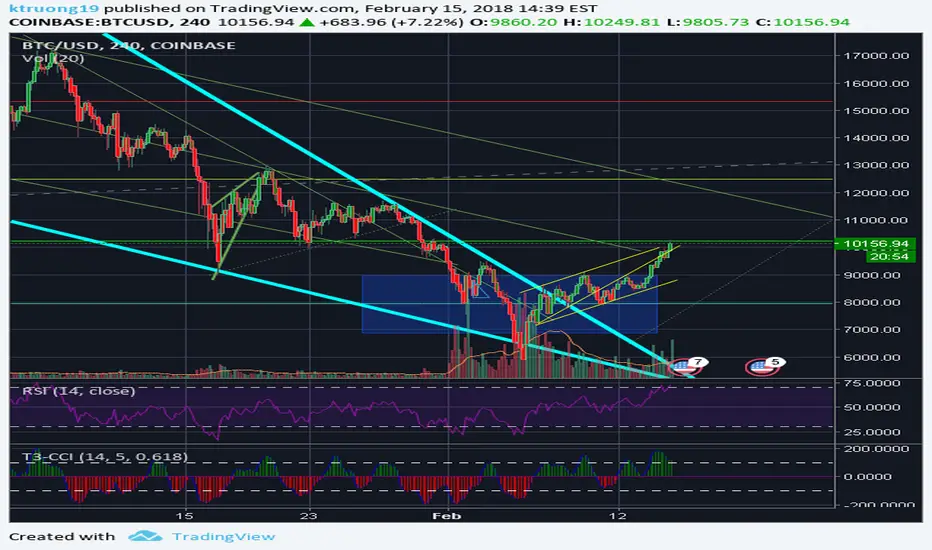
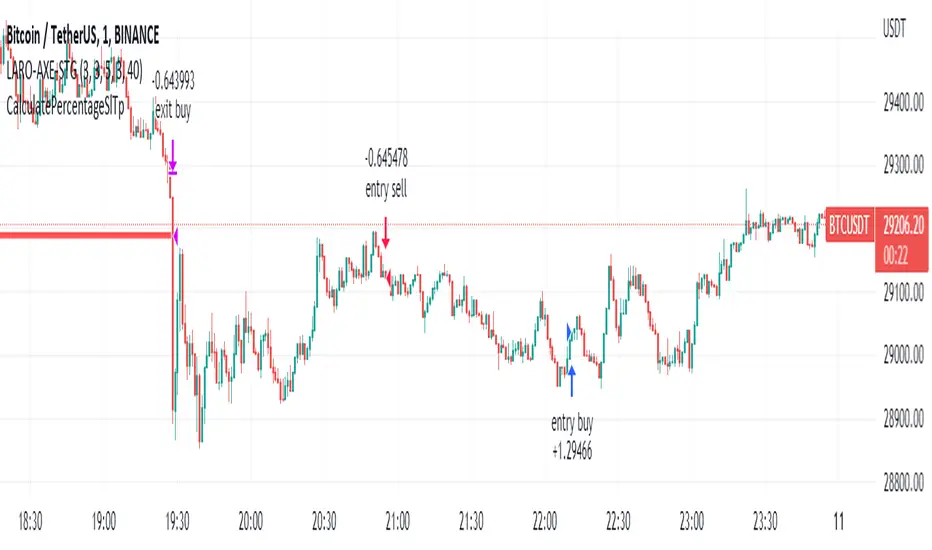
FX Sniper: T3-CCI Strategy - With 100 IndicatorsEntry signal when moving above -100, sell signal when going below 100Pine Script®指标由penguin_提供22318
Amazing Crossover SystemEntry Rules BUY when the 5 EMA crosses above the 10 EMA from underneath and the RSI crosses above the 50.0 mark from the bottom. SELL when the 5 EMA crosses below the 10 EMA from the top and the RSI crosses below the 50.0 mark from the top. Make sure that the RSI did cross 50.0 from the top or bottom and not just ranging tightly around the level. How to setup Alert: 1) Add the Amazing Crossover System to your chart via Indicators 2) Find your currency pair 3) Set the timeframe on the chart to 1 hour 4) Press 'Alt + A' (create alert shortcut) 5) Set the following criteria for the alert: Condition = 'Amazing Crossover System', Plot, ' BUY Signal' The rest of the alert can be customized to your preferences 5) Repeat steps 1 - 4, but set the Condition = 'Amazing Crossover System', Plot, ' SELL Signal' Pine Script®指标由rmunoz提供已更新 44143
Bit secure - RSI Divergence🔔 **Bit Secure – RSI Divergence ** **Bit Secure – RSI Divergenct** is a multi-confirmation trading indicator designed to capture **high-probability trend entries** This tool is ideal for traders who want **clear direction, reduced noise, and disciplined entries**. --- ## 🧠 **How the Indicator Works** ### 1️⃣ **UT Bot (ATR-Based Trend Signal)** * Uses **ATR trailing stop logic** to define market direction * Generates: * Optional **Heikin Ashi candle source** for smoother signals ✅ Signals are confirmed on candle close (non-repainting). --- ### 2️⃣ **Hull Moving Average (HMA) – Trend Filter** * Fast and smooth moving average for trend clarity * **Color-changing HMA**: * 🟢 Green → Bullish momentum * 🔴 Red → Bearish momentum * Helps traders **stay with the trend and avoid choppy markets** --- ### 3️⃣ **Open Range Breakout (ORB) Levels** * Automatically marks **Opening Range High & Low** * Session-based calculation (customizable time window) * Acts as: * Intraday **support & resistance** * Breakout confirmation zones Best suited for **intraday trading**, especially index & stock markets. --- ## 📊 **Visual Signals on Chart** * 🟢 **Buy Label** below candle * 🔴 **Sell Label** above candle * Dynamic **Hull MA line** * ORB High (Green) & ORB Low (Red) levels Chart remains **clean and readable**. --- ## 🔔 **Alerts** * ✅ UT Long Alert * ✅ UT Short Alert Alerts trigger only when **valid buy/sell conditions** are met. --- ## ⚙️ **Customizable Inputs** * UT Bot sensitivity & ATR period * Heikin Ashi ON/OFF toggle * Hull Moving Average period * ORB session time & duration Allows easy adjustment for **different markets & timeframes**. --- ## 🎯 **Best Use Case** ✔ Intraday trading ✔ Trend-following strategies ✔ Works well on **Indices, Stocks & Crypto** ✔ Can be combined with price action, VWAP, or support–resistance --- ## ⚠️ **Disclaimer** This indicator provides **entry signals only**. Proper **risk management, stop-loss, and position sizing** should always be applied by the trader. --- Agar chaahe to bhai main: * 🔹 **Short description (2–3 lines)** * 🔹 **Aggressive marketing version** * 🔹 **Bot-style auto-trading disclaimer** * 🔹 **Hindi + English mixed version** bhi bana deta hoon 😄 Bas bol 🔥 nce for early clearance Pine Script®指标由devh697提供0
[blackcat] L3 3-in-1 CCI Trader█ OVERVIEW The L3 3-in-1 CCI Trader is a comprehensive overlay indicator that combines CCI (Commodity Channel Index) analysis across multiple timeframes with trend detection, divergence identification, and support/resistance level visualization. This all-in-one tool helps traders identify potential entry and exit points through multiple confirmation signals. █ CONCEPTS This indicator utilizes multi-period CCI analysis combined with weighted price averaging to identify trend direction, momentum shifts, and potential reversal points. Core Principles: • Multi-Timeframe CCI — Combines CCI calculations from 6, 10, 20, 30, and 60 periods for comprehensive momentum analysis • Weighted Price Average — Uses a sophisticated weighted calculation (3×Close + High + Low + Open) / 6 for smoother trend identification • Divergence Detection — Identifies bullish and bearish divergences using EMA crossovers and RSI-based analysis • Dynamic Support/Resistance — Automatically calculates and displays key price levels based on historical highs and lows █ HOW TO USE 1 — Add the indicator to your chart from the TradingView indicators library 2 — Observe the trend lines: the thick line shows short-term trend, the stepped line shows mid-term trend 3 — Watch for signal labels that appear on the chart indicating potential trading opportunities 4 — Use the color-coded background as a quick trend reference (green = uptrend, orange = downtrend) 5 — Set up alerts for the signal types that match your trading strategy Trend Interpretation • Green Fill — Short-term line above mid-term line (bullish bias) • Orange Fill — Short-term line below mid-term line (bearish bias) • Teal Dotted Line — Dynamic support level based on 34-bar lowest low █ SIGNALS Bullish Signals • ▲ Bullish — Appears when CCI period 6 drops below negative CCI period 30 differential, indicating potential upward reversal • ⬆ Bottom Div — Bullish divergence detected when fast EMA (3) crosses above slow EMA (21) • ★☆ Confirmed — Star formation signal indicating strong reversal potential • 📈 ∠45° Uptrend — Appears when price maintains a 45-degree upward angle with bullish confirmation Bearish Signals • ▼ Bearish — Appears when CCI period 6 exceeds CCI period 30 differential, indicating potential downward reversal • ⬇ Top Div — Bearish divergence detected when RSI-based value crosses below 88 Visual Elements • Green/Red Stepped Lines — Recent 20-bar high (resistance) and low (support) levels • Trend Fill Colors — Green for uptrend, orange for downtrend • Signal Candles — Small candlestick markers highlighting signal locations █ ALERTS This indicator includes 10 built-in alert conditions: Individual Signal Alerts • Bearish Signal — Potential downtrend ahead • Bullish Signal — Potential uptrend ahead • Star Confirmed Signal — Strong reversal pattern • Bottom Divergence (Bullish) — Bullish reversal signal • Top Divergence (Bearish) — Bearish reversal signal • 45° Angle Uptrend — Strong bullish momentum Trend Change Alerts • Trend Change - Uptrend — Short-term line crossed above mid-term line • Trend Change - Downtrend — Short-term line crossed below mid-term line Combined Alerts • Any Bullish Signal — Triggers on any bullish condition • Any Bearish Signal — Triggers on any bearish condition █ RECOMMENDED SETTINGS • Timeframe — Works on all timeframes; optimal results on 15m to 4H charts • Market Type — Suitable for forex, stocks, cryptocurrencies, and commodities • Best Use — Use in conjunction with other confirmation indicators and proper risk management █ LIMITATIONS • Signals may produce false positives in strongly trending markets without pullbacks • Divergence signals work best in ranging or slowly trending markets • The indicator is based on historical data and cannot predict future price movements • Multiple signals may appear simultaneously; prioritize based on your trading strategy • Performance may vary across different asset classes and market conditions █ NOTES • This indicator is designed for educational purposes and should not be used as the sole basis for trading decisions • Always practice proper risk management and use stop-loss orders • Backtest thoroughly on your preferred instruments before live trading • The indicator uses max_bars_back=5000 for calculations, ensuring sufficient historical data • Labels are limited to 500 to maintain chart performance ═════════════════════════════════════════════════════════════════════════ For questions or feedback, use the comments section below. Pine Script®指标由blackcat1402提供9
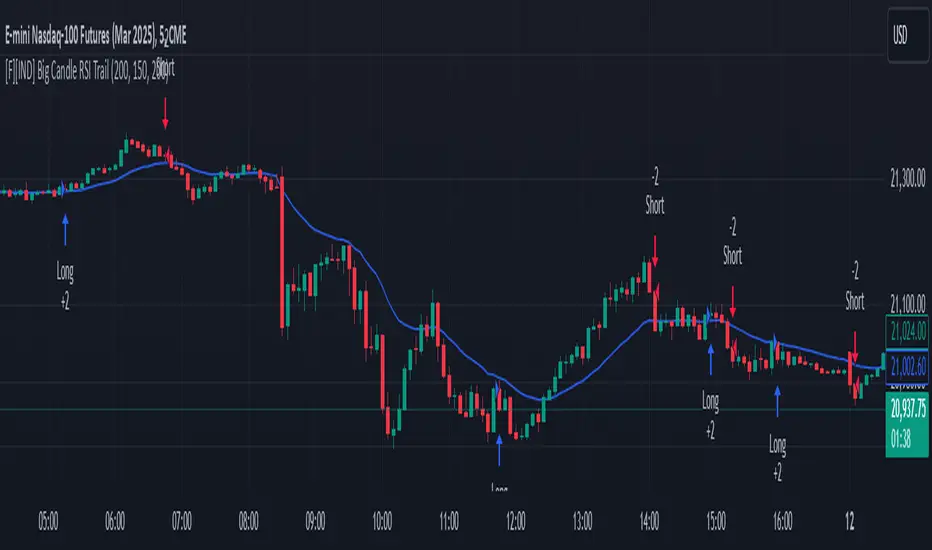
Big Candle Identifier with RSI Divergence and Advanced Stops1. Strategy Objective The main goal of this strategy is to: Identify significant price momentum (big candles). Enter trades at opportune moments based on market signals (candlestick patterns and RSI divergence). Limit initial risk through a fixed stop loss. Maximize profits by using a trailing stop that activates only after the trade moves a specified distance in the profitable direction. 2. Components of the Strategy A. Big Candle Identification The strategy identifies big candles as indicators of strong momentum. A big candle is defined as: The body (absolute difference between close and open) of the current candle (body0) is larger than the bodies of the last five candles. The candle is: Bullish Big Candle: If close > open. Bearish Big Candle: If open > close. Purpose: Big candles signal potential continuation or reversal of trends, serving as the primary entry trigger. B. RSI Divergence Relative Strength Index (RSI): A momentum oscillator used to detect overbought/oversold conditions and divergence. Fast RSI: A 5-period RSI, which is more sensitive to short-term price movements. Slow RSI: A 14-period RSI, which smoothens fluctuations over a longer timeframe. Divergence: The difference between the fast and slow RSIs. Positive divergence (divergence > 0): Bullish momentum. Negative divergence (divergence < 0): Bearish momentum. Visualization: The divergence is plotted on the chart, helping traders confirm momentum shifts. C. Stop Loss Initial Stop Loss: When entering a trade, an immediate stop loss of 200 points is applied. This stop loss ensures the maximum risk is capped at a predefined level. Implementation: Long Trades: Stop loss is set below the entry price at low - 200 points. Short Trades: Stop loss is set above the entry price at high + 200 points. Purpose: Prevents significant losses if the price moves against the trade immediately after entry. D. Trailing Stop The trailing stop is a dynamic risk management tool that adjusts with price movements to lock in profits. Here’s how it works: Activation Condition: The trailing stop only starts trailing when the trade moves 200 ticks (profit) in the right direction: Long Position: close - entry_price >= 200 ticks. Short Position: entry_price - close >= 200 ticks. Trailing Logic: Once activated, the trailing stop: For Long Positions: Trails behind the price by 150 ticks (trail_stop = close - 150 ticks). For Short Positions: Trails above the price by 150 ticks (trail_stop = close + 150 ticks). Exit Condition: The trade exits automatically if the price touches the trailing stop level. Purpose: Ensures profits are locked in as the trade progresses while still allowing room for price fluctuations. E. Trade Entry Logic Long Entry: Triggered when a bullish big candle is identified. Stop loss is set at low - 200 points. Short Entry: Triggered when a bearish big candle is identified. Stop loss is set at high + 200 points. F. Trade Exit Logic Trailing Stop: Automatically exits the trade if the price touches the trailing stop level. Fixed Stop Loss: Exits the trade if the price hits the predefined stop loss level. G. 21 EMA The strategy includes a 21-period Exponential Moving Average (EMA), which acts as a trend filter. EMA helps visualize the overall market direction: Price above EMA: Indicates an uptrend. Price below EMA: Indicates a downtrend. H. Visualization Big Candle Identification: The open and close prices of big candles are plotted for easy reference. Trailing Stop: Plotted on the chart to visualize its progression during the trade. Green Line: Indicates the trailing stop for long positions. Red Line: Indicates the trailing stop for short positions. RSI Divergence: Positive divergence is shown in green. Negative divergence is shown in red. 3. Key Parameters trail_start_ticks: The number of ticks required before the trailing stop activates (default: 200 ticks). trail_distance_ticks: The distance between the trailing stop and price once the trailing stop starts (default: 150 ticks). initial_stop_loss_points: The fixed stop loss in points applied at entry (default: 200 points). tick_size: Automatically calculates the minimum tick size for the trading instrument. 4. Workflow of the Strategy Step 1: Entry Signal The strategy identifies a big candle (bullish or bearish). If conditions are met, a trade is entered with a fixed stop loss. Step 2: Initial Risk Management The trade starts with an initial stop loss of 200 points. Step 3: Trailing Stop Activation If the trade moves 200 ticks in the profitable direction: The trailing stop is activated and follows the price at a distance of 150 ticks. Step 4: Exit the Trade The trade is exited if: The price hits the trailing stop. The price hits the initial stop loss. 5. Advantages of the Strategy Risk Management: The fixed stop loss ensures that losses are capped. The trailing stop locks in profits after the trade becomes profitable. Momentum-Based Entries: The strategy uses big candles as entry triggers, which often indicate strong price momentum. Divergence Confirmation: RSI divergence helps validate momentum and avoid false signals. Dynamic Profit Protection: The trailing stop adjusts dynamically, allowing the trade to capture larger moves while protecting gains. 6. Ideal Market Conditions This strategy performs best in: Trending Markets: Big candles and momentum signals are more effective in capturing directional moves. High Volatility: Larger price swings improve the probability of reaching the trailing stop activation level (200 ticks). Pine Script®策略由NomaAlgo提供2279
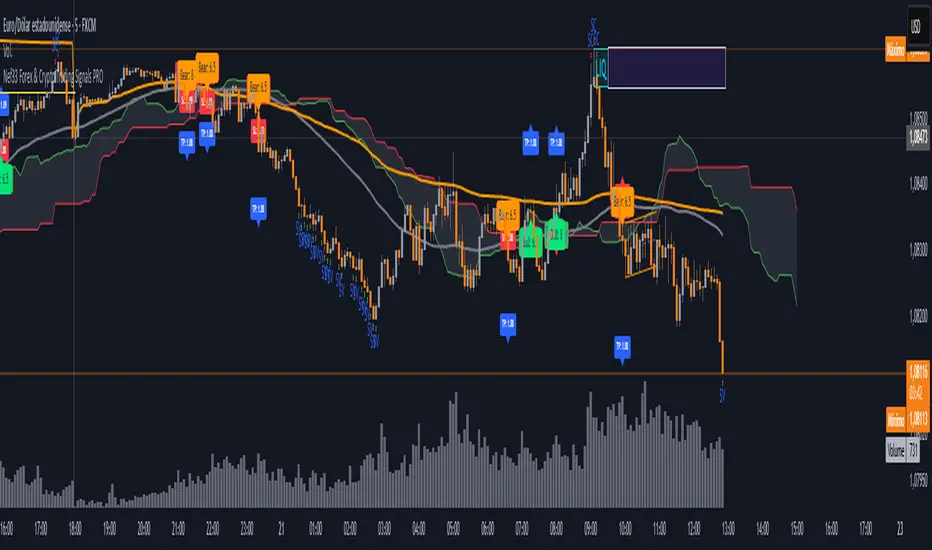
Nef33 Forex & Crypto Trading Signals PRO 1. Understanding the Indicator's Context The indicator generates signals based on confluence (trend, volume, key zones, etc.), but it does not include predefined SL or TP levels. To establish them, we must: Use dynamic or static support/resistance levels already present in the script. Incorporate volatility (such as ATR) to adjust the levels based on market conditions. Define a risk/reward ratio (e.g., 1:2). 2. Options for Determining SL and TP Below, I provide several ideas based on the tools available in the script: Stop Loss (SL) The SL should protect you from adverse movements. You can base it on: ATR (Volatility): Use the smoothed ATR (atr_smooth) multiplied by a factor (e.g., 1.5 or 2) to set a dynamic SL. Buy: SL = Entry Price - (atr_smooth * atr_mult). Sell: SL = Entry Price + (atr_smooth * atr_mult). Key Zones: Place the SL below a support (for buys) or above a resistance (for sells), using Order Blocks, Fair Value Gaps, or Liquidity Zones. Buy: SL below the nearest ob_lows or fvg_lows. Sell: SL above the nearest ob_highs or fvg_highs. VWAP: Use the daily VWAP (vwap_day) as a critical level. Buy: SL below vwap_day. Sell: SL above vwap_day. Take Profit (TP) The TP should maximize profits. You can base it on: Risk/Reward Ratio: Multiply the SL distance by a factor (e.g., 2 or 3). Buy: TP = Entry Price + (SL Distance * 2). Sell: TP = Entry Price - (SL Distance * 2). Key Zones: Target the next resistance (for buys) or support (for sells). Buy: TP at the next ob_highs, fvg_highs, or liq_zone_high. Sell: TP at the next ob_lows, fvg_lows, or liq_zone_low. Ichimoku: Use the cloud levels (Senkou Span A/B) as targets. Buy: TP at senkou_span_a or senkou_span_b (whichever is higher). Sell: TP at senkou_span_a or senkou_span_b (whichever is lower). 3. Practical Implementation Since the script does not automatically draw SL/TP, you can: Calculate them manually: Observe the chart and use the levels mentioned. Modify the code: Add SL/TP as labels (label.new) at the moment of the signal. Here’s an example of how to modify the code to display SL and TP based on ATR with a 1:2 risk/reward ratio: Modified Code (Signals Section) Find the lines where the signals (trade_buy and trade_sell) are generated and add the following: pinescript // Calculate SL and TP based on ATR atr_sl_mult = 1.5 // Multiplier for SL atr_tp_mult = 3.0 // Multiplier for TP (1:2 ratio) sl_distance = atr_smooth * atr_sl_mult tp_distance = atr_smooth * atr_tp_mult if trade_buy entry_price = close sl_price = entry_price - sl_distance tp_price = entry_price + tp_distance label.new(bar_index, low, "Buy: " + str.tostring(math.round(bull_conditions, 1)), color=color.green, textcolor=color.white, style=label.style_label_up, size=size.tiny) label.new(bar_index, sl_price, "SL: " + str.tostring(math.round(sl_price, 2)), color=color.red, textcolor=color.white, style=label.style_label_down, size=size.tiny) label.new(bar_index, tp_price, "TP: " + str.tostring(math.round(tp_price, 2)), color=color.blue, textcolor=color.white, style=label.style_label_up, size=size.tiny) if trade_sell entry_price = close sl_price = entry_price + sl_distance tp_price = entry_price - tp_distance label.new(bar_index, high, "Sell: " + str.tostring(math.round(bear_conditions, 1)), color=color.red, textcolor=color.white, style=label.style_label_down, size=size.tiny) label.new(bar_index, sl_price, "SL: " + str.tostring(math.round(sl_price, 2)), color=color.red, textcolor=color.white, style=label.style_label_up, size=size.tiny) label.new(bar_index, tp_price, "TP: " + str.tostring(math.round(tp_price, 2)), color=color.blue, textcolor=color.white, style=label.style_label_down, size=size.tiny) Code Explanation SL: Calculated by subtracting/adding sl_distance to the entry price (close) depending on whether it’s a buy or sell. TP: Calculated with a double distance (tp_distance) for a 1:2 risk/reward ratio. Visualization: Labels are added to the chart to display SL (red) and TP (blue). 4. Practical Strategy Without Modifying the Code If you don’t want to modify the script, follow these steps manually: Entry: Take the trade_buy or trade_sell signal. SL: Check the smoothed ATR (atr_smooth) on the chart or calculate a fixed level (e.g., 1.5 times the ATR). Also, review nearby key zones (OB, FVG, VWAP). TP: Define a target based on the next key zone or multiply the SL distance by 2 or 3. Example: Buy at 100, ATR = 2. SL = 100 - (2 * 1.5) = 97. TP = 100 + (2 * 3) = 106. 5. Recommendations Test in Demo: Apply this logic in a demo account to adjust the multipliers (atr_sl_mult, atr_tp_mult) based on the market (forex or crypto). Combine with Zones: If the ATR-based SL is too wide, use the nearest OB or FVG as a reference. Risk/Reward Ratio: Adjust the TP based on your tolerance (1:1, 1:2, 1:3) Pine Script®指标由neftali1327提供1144
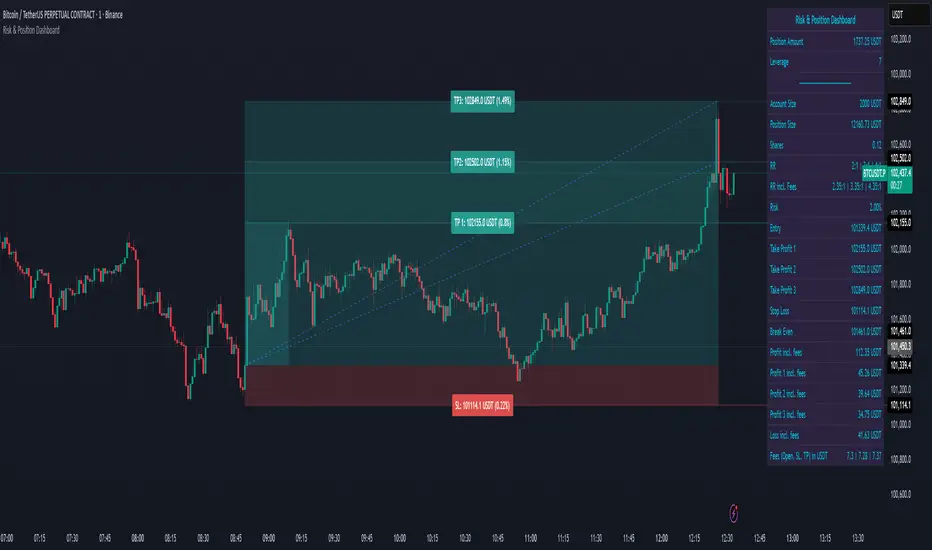
Risk & Position DashboardRisk & Position Dashboard Overview The Risk & Position Dashboard is a comprehensive trading tool designed to help traders calculate optimal position sizes, manage risk, and visualize potential profit/loss scenarios before entering trades. This indicator provides real-time calculations for position sizing based on account size, risk percentage, and stop-loss levels, while displaying multiple take-profit targets with customizable risk-reward ratios. Key Features Position Sizing & Risk Management: Automatic position size calculation based on account size and risk percentage Support for leveraged trading with maximum leverage limits Fractional shares support for brokers that allow partial share trading Real-time fee calculation including entry, stop-loss, and take-profit fees Break-even price calculation including trading fees Multi-Target Profit Management: Support for up to 3 take-profit levels with individual portion allocations Customizable risk-reward ratios for each take-profit target Visual profit/loss zones displayed as colored boxes on the chart Individual profit calculations for each take-profit level Visual Dashboard: Clean, customizable table display showing all key metrics Configurable label positioning and styling options Real-time tracking of whether stop-loss or take-profit levels have been reached Color-coded visual zones for easy identification of risk and reward areas Advanced Configuration: Comprehensive input validation and error handling Support for different chart timeframes and symbols Customizable colors, fonts, and display options Hide/show individual data fields for personalized dashboard views How to Use Set Account Parameters: Configure your account size, maximum risk percentage per trade, and trading fees in the "Account Settings" section. Define Trade Setup: Use the "Entry" time picker to select your entry point on the chart, then input your entry price and stop-loss level. Configure Take Profits: Set your desired risk-reward ratios and portion allocations for each take-profit level. The script supports 1-3 take-profit targets. Analyze Results: The dashboard will automatically calculate and display position size, number of shares, potential profits/losses, fees, and break-even levels. Visual Confirmation: Colored boxes on the chart show profit zones (green) and loss zones (red), with lines extending to current price levels. Reset Entry and SL: You can easily reset the entry and stop-loss by clicking the "Reset points..." button from the script's "More" menu. This is useful if you want to quickly clear your current trade setup and start fresh without manually adjusting the points on the chart. Calculations The script performs sophisticated calculations including: Position size based on risk amount and price difference between entry and stop-loss Leverage requirements and position amount calculations Fee-adjusted risk-reward ratios for realistic profit expectations Break-even price including all trading costs Individual profit calculations for partial position closures Detailed Take-Profit Calculation Formula: The take-profit prices are calculated using the following mathematical formula: // Core variables: // risk_amount = account_size * (risk_percentage / 100) // total_risk_per_share = |entry_price - sl_price| + (entry_price * fee%) + (sl_price * fee%) // shares = risk_amount / total_risk_per_share // direction_factor = 1 for long positions, -1 for short positions // Take-profit calculation: net_win = total_risk_per_share * shares * RR_ratio tp_price = (net_win + (direction_factor * entry_price * shares) + (entry_price * fee% * shares)) / (direction_factor * shares - fee% * shares) Step-by-step example for a long position (based on screenshot): Account Size: 2,000 USDT, Risk: 2% = 40 USDT Entry: 102,062.9 USDT, Stop Loss: 102,178.4 USDT, Fee: 0.06% Risk per share: |102,062.9 - 102,178.4| + (102,062.9 × 0.0006) + (102,178.4 × 0.0006) = 115.5 + 61.24 + 61.31 = 238.05 USDT Shares: 40 ÷ 238.05 = 0.168 shares (rounded to 0.17 in display) Position Size: 0.17 × 102,062.9 = 17,350.69 USDT Position Amount (with 9x leverage): 17,350.69 ÷ 9 = 1,927.85 USDT For 2:1 RR: Net win = 238.05 × 0.17 × 2 = 80.94 USDT TP1 price = (80.94 + (1 × 102,062.9 × 0.17) + (102,062.9 × 0.0006 × 0.17)) ÷ (1 × 0.17 - 0.0006 × 0.17) = 101,464.7 USDT For 3:1 RR: TP2 price = 101,226.7 USDT (following same formula with RR=3) This ensures that after accounting for all fees, the actual risk-reward ratio matches the specified target ratio. Risk Management Features Maximum Trade Amount: Optional setting to limit position size regardless of account size Leverage Limits: Built-in maximum leverage protection Fee Integration: All calculations include realistic trading fees for accurate expectations Validation: Automatic checking that take-profit portions sum to 100% Historical Tracking: Visual indication when stop-loss or take-profit levels are reached (within last 5000 bars) Understanding Max Trade Amount - Multiple Simultaneous Trades: The "Max Trade Amount" feature is designed for traders who want to open multiple positions simultaneously while maintaining proper risk management. Here's how it works: Key Concept: - Risk percentage (2%) always applies to your full Account Size - Max Trade Amount limits the capital allocated per individual trade - This allows multiple trades with full risk on each trade Example from Screenshot: Account Size: 2,000 USDT Max Trade Amount: 500 USDT Risk per Trade: 2% × 2,000 = 40 USDT per trade Stop Loss Distance: 0.11% from entry Result: Position Size = 17,350.69 USDT with 35x leverage Total Risk (including fees): 40.46 USDT Multiple Trades Strategy: With this setup, you can open: Trade 1: 40 USDT risk, 495.73 USDT position amount (35x leverage) Trade 2: 40 USDT risk, 495.73 USDT position amount (35x leverage) Trade 3: 40 USDT risk, 495.73 USDT position amount (35x leverage) Trade 4: 40 USDT risk, 495.73 USDT position amount (35x leverage) Total Portfolio Exposure: - 4 simultaneous trades = 4 × 495.73 = 1,982.92 USDT position amount - Total risk exposure = 4 × 40 = 160 USDT (8% of account) Pine Script®指标由HllN提供158
LO1_TradersPostLibrary "LO1_TradersPost" Enhanced TradersPost integration library with comprehensive order management _buildJSONField(key, value, required) Build a JSON field with proper handling of required vs optional fields Parameters: key (string) : The JSON key name value (string) : The value to include (any type, will be converted to string) required (bool) : If true, field is always included even if value is na/empty Returns: String containing JSON field or empty string if optional and na/empty _buildConditionalField(key, value) Build a conditional JSON field that's only included if value is valid Parameters: key (string) : The JSON key name value (string) : The value to include Returns: String containing JSON field or empty string if value is na/empty _buildConditionalNumericField(key, value) Build a conditional JSON field for numeric values Parameters: key (string) : The JSON key name value (float) : The numeric value Returns: String containing JSON field or empty string if value is na _buildNestedObject(objectType, price, amount, percent, stopType, limitPrice, trailAmount, trailPercent) Build nested JSON objects for takeProfit/stopLoss Parameters: objectType (string) : The type of object being built ("takeProfit" or "stopLoss") price (float) : The limit price for TP or stop price for SL amount (float) : The dollar amount (optional) percent (float) : The percentage (optional) stopType (series StopLossType) : The stop loss type - only for stopLoss limitPrice (float) : The limit price for stop_limit orders - only for stopLoss trailAmount (float) : Trailing amount for trailing stops - only for stopLoss trailPercent (float) : Trailing percent for trailing stops - only for stopLoss Returns: String containing nested JSON object or empty string if no valid data _validateAndBuildJSON(ticker, action, quantity, quantityType, orderType, sentiment, cancel, timeInForce, limitPrice, stopPrice, trailAmount, trailPercent, takeProfitPrice, takeProfitAmount, takeProfitPercent, stopLossPrice, stopLossAmount, stopLossPercent, stopLossType, stopLossLimitPrice, extendedHours, optionType, intrinsicValue, expiration, strikePrice, signalPrice, comment) Master JSON builder that validates parameters and constructs JSON Parameters: ticker (string) : The trading symbol action (series Action) : The order action (buy, sell, exit, etc.) quantity (float) : The order quantity quantityType (series QuantityType) : The type of quantity (fixed, dollar, percent) orderType (series OrderType) : The order type (market, limit, stop, etc.) sentiment (series Sentiment) : The position sentiment (long, short, flat) - optional cancel (bool) : Controls order cancellation (true = cancel existing orders, false = don't cancel) timeInForce (series TimeInForce) : Time in force for the order (DAY, GTC, IOC, FOK) limitPrice (float) : Price for limit orders stopPrice (float) : Price for stop orders trailAmount (float) : Trailing amount for trailing stops trailPercent (float) : Trailing percent for trailing stops takeProfitPrice (float) : Take profit limit price (absolute) takeProfitAmount (float) : Take profit dollar amount (relative) takeProfitPercent (float) : Take profit percentage (relative) stopLossPrice (float) : Stop loss price (absolute) stopLossAmount (float) : Stop loss dollar amount (relative) stopLossPercent (float) : Stop loss percentage (relative) stopLossType (series StopLossType) : Stop loss order type stopLossLimitPrice (float) : Limit price for stop_limit orders extendedHours (bool) : Enable extended hours trading (boolean) optionType (series OptionType) : Option type for options trading (both/call/put) intrinsicValue (series IntrinsicValue) : Intrinsic value filter for options (itm/otm) expiration (string) : Option expiration (date string) strikePrice (float) : Option strike price signalPrice (float) : The market price at alert time (for slippage tracking) comment (string) : Optional comment for the order (shows in TradersPost UI for debugging) Returns: ErrorResponse with success status and JSON string or error details ValidateOrder(ticker, action, orderType, limitPrice, stopPrice) Validate order parameters before JSON construction Parameters: ticker (string) : Trading symbol action (series Action) : Order action orderType (series OrderType) : Order type (market, limit, stop, etc.) limitPrice (float) : Limit price for limit orders stopPrice (float) : Stop price for stop orders Returns: ErrorResponse with validation results ValidateQuantity(quantity, quantityType) Validate quantity based on type and constraints Parameters: quantity (float) : The quantity value quantityType (series QuantityType) : The type of quantity Returns: ErrorResponse with validation results ValidatePrices(entryPrice, stopPrice, takeProfitPrice, action) Validate price relationships and values Parameters: entryPrice (float) : Entry price for the order stopPrice (float) : Stop loss price takeProfitPrice (float) : Take profit price action (series Action) : Order action (buy/sell) Returns: ErrorResponse with validation results ValidateSymbol(ticker) Validate trading symbol format Parameters: ticker (string) : The symbol to validate Returns: ErrorResponse with validation results CombineValidationResults(validationResults) Create validation error collection and reporting system Parameters: validationResults (array) : Array of ErrorResponse objects from multiple validations Returns: Combined ErrorResponse with all validation results ValidateCompleteOrder(ticker, action, quantity, quantityType, orderType, limitPrice, stopPrice, takeProfitPrice) Comprehensive validation for all order parameters Parameters: ticker (string) : Trading symbol action (series Action) : Order action quantity (float) : Order quantity quantityType (series QuantityType) : Type of quantity orderType (series OrderType) : Order type limitPrice (float) : Limit price (optional) stopPrice (float) : Stop price (optional) takeProfitPrice (float) : Take profit price (optional) Returns: ErrorResponse with complete validation results CreateErrorResponse(success, errorMessages, message, severity, context, functionName) Create standardized error response Parameters: success (bool) : Whether the operation succeeded errorMessages (array) : Array of error messages message (string) : Summary message severity (series ErrorSeverity) : Error severity level context (string) : Context where error occurred functionName (string) : Name of function that generated error Returns: EnhancedErrorResponse with all error details HandleValidationError(validationResult, context, functionName) Handle validation errors with context Parameters: validationResult (ErrorResponse) : The validation result to handle context (string) : Description of what was being validated functionName (string) : Name of calling function Returns: Processed error response with enhanced context LogError(errorResponse, displayOnChart) Log error with appropriate level Parameters: errorResponse (EnhancedErrorResponse) : The error response to log displayOnChart (bool) : Whether to show error on chart CreateSuccessResponse(message, context, functionName) Create success response Parameters: message (string) : Success message context (string) : Context of successful operation functionName (string) : Name of function Returns: Success response _validateJSONConstruction(jsonString) Validate JSON construction and handle malformed data Parameters: jsonString (string) : The constructed JSON string Returns: ErrorResponse indicating if JSON is valid CreateDetailedError(success, errors, warnings, severity, context) Create detailed error response with context Parameters: success (bool) : Operation success status errors (array) : Array of error messages warnings (array) : Array of warning messages severity (series ErrorSeverity) : Error severity level context (string) : Context where error occurred Returns: DetailedErrorResponse object LogDetailedError(response) Log detailed error response with appropriate severity Parameters: response (DetailedErrorResponse) : DetailedErrorResponse to log Returns: Nothing - logs to Pine Script console CombineIntoDetailedResponse(responses, context) Combine multiple error responses into detailed response Parameters: responses (array) : Array of ErrorResponse objects to combine context (string) : Context for the combined operation Returns: DetailedErrorResponse with combined results SendAdvancedOrder(ticker, action, quantity, quantityType, orderType, sentiment, cancel, limitPrice, stopPrice, trailAmount, trailPercent, takeProfitPrice, takeProfitAmount, takeProfitPercent, stopLossPrice, stopLossAmount, stopLossPercent, stopLossType, stopLossLimitPrice, extendedHours, optionType, intrinsicValue, expiration, strikePrice, signalPrice, comment) Send advanced order with comprehensive parameter validation and JSON construction Parameters: ticker (string) : Symbol to trade (defaults to syminfo.ticker) action (series Action) : Order action (buy/sell/exit/cancel/add) quantity (float) : Order quantity quantityType (series QuantityType) : Type of quantity (fixed/dollar/percent) orderType (series OrderType) : Type of order (market/limit/stop/stop_limit/trailing_stop) sentiment (series Sentiment) : Position sentiment (long/short/flat, optional) cancel (bool) : Controls order cancellation (true = cancel existing, false = don't cancel, na = use defaults) limitPrice (float) : Limit price for limit orders stopPrice (float) : Stop price for stop orders trailAmount (float) : Trailing amount for trailing stops trailPercent (float) : Trailing percent for trailing stops takeProfitPrice (float) : Take profit limit price (absolute) takeProfitAmount (float) : Take profit dollar amount (relative) takeProfitPercent (float) : Take profit percentage (relative) stopLossPrice (float) : Stop loss price (absolute) stopLossAmount (float) : Stop loss dollar amount (relative) stopLossPercent (float) : Stop loss percentage (relative) stopLossType (series StopLossType) : Stop loss order type stopLossLimitPrice (float) : Limit price for stop_limit orders extendedHours (bool) : Enable extended hours trading (boolean) optionType (series OptionType) : Option type for options trading (both/call/put) intrinsicValue (series IntrinsicValue) : Intrinsic value filter for options (itm/otm) expiration (string) : Option expiration (date string) strikePrice (float) : Option strike price signalPrice (float) : The market price at alert time (for slippage tracking) comment (string) : Optional comment for the order (shows in TradersPost UI for debugging) Returns: ErrorResponse with success status and JSON or error details SendSentiment(ticker, sentiment, quantity, quantityType, signalPrice, comment) Send sentiment-based position management order Parameters: ticker (string) : Symbol to manage (defaults to syminfo.ticker) sentiment (series Sentiment) : Target position sentiment (long/short/flat) quantity (float) : Position size (optional, uses account default if not specified) quantityType (series QuantityType) : Type of quantity specification signalPrice (float) : The market price at alert time (for slippage tracking) comment (string) : Optional comment Returns: ErrorResponse with success status SendCancelAll(ticker, comment) Cancel all open orders for the specified symbol Parameters: ticker (string) : Symbol to cancel orders for (defaults to syminfo.ticker) comment (string) : Optional comment for the cancellation Returns: ErrorResponse with success status SendOrderNoCancelExisting(ticker, action, quantity, quantityType, orderType, sentiment, limitPrice, stopPrice, takeProfitPrice, takeProfitAmount, takeProfitPercent, stopLossPrice, stopLossAmount, stopLossPercent, stopLossType, stopLossLimitPrice, signalPrice, comment) Send order without canceling existing orders Parameters: ticker (string) : Symbol to trade (defaults to syminfo.ticker) action (series Action) : Order action (buy/sell/exit) quantity (float) : Order quantity quantityType (series QuantityType) : Type of quantity (fixed/dollar/percent) orderType (series OrderType) : Type of order (market/limit/stop/stop_limit) sentiment (series Sentiment) : Position sentiment (long/short/flat, optional) limitPrice (float) : Limit price for limit orders stopPrice (float) : Stop price for stop orders takeProfitPrice (float) : Take profit price takeProfitAmount (float) : Take profit amount (optional) takeProfitPercent (float) stopLossPrice (float) : Stop loss price stopLossAmount (float) : Stop loss amount (optional) stopLossPercent (float) : Stop loss percentage (optional) stopLossType (series StopLossType) : Stop loss order type stopLossLimitPrice (float) : Limit price for stop_limit orders signalPrice (float) : The market price at alert time (for slippage tracking) comment (string) : Optional comment Returns: ErrorResponse with success status _buildBracketOrderParams(orderType, entryPrice, entryLimitPrice) Build bracket order parameters by routing entryPrice to correct parameter based on orderType This helper function maps the conceptual "entryPrice" to the technical parameters needed Parameters: orderType (series OrderType) : The order type for the entry order entryPrice (float) : The desired entry price (trigger for stops, limit for limits) entryLimitPrice (float) : The limit price for stop_limit orders (optional) Returns: array with correct routing SendBracketOrder(ticker, action, quantity, quantityType, orderType, entryPrice, entryLimitPrice, takeProfitPrice, stopLossPrice, takeProfitAmount, takeProfitPercent, stopLossAmount, stopLossPercent, stopLossType, stopLossLimitPrice, signalPrice, comment) Send bracket order (entry + take profit + stop loss) Parameters: ticker (string) : Symbol to trade action (series Action) : Entry action (buy/sell) quantity (float) : Order quantity quantityType (series QuantityType) : Type of quantity specification orderType (series OrderType) : Type of entry order entryPrice (float) : Entry price (trigger price for stop orders, limit price for limit orders) entryLimitPrice (float) : Entry limit price (only for stop_limit orders, defaults to entryPrice if na) takeProfitPrice (float) : Take profit price stopLossPrice (float) : Stop loss price takeProfitAmount (float) : Take profit dollar amount (alternative to price) takeProfitPercent (float) : Take profit percentage (alternative to price) stopLossAmount (float) : Stop loss dollar amount (alternative to price) stopLossPercent (float) : Stop loss percentage (alternative to price) stopLossType (series StopLossType) : Stop loss order type stopLossLimitPrice (float) : Limit price for stop_limit orders signalPrice (float) : The market price at alert time (for slippage tracking) comment (string) : Optional comment Returns: ErrorResponse with success status SendOTOOrder(primaryTicker, primaryAction, primaryQuantity, primaryOrderType, primaryPrice, secondaryTicker, secondaryAction, secondaryQuantity, secondaryOrderType, secondaryPrice, signalPrice, comment) Send One-Triggers-Other (OTO) order sequence Note: OTO linking must be configured in TradersPost strategy settings This sends two separate orders - TradersPost handles the OTO logic Parameters: primaryTicker (string) : Primary order ticker primaryAction (series Action) : Primary order action primaryQuantity (float) : Primary order quantity primaryOrderType (series OrderType) : Primary entry type primaryPrice (float) : Primary order price secondaryTicker (string) : Secondary order ticker (defaults to primary ticker) secondaryAction (series Action) : Secondary order action secondaryQuantity (float) : Secondary order quantity secondaryOrderType (series OrderType) : Secondary entry type secondaryPrice (float) : Secondary order price signalPrice (float) : The market price at alert time (for slippage tracking) comment (string) : Optional comment for both orders Returns: ErrorResponse with success status SendOCOOrder(ticker, firstAction, firstQuantity, firstOrderType, firstPrice, secondAction, secondQuantity, secondOrderType, secondPrice, signalPrice, comment) Send One-Cancels-Other (OCO) order pair Note: OCO linking must be configured in TradersPost strategy settings This sends two separate orders - TradersPost handles the OCO logic Parameters: ticker (string) : Symbol for both orders firstAction (series Action) : Action for first order firstQuantity (float) : Quantity for first order firstOrderType (series OrderType) : Order type for first order firstPrice (float) : Price for first order secondAction (series Action) : Action for second order secondQuantity (float) : Quantity for second order secondOrderType (series OrderType) : Order type for second order secondPrice (float) : Price for second order signalPrice (float) : The market price at alert time (for slippage tracking) comment (string) : Optional comment Returns: ErrorResponse with success status ErrorResponse Fields: success (series bool) errors (array) message (series string) EnhancedErrorResponse Fields: success (series bool) errors (array) message (series string) severity (series ErrorSeverity) context (series string) timestamp (series int) functionName (series string) DetailedErrorResponse Fields: success (series bool) errors (array) warnings (array) severity (series ErrorSeverity) context (series string) message (series string)Pine Script®库由Vantage-Stack提供已更新 111
CalculatePercentageSlTpLibrary "CalculatePercentageSlTp" This Library calculate the sl and tp amount in percentage sl_percentage(entry_price, sl_price) this function calculates the sl value in percentage Parameters: entry_price : indicates the entry level sl_price : indicates the stop loss level Returns: stop loss in percentage tp_percentage(entry_price, tp_price) this function calculates the tp value in percentage Parameters: entry_price : indicates the entry level tp_price : indicates the take profit level Returns: take profit in percentage sl_level(entry_price, sl_percentage) this function calculates the sl level price Parameters: entry_price : indicates the entry level sl_percentage : indicates the stop loss percentage Returns: stop loss price in $ tp_level(entry_price, tp_percentage) this function calculates the tp level price Parameters: entry_price : indicates the entry level tp_percentage : indicates the take profit percentage Returns: take profit price in $Pine Script®库由massiveMoth88776提供1
PivotBoss VWAP Bands (Auto TF) - FixedWhat this indicator shows (high level) The indicator plots a VWAP line and three bands above (R1, R2, R3) and three bands below (S1, S2, S3). Band spacing is computed from STD(abs(VWAP − price), N) and multiplied by 1, 2 and 3 to form R1–R3 / S1–S3. The script is timeframe-aware: on 30m/1H charts it uses Weekly VWAP and weekly bands; on Daily charts it uses Monthly VWAP and monthly bands; otherwise it uses the session/chart VWAP. VWAP = the market’s volume-weighted average price (a measure of fair value). Bands = volatility-scaled zones around that fair value. Trading idea — concept summary VWAP = fair value. Price above VWAP implies bullish bias; below VWAP implies bearish bias. Bands = graded overbought/oversold zones. R1/S1 are near-term limits, R2/S2 are stronger, R3/S3 are extreme. Use trend alignment + price action + volume to choose higher-probability trades. VWAP bands give location and magnitude; confirmations reduce false signals. Entry rules (multiple strategies with examples) A. Momentum breakout (trend-following) — preferred on trending markets Setup: Price consolidates near or below R1 and then closes above R1 with above-average volume. Chart: 30m/1H (Weekly VWAP) or Daily (Monthly VWAP) depending on your timeframe. Entry: Enter long at the close of the breakout bar that closes above R1. Stop-loss: Place initial stop below the higher of (VWAP or recent swing low). Example: if price broke R1 at ₹1,200 and VWAP = ₹1,150, set stop at ₹1,145 (5 rupee buffer below VWAP) or below the last swing low if that is wider. Target: Partial target at R2, full target at R3. Trail stop to VWAP or to R1 after price reaches R2. Example numeric: Weekly VWAP = ₹1,150, R1 = ₹1,200, R2 = ₹1,260. Buy at ₹1,205 (close above R1), stop ₹1,145, target1 ₹1,260 (R2), target2 ₹1,320 (R3). B. Mean-reversion fade near bands — for range-bound markets Setup: Market is not trending (VWAP flatish). Price rallies up to R2 or R3 and shows rejection (pin bar, bearish engulfing) on increasing or neutral volume. Entry: Enter short after a confirmed rejection candle that fails to sustain above R2 or R3 (prefer confirmation: close back below R1 or below the rejection candle low). Stop-loss: Just above the recent high (e.g., 1–2 ATR or a fixed buffer above R2/R3). Target: First target VWAP, second target S1. Reduce size if taking R3 fade as it’s an extreme. Example numeric: VWAP = ₹950, R2 = ₹1,020. Price spikes to ₹1,025 and forms a bearish engulfing candle. Enter short at ₹1,015 after the next close below ₹1,020. Stop at ₹1,035, target VWAP ₹950. C. Pullback entries in trending markets — higher probability Setup: Price is above VWAP and trending higher (higher highs and higher lows). Price pulls back toward VWAP or S1 with decreasing downside volume and a reversal candle forms. Entry: Long when price forms a bullish reversal (hammer/inside-bar) with a close back above the pullback candle. Stop-loss: Below the pullback low (or below S2 if a larger stop is justified). Target: VWAP then R1; if momentum resumes, trail toward R2/R3. Example numeric: Price trending above Weekly VWAP at ₹1,400; pullback to S1 at ₹1,360. Enter long at ₹1,370 when a bullish candle closes; stop at ₹1,350; first target VWAP ₹1,400, second target R1 ₹1,450. Exit rules and money management Basic exit hierarchy Hard stop exit — when price hits initial stop-loss. Always use. Target exit — take partial profits at R1/R2 (for longs) or S1/S2 (for shorts). Use trailing stops for the remainder. VWAP invalidation — if you entered long above VWAP and price returns and closes significantly below VWAP, consider exiting (condition depends on timeframe and trade size). Price action exit — reversal patterns (strong opposite candle, bearish/bullish engulfing) near targets or beyond signals to exit. Trailing rules After price reaches R2, move stop to breakeven + a small buffer or to VWAP. After price reaches R3, trail by 1 ATR or lock a defined profit percentage. Position sizing & risk Risk per trade: commonly 0.5–2% of account equity. Determine position size by RiskAmount ÷ (EntryPrice − StopPrice). If the stop distance is large (e.g., trading R3 fades), reduce position size. Filters & confirmation (to reduce false signals) Volume filter: For breakouts, require volume above short-term average (e.g., >20-period average). Breakouts on low volume are suspect. Trend filter: Only take breakouts in the direction of the higher-timeframe trend (for example, use Daily/Weekly trend when trading 30m/1H). Candle confirmation: Prefer entries on close of the confirming candle (not intrabar noise). Multiple confirmations: When R1 break happens but RSI/plotted momentum indicator does not confirm, treat signal as lower probability. Special considerations for timeframe-aware logic On 30m/1H the script uses Weekly VWAP/bands. That means band levels change only on weekly candles — they are strong, structural levels. Treat R1/R2/R3 as significant and expect fewer, stronger signals. On Daily, the script uses Monthly VWAP/bands. These are wider; trades should allow larger stops and smaller position sizes (or be used for swing trades). On other intraday charts you get session VWAP (useful for intraday scalps). Example: If you trade 1H and the Weekly R1 is at ₹2,400 while session VWAP is ₹2,350, a close above Weekly R1 represents a weekly-level breakout — prefer that for swing entries rather than scalps. Example trade walkthrough (step-by-step) Context: 1H chart, auto-mapped → Weekly VWAP used. Weekly VWAP = ₹3,000; R1 = ₹3,080; R2 = ₹3,150. Price consolidates below R1. A large bullish candle closes at ₹3,085 with volume 40% above the 20-bar average. Entry: Buy at close ₹3,085. Stop: Place stop at ₹2,995 (just under Weekly VWAP). Risk = ₹90. Position size: If risking ₹900 per trade → size = 900 ÷ 90 = 10 units. Targets: Partial take-profit at R2 = ₹3,150; rest trailed with stop moved to breakeven after R2 is hit. If price reverses and closes below VWAP within two bars, exit immediately to limit drawdown. When to avoid trading these signals High-impact news (earnings, macro announcements) that can gap through bands unpredictably. Thin markets with low volume — VWAP loses significance when volumes are extremely low. When weekly/monthly bands are flat but intraday price is volatile without clear structure — prefer session VWAP on smaller timeframes. Alerts & automation suggestions Alert on close above R1 / below S1 (use the built-in alertcondition the script adds). For higher-confidence alerts, require volume filter in the alert condition. Automated order rules (if you automate): use limit entry at breakout close plus a small slippage buffer, immediate stop order, and OCO for TP and SL.Pine Script®指标由krkone提供4
BackTestLibLibrary "BackTestLib" Allows backtesting indicator performance. Tracks typical metrics such as won/loss, profit factor, draw down, etc. Trading View strategy library provides similar (and more comprehensive) functionality but only works with strategies. This libary was created to address performance tracking within indicators. Two primary outputs are generated: 1. Summary Table: Displays overall performance metrics for the indicator over the chart's loaded timeframe and history 2. Details Table: Displays a table of individual trade entries and exits. This table can grow larger than the available chart space. It does have a max number of rows supported. I haven't found a way to add scroll bars or scroll bar equivalents yet. f_init(data, _defaultStopLoss, _defaultTakeProfit, _useTrailingStop, _useTraingStopToBreakEven, _trailingStopActivation, _trailingStopOffset) f_init Initialize the backtest data type. Called prior to using the backtester functions Parameters: data (backtesterData) : backtesterData to initialize _defaultStopLoss (float) : Default trade stop loss to apply _defaultTakeProfit (float) : Default trade take profit to apply _useTrailingStop (bool) : Trailing stop enabled _useTraingStopToBreakEven (bool) : When trailing stop active, trailing stop will increase no further than the entry price _trailingStopActivation (int) : When trailing stop active, trailing will begin once price exceeds base stop loss by this number of points _trailingStopOffset (int) : When trailing stop active, it will trail the max price achieved by this number of points Returns: Initialized data set f_buildResultStr(_resultType, _price, _resultPoints, _numWins, _pointsWon, _numLoss, _pointsLost) f_buildResultStr Helper function to construct a string of resutling data for exit tooltip labels Parameters: _resultType (string) _price (float) _resultPoints (float) _numWins (int) _pointsWon (float) _numLoss (int) _pointsLost (float) f_buildResultLabel(data, labelVertical, labelOffset, long) f_buildResultLabel Helper function to construct an Exit label for display on the chart Parameters: data (backtesterData) labelVertical (bool) labelOffset (int) long (bool) f_updateTrailingStop(_entryPrice, _curPrice, _sl, _tp, trailingStopActivationInput, trailingStopOffsetInput, useTrailingStopToBreakEven) f_updateTrailingStop Helper function to advance the trailing stop as price action dictates Parameters: _entryPrice (float) _curPrice (float) _sl (float) _tp (float) trailingStopActivationInput (float) trailingStopOffsetInput (float) useTrailingStopToBreakEven (bool) Returns: Updated stop loss for current price action f_enterShort(data, entryPrice, fixedStopLoss) f_enterShort Helper function to enter a short and collect data necessary for tracking the trade entry Parameters: data (backtesterData) entryPrice (float) fixedStopLoss (float) Returns: Updated backtest data f_enterLong(data, entryPrice, fixedStopLoss) f_enterLong Helper function to enter a long and collect data necessary for tracking the trade entry Parameters: data (backtesterData) entryPrice (float) fixedStopLoss (float) Returns: Updated backtest data f_exitTrade(data) f_enterLong Helper function to exit a trade and update/reset tracking data Parameters: data (backtesterData) Returns: Updated backtest data f_checkTradeConditionForExit(data, condition, curPrice, enableRealTime) f_checkTradeConditionForExit Helper function to determine if provided condition indicates an exit Parameters: data (backtesterData) condition (bool) : When true trade will exit curPrice (float) enableRealTime (bool) : When true trade will evaluate if barstate is relatime or barstate is confirmed; otherwise just checks on is confirmed Returns: Updated backtest data f_checkTrade(data, curPrice, curLow, curHigh, enableRealTime) f_checkTrade Helper function to determine if current price action dictates stop loss or take profit exit Parameters: data (backtesterData) curPrice (float) curLow (float) curHigh (float) enableRealTime (bool) : When true trade will evaluate if barstate is relatime or barstate is confirmed; otherwise just checks on is confirmed Returns: Updated backtest data f_fillCell(_table, _column, _row, _title, _value, _bgcolor, _txtcolor, _text_size) f_fillCell Helper function to construct result table cells Parameters: _table (table) _column (int) _row (int) _title (string) _value (string) _bgcolor (color) _txtcolor (color) _text_size (string) Returns: Table cell f_prepareStatsTable(data, drawTesterSummary, drawTesterDetails, summaryTableTextSize, detailsTableTextSize, displayRowZero, summaryTableLocation, detailsTableLocation) f_fillCell Helper function to populate result table Parameters: data (backtesterData) drawTesterSummary (bool) drawTesterDetails (bool) summaryTableTextSize (string) detailsTableTextSize (string) displayRowZero (bool) summaryTableLocation (string) detailsTableLocation (string) Returns: Updated backtest data backtesterData backtesterData - container for backtest performance metrics Fields: tradesArray (array) : Array of strings with entries for each individual trade and its results pointsBalance (series float) : Running sum of backtest points won/loss results drawDown (series float) : Running sum of backtest total draw down points maxDrawDown (series float) : Running sum of backtest total draw down points maxRunup (series float) : Running sum of max points won over the backtest numWins (series int) : Number of wins of current backtes set numLoss (series int) : Number of losses of current backtes set pointsWon (series float) : Running sum of points won to date pointsLost (series float) : Running sum of points lost to date entrySide (series string) : Current entry long/short tradeActive (series bool) : Indicates if a trade is currently active tradeComplete (series bool) : Indicates if a trade just exited (due to stop loss or take profit) entryPrice (series float) : Current trade entry price entryTime (series int) : Current trade entry time sl (series float) : Current trade stop loss tp (series float) : Current trade take profit defaultStopLoss (series float) : Default trade stop loss to apply defaultTakeProfit (series float) : Default trade take profit to apply useTrailingStop (series bool) : Trailing stop enabled useTrailingStopToBreakEven (series bool) : When trailing stop active, trailing stop will increase no further than the entry price trailingStopActivation (series int) : When trailing stop active, trailing will begin once price exceeds base stop loss by this number of points trailingStopOffset (series int) : When trailing stop active, it will trail the max price achieved by this number of points resultType (series string) : Current trade won/lost exitPrice (series float) : Current trade exit price resultPoints (series float) : Current trade points won/lost summaryTable (series table) : Table to deisplay summary info tradesTable (series table) : Table to display per trade infoPine Script®库由BlueMagicTrading提供12
position_toolLibrary "position_tool" Trying to turn TradingView's position tool into a library from which you can draw position tools for your strategies on the chart. Not sure if this is going to work calcBaseUnit() Calculates the chart symbol's base unit of change in asset prices. Returns: (float) A ticks or pips value of base units of change. calcOrderPipsOrTicks(orderSize, unit) Converts the `orderSize` to ticks. Parameters: orderSize (float) : (series float) The order size to convert to ticks. unit (simple float) : (simple float) The basic units of change in asset prices. Returns: (int) A tick value based on a given order size. calcProfitLossSize(price, entryPrice, isLongPosition) Calculates a difference between a `price` and the `entryPrice` in absolute terms. Parameters: price (float) : (series float) The price to calculate the difference from. entryPrice (float) : (series float) The price of entry for the position. isLongPosition (bool) Returns: (float) The absolute price displacement of a price from an entry price. calcRiskRewardRatio(profitSize, lossSize) Calculates a risk to reward ratio given the size of profit and loss. Parameters: profitSize (float) : (series float) The size of the profit in absolute terms. lossSize (float) : (series float) The size of the loss in absolute terms. Returns: (float) The ratio between the `profitSize` to the `lossSize` createPosition(entryPrice, entryTime, tpPrice, slPrice, entryColor, tpColor, slColor, textColor, showExtendRight) Main function to create a position visualization with entry, TP, and SL Parameters: entryPrice (float) : (float) The entry price of the position entryTime (int) : (int) The entry time of the position in bar_time format tpPrice (float) : (float) The take profit price slPrice (float) : (float) The stop loss price entryColor (color) : (color) Color for entry line tpColor (color) : (color) Color for take profit zone slColor (color) : (color) Color for stop loss zone textColor (color) : (color) Color for text labels showExtendRight (bool) : (bool) Whether to extend lines to the right Returns: (bool) Returns true when position is closedPine Script®库由k4sual提供已更新 10
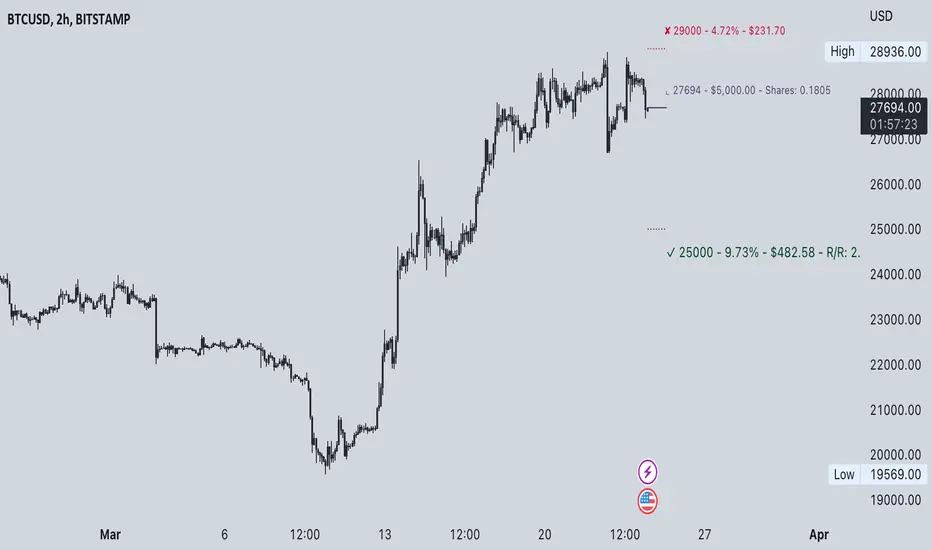
Commission-aware Trade LabelsCommission-aware Trade Labels Description: This library provides an easy way to visualize take-profit and stop-loss levels on your chart, taking into account trading commissions. The library calculates and displays the net profit or loss, along with other useful information such as risk/reward ratio, shares, and position size. Features: Configurable take-profit and stop-loss prices or percentages. Set entry amount or shares. Calculates and displays the risk/reward ratio. Shows net profit or loss, considering trading commissions. Customizable label appearance. Usage: Add the script to your chart. Create an Order object for take-profit and stop-loss with desired configurations. Call target_label() and stop_label() methods for each order object. Example: target_order = Order.new(take_profit_price=27483, stop_loss_price=28000, shares=0.2) stop_order = Order.new(stop_loss_price=29000, shares=1) target_order.target_label() stop_order.stop_label() This script is a powerful tool for visualizing your trading strategy's performance and helps you make better-informed decisions by considering trading commissions in your profit and loss calculations. Library "tradelabels" entry_price(this) Parameters: this : Order object @return entry_price take_profit_price(this) Parameters: this : Order object @return take_profit_price stop_loss_price(this) Parameters: this : Order object @return stop_loss_price is_long(this) Parameters: this : Order object @return entry_price is_short(this) Parameters: this : Order object @return entry_price percent_to_target(this, target) Parameters: this : Order object target : Target price @return percent risk_reward(this) Parameters: this : Order object @return risk_reward_ratio shares(this) Parameters: this : Order object @return shares position_size(this) Parameters: this : Order object @return position_size commission_cost(this, target_price) Parameters: this : Order object @return commission_cost target_price net_result(this, target_price) Parameters: this : Order object target_price : The target price to calculate net result for (either take_profit_price or stop_loss_price) @return net_result create_take_profit_label(this, prefix, size, offset_x, bg_color, text_color) Parameters: this prefix size offset_x bg_color text_color create_stop_loss_label(this, prefix, size, offset_x, bg_color, text_color) Parameters: this prefix size offset_x bg_color text_color create_entry_label(this, prefix, size, offset_x, bg_color, text_color) Parameters: this prefix size offset_x bg_color text_color create_line(this, target_price, line_color, offset_x, line_style, line_width, draw_entry_line) Parameters: this target_price line_color offset_x line_style line_width draw_entry_line Order Order Fields: entry_price : Entry price stop_loss_price : Stop loss price stop_loss_percent : Stop loss percent, default 2% take_profit_price : Take profit price take_profit_percent : Take profit percent, default 6% entry_amount : Entry amount, default 5000$ shares : Shares commission : Commission, default 0.04%Pine Script®库由bunulu提供已更新 4454
DafeRLMLLibDafeRLMLLib: The Reinforcement Learning & Machine Learning Engine This is not an indicator. This is an artificial intelligence. A state-based, self-learning engine designed to bring the power of professional quantitative finance to the Pine Script ecosystem. Welcome to the next frontier of trading analysis. █ CHAPTER 1: THE PHILOSOPHY - FROM STATIC RULES TO DYNAMIC LEARNING Technical analysis has, for a century, been a discipline of static, human-defined rules. "If RSI is below 30, then buy." "If the 50 EMA crosses the 200 EMA, then sell." These are fixed heuristics. They are brittle. They fail to adapt to the market's ever-changing personality—its shifts between trend and range, high and low volatility, risk-on and risk-off sentiment. An indicator built on static rules is an automaton, destined to fail when the environment it was designed for inevitably changes. The DafeRLMLLib was created to shatter this paradigm. It is not a tool with fixed rules; it is a framework for discovering optimal rules. It is a true Reinforcement Learning (RL) and Machine Learning (ML) engine, built from the ground up in Pine Script. Its purpose is not to follow a pre-programmed strategy, but to learn a strategy through trial, error, and feedback. This library provides a complete, professional-grade toolkit for developers to build indicators that think, adapt, and evolve. It observes the market state, selects an action, receives a reward signal based on the outcome, and updates its internal "brain" to improve its future decisions. This is not just a step forward; it is a quantum leap into the future of on-chart intelligence. █ CHAPTER 2: THE CORE INNOVATIONS - WHAT MAKES THIS A TRUE ML ENGINE? This library is not a collection of simple moving averages labeled as "AI." It is a suite of genuine, academically recognized machine learning algorithms, adapted for the unique constraints and opportunities of the Pine Script environment. Multi-Algorithm Architecture: You are not locked into one learning model. The library provides a choice of powerful RL algorithms: Q-Learning with TD(λ) Eligibility Traces: A classic, robust algorithm for learning state-action values. We've enhanced it with eligibility traces (Lambda), allowing the agent to more efficiently assign credit or blame to a sequence of past actions, dramatically speeding up the learning process. REINFORCE Policy Gradient with Baseline: A more advanced method that directly learns a "policy"—a probability distribution over actions—instead of just values. The baseline helps to stabilize learning by reducing variance. Actor-Critic Architecture: The state-of-the-art. This hybrid model combines the best of both worlds. The "Actor" (the policy) decides what to do, and the "Critic" (the value function) evaluates how good that action was. The Critic's feedback is then used to directly improve the Actor's decisions. Prioritized Experience Replay: Like a human, the AI learns more from surprising or significant events. Instead of learning from experiences in a simple chronological order, the library stores them in a ReplayBuffer. It then replays these memories to the learning algorithms, prioritizing experiences that resulted in a large prediction error. This makes learning incredibly efficient. Meta-Learning & Self-Tuning: An AI that cannot learn how to learn is still a dumb machine. The MetaState module is a meta-learning layer that monitors the agent's own performance over time. If it detects that performance is degrading, it will automatically increase the learning rate ("Synaptic Plasticity"). If performance is improving, it will decrease the learning rate to stabilize the learned strategy. It tunes its own hyperparameters. Catastrophic Forgetting Prevention: A common failure mode for simple neural networks is "catastrophic forgetting," where learning a new task completely erases knowledge of a previous one. This library includes mechanisms like soft_reset and L2 regularization to prevent the agent's learned weights from exploding or being wiped out by a single bad run of trades, ensuring more stable, long-term learning. The Universal Socket Interface: How does the AI "see" the market? Through DataSockets. This brilliant, extensible interface allows a developer to connect any data series—an RSI, a volume metric, a volatility reading, a custom calculation—to the AI's "brain." Each socket normalizes its input, tracks its own statistics, and feeds into the state-building process. This makes the library universally adaptable to any trading idea. █ CHAPTER 3: A DUAL-PURPOSE FRAMEWORK - MODES OF OPERATION This library is a foundational component of the DAFE AI ecosystem, designed for ultimate flexibility. It can be used in two primary modes: as a powerful standalone intelligence, or as the core cognitive engine within a larger, bridged super-system. Understanding these modes is key to unlocking its full potential. MODE 1: STANDALONE ENGINE OPERATION (Independent Power The DafeRLMLLib can be used entirely on its own to create a complete, self-learning trading indicator. This approach is perfect for building focused, single-purpose tools that are designed to master a specific task. In this mode, the developer is responsible for creating the full feedback loop within their own indicator script. The Workflow: Your indicator initializes the ML agent. On each bar, it feeds the agent market data via the socket interface. It asks the agent for an action (e.g., Buy, Sell, Hold). Your script then executes its own internal trade logic based on the agent's decision. Your script is responsible for tracking the Profit & Loss (PnL) of the resulting simulated trade. When the trade is closed, your script feeds the final PnL directly back into the agent's learn() function as the "reward" signal. The Result: A pure, state-based learning system. The agent directly learns the consequences of its own actions. This is excellent for discovering novel, micro-level trading patterns and for building indicators that are designed to operate with complete autonomy. MODE 2: BRIDGED SUPER-SYSTEM OPERATION (Synergistic Intelligence) This is the pinnacle of the DAFE ecosystem. In this advanced mode, the DafeRLMLLib acts as the core "cognitive engine" or the "tactical brain" within a larger, multi-library system. It can be fused with a strategic portfolio management engine (like the DafeSPALib) via a master communication protocol (the DafeMLSPABridge). The Workflow: The ML engine (this library) generates a set of creative, state-based proposals or predictions. The Bridge Library translates these proposals into a portfolio of micro-strategies. The SPA (Strategy Portfolio Allocation) engine, acting as a high-level manager, analyzes the real-time performance of these micro-strategies and selects the one it trusts the most. This becomes the final decision. The PnL from the SPA's final, performance-vetted decision is then routed back through the Bridge as a highly-qualified reward signal for the ML engine. The Result: A hybrid intelligence that is more robust and adaptive than either system alone. The ML engine provides tactical creativity, while the SPA engine provides ruthless, strategic, performance-based oversight. The ML proposes, the SPA disposes, and the ML learns from the SPA's wisdom. This creates a system of checks, balances, and continuous, synergistic learning, perfect for building an ultimate, all-in-one "drawing indicator" or trading system. As a developer, the choice is yours. Use this library independently to build powerful, specialized learning tools, or use it as the foundational brain for a truly comprehensive trading AI. █ CHAPTER 4: A GUIDE FOR DEVELOPERS - INTEGRATING THE BRAIN We have made it incredibly simple to bring your indicators to life with the DAFE AI. This is the true purpose of the library—to empower you. This section provides the full, unabridged input template and usage guide. PART I: THE INPUTS TEMPLATE To give your users full control over the AI, copy this entire block of inputs into your indicator script. It is professionally organized with groups and detailed tooltips. // ╔═════════════════════════════════════════════════════╗ // ║ INPUTS TEMPLATE (COPY INTO YOUR SCRIPT) ║ // ╚═════════════════════════════════════════════════════╝ // INPUT GROUPS string G_RL_AGENT = "═══════════ 🧠 AGENT CONFIGURATION ════════════" string G_RL_LEARN = "═══════════ 📚 LEARNING PARAMETERS ═══════════" string G_RL_REWARD = "═══════════ 💰 REWARD SYSTEM ═══════════════" string G_RL_REPLAY = "═══════════ 📼 EXPERIENCE REPLAY ════════════" string G_RL_META = "═══════════ 🔮 META-LEARNING ═══════════════" string G_RL_DASH = "═══════════ 📋 DIAGNOSTICS DASHBOARD ═════════" // AGENT CONFIGURATION string i_rl_algorithm = input.string("Actor-Critic", "🤖 Algorithm", options= , group=G_RL_AGENT, tooltip="Selects the core learning algorithm.\n\n" + "• Q-Learning: Classic, robust, and fast for discrete states. Learns the 'value' of actions.\n" + "• Policy Gradient: Learns a direct probability distribution over actions.\n" + "• Actor-Critic: The state-of-the-art. The 'Actor' decides, the 'Critic' evaluates.\n" + "• Ensemble: Runs both Q-Learning and Policy Gradient and chooses the action with the highest confidence.\n\n" + "RECOMMENDATION: Start with 'Q-Learning' for stability or 'Actor-Critic' for performance.") int i_rl_num_features = input.int(8, "Number of Features (Sockets)", minval=2, maxval=12, group=G_RL_AGENT, tooltip="Defines the size of the AI's 'vision'. This MUST match the number of sockets you connect.") int i_rl_num_actions = input.int(3, "Number of Actions", minval=2, maxval=5, group=G_RL_AGENT, tooltip="Defines what the AI can do. 3 is standard (0=Neutral, 1=Buy, 2=Sell).") // LEARNING PARAMETERS float i_rl_learning_rate = input.float(0.05, "🎓 Learning Rate (Alpha)", minval=0.001, maxval=0.2, step=0.005, group=G_RL_LEARN, tooltip="How strongly the AI updates its knowledge. Low (0.01-0.03) is stable. High (0.1+) is aggressive.") float i_rl_discount = input.float(0.95, "🔮 Discount Factor (Gamma)", minval=0.8, maxval=0.99, step=0.01, group=G_RL_LEARN, tooltip="Determines the agent's 'foresight'. High (0.95+) for trend following. Low (0.85) for scalping.") float i_rl_epsilon = input.float(0.15, "🧭 Exploration Rate (Epsilon)", minval=0.01, maxval=0.5, step=0.01, group=G_RL_LEARN, tooltip="For Q-Learning. The probability of taking a random action to explore. Decays automatically over time.") float i_rl_lambda = input.float(0.7, "⚡ Eligibility Trace (Lambda)", minval=0.0, maxval=0.95, step=0.05, group=G_RL_LEARN, tooltip="For Q-Learning. A powerful accelerator that allows a reward to be 'traced' back through a sequence of actions.") // REWARD SYSTEM string i_rl_reward_mode = input.string("Normalized", "💰 Reward Shaping Mode", options= , group=G_RL_REWARD, tooltip="Modifies the raw PnL reward signal to guide learning.\n\n" + "• Normalized: Creates a stable reward signal (Recommended).\n" + "• Asymmetric: Punishes losses more than it rewards gains. Teaches risk aversion.\n" + "• Risk-Adjusted: Divides PnL by risk (e.g., ATR). Teaches better risk/reward.") // EXPERIENCE REPLAY bool i_rl_use_replay = input.bool(true, "📼 Enable Experience Replay", group=G_RL_REPLAY, tooltip="Allows the agent to store and re-learn from past experiences. Dramatically improves learning stability. HIGHLY RECOMMENDED.") int i_rl_replay_capacity = input.int(500, "Replay Buffer Size", minval=100, maxval=2000, group=G_RL_REPLAY) int i_rl_replay_batch = input.int(4, "Replay Batch Size", minval=1, maxval=10, group=G_RL_REPLAY) // META-LEARNING bool i_rl_use_meta = input.bool(true, "🔮 Enable Meta-Learning", group=G_RL_META, tooltip="Allows the agent to self-tune its own learning rate based on performance trends.") // DIAGNOSTICS DASHBOARD bool i_rl_show_dash = input.bool(true, "📋 Show Diagnostics Dashboard", group=G_RL_DASH) PART II: THE IMPLEMENTATION LOGIC This is the boilerplate code you will adapt to your indicator. It shows the complete Observe-Act-Learn loop. // ╔═══════════════════════════════════════════════════════╗ // ║ USAGE EXAMPLE (ADAPT TO YOUR SCRIPT) ║ // ╚═══════════════════════════════════════════════════════╝ // 1. INITIALIZE THE AGENT (happens only on the first bar) int algo_id = i_rl_algorithm == "Q-Learning" ? 0 : i_rl_algorithm == "Policy Gradient" ? 1 : i_rl_algorithm == "Actor-Critic" ? 2 : 3 int reward_id = i_rl_reward_mode == "Raw PnL" ? 0 : i_rl_reward_mode == "Normalized" ? 1 : i_rl_reward_mode == "Asymmetric" ? 2 : 3 var rl.RLAgent agent = rl.init(algo_id, i_rl_num_features, i_rl_num_actions, i_rl_learning_rate, 54, i_rl_replay_capacity, i_rl_epsilon, i_rl_discount, i_rl_lambda, reward_id) // 2. CONNECT THE "SENSES" (happens only on the first bar) if barstate.isfirst // Connect your indicator's data series to the AI's sockets. The number MUST match 'i_rl_num_features'. agent := rl.connect_socket(agent, "rsi", ta.rsi(close, 14), "oscillator", 1.0) agent := rl.connect_socket(agent, "atr_norm", ta.atr(14)/close*100, "custom", 0.8) // ... connect all other features ... // 3. THE MAIN LOOP (Observe -> Act -> Learn) - runs on every bar var bool in_trade = false var int trade_direction = 0 var float entry_price = 0.0 var int last_state_hash = 0 var int last_action_taken = 0 // --- OBSERVE: Build the current market state --- rl.RLState current_state = rl.build_state(agent) // --- ACT: Ask the AI for a decision --- = rl.select_action(agent, current_state) agent := updated_agent // CRITICAL: Always update the agent state // --- EXECUTE: Your custom trade logic goes here --- if not in_trade and ai_action.action != 0 // Assuming 0 is "Hold" in_trade := true trade_direction := ai_action.action == 1 ? 1 : -1 // Assuming 1=Buy, 2=Sell entry_price := close last_state_hash := current_state.hash // Store the state at the moment of entry last_action_taken := ai_action.action // --- LEARN: Check for trade closure and provide feedback --- bool trade_is_closed = false float reward = 0.0 if in_trade // Your custom exit condition here (e.g., stop loss, take profit, opposite signal) bool exit_condition = bar_index > ta.valuewhen(in_trade, bar_index, 0) + 20 if exit_condition trade_is_closed := true pnl = trade_direction == 1 ? (close - entry_price) / entry_price : (entry_price - close) / entry_price reward := pnl * 100 in_trade := false // If a trade was closed on THIS bar, feed the experience to the AI if trade_is_closed agent := rl.learn(agent, last_state_hash, last_action_taken, reward, current_state, true) // 4. DISPLAY DIAGNOSTICS if i_rl_show_dash and barstate.islast string diag_text = rl.diagnostics(agent) label.new(bar_index, high, diag_text, style=label.style_label_down, color=color.new(#0A0A14, 10), textcolor=#00FF41, size=size.small, textalign=text.align_left) █ DEVELOPMENT PHILOSOPHY The DafeRLMLLib was born from a desire to push the boundaries of Pine Script and to empower the entire TradingView developer community. We believe that the future of technical analysis is not just in creating more complex algorithms, but in building systems that can learn, adapt, and optimize themselves. This library is an open-source framework designed to be a launchpad for a new generation of truly intelligent indicators on TradingView. This library is designed to help you and your users discover what "the best trades" are, not by following a fixed set of rules, but by learning from the market's own feedback, one trade at a time. █ DISCLAIMER & IMPORTANT NOTES THIS IS A LIBRARY FOR ADVANCED DEVELOPERS: This script does nothing on its own. It is a powerful engine that must be integrated into other indicators. REINFORCEMENT LEARNING IS COMPLEX: RL is not a magic bullet. It requires careful feature engineering (choosing the right sockets), a well-defined reward signal, and a sufficient amount of training data (trades) to converge on a profitable strategy. ALL TRADING INVOLVES RISK: The AI's decisions are based on statistical probabilities learned from past data. It does not predict the future with certainty. "The goal of a successful trader is to make the best trades. Money is secondary." — Alexander Elder Taking you to school. - Dskyz, Create with RL.Pine Script®库由DskyzInvestments提供4418
TradingHelperLibLibrary "TradingHelperLib" Trading Helper Library - Limit order, pip calculation and utility functions for trading bots f_pipValue() Calculates pip value based on symbol info Returns: Pip value f_pipsToPrice(pips) Converts pip count to price difference Parameters: pips (float) : Number of pips Returns: Price difference calcExpireBarCount(minutesToExpire) Converts minutes to bar count based on timeframe Parameters: minutesToExpire (float) : Duration in minutes Returns: Bar count calcLimitPrice(isLong, signalPrice, deviation, deviationType) Calculates limit order price with deviation Parameters: isLong (bool) : True for long, false for short signalPrice (float) : Signal price deviation (float) : Deviation amount deviationType (string) : Deviation type ("USDT" or "%") Returns: Limit price checkLimitFill(isLong, limitPrice) Checks if limit order is filled Parameters: isLong (bool) : True for long, false for short limitPrice (float) : Limit price to check Returns: True if filled f_multiplier(lvl, mode) Calculates DCA multiplier based on level and mode Parameters: lvl (int) : DCA level mode (string) : Multiplier mode ("Sabit", "Fibonacci", "Martingale", etc.) Returns: Multiplier value f_pctToPrice(pct, basePrice) Converts percentage value to price difference Parameters: pct (float) : Percentage value (e.g. 2.0 = 2%) basePrice (float) : Reference price Returns: Price difference f_priceChange_toPct(priceChange, basePrice) Converts price change to percentage Parameters: priceChange (float) : Price difference basePrice (float) : Reference price Returns: Percentage value calcMargin(notional, leverage) Calculates margin from notional value Parameters: notional (float) : Trade size (e.g. $1000) leverage (int) : Leverage value (e.g. 100) Returns: Margin value calcNotional(margin, leverage) Calculates notional from margin Parameters: margin (float) : Collateral value leverage (int) : Leverage value Returns: Notional value calcLiqPriceLongSimple(avgPrice, leverage) Calculates simple liquidation price for Long position Parameters: avgPrice (float) : Average entry price leverage (int) : Leverage value Returns: Estimated liquidation price calcLiqPriceShortSimple(avgPrice, leverage) Calculates simple liquidation price for Short position Parameters: avgPrice (float) : Average entry price leverage (int) : Leverage value Returns: Estimated liquidation price calcPnlLong(entryPrice, currentPrice, notional) Calculates Long position PNL Parameters: entryPrice (float) : Entry price currentPrice (float) : Current price notional (float) : Position size Returns: PNL value calcPnlShort(entryPrice, currentPrice, notional) Calculates Short position PNL Parameters: entryPrice (float) : Entry price currentPrice (float) : Current price notional (float) : Position size Returns: PNL value calcFee(notional, feeRate) Calculates trading fee Parameters: notional (float) : Trade size feeRate (float) : Fee rate in percentage (e.g. 0.1 = 0.1%) Returns: Fee valuePine Script®库由SwSpace提供已更新 1
Katz Exploding PowerBand FilterUnderstanding the Katz Exploding PowerBand Filter (EPBF) v2.4 1. Indicator Overview The Katz Exploding PowerBand Filter (EPBF) is an advanced technical indicator designed to identify moments of expanding bullish or bearish momentum, often referred to as "power." It operates as a standalone oscillator in a separate pane below the main price chart. Its primary goal is to measure underlying market strength by calculating custom "Bull" and "Bear" power components. These components are then filtered through a versatile moving average and a dual signal line system to generate clear entry and exit signals. This indicator is not a simple momentum oscillator; it uses a unique calculation based on exponential envelopes of both price and squared price to derive its values. 2. On-Chart Lines and Components The indicator pane consists of five main lines: Bullish Component (Thick Green/Blue/Yellow/Gray Line): This is the core of the indicator. It represents the calculated bullish "power" or momentum in the market. Bright Green: Indicates a strong, active long signal condition. Blue: Shows the bull component is above the MA filter, but the filter itself is still pointing down—a potential sign of a reversal or weakening downtrend. Yellow: A warning sign that bullish power is weakening and has fallen below the primary signal lines. Gray: Represents neutral or insignificant bullish power. Bearish Component (Thick Red/Purple/Yellow/Gray Line): This line represents the calculated bearish "power" or downward momentum. Bright Red: Indicates a strong, active short signal condition. Purple: Shows the bear component is above the MA filter, but the filter itself is still pointing down—a sign of potential trend continuation. Yellow: A warning sign that bearish power is weakening. Gray: Represents neutral or insignificant bearish power. MA Filter (Purple Line): This is the main filter, calculated using the moving average type and length you select in the settings (e.g., HullMA, EMA). The Bull and Bear components are compared against this line to determine the underlying trend bias. Signal Line 1 (Orange Line): A fast Exponential Moving Average (EMA) of the stronger power component. It acts as the first level of dynamic support or resistance for the power lines. Signal Line 2 (Lime/Gray Line): A slower EMA that acts as a confirmation filter. Lime Green: The line turns lime when it is rising and the faster Signal Line 1 is above it, indicating a confirmed bullish trend in momentum. Gray: Indicates a neutral or bearish momentum trend. 3. On-Chart Symbols and Their Meanings Various characters are plotted at the bottom of the indicator pane to provide clear, actionable signals. L (Pre-Long Signal): The first sign of a potential long entry. It appears when the Bullish Component rises and crosses above both signal lines for the first time. S (Pre-Short Signal): The first sign of a potential short entry. It appears when the Bearish Component rises and crosses above both signal lines for the first time. ▲ (Post-Long Signal): A stronger confirmation for a long entry. It appears with the 'L' signal only if the momentum trend is also confirmed bullish (i.e., the slower Signal Line 2 is lime green). ▼ (Post-Short Signal): A stronger confirmation for a short entry. It appears with the 'S' signal only if the momentum trend is confirmed bullish. Exit / Take-Profit Symbols: These symbols appear when a power component crosses below a line, suggesting that momentum is fading and it may be time to take profit. ⚠️ (Exit Signal 1): The Bull/Bear component has crossed below the main MA Filter. This is the first and most sensitive take-profit signal. ☣️ (Exit Signal 2): The Bull/Bear component has crossed below the faster Signal Line 1. This is a moderate take-profit signal. 🚼 (Exit Signal 3): The Bull/Bear component has crossed below the slower Signal Line 2. This is the slowest take-profit signal, suggesting the trend is more definitively exhausted. 4. Trading Strategy and Rules Long Entry Rules: Initial Signal: Wait for an L to appear at the bottom of the indicator. This confirms that bullish power is expanding. Confirmation (Recommended): For a higher-probability trade, wait for a green ▲ symbol to appear. This confirms the underlying momentum trend aligns with the signal. Entry: Enter a long (buy) position on the opening of the next candle after the signal appears. Short Entry Rules: Initial Signal: Wait for an S to appear at the bottom of the indicator. This confirms that bearish power is expanding. Confirmation (Recommended): For a higher-probability trade, wait for a maroon ▼ symbol to appear. This confirms the underlying momentum trend aligns with the signal. Entry: Enter a short (sell) position on the opening of the next candle after the signal appears. Take Profit (TP) Rules: The indicator provides three levels of take-profit signals. You can choose to exit your entire position or scale out at each level. For a long trade, exit when you see ⚠️, ☣️, or 🚼 appear below the Bullish Component. For a short trade, exit when you see ⚠️, ☣️, or 🚼 appear below the Bearish Component. Stop Loss (SL) Rules: The indicator does not provide an explicit stop loss. You must use your own risk management rules. Common methods include: Swing High/Low: For a long position, place your stop loss below the most recent significant swing low on the price chart. For a short position, place it above the most recent swing high. ATR-Based: Use an Average True Range (ATR) indicator to set a volatility-based stop loss. Fixed Percentage: Risk a fixed percentage (e.g., 1-2%) of your account on the trade. 5. Disclaimer This indicator is a tool for technical analysis and should not be considered financial advice. All trading involves significant risk, and past performance is not indicative of future results. The signals generated by this indicator are probabilistic and can result in losing trades. Always use proper risk management, such as setting a stop loss, and never risk more than you are willing to lose. It is recommended to backtest this indicator and use it in conjunction with other forms of analysis before trading with real capital. The indicator should only be used for educational purposes.Pine Script®指标由KATZcrypto提供14
EAOBS by MIGVersion 1 1. Strategy Overview Objective: Capitalize on breakout movements in Ethereum (ETH) price after the Asian open pre-market session (7:00 PM–7:59 PM EST) by identifying high and low prices during the session and trading breakouts above the high or below the low. Timeframe: Any (script is timeframe-agnostic, but align with session timing). Session: Pre-market session (7:00 PM–7:59 PM EST, adjustable for other time zones, e.g., 12:00 AM–12:59 AM GMT). Risk-Reward Ratios (R:R): Targets range from 1.2:1 to 5.2:1, with a fixed stop loss. Instrument: Ethereum (ETH/USD or ETH-based pairs). 2. Market Setup Session Monitoring: Monitor ETH price action during the pre-market session (7:00 PM–7:59 PM EST), which aligns with the Asian market open (e.g., 9:00 AM–9:59 AM JST). The script tracks the highest high and lowest low during this session. Breakout Triggers: Buy Signal: Price breaks above the session’s high after the session ends (7:59 PM EST). Sell Signal: Price breaks below the session’s low after the session ends. Visualization: The session is highlighted on the chart with a white background. Horizontal lines are drawn at the session’s high and low, extended for 30 bars, along with take-profit (TP) and stop-loss (SL) levels. 3. Entry Rules Long (Buy) Entry: Enter a long position when the price breaks above the session’s high price after 7:59 PM EST. Entry price: Just above the session high (e.g., add a small buffer, like 0.1–0.5%, to avoid false breakouts, depending on volatility). Short (Sell) Entry: Enter a short position when the price breaks below the session’s low price after 7:59 PM EST. Entry price: Just below the session low (e.g., subtract a small buffer, like 0.1–0.5%). Confirmation: Use a candlestick close above/below the breakout level to confirm the entry. Optionally, add volume confirmation or a momentum indicator (e.g., RSI or MACD) to filter out weak breakouts. Position Size: Calculate position size based on risk tolerance (e.g., 1–2% of account per trade). Risk is determined by the stop-loss distance (10 points, as defined in the script). 4. Exit Rules Take-Profit Levels (in points, based on script inputs):TP1: 12 points (1.2:1 R:R). TP2: 22 points (2.2:1 R:R). TP3: 32 points (3.2:1 R:R). TP4: 42 points (4.2:1 R:R). TP5: 52 points (5.2:1 R:R). Example for Long: If session high is 3000, TP levels are 3012, 3022, 3032, 3042, 3052. Example for Short: If session low is 2950, TP levels are 2938, 2928, 2918, 2908, 2898. Strategy: Scale out of the position (e.g., close 20% at TP1, 20% at TP2, etc.) or take full profit at a preferred TP level based on market conditions. Stop-Loss: Fixed at 10 points from the entry. Long SL: Session high - 10 points (e.g., entry at 3000, SL at 2990). Short SL: Session low + 10 points (e.g., entry at 2950, SL at 2960). Trailing Stop (Optional):After reaching TP2 or TP3, consider trailing the stop to lock in profits (e.g., trail by 10–15 points below the current price). 5. Risk Management per Trade: Limit risk to 1–2% of your trading account per trade. Calculate position size: Account Size × Risk % ÷ (Stop-Loss Distance × ETH Price per Point). Example: $10,000 account, 1% risk = $100. If SL = 10 points and 1 point = $1, position size = $100 ÷ 10 = 0.1 ETH. Daily Risk Limit: Cap daily losses at 3–5% of the account to avoid overtrading. Maximum Exposure: Avoid taking both long and short positions simultaneously unless using separate accounts or strategies. Volatility Consideration: Adjust position size during high-volatility periods (e.g., major news events like Ethereum upgrades or macroeconomic announcements). 6. Trade Management Monitoring :Watch for breakouts after 7:59 PM EST. Monitor price action near TP and SL levels using alerts or manual checks. Trade Duration: Breakout lines extend for 30 bars (script parameter). Close trades if no TP or SL is hit within this period, or reassess based on market conditions. Adjustments: If the market shows strong momentum, consider holding beyond TP5 with a trailing stop. If the breakout fails (e.g., price reverses before TP1), exit early to minimize losses. 7. Additional Considerations Market Conditions: The 7:00 PM–7:59 PM EST session aligns with the Asian market open (e.g., Tokyo Stock Exchange open at 9:00 AM JST), which may introduce higher volatility due to Asian trading activity. Avoid trading during low-liquidity periods or extreme volatility (e.g., major crypto news). Check for upcoming events (e.g., Ethereum network upgrades, ETF decisions) that could impact price. Backtesting: Test the strategy on historical ETH data using the session high/low breakouts for the 7:00 PM–7:59 PM EST window to validate performance. Adjust TP/SL levels based on backtest results if needed. Broker and Fees: Use a low-fee crypto exchange (e.g., Binance, Kraken, Coinbase Pro) to maximize R:R. Account for trading fees and slippage in your position sizing. Time zone Adjustment: Adjust session time input for your time zone (e.g., "0000-0059" for GMT). Ensure your trading platform’s clock aligns with the script’s time zone (default: America/New_York). 8. Example Trade Scenario: Session (7:00 PM–7:59 PM EST) records a high of 3050 and a low of 3000. Long Trade: Entry: Price breaks above 3050 (e.g., enter at 3051). TP Levels: 3063 (TP1), 3073 (TP2), 3083 (TP3), 3093 (TP4), 3103 (TP5). SL: 3040 (3050 - 10). Position Size: For a $10,000 account, 1% risk = $100. SL = 11 points ($11). Size = $100 ÷ 11 = ~0.09 ETH. Short Trade: Entry: Price breaks below 3000 (e.g., enter at 2999). TP Levels: 2987 (TP1), 2977 (TP2), 2967 (TP3), 2957 (TP4), 2947 (TP5). SL: 3010 (3000 + 10). Position Size: Same as above, ~0.09 ETH. Execution: Set alerts for breakouts, enter with limit orders, and monitor TPs/SL. 9. Tools and Setup Platform: Use TradingView to implement the Pine Script and visualize breakout levels. Alerts: Set price alerts for breakouts above the session high or below the session low after 7:59 PM EST. Set alerts for TP and SL levels. Chart Settings: Use a 1-minute or 5-minute chart for precise session tracking. Overlay the script to see high/low lines, TP levels, and SL levels. Optional Indicators: Add RSI (e.g., avoid overbought/oversold breakouts) or volume to confirm breakouts. 10. Risk Warnings Crypto Volatility: ETH is highly volatile; unexpected news can cause rapid price swings. False Breakouts: Breakouts may fail, especially in low-volume sessions. Use confirmation signals. Leverage: Avoid high leverage (e.g., >5x) to prevent liquidation during volatile moves. Session Accuracy: Ensure correct session timing for your time zone to avoid misaligned entries. 11. Performance Tracking Journaling :Record each trade’s entry, exit, R:R, and outcome. Note market conditions (e.g., trending, ranging, news-driven). Review: Weekly: Assess win rate, average R:R, and adherence to the plan. Monthly: Adjust TP/SL or session timing based on performance. Pine Script®指标由levijames7提供12
ai quant oculusAI QUANT OCULUS Version 1.0 | Pine Script v6 Purpose & Innovation AI QUANT OCULUS integrates four distinct technical concepts—exponential trend filtering, adaptive smoothing, momentum oscillation, and Gaussian smoothing—into a single, cohesive system that delivers clear, objective buy and sell signals along with automatically plotted stop-loss and three profit-target levels. This mash-up goes beyond a simple EMA crossover or standalone TRIX oscillator by requiring confluence across trend, adaptive moving averages, momentum direction, and smoothed price action, reducing false triggers and focusing on high‐probability turning points. How It Works & Why Its Components Matter Trend Filter: EMA vs. Adaptive MA EMA (20) measures the prevailing trend with fixed sensitivity. Adaptive MA (also EMA-based, length 10) approximates a faster-responding moving average, standing in for a KAMA-style filter. Bullish bias requires AMA > EMA; bearish bias requires AMA < EMA. This ensures signals align with both the underlying trend and a more nimble view of recent price action. Momentum Confirmation: TRIX Calculates a triple-smoothed EMA of price over TRIX Length (15), then converts it to a percentage rate-of-change oscillator. Positive TRIX reinforces bullish entries; negative TRIX reinforces bearish entries. Using TRIX helps filter whipsaws by focusing on sustained momentum shifts. Gaussian Price Smoother Applies two back-to-back 5-period EMAs to the price (“gaussian” smoothing) to remove short-term noise. Price above the smoothed line confirms strength for longs; below confirms weakness for shorts. This layer avoids entries on erratic spikes. Confluence Signals Buy Signal (isBull) fires only when: AMA > EMA (trend alignment) TRIX > 0 (momentum support) Close > Gaussian (price strength) Sell Signal (isBear) fires under the inverse conditions. Requiring all three conditions simultaneously sharply reduces false triggers common to single-indicator systems. Automatic Risk & Reward Plotting On each new buy or sell signal (edge detection via not isBull or not isBear ), the script: Stores entryPrice at the signal bar’s close. Draws a stop-loss line at entry minus ATR(14) × Stop Multiplier (1.5) by default. Plots three profit-target lines at entry plus ATR × Target Multiplier (1×, 1.5×, and 2×). All previous labels and lines are deleted on each new signal, keeping the chart uncluttered and focusing only on the current trade. Inputs & Customization Input Description Default EMA Length Period for the main trend EMA 20 Adaptive MA Length Period for the faster adaptive EM A substitute 10 TRIX Length Period for the triple-smoothed momentum oscillator 15 Dominant Cycle Length (Reserved) 40 Stop Multiplier ATR multiple for stop-loss distance 1.5 Target Multiplier ATR multiple for first profit target 1.5 Show Buy/Sell Signals Toggle on-chart labels for entry signals On How to Use Apply to Chart: Best on 15 m–1 h timeframes for swing entries or 5 m for agile scalps. Wait for Full Confluence: Look for the AMA to cross above/below the EMA and verify TRIX and Gaussian conditions on the same bar. A bright “LONG” or “SHORT” label marks your entry. Manage the Trade: Place your stop where the red or green SL line appears. Scale or exit at the three yellow TP1/TP2/TP3 lines, automatically drawn by volatility. Repeat Cleanly: Each new signal clears prior annotations, ensuring you only track the active setup. Why This Script Stands Out Multi-Layer Confluence: Trend, momentum, and noise-reduction must all align, addressing the weaknesses of single-indicator strategies. Automated Trade Management: No manual plotting—stop and target lines appear seamlessly with each signal. Transparent & Customizable: All logic is open, adjustable, and clearly documented, allowing traders to tweak lengths and multipliers to suit different instruments. Disclaimer No indicator guarantees profit. Always backtest AI QUANT OCULUS extensively, combine its signals with your own analysis and risk controls, and practice sound money management before trading live.Pine Script®指标由OnlyOneOculus提供279
TrailingStopLibraryLibrary "TrailingStopLibrary" 专业移动止盈库 - 为Pine Script策略提供完整的追踪止盈功能。支持做多做空双向交易,基于风险回报比智能激活,提供收盘价和高低价两种判断模式。包含完整的状态管理、调试信息和易用的API接口。适用于股票、外汇、加密货币等各种市场的风险管理。 @version 1.0 @author runto2006 new_config(enabled, activation_ratio, pullback_percent, price_type) 创建移动止盈配置对象 Parameters: enabled (bool) : (bool) 是否启用移动止盈,默认true activation_ratio (float) : (float) 激活盈亏比,默认4.0,表示盈利4倍止损距离时激活 pullback_percent (float) : (float) 回撤百分比,默认1.0,表示回撤1%时触发止盈 price_type (string) : (string) 价格类型,默认"close"。"close"=收盘价模式,"hl"=高低价模式 Returns: Config 配置对象 new_state() 创建移动止盈状态对象 Returns: State 初始化的状态对象 reset(state) 重置移动止盈状态 Parameters: state (State) : (State) 要重置的状态对象 Returns: void calc_activation_target(entry_price, stop_price, activation_ratio, is_long) 计算激活目标价格 Parameters: entry_price (float) : (float) 入场价格 stop_price (float) : (float) 止损价格 activation_ratio (float) : (float) 激活盈亏比 is_long (bool) : (bool) 是否为多头持仓 Returns: float 激活目标价格,如果输入无效则返回na get_check_price(price_type, is_long, for_activation) 获取用于判断的价格 Parameters: price_type (string) : (string) 价格类型:"close"或"hl" is_long (bool) : (bool) 是否为多头持仓 for_activation (bool) : (bool) 是否用于激活判断,影响高低价的选择方向 Returns: float 当前判断价格 check_activation(config, state, entry_price, stop_price, is_long, has_position) 检查是否应该激活移动止盈 Parameters: config (Config) : (Config) 移动止盈配置 state (State) : (State) 移动止盈状态 entry_price (float) : (float) 入场价格 stop_price (float) : (float) 止损价格 is_long (bool) : (bool) 是否为多头持仓 has_position (bool) : (bool) 是否有持仓 Returns: bool 是否成功激活 update_tracking(config, state, is_long) 更新移动止盈的追踪价格 Parameters: config (Config) : (Config) 移动止盈配置 state (State) : (State) 移动止盈状态 is_long (bool) : (bool) 是否为多头持仓 Returns: void check_trigger(config, state, entry_price, is_long) 检查是否触发移动止盈 Parameters: config (Config) : (Config) 移动止盈配置 state (State) : (State) 移动止盈状态 entry_price (float) : (float) 入场价格 is_long (bool) : (bool) 是否为多头持仓 Returns: bool 是否触发止盈 process(config, state, entry_price, stop_price, is_long, has_position) 一体化处理移动止盈逻辑 Parameters: config (Config) : (Config) 移动止盈配置 state (State) : (State) 移动止盈状态 entry_price (float) : (float) 入场价格 stop_price (float) : (float) 止损价格 is_long (bool) : (bool) 是否为多头持仓 has_position (bool) : (bool) 是否有持仓 Returns: bool 是否触发止盈 get_trigger_price(config, state, is_long) 获取当前触发价格 Parameters: config (Config) : (Config) 移动止盈配置 state (State) : (State) 移动止盈状态 is_long (bool) : (bool) 是否为多头持仓 Returns: float 触发价格,未激活时返回na get_pullback_percent(config, state, entry_price, is_long) 计算当前回撤百分比 Parameters: config (Config) : (Config) 移动止盈配置 state (State) : (State) 移动止盈状态 entry_price (float) : (float) 入场价格 is_long (bool) : (bool) 是否为多头持仓 Returns: float 当前回撤百分比,未激活时返回na get_status_info(config, state, entry_price, is_long) 获取状态信息字符串(用于调试) Parameters: config (Config) : (Config) 移动止盈配置 state (State) : (State) 移动止盈状态 entry_price (float) : (float) 入场价格 is_long (bool) : (bool) 是否为多头持仓 Returns: string 详细的状态信息 Config 移动止盈配置对象 Fields: enabled (series bool) : (bool) 是否启用移动止盈功能 activation_ratio (series float) : (float) 激活盈亏比 - 盈利达到止损距离的多少倍时激活追踪 pullback_percent (series float) : (float) 回撤百分比 - 从最优价格回撤多少百分比时触发止盈 price_type (series string) : (string) 价格判断类型 - "close"使用收盘价,"hl"使用高低价 State 移动止盈状态对象 Fields: activated (series bool) : (bool) 是否已激活追踪止盈 highest_price (series float) : (float) 激活后记录的最高价格 lowest_price (series float) : (float) 激活后记录的最低价格 activation_target (series float) : (float) 激活目标价格Pine Script®库由l1869688提供2
CNTLibraryLibrary "CNTLibrary" Custom Functions To Help Code In Pinescript V5 Coded By Christian Nataliano First Coded In 10/06/2023 Last Edited In 22/06/2023 Huge Shout Out To © ZenAndTheArtOfTrading and his ZenLibrary V5, Some Of The Custom Functions Were Heavily Inspired By Matt's Work & His Pine Script Mastery Course Another Shout Out To The TradingView's Team Library ta V5 //==================================================================================================================================================== // Custom Indicator Functions //==================================================================================================================================================== GetKAMA(KAMA_lenght, Fast_KAMA, Slow_KAMA) Calculates An Adaptive Moving Average Based On Perry J Kaufman's Calculations Parameters: KAMA_lenght (int) : Is The KAMA Lenght Fast_KAMA (int) : Is The KAMA's Fastes Moving Average Slow_KAMA (int) : Is The KAMA's Slowest Moving Average Returns: Float Of The KAMA's Current Calculations GetMovingAverage(Source, Lenght, Type) Get Custom Moving Averages Values Parameters: Source (float) : Of The Moving Average, Defval = close Lenght (simple int) : Of The Moving Average, Defval = 50 Type (string) : Of The Moving Average, Defval = Exponential Moving Average Returns: The Moving Average Calculation Based On Its Given Source, Lenght & Calculation Type (Please Call Function On Global Scope) GetDecimals() Calculates how many decimals are on the quote price of the current market © ZenAndTheArtOfTrading Returns: The current decimal places on the market quote price Truncate(number, decimalPlaces) Truncates (cuts) excess decimal places © ZenAndTheArtOfTrading Parameters: number (float) decimalPlaces (simple float) Returns: The given number truncated to the given decimalPlaces ToWhole(number) Converts pips into whole numbers © ZenAndTheArtOfTrading Parameters: number (float) Returns: The converted number ToPips(number) Converts whole numbers back into pips © ZenAndTheArtOfTrading Parameters: number (float) Returns: The converted number GetPctChange(value1, value2, lookback) Gets the percentage change between 2 float values over a given lookback period © ZenAndTheArtOfTrading Parameters: value1 (float) value2 (float) lookback (int) BarsAboveMA(lookback, ma) Counts how many candles are above the MA © ZenAndTheArtOfTrading Parameters: lookback (int) ma (float) Returns: The bar count of how many recent bars are above the MA BarsBelowMA(lookback, ma) Counts how many candles are below the MA © ZenAndTheArtOfTrading Parameters: lookback (int) ma (float) Returns: The bar count of how many recent bars are below the EMA BarsCrossedMA(lookback, ma) Counts how many times the EMA was crossed recently © ZenAndTheArtOfTrading Parameters: lookback (int) ma (float) Returns: The bar count of how many times price recently crossed the EMA GetPullbackBarCount(lookback, direction) Counts how many green & red bars have printed recently (ie. pullback count) © ZenAndTheArtOfTrading Parameters: lookback (int) direction (int) Returns: The bar count of how many candles have retraced over the given lookback & direction GetSwingHigh(Lookback, SwingType) Check If Price Has Made A Recent Swing High Parameters: Lookback (int) : Is For The Swing High Lookback Period, Defval = 7 SwingType (int) : Is For The Swing High Type Of Identification, Defval = 1 Returns: A Bool - True If Price Has Made A Recent Swing High GetSwingLow(Lookback, SwingType) Check If Price Has Made A Recent Swing Low Parameters: Lookback (int) : Is For The Swing Low Lookback Period, Defval = 7 SwingType (int) : Is For The Swing Low Type Of Identification, Defval = 1 Returns: A Bool - True If Price Has Made A Recent Swing Low //==================================================================================================================================================== // Custom Risk Management Functions //==================================================================================================================================================== CalculateStopLossLevel(OrderType, Entry, StopLoss) Calculate StopLoss Level Parameters: OrderType (int) : Is To Determine A Long / Short Position, Defval = 1 Entry (float) : Is The Entry Level Of The Order, Defval = na StopLoss (float) : Is The Custom StopLoss Distance, Defval = 2x ATR Below Close Returns: Float - The StopLoss Level In Actual Price As A CalculateStopLossDistance(OrderType, Entry, StopLoss) Calculate StopLoss Distance In Pips Parameters: OrderType (int) : Is To Determine A Long / Short Position, Defval = 1 Entry (float) : Is The Entry Level Of The Order, NEED TO INPUT PARAM StopLoss (float) : Level Based On Previous Calculation, NEED TO INPUT PARAM Returns: Float - The StopLoss Value In Pips CalculateTakeProfitLevel(OrderType, Entry, StopLossDistance, RiskReward) Calculate TakeProfit Level Parameters: OrderType (int) : Is To Determine A Long / Short Position, Defval = 1 Entry (float) : Is The Entry Level Of The Order, Defval = na StopLossDistance (float) RiskReward (float) Returns: Float - The TakeProfit Level In Actual Price CalculateTakeProfitDistance(OrderType, Entry, TakeProfit) Get TakeProfit Distance In Pips Parameters: OrderType (int) : Is To Determine A Long / Short Position, Defval = 1 Entry (float) : Is The Entry Level Of The Order, NEED TO INPUT PARAM TakeProfit (float) : Level Based On Previous Calculation, NEED TO INPUT PARAM Returns: Float - The TakeProfit Value In Pips CalculateConversionCurrency(AccountCurrency, SymbolCurrency, BaseCurrency) Get The Conversion Currecny Between Current Account Currency & Current Pair's Quoted Currency (FOR FOREX ONLY) Parameters: AccountCurrency (simple string) : Is For The Account Currency Used SymbolCurrency (simple string) : Is For The Current Symbol Currency (Front Symbol) BaseCurrency (simple string) : Is For The Current Symbol Base Currency (Back Symbol) Returns: Tuple Of A Bollean (Convert The Currency ?) And A String (Converted Currency) CalculateConversionRate(ConvertCurrency, ConversionRate) Get The Conversion Rate Between Current Account Currency & Current Pair's Quoted Currency (FOR FOREX ONLY) Parameters: ConvertCurrency (bool) : Is To Check If The Current Symbol Needs To Be Converted Or Not ConversionRate (float) : Is The Quoted Price Of The Conversion Currency (Input The request.security Function Here) Returns: Float Price Of Conversion Rate (If In The Same Currency Than Return Value Will Be 1.0) LotSize(LotSizeSimple, Balance, Risk, SLDistance, ConversionRate) Get Current Lot Size Parameters: LotSizeSimple (bool) : Is To Toggle Lot Sizing Calculation (Simple Is Good Enough For Stocks & Crypto, Whilst Complex Is For Forex) Balance (float) : Is For The Current Account Balance To Calculate The Lot Sizing Based Off Risk (float) : Is For The Current Risk Per Trade To Calculate The Lot Sizing Based Off SLDistance (float) : Is The Current Position StopLoss Distance From Its Entry Price ConversionRate (float) : Is The Currency Conversion Rate (Used For Complex Lot Sizing Only) Returns: Float - Position Size In Units ToLots(Units) Converts Units To Lots Parameters: Units (float) : Is For How Many Units Need To Be Converted Into Lots (Minimun 1000 Units) Returns: Float - Position Size In Lots ToUnits(Lots) Converts Lots To Units Parameters: Lots (float) : Is For How Many Lots Need To Be Converted Into Units (Minimun 0.01 Units) Returns: Int - Position Size In Units ToLotsInUnits(Units) Converts Units To Lots Than Back To Units Parameters: Units (float) : Is For How Many Units Need To Be Converted Into Lots (Minimun 1000 Units) Returns: Float - Position Size In Lots That Were Rounded To Units ATRTrail(OrderType, SourceType, ATRPeriod, ATRMultiplyer, SwingLookback) Calculate ATR Trailing Stop Parameters: OrderType (int) : Is To Determine A Long / Short Position, Defval = 1 SourceType (int) : Is To Determine Where To Calculate The ATR Trailing From, Defval = close ATRPeriod (simple int) : Is To Change Its ATR Period, Defval = 20 ATRMultiplyer (float) : Is To Change Its ATR Trailing Distance, Defval = 1 SwingLookback (int) : Is To Change Its Swing HiLo Lookback (Only From Source Type 5), Defval = 7 Returns: Float - Number Of The Current ATR Trailing DangerZone(WinRate, AvgRRR, Filter) Calculate Danger Zone Of A Given Strategy Parameters: WinRate (float) : Is The Strategy WinRate AvgRRR (float) : Is The Strategy Avg RRR Filter (float) : Is The Minimum Profit It Needs To Be Out Of BE Zone, Defval = 3 Returns: Int - Value, 1 If Out Of Danger Zone, 0 If BE, -1 If In Danger Zone IsQuestionableTrades(TradeTP, TradeSL) Checks For Questionable Trades (Which Are Trades That Its TP & SL Level Got Hit At The Same Candle) Parameters: TradeTP (float) : Is The Trade In Question Take Profit Level TradeSL (float) : Is The Trade In Question Stop Loss Level Returns: Bool - True If The Last Trade Was A "Questionable Trade" //==================================================================================================================================================== // Custom Strategy Functions //==================================================================================================================================================== OpenLong(EntryID, LotSize, LimitPrice, StopPrice, Comment, CommentValue) Open A Long Order Based On The Given Params Parameters: EntryID (string) : Is The Trade Entry ID, Defval = "Long" LotSize (float) : Is The Lot Size Of The Trade, Defval = 1 LimitPrice (float) : Is The Limit Order Price To Set The Order At, Defval = Na / Market Order Execution StopPrice (float) : Is The Stop Order Price To Set The Order At, Defval = Na / Market Order Execution Comment (string) : Is The Order Comment, Defval = Long Entry Order CommentValue (string) : Is For Custom Values In The Order Comment, Defval = Na Returns: Void OpenShort(EntryID, LotSize, LimitPrice, StopPrice, Comment, CommentValue) Open A Short Order Based On The Given Params Parameters: EntryID (string) : Is The Trade Entry ID, Defval = "Short" LotSize (float) : Is The Lot Size Of The Trade, Defval = 1 LimitPrice (float) : Is The Limit Order Price To Set The Order At, Defval = Na / Market Order Execution StopPrice (float) : Is The Stop Order Price To Set The Order At, Defval = Na / Market Order Execution Comment (string) : Is The Order Comment, Defval = Short Entry Order CommentValue (string) : Is For Custom Values In The Order Comment, Defval = Na Returns: Void TP_SLExit(FromID, TPLevel, SLLevel, PercentageClose, Comment, CommentValue) Exits Based On Predetermined TP & SL Levels Parameters: FromID (string) : Is The Trade ID That The TP & SL Levels Be Palced TPLevel (float) : Is The Take Profit Level SLLevel (float) : Is The StopLoss Level PercentageClose (float) : Is The Amount To Close The Order At (In Percentage) Defval = 100 Comment (string) : Is The Order Comment, Defval = Exit Order CommentValue (string) : Is For Custom Values In The Order Comment, Defval = Na Returns: Void CloseLong(ExitID, PercentageClose, Comment, CommentValue, Instant) Exits A Long Order Based On A Specified Condition Parameters: ExitID (string) : Is The Trade ID That Will Be Closed, Defval = "Long" PercentageClose (float) : Is The Amount To Close The Order At (In Percentage) Defval = 100 Comment (string) : Is The Order Comment, Defval = Exit Order CommentValue (string) : Is For Custom Values In The Order Comment, Defval = Na Instant (bool) : Is For Exit Execution Type, Defval = false Returns: Void CloseShort(ExitID, PercentageClose, Comment, CommentValue, Instant) Exits A Short Order Based On A Specified Condition Parameters: ExitID (string) : Is The Trade ID That Will Be Closed, Defval = "Short" PercentageClose (float) : Is The Amount To Close The Order At (In Percentage) Defval = 100 Comment (string) : Is The Order Comment, Defval = Exit Order CommentValue (string) : Is For Custom Values In The Order Comment, Defval = Na Instant (bool) : Is For Exit Execution Type, Defval = false Returns: Void BrokerCheck(Broker) Checks Traded Broker With Current Loaded Chart Broker Parameters: Broker (string) : Is The Current Broker That Is Traded Returns: Bool - True If Current Traded Broker Is Same As Loaded Chart Broker OpenPC(LicenseID, OrderType, UseLimit, LimitPrice, SymbolPrefix, Symbol, SymbolSuffix, Risk, SL, TP, OrderComment, Spread) Compiles Given Parameters Into An Alert String Format To Open Trades Using Pine Connector Parameters: LicenseID (string) : Is The Users PineConnector LicenseID OrderType (int) : Is The Desired OrderType To Open UseLimit (bool) : Is If We Want To Enter The Position At Exactly The Previous Closing Price LimitPrice (float) : Is The Limit Price Of The Trade (Only For Pending Orders) SymbolPrefix (string) : Is The Current Symbol Prefix (If Any) Symbol (string) : Is The Traded Symbol SymbolSuffix (string) : Is The Current Symbol Suffix (If Any) Risk (float) : Is The Trade Risk Per Trade / Fixed Lot Sizing SL (float) : Is The Trade SL In Price / In Pips TP (float) : Is The Trade TP In Price / In Pips OrderComment (string) : Is The Executed Trade Comment Spread (float) : is The Maximum Spread For Execution Returns: String - Pine Connector Order Syntax Alert Message ClosePC(LicenseID, OrderType, SymbolPrefix, Symbol, SymbolSuffix) Compiles Given Parameters Into An Alert String Format To Close Trades Using Pine Connector Parameters: LicenseID (string) : Is The Users PineConnector LicenseID OrderType (int) : Is The Desired OrderType To Close SymbolPrefix (string) : Is The Current Symbol Prefix (If Any) Symbol (string) : Is The Traded Symbol SymbolSuffix (string) : Is The Current Symbol Suffix (If Any) Returns: String - Pine Connector Order Syntax Alert Message //==================================================================================================================================================== // Custom Backtesting Calculation Functions //==================================================================================================================================================== CalculatePNL(EntryPrice, ExitPrice, LotSize, ConversionRate) Calculates Trade PNL Based On Entry, Eixt & Lot Size Parameters: EntryPrice (float) : Is The Trade Entry ExitPrice (float) : Is The Trade Exit LotSize (float) : Is The Trade Sizing ConversionRate (float) : Is The Currency Conversion Rate (Used For Complex Lot Sizing Only) Returns: Float - The Current Trade PNL UpdateBalance(PrevBalance, PNL) Updates The Previous Ginve Balance To The Next PNL Parameters: PrevBalance (float) : Is The Previous Balance To Be Updated PNL (float) : Is The Current Trade PNL To Be Added Returns: Float - The Current Updated PNL CalculateSlpComm(PNL, MaxRate) Calculates Random Slippage & Commisions Fees Based On The Parameters Parameters: PNL (float) : Is The Current Trade PNL MaxRate (float) : Is The Upper Limit (In Percentage) Of The Randomized Fee Returns: Float - A Percentage Fee Of The Current Trade PNL UpdateDD(MaxBalance, Balance) Calculates & Updates The DD Based On Its Given Parameters Parameters: MaxBalance (float) : Is The Maximum Balance Ever Recorded Balance (float) : Is The Current Account Balance Returns: Float - The Current Strategy DD CalculateWR(TotalTrades, LongID, ShortID) Calculate The Total, Long & Short Trades Win Rate Parameters: TotalTrades (int) : Are The Current Total Trades That The Strategy Has Taken LongID (string) : Is The Order ID Of The Long Trades Of The Strategy ShortID (string) : Is The Order ID Of The Short Trades Of The Strategy Returns: Tuple Of Long WR%, Short WR%, Total WR%, Total Winning Trades, Total Losing Trades, Total Long Trades & Total Short Trades CalculateAvgRRR(WinTrades, LossTrades) Calculates The Overall Strategy Avg Risk Reward Ratio Parameters: WinTrades (int) : Are The Strategy Winning Trades LossTrades (int) : Are The Strategy Losing Trades Returns: Float - The Average RRR Values CAGR(StartTime, StartPrice, EndTime, EndPrice) Calculates The CAGR Over The Given Time Period © TradingView Parameters: StartTime (int) : Is The Starting Time Of The Calculation StartPrice (float) : Is The Starting Price Of The Calculation EndTime (int) : Is The Ending Time Of The Calculation EndPrice (float) : Is The Ending Price Of The Calculation Returns: Float - The CAGR Values //==================================================================================================================================================== // Custom Plot Functions //==================================================================================================================================================== EditLabels(LabelID, X1, Y1, Text, Color, TextColor, EditCondition, DeleteCondition) Edit / Delete Labels Parameters: LabelID (label) : Is The ID Of The Selected Label X1 (int) : Is The X1 Coordinate IN BARINDEX Xloc Y1 (float) : Is The Y1 Coordinate IN PRICE Yloc Text (string) : Is The Text Than Wants To Be Written In The Label Color (color) : Is The Color Value Change Of The Label Text TextColor (color) EditCondition (int) : Is The Edit Condition of The Line (Setting Location / Color) DeleteCondition (bool) : Is The Delete Condition Of The Line If Ture Deletes The Prev Itteration Of The Line Returns: Void EditLine(LineID, X1, Y1, X2, Y2, Color, EditCondition, DeleteCondition) Edit / Delete Lines Parameters: LineID (line) : Is The ID Of The Selected Line X1 (int) : Is The X1 Coordinate IN BARINDEX Xloc Y1 (float) : Is The Y1 Coordinate IN PRICE Yloc X2 (int) : Is The X2 Coordinate IN BARINDEX Xloc Y2 (float) : Is The Y2 Coordinate IN PRICE Yloc Color (color) : Is The Color Value Change Of The Line EditCondition (int) : Is The Edit Condition of The Line (Setting Location / Color) DeleteCondition (bool) : Is The Delete Condition Of The Line If Ture Deletes The Prev Itteration Of The Line Returns: Void //==================================================================================================================================================== // Custom Display Functions (Using Tables) //==================================================================================================================================================== FillTable(TableID, Column, Row, Title, Value, BgColor, TextColor, ToolTip) Filling The Selected Table With The Inputed Information Parameters: TableID (table) : Is The Table ID That Wants To Be Edited Column (int) : Is The Current Column Of The Table That Wants To Be Edited Row (int) : Is The Current Row Of The Table That Wants To Be Edited Title (string) : Is The String Title Of The Current Cell Table Value (string) : Is The String Value Of The Current Cell Table BgColor (color) : Is The Selected Color For The Current Table TextColor (color) : Is The Selected Color For The Current Table ToolTip (string) : Is The ToolTip Of The Current Cell In The Table Returns: Void DisplayBTResults(TableID, BgColor, TextColor, StartingBalance, Balance, DollarReturn, TotalPips, MaxDD) Filling The Selected Table With The Inputed Information Parameters: TableID (table) : Is The Table ID That Wants To Be Edited BgColor (color) : Is The Selected Color For The Current Table TextColor (color) : Is The Selected Color For The Current Table StartingBalance (float) : Is The Account Starting Balance Balance (float) DollarReturn (float) : Is The Account Dollar Reture TotalPips (float) : Is The Total Pips Gained / loss MaxDD (float) : Is The Maximum Drawdown Over The Backtesting Period Returns: Void DisplayBTResultsV2(TableID, BgColor, TextColor, TotalWR, QTCount, LongWR, ShortWR, InitialCapital, CumProfit, CumFee, AvgRRR, MaxDD, CAGR, MeanDD) Filling The Selected Table With The Inputed Information Parameters: TableID (table) : Is The Table ID That Wants To Be Edited BgColor (color) : Is The Selected Color For The Current Table TextColor (color) : Is The Selected Color For The Current Table TotalWR (float) : Is The Strategy Total WR In % QTCount (int) : Is The Strategy Questionable Trades Count LongWR (float) : Is The Strategy Total WR In % ShortWR (float) : Is The Strategy Total WR In % InitialCapital (float) : Is The Strategy Initial Starting Capital CumProfit (float) : Is The Strategy Ending Cumulative Profit CumFee (float) : Is The Strategy Ending Cumulative Fee (Based On Randomized Fee Assumptions) AvgRRR (float) : Is The Strategy Average Risk Reward Ratio MaxDD (float) : Is The Strategy Maximum DrawDown In Its Backtesting Period CAGR (float) : Is The Strategy Compounded Average GRowth In % MeanDD (float) : Is The Strategy Mean / Average Drawdown In The Backtesting Period Returns: Void //==================================================================================================================================================== // Custom Pattern Detection Functions //==================================================================================================================================================== BullFib(priceLow, priceHigh, fibRatio) Calculates A Bullish Fibonacci Value (From Swing Low To High) © ZenAndTheArtOfTrading Parameters: priceLow (float) priceHigh (float) fibRatio (float) Returns: The Fibonacci Value Of The Given Ratio Between The Two Price Points BearFib(priceLow, priceHigh, fibRatio) Calculates A Bearish Fibonacci Value (From Swing High To Low) © ZenAndTheArtOfTrading Parameters: priceLow (float) priceHigh (float) fibRatio (float) Returns: The Fibonacci Value Of The Given Ratio Between The Two Price Points GetBodySize() Gets The Current Candle Body Size IN POINTS © ZenAndTheArtOfTrading Returns: The Current Candle Body Size IN POINTS GetTopWickSize() Gets The Current Candle Top Wick Size IN POINTS © ZenAndTheArtOfTrading Returns: The Current Candle Top Wick Size IN POINTS GetBottomWickSize() Gets The Current Candle Bottom Wick Size IN POINTS © ZenAndTheArtOfTrading Returns: The Current Candle Bottom Wick Size IN POINTS GetBodyPercent() Gets The Current Candle Body Size As A Percentage Of Its Entire Size Including Its Wicks © ZenAndTheArtOfTrading Returns: The Current Candle Body Size IN PERCENTAGE GetTopWickPercent() Gets The Current Top Wick Size As A Percentage Of Its Entire Body Size Returns: Float - The Current Candle Top Wick Size IN PERCENTAGE GetBottomWickPercent() Gets The Current Bottom Wick Size As A Percentage Of Its Entire Bodu Size Returns: Float - The Current Candle Bottom Size IN PERCENTAGE BullishEC(Allowance, RejectionWickSize, EngulfWick, NearSwings, SwingLookBack) Checks If The Current Bar Is A Bullish Engulfing Candle Parameters: Allowance (int) : To Give Flexibility Of Engulfing Pattern Detection In Markets That Have Micro Gaps, Defval = 0 RejectionWickSize (float) : To Filter Out long (Upper And Lower) Wick From The Bullsih Engulfing Pattern, Defval = na EngulfWick (bool) : To Specify If We Want The Pattern To Also Engulf Its Upper & Lower Previous Wicks, Defval = false NearSwings (bool) : To Specify If We Want The Pattern To Be Near A Recent Swing Low, Defval = true SwingLookBack (int) : To Specify How Many Bars Back To Detect A Recent Swing Low, Defval = 10 Returns: Bool - True If The Current Bar Matches The Requirements of a Bullish Engulfing Candle BearishEC(Allowance, RejectionWickSize, EngulfWick, NearSwings, SwingLookBack) Checks If The Current Bar Is A Bearish Engulfing Candle Parameters: Allowance (int) : To Give Flexibility Of Engulfing Pattern Detection In Markets That Have Micro Gaps, Defval = 0 RejectionWickSize (float) : To Filter Out long (Upper And Lower) Wick From The Bearish Engulfing Pattern, Defval = na EngulfWick (bool) : To Specify If We Want The Pattern To Also Engulf Its Upper & Lower Previous Wicks, Defval = false NearSwings (bool) : To Specify If We Want The Pattern To Be Near A Recent Swing High, Defval = true SwingLookBack (int) : To Specify How Many Bars Back To Detect A Recent Swing High, Defval = 10 Returns: Bool - True If The Current Bar Matches The Requirements of a Bearish Engulfing Candle Hammer(Fib, ColorMatch, NearSwings, SwingLookBack, ATRFilterCheck, ATRPeriod) Checks If The Current Bar Is A Hammer Candle Parameters: Fib (float) : To Specify Which Fibonacci Ratio To Use When Determining The Hammer Candle, Defval = 0.382 Ratio ColorMatch (bool) : To Filter Only Bullish Closed Hammer Candle Pattern, Defval = false NearSwings (bool) : To Specify If We Want The Doji To Be Near A Recent Swing Low, Defval = true SwingLookBack (int) : To Specify How Many Bars Back To Detect A Recent Swing Low, Defval = 10 ATRFilterCheck (float) : To Filter Smaller Hammer Candles That Might Be Better Classified As A Doji Candle, Defval = 1 ATRPeriod (simple int) : To Change ATR Period Of The ATR Filter, Defval = 20 Returns: Bool - True If The Current Bar Matches The Requirements of a Hammer Candle Star(Fib, ColorMatch, NearSwings, SwingLookBack, ATRFilterCheck, ATRPeriod) Checks If The Current Bar Is A Hammer Candle Parameters: Fib (float) : To Specify Which Fibonacci Ratio To Use When Determining The Hammer Candle, Defval = 0.382 Ratio ColorMatch (bool) : To Filter Only Bullish Closed Hammer Candle Pattern, Defval = false NearSwings (bool) : To Specify If We Want The Doji To Be Near A Recent Swing Low, Defval = true SwingLookBack (int) : To Specify How Many Bars Back To Detect A Recent Swing Low, Defval = 10 ATRFilterCheck (float) : To Filter Smaller Hammer Candles That Might Be Better Classified As A Doji Candle, Defval = 1 ATRPeriod (simple int) : To Change ATR Period Of The ATR Filter, Defval = 20 Returns: Bool - True If The Current Bar Matches The Requirements of a Hammer Candle Doji(MaxWickSize, MaxBodySize, DojiType, NearSwings, SwingLookBack) Checks If The Current Bar Is A Doji Candle Parameters: MaxWickSize (float) : To Specify The Maximum Lenght Of Its Upper & Lower Wick, Defval = 2 MaxBodySize (float) : To Specify The Maximum Lenght Of Its Candle Body IN PERCENT, Defval = 0.05 DojiType (int) NearSwings (bool) : To Specify If We Want The Doji To Be Near A Recent Swing High / Low (Only In Dragonlyf / Gravestone Mode), Defval = true SwingLookBack (int) : To Specify How Many Bars Back To Detect A Recent Swing High / Low (Only In Dragonlyf / Gravestone Mode), Defval = 10 Returns: Bool - True If The Current Bar Matches The Requirements of a Doji Candle BullishIB(Allowance, RejectionWickSize, EngulfWick, NearSwings, SwingLookBack) Checks If The Current Bar Is A Bullish Harami Candle Parameters: Allowance (int) : To Give Flexibility Of Harami Pattern Detection In Markets That Have Micro Gaps, Defval = 0 RejectionWickSize (float) : To Filter Out long (Upper And Lower) Wick From The Bullsih Harami Pattern, Defval = na EngulfWick (bool) : To Specify If We Want The Pattern To Also Engulf Its Upper & Lower Previous Wicks, Defval = false NearSwings (bool) : To Specify If We Want The Pattern To Be Near A Recent Swing Low, Defval = true SwingLookBack (int) : To Specify How Many Bars Back To Detect A Recent Swing Low, Defval = 10 Returns: Bool - True If The Current Bar Matches The Requirements of a Bullish Harami Candle BearishIB(Allowance, RejectionWickSize, EngulfWick, NearSwings, SwingLookBack) Checks If The Current Bar Is A Bullish Harami Candle Parameters: Allowance (int) : To Give Flexibility Of Harami Pattern Detection In Markets That Have Micro Gaps, Defval = 0 RejectionWickSize (float) : To Filter Out long (Upper And Lower) Wick From The Bearish Harami Pattern, Defval = na EngulfWick (bool) : To Specify If We Want The Pattern To Also Engulf Its Upper & Lower Previous Wicks, Defval = false NearSwings (bool) : To Specify If We Want The Pattern To Be Near A Recent Swing High, Defval = true SwingLookBack (int) : To Specify How Many Bars Back To Detect A Recent Swing High, Defval = 10 Returns: Bool - True If The Current Bar Matches The Requirements of a Bearish Harami Candle //==================================================================================================================================================== // Custom Time Functions //==================================================================================================================================================== BarInSession(sess, useFilter) Determines if the current price bar falls inside the specified session © ZenAndTheArtOfTrading Parameters: sess (simple string) useFilter (bool) Returns: A boolean - true if the current bar falls within the given time session BarOutSession(sess, useFilter) Determines if the current price bar falls outside the specified session © ZenAndTheArtOfTrading Parameters: sess (simple string) useFilter (bool) Returns: A boolean - true if the current bar falls outside the given time session DateFilter(startTime, endTime) Determines if this bar's time falls within date filter range © ZenAndTheArtOfTrading Parameters: startTime (int) endTime (int) Returns: A boolean - true if the current bar falls within the given dates DayFilter(monday, tuesday, wednesday, thursday, friday, saturday, sunday) Checks if the current bar's day is in the list of given days to analyze © ZenAndTheArtOfTrading Parameters: monday (bool) tuesday (bool) wednesday (bool) thursday (bool) friday (bool) saturday (bool) sunday (bool) Returns: A boolean - true if the current bar's day is one of the given days AUSSess() Checks If The Current Australian Forex Session In Running Returns: Bool - True If Currently The Australian Session Is Running ASIASess() Checks If The Current Asian Forex Session In Running Returns: Bool - True If Currently The Asian Session Is Running EURSess() Checks If The Current European Forex Session In Running Returns: Bool - True If Currently The European Session Is Running USSess() Checks If The Current US Forex Session In Running Returns: Bool - True If Currently The US Session Is Running UNIXToDate(Time, ConversionType, TimeZone) Converts UNIX Time To Datetime Parameters: Time (int) : Is The UNIX Time Input ConversionType (int) : Is The Datetime Output Format, Defval = DD-MM-YYYY TimeZone (string) : Is To Convert The Outputed Datetime Into The Specified Time Zone, Defval = Exchange Time Zone Returns: String - String Of DatetimePine Script®库由CN_FX-999提供已更新 5
Strategy█ OVERVIEW This library is a Pine Script™ programmer’s tool containing a variety of strategy-related functions to assist in calculations like profit and loss, stop losses and limits. It also includes several useful functions one can use to convert between units in ticks, price, currency or a percentage of the position's size. █ CONCEPTS The library contains three types of functions: 1 — Functions beginning with `percent` take either a portion of a price, or the current position's entry price and convert it to the value outlined in the function's documentation. Example: Converting a percent of the current position entry price to ticks, or calculating a percent profit at a given level for the position. 2 — Functions beginning with `tick` convert a tick value to another form. These are useful for calculating a price or currency value from a specified number of ticks. 3 — Functions containing `Level` are used to calculate a stop or take profit level using an offset in ticks from the current entry price. These functions can be used to plot stop or take profit levels on the chart, or as arguments to the `limit` and `stop` parameters in strategy.exit() function calls. Note that these calculated levels flip automatically with the position's bias. For example, using `ticksToStopLevel()` will calculate a stop level under the entry price for a long position, and above the entry price for a short position. There are also two functions to assist in calculating a position size using the entry's stop and a fixed risk expressed as a percentage of the current account's equity. By varying the position size this way, you ensure that entries with different stop levels risk the same proportion of equity. █ NOTES Example code using some of the library's functions is included at the end of the library. To see it in action, copy the library's code to a new script in the Pine Editor, and “Add to chart”. For each trade, the code displays: • The entry level in orange. • The stop level in fuchsia. • The take profit level in green. The stop and take profit levels automatically flip sides based on whether the current position is long or short. Labels near the last trade's levels display the percentages used to calculate them, which can be changed in the script's inputs. We plot markers for entries and exits because strategy code in libraries does not display the usual markers for them. Look first. Then leap. █ FUNCTIONS percentToTicks(percent) Converts a percentage of the average entry price to ticks. Parameters: percent : (series int/float) The percentage of `strategy.position_avg_price` to convert to ticks. 50 is 50% of the entry price. Returns: (float) A value in ticks. percentToPrice(percent) Converts a percentage of the average entry price to a price. Parameters: percent : (series int/float) The percentage of `strategy.position_avg_price` to convert to price. 50 is 50% of the entry price. Returns: (float) A value in the symbol's quote currency (USD for BTCUSD). percentToCurrency(price, percent) Converts the percentage of a price to money. Parameters: price : (series int/float) The symbol's price. percent : (series int/float) The percentage of `price` to calculate. Returns: (float) A value in the symbol's currency. percentProfit(exitPrice) Calculates the profit (as a percentage of the position's `strategy.position_avg_price` entry price) if the trade is closed at `exitPrice`. Parameters: exitPrice : (series int/float) The potential price to close the position. Returns: (float) Percentage profit for the current position if closed at the `exitPrice`. priceToTicks(price) Converts a price to ticks. Parameters: price : (series int/float) Price to convert to ticks. Returns: (float) A quantity of ticks. ticksToPrice(price) Converts ticks to a price offset from the average entry price. Parameters: price : (series int/float) Ticks to convert to a price. Returns: (float) A price level that has a distance from the entry price equal to the specified number of ticks. ticksToCurrency(ticks) Converts ticks to money. Parameters: ticks : (series int/float) Number of ticks. Returns: (float) Money amount in the symbol's currency. ticksToStopLevel(ticks) Calculates a stop loss level using a distance in ticks from the current `strategy.position_avg_price` entry price. This value can be plotted on the chart, or used as an argument to the `stop` parameter of a `strategy.exit()` call. NOTE: The stop level automatically flips based on whether the position is long or short. Parameters: ticks : (series int/float) The distance in ticks from the entry price to the stop loss level. Returns: (float) A stop loss level for the current position. ticksToTpLevel(ticks) Calculates a take profit level using a distance in ticks from the current `strategy.position_avg_price` entry price. This value can be plotted on the chart, or used as an argument to the `limit` parameter of a `strategy.exit()` call. NOTE: The take profit level automatically flips based on whether the position is long or short. Parameters: ticks : (series int/float) The distance in ticks from the entry price to the take profit level. Returns: (float) A take profit level for the current position. calcPositionSizeByStopLossTicks(stopLossTicks, riskPercent) Calculates the position size needed to implement a given stop loss (in ticks) corresponding to `riskPercent` of equity. Parameters: stopLossTicks : (series int) The stop loss (in ticks) that will be used to protect the position. riskPercent : (series int/float) The maximum risk level as a percent of current equity (`strategy.equity`). Returns: (int) A quantity of contracts. calcPositionSizeByStopLossPercent(stopLossPercent, riskPercent, entryPrice) Calculates the position size needed to implement a given stop loss (%) corresponding to `riskPercent` of equity. Parameters: stopLossPercent : (series int/float) The stop loss in percent that will be used to protect the position. riskPercent : (series int/float) The maximum risk level as a percent of current equity (`strategy.equity`). entryPrice : (series int/float) The entry price of the position. Returns: (int) A quantity of contracts. exitPercent(id, lossPercent, profitPercent, qty, qtyPercent, comment, when, alertMessage) A wrapper of the `strategy.exit()` built-in which adds the possibility to specify loss & profit in as a value in percent. NOTE: this function may work incorrectly with pyramiding turned on due to the use of `strategy.position_avg_price` in its calculations of stop loss and take profit offsets. Parameters: id : (series string) The order identifier of the `strategy.exit()` call. lossPercent : (series int/float) Stop loss as a percent of the entry price. profitPercent : (series int/float) Take profit as a percent of the entry price. qty : (series int/float) Number of contracts/shares/lots/units to exit a trade with. The default value is `na`. qtyPercent : (series int/float) The percent of the position's size to exit a trade with. If `qty` is `na`, the default value of `qty_percent` is 100. comment : (series string) Optional. Additional notes on the order. when : (series bool) Condition of the order. The order is placed if it is true. alertMessage : (series string) An optional parameter which replaces the {{strategy.order.alert_message}} placeholder when it is used in the "Create Alert" dialog box's "Message" field.Pine Script®库由TradingView提供已更新 3333806
SWLib_CoreLibrary "SWLib_Core" f_pctToPrice(pct, basePrice) Parameters: pct (float) : Percentage value (e.g., 2.0 = 2%) basePrice (float) : Reference price Returns: Price difference f_pipsToPrice(pips, pipVal) Parameters: pips (float) : Number of pips (e.g., 100 pips) pipVal (float) : Price value of 1 pip (XAUUSD: 0.01) Returns: Price difference f_toPrice(value, basePrice, isForex, pipVal) Parameters: value (float) : Distance value (% or pip) basePrice (float) : Reference price (for percentage mode) isForex (bool) : Is Forex mode pipVal (float) : Pip value (for Forex mode) Returns: Price difference f_lotToNotional(lots, price, contractSize) Parameters: lots (float) : Lot amount (e.g., 0.01) price (float) : Instrument price contractSize (float) : Contract size (XAUUSD: 100) Returns: Position value in Dollars f_lotToMargin(lots, price, contractSize, leverage) Parameters: lots (float) : Lot amount price (float) : Price contractSize (float) : Contract size leverage (int) : Leverage Returns: Required margin (USD) f_calcFee(notional, useFee, feePercent) Parameters: notional (float) : Trade volume useFee (bool) : Is fee active feePercent (float) : Fee percentage Returns: Calculated fee f_calcAvgPrice(oldAvg, oldNotional, newPrice, newNotional) Parameters: oldAvg (float) : Current average price oldNotional (float) : Current position volume newPrice (float) : New entry price newNotional (float) : New entry volume Returns: New weighted average price f_multiplier(lvl, dcaMode) Parameters: lvl (int) : Current DCA level dcaMode (string) : DCA mode ('Adım', '2x', 'Kapalı', 'Seçim Adımlı') Returns: Multiplier value f_unrealizedPnL(isLong, avgPrice, totalNotional, currentPrice) Parameters: isLong (bool) : Long or Short avgPrice (float) : Average entry price totalNotional (float) : Total volume currentPrice (float) : Current price Returns: Unrealized PnL f_totalUnrealizedPnL(avgLongPrice, totalLongNotional, avgShortPrice, totalShortNotional, currentPrice) Parameters: avgLongPrice (float) totalLongNotional (float) avgShortPrice (float) totalShortNotional (float) currentPrice (float) f_liqPrice_Long(avgPrice, totalNotional, availableEquity) Parameters: avgPrice (float) : Long average price totalNotional (float) : Long total volume availableEquity (float) : Available equity (balance + realized PNL - fee - short margin) Returns: Estimated liquidation price f_liqPrice_Short(avgPrice, totalNotional, availableEquity) Parameters: avgPrice (float) : Short average price totalNotional (float) : Short total volume availableEquity (float) : Available equity Returns: Estimated liquidation price f_calcTPLevels_Long(avgPrice, tp1_pct, tp2_pct, tp3_pct) Parameters: avgPrice (float) : Average entry price tp1_pct (float) : TP1 percentage tp2_pct (float) : TP2 percentage tp3_pct (float) : TP3 percentage Returns: TPVisuals structure f_calcTPLevels_Short(avgPrice, tp1_pct, tp2_pct, tp3_pct) Parameters: avgPrice (float) : Average entry price tp1_pct (float) : TP1 percentage tp2_pct (float) : TP2 percentage tp3_pct (float) : TP3 percentage Returns: TPVisuals structure f_calcTPLevels_Long_Unified(avgPrice, tp1_val, tp2_val, tp3_val, isForex, pipVal) Parameters: avgPrice (float) : Average entry price tp1_val (float) : TP1 distance (% or pip) tp2_val (float) : TP2 distance tp3_val (float) : TP3 distance isForex (bool) : Is Forex (pip) mode pipVal (float) : Pip value (for Forex) Returns: TPVisuals structure f_calcTPLevels_Short_Unified(avgPrice, tp1_val, tp2_val, tp3_val, isForex, pipVal) Parameters: avgPrice (float) tp1_val (float) tp2_val (float) tp3_val (float) isForex (bool) pipVal (float) f_calcSL_Long(avgPrice, level, cfg, trailHigh) Parameters: avgPrice (float) level (int) cfg (SLConfig) trailHigh (float) f_calcSL_Short(avgPrice, level, cfg, trailLow) Parameters: avgPrice (float) level (int) cfg (SLConfig) trailLow (float) f_calcSL_Long_Unified(avgPrice, level, cfg, trailHigh, isForex, pipVal) Parameters: avgPrice (float) level (int) cfg (SLConfig) trailHigh (float) isForex (bool) : if true pip based, else % based pipVal (float) : Forex pip value (for Forex mode) Returns: tuple f_calcSL_Short_Unified(avgPrice, level, cfg, trailLow, isForex, pipVal) Parameters: avgPrice (float) level (int) cfg (SLConfig) trailLow (float) isForex (bool) pipVal (float) f_effectiveSL(isLong, slFixed, slTrail) Parameters: isLong (bool) : True if Long slFixed (float) : Fixed SL slTrail (float) : Trailing SL (can be na) Returns: Effective SL price f_calcEquity(walletBalance, totalRealizedPnL, latchedPnL_L, latchedPnL_S, unrealizedTotal) Parameters: walletBalance (float) totalRealizedPnL (float) latchedPnL_L (float) latchedPnL_S (float) unrealizedTotal (float) f_calcFreeMargin(equity, totalLongNotional, totalShortNotional, leverage) Parameters: equity (float) totalLongNotional (float) totalShortNotional (float) leverage (int) f_availableEquityForLiq(walletBalance, totalRealizedPnL, latchedPnL_L, latchedPnL_S, totalFees, useFee, otherSideNotional, leverage) Parameters: walletBalance (float) totalRealizedPnL (float) latchedPnL_L (float) latchedPnL_S (float) totalFees (float) useFee (bool) otherSideNotional (float) leverage (int) Returns: Available equity f_shouldForceFullExit(posNotional, exitAmount, leverage, minThreshold) Parameters: posNotional (float) : Current position volume exitAmount (float) : Amount to exit leverage (int) : Leverage minThreshold (float) : Minimum position size (USDT) Returns: true if full close required f_calcExitPnL(isLong, avgPrice, exitPrice, exitAmount) Parameters: isLong (bool) : Is Long avgPrice (float) : Average price exitPrice (float) : Exit price exitAmount (float) : Exit amount Returns: PnL value f_isApproachingSL(isLong, priceExtreme, slPrice, avgPrice, approachPct) Parameters: isLong (bool) : Is Long priceExtreme (float) : Low (Long) or High (Short) slPrice (float) : SL price avgPrice (float) : Average price approachPct (float) : Approach threshold percentage Returns: true if approaching f_isApproachingLiq(isLong, priceExtreme, liqPrice, avgPrice, approachPct) Parameters: isLong (bool) priceExtreme (float) liqPrice (float) avgPrice (float) approachPct (float) f_isApproachingSL_Unified(isLong, priceExtreme, slPrice, avgPrice, approachVal, isForex, pipVal) Parameters: isLong (bool) priceExtreme (float) slPrice (float) avgPrice (float) approachVal (float) isForex (bool) pipVal (float) f_isApproachingLiq_Unified(isLong, priceExtreme, liqPrice, avgPrice, approachVal, isForex, pipVal) Parameters: isLong (bool) priceExtreme (float) liqPrice (float) avgPrice (float) approachVal (float) isForex (bool) pipVal (float) f_forexUsedMargin(lots, price, contractSize, leverage) Parameters: lots (float) : Lot amount price (float) : Price contractSize (float) : Contract size leverage (int) : Leverage Returns: Used margin (USD) f_forexFreeMargin(equity, usedMarginL, usedMarginS) Parameters: equity (float) usedMarginL (float) usedMarginS (float) f_forexPnL(isLong, entryPrice, exitPrice, lots, contractSize, pipVal) Parameters: isLong (bool) : Is Long entryPrice (float) : Entry price exitPrice (float) : Exit price lots (float) : Lot amount contractSize (float) : Contract size pipVal (float) : Pip value Returns: PnL (USD) f_calcPivots(method, h, l, c) Parameters: method (string) : Pivot method ('Geleneksel', 'Fibonacci', 'Woodie', 'Camarilla') h (float) : Previous High l (float) : Previous Low c (float) : Previous Close Returns: f_getPrice(inlinePrice, currentClose) Parameters: inlinePrice (float) currentClose (float) f_stackOffset(h, l) Parameters: h (float) l (float) TPConfig Fields: tp1_pct (series float) tp1_port (series float) tp1_reverse (series bool) tp2_active (series bool) tp2_pct (series float) tp2_port (series float) tp3_active (series bool) tp3_pct (series float) tp3_port (series float) DCATPConfig Fields: tp1_pct (series float) tp1_port (series float) tp2_pct (series float) tp2_port (series float) tp3_pct (series float) tp3_port (series float) SLConfig Fields: l1_pct (series float) dca_pct (series float) useBE (series bool) be_act_pct (series float) be_offset_pct (series float) useTS (series bool) ts_act_pct (series float) ts_dev_pct (series float) PositionConfig Fields: baseAmount (series float) leverage (series int) maxLevel (series int) dcaMode (series string) selectionStep (series int) useFee (series bool) feePercent (series float) PositionState Fields: level (series int) signalCounter (series int) avgPrice (series float) lastEntryPrice (series float) totalNotional (series float) peakNotional (series float) pctLeft (series float) tpStage (series int) tpStageDCA (series int) accumulatedPnL (series float) TradeStats Fields: slCountWin (series int) slCountLoss (series int) liqCount (series int) maxDcaHit (series int) maxVol (series float) maxLoss (series float) grossLoss (series float) totalFees (series float) totalVolume (series float) tradeCount (series int) peakEquity (series float) maxDrawdown (series float) maxDrawdownPct (series float) currentDrawdownPct (series float) approachSL (series int) approachLiq (series int) TPVisuals Fields: tp1 (series float) tp2 (series float) tp3 (series float) SLState Fields: slFixed (series float) slTrail (series float) trailExtreme (series float) ForexConfig Fields: pipValue (series float) contractSize (series float) baseLot (series float) isForex (series bool)Pine Script®库由SwSpace提供已更新 0
Reverse Pulse System FractalTP# Reverse Pulse System FractalTP – Strategy Description for TradingView --- ## Overview **Reverse Pulse System FractalTP** is a variant of the Reverse Pulse sweep-and-reverse system with **Fractal-based Take-Profit**. Instead of a fixed R:R, the TP can target the next fractal level—the nearest resistance (long) or support (short). - **Type:** Mean-reversion / Sweep-reversal - **Timeframe:** M5 (recommended) - **Instruments:** XAUUSD, EURUSD, and similar liquid pairs - **Session:** 09:00–17:00 (Europe/Berlin, DST-safe) - **Non-repainting:** Closed-bar logic, no lookahead bias --- ## Concept 1. **Trend Bias (H1):** Supertrend on H1 with body-break confirmation—long setups only when bias is long, short setups only when bias is short. 2. **POI Level:** Fractal highs (short bias) or fractal lows (long bias) define the key levels to watch. 3. **Sweep:** Price breaks the POI level (wick) but reverses back. 4. **Entry:** "Attempted Candle"—the candle that prints the new extreme and confirms reversal (either directly bullish/bearish or via a trigger break). 5. **TP (FractalTP):** Take-profit at the **next fractal**—long targets the nearest fractal high above entry, short targets the nearest fractal low below entry. --- ## Components ### Trend Bias (Supertrend H1) - Supertrend on H1 with adjustable Factor and ATR Length. - **Body-break:** Direction change only when the candle body breaks the Supertrend line (not just the wick). ### POI (Point of Interest) - **MTF Fractals ** – CC BY-NC-SA 4.0 - Long bias: Fractal low as POI (lowest fractal low in lookback). - Short bias: Fractal high as POI (highest fractal high in lookback). - Fractal size: 3, 5, 7, or 9 bars. - Optional: Higher timeframe for fractals (MTF). ### Sweep Detection - **Long:** Price makes a new low below the POI level. - **Short:** Price makes a new high above the POI level. - While sweep is active, the extreme low/high is tracked. ### Entry Logic (Two Paths) **1. Attempted Candle (direct)** – Sweep + failure on the same candle: - **Long:** `low < poiLevel` (sweep), `close > open` (bullish), `low < low ` (new low). - **Short:** `high > poiLevel` (sweep), `close < open` (bearish), `high > high ` (new high). - SL: Low/High of this attempted candle. Entry: Close. **2. Trigger + Break** – Candle prints the extreme but has the wrong color → wait for break: - **Long:** Trigger candle = bearish, prints low. Trigger level = its high. Entry when a bullish candle closes above the trigger level. - **Short:** Trigger candle = bullish, prints high. Trigger level = its low. Entry when a bearish candle closes below the trigger level. - SL: Option A = Low/High of the break candle. Option B = Low/High of the trigger candle. ### Williams %R Filter (Optional) - **Long:** Trade only if Williams %R (0–100) reached at least 80 (overbought) within the last X bars. - **Short:** Trade only if Williams %R (0–100) reached at most 20 (oversold) within the last X bars. - Default lookback: 20 bars. Default length: 14. - When disabled, the filter is not applied. --- ## Exits – TP Mode: Fixed CRV vs Next Fractal ### TP Mode (Default: Next Fractal) | Mode | Description | |------|-------------| | **Fixed CRV** | TP = Entry ± (Risk × Min R:R), same as base Reverse Pulse. | | **Next Fractal** | TP at the next fractal level above (long) or below (short) entry. | ### Next Fractal Logic - **Long:** TP = smallest fractal high **above** entry (nearest resistance). - **Short:** TP = largest fractal low **below** entry (nearest support). - **Fallback:** If no valid fractal exists, or the fractal is closer than "Min R:R (Fallback)", the CRV-based TP is used instead. ### SL - Stop-Loss based on entry logic (Low/High of the relevant candle). --- ## Risk Management - **Position sizing:** `qty = RiskAmount / (SL distance × USD per point)`. - **XAUUSD:** USD per point = 1 (1 USD P&L per 1 USD price move per oz). - **Daily stop:** After N stop-loss losses (default: 3), no further trades until session reset (09:00). - **Max Qty:** Upper limit for position size (e.g. 500 oz for Gold). --- ## Session & Time - **DST-safe:** Timestamps use IANA timezone (e.g. `Europe/Berlin`). - **Default:** 09:00–17:00 Europe/Berlin. Timezone selectable via dropdown. - **Session OFF:** Debug option to disable session filter (24/7 testing). --- ## Settings Overview | Group | Parameter | Default | |-------|-----------|---------| | Session | Start/End Hour, Min, Timezone | 09:00–17:00, Europe/Berlin | | Supertrend | Factor, ATR Length | 3.0, 10 | | Fractals | Bars in Fractal, Timeframe | 5, Chart TF | | Entry | Trigger-Break SL (A/B) | A | | Filter Williams %R | Use Filter, Lookback, Length | Off, 20, 14 | | Filter Williams %R | Min for Long, Max for Short | 80, 20 | | Risk | Risk %, USD per Point, Max Qty | 1%, 1, 500 | | Risk | **TP Mode** | **Next Fractal** | | Risk | Min R:R (TP), Fractal TP: Min R:R (Fallback) | 2, 1 | | Risk | Max SL per Day | 3 | | Alerts | Alert Output, Telegram / PineConnector options | Off | | Debug | Show Debug, Level Lines, Legend | true, true, true | --- ## Alerts – Telegram or PineConnector ### Alert Output - **Off:** No alerts. - **Telegram:** Webhook/Telegram, copier-friendly format. - **PineConnector:** Format for PineConnector EA (MT4/MT5). ### Telegram / Webhook - **Alert prefix:** First line (e.g. "Reverse Pulse"). - **Telegram Channel ID:** For webhook routing (e.g. `-1001234567890`). - **Format:** `SYMBOL Buy/Sell now SL: X.XX TP: X.XX` – copier compatible. ### PineConnector - **License ID:** Your PineConnector license (13–14 digits). - **Volume Parameter:** `vol_lots` (strategy qty), `vol_pct_bal_loss` (% balance), `vol_dollar` ($ risk). - **Symbol Override:** Broker symbol (e.g. GOLD instead of XAUUSD), empty = chart symbol. - **Format:** `LicenseID,buy,Symbol,vol_lots=0.15,sl_price=2650.50,tp_price=2660.75` --- ## Recommended Instruments - **XAUUSD** (Gold) - **EURUSD** - Other liquid forex and metal pairs with suitable tick size --- ## Technical Notes - **process_orders_on_close:** Orders are executed at bar close. - **pyramiding:** 0 (no pyramiding). - **Float comparison:** `approxEq()` with `syminfo.mintick` for stable behavior. --- ## License Notice - Fractals: MTF Fractals – CC BY-NC-SA 4.0 creativecommons.org --- ## Disclaimer This system is for educational and research purposes only. There is no guarantee of profits. Trading involves substantial risk. Only trade with capital you can afford to lose. Pine Script®策略由Lean_Trading提供已更新 25