Uhl MA Crossover SystemToday proposed indicator is based on the corrected moving average, an indicator originally proposed by Andreas Uhl professor at Salzburg University. This moving average is not the most well known, which is a pity since its design is extremely elegant.
The corrected moving average (CMA) is an adaptive moving average based on exponential averaging and aim to correct common problems of classical moving averages such as crosses occurring during sideway markets, more details will be introduced in the calculation section. The CMA aim to act as a slow moving average in a moving average crossover system.
Here a new fast adaptive moving average named corrected trend step (CTS) based on the CMA is introduced in order to provide a full moving average crossover system based on A. Uhl design.
To Andreas Uhl
Calculation And Understanding The CTS
Even if the code is quite compact, the original idea behind the CMA can be blurry for some users, however it is actually relatively simple to understand. The CMA is based on exponential averaging and a smoothing variable is therefore required, in the CMA the calculation of the smoothing variable is based on the squared distance between the precedent CMA output and a simple moving average, and the rolling variance, where the rolling variance act as threshold.
The CTS work the same way but instead of using the squared error between a simple moving average and the previous CMA output, we use the squared error between the closing price and the previous CTS output, this allow the CTS to better fit with the closing price. As said before the rolling variance act as threshold, if the squared error is lower than the rolling variance this mean that the CTS is close to the price, which can indicate a sideway market, therefore we should filter the entirety of the current price, therefore on sideways market the CTS is equal to the precedent value of the CTS.
In trending/volatile markets we expect the price to go away from the CTS, thus having an high squared error, if the squared error is greater than the rolling variance, the smoothing variable is equal to 1 - variance/squared error , here variance/squared error < 1 since the squared error is greater than the rolling variance ( remember that the smoothing variable need to be in a (0,1) range ), however if the squared error is way higher than variance this ratio will be small, which would return a non reactive output, but thats not what we want ! This is why we subtract 1 by this ratio in order to make the CTS more reactive instead of less reactive.
In case the squared error is greater than the rolling variance during sideway markets we would not expect a huge difference anyway, that is squared error ≈ variance and therefore:
1 - variance/squared error ≈ 1 - 1/1 ≈ 1 - 1 ≈ 0
This is a beautiful way to make an adaptive moving average, the CMA is not a flashy indicator, but when we look at the details behind the design we can only get amazed, or maybe that its just me, truly a great adaptive moving average.
The System
length control the filtering amount of both moving averages, with higher values of length returning larger filtering amount. Mult multiply the rolling variance by an user selected value, this also allow a greater amount of filtering.
The CTS act as a fast moving average while the CMA act as a slow moving average.
Here the indicator with length = 200, we can see how a sideway market who could have generated a large amount of signals don't affect our system.
Unlike classical crossovers systems where the slow moving average will rarely produce a cross with the fast moving average and price at the same time, the Uhl system can actually do that:
Conclusion
A moving average crossover system based on the corrected moving average proposed by Andreas Uhl has been presented, a new moving average that aim to produce good fits with the price has been created especially for this system. The logic behind the CMA has also been explained. A possible strategy analysis could be presented in the future.
In conclusion i would say the CMA is a bit underrated, in a field where arrows, signals, alerts are the only things appreciated by peoples, original content is slowly dying, this actually make today technical indicators have a pretty bad academic reputations. I'am afraid that today haiku master is Uhl rather than me, i hope to see more indicators from him in the future.
Thanks for reading !
Original paper: www.buero-uhl.de
在脚本中搜索"ma cross"
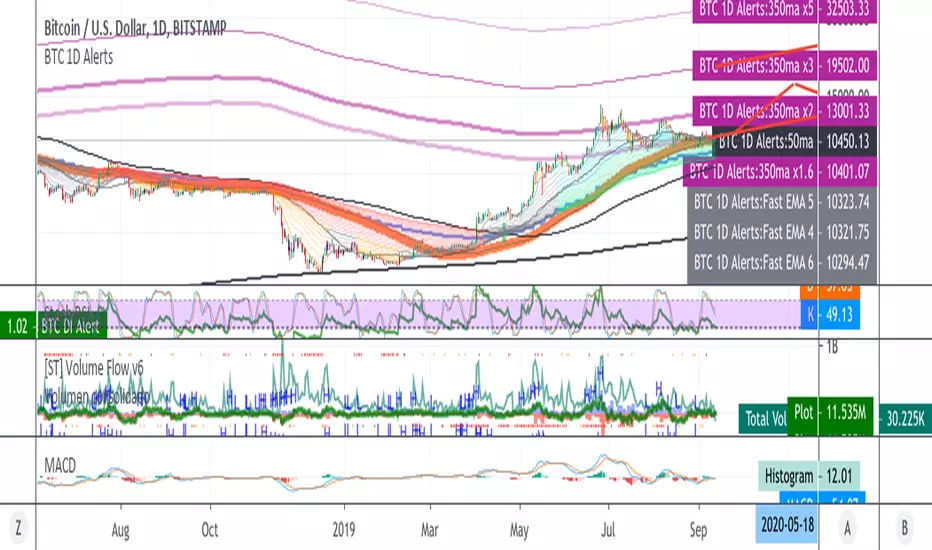
BTC 1D Alerts V1This script contains a variety of key indicator for bitcoin all-in-one and they can be activated individually in the menu. These are meant to be used on the 1D chart for Bitcoin.
1457 Day Moving Average: the bottom of the bitcoin price and arguably the rock bottom price target.
Ichimoku Cloud: a common useful indicator for bitcoin support and resistance.
350ma fibs (21 8 5 3 2 and 1.6) : Signify the tops of each logarthmic rise in bitcoin price. They are generally curving higher over the long term. For halvening #3, the predicted market crash would be after hitting the 350ma x3 fib. Also the 350 ma / 111 ma cross signifies bull market top within about 3 days as well. Using the combination of the 350ma fibs and the 350/111 crosses, reasonably identify when market top is about to occur.
50,120,200 ma: Common moving averages that bitcoin retests during bull market runs. Also, the 50/200 golden and death crosses.
1D EMA Superguppy Ribbons: green = bull market, gray is indeterminate, red = bear market. Very high specificity indicator of bull runs, especially for bitcoin. You can change to 3D candle for even more specificity for a bull market start. Use the 1W for even more specificity. 1D Superguppy is recommended for decisionmaking.
1W EMA21: a very good moving average programmed to be shown on both the daily and weekly candle time. Bitcoin commonly corrects to this repeatedly during past bull runs. Acts as support during bull run and resistance during a bear market.
Steps to identifying a bull market:
1. 50/200 golden cross
2. 1D EMA superguppy green
3. 3D EMA superguppy green (if you prefer more certainty than step 2).
4. Hitting the 1W EMA21 and bouncing off during the bull run signifies corrections.
Once a bull market is identified,
Additional recommended buying and selling techniques:
Indicators:
- Fiblines - to determine retracements from peaks (such as all time high or recent highs)
- Stochastic RSI - 1d, 3d, and 1W SRSI are great time to buy, especially the 1W SRSI which comes much less frequently.
- volumen consolidado - for multi exchange volumes compiled into a single line. I prefer buying on the lowest volume days which generally coincide with dips.
- MACD - somewhat dubious utility but many algorithms are programmed to buy or sell based on this.
Check out the Alerts for golden crosses and 350ma Fib crosses which are invaluable for long term buying planning.
I left this open source so that all the formulas can be understood and verified. Much of it hacked together from other sources but all indicators that are fundamental to bitcoin. I apologize in advance for not attributing all the articles and references... but then again I am making no money off of this anyway.
EP CPR Future CPR + 4 MA
1. CPR Trend Direction(Bias):
Bullish: If the current day's price is trading above the TC, it suggests a strong bullish trend where the CPR acts as a support zone.
Bearish: If the current day's price is trading below the BC, it suggests a strong bearish trend where the CPR acts as a resistance zone.
Range-Bound/Consolidation: If the price is trading within the CPR lines, it indicates a lack of clear directional bias and suggests a likely sideways or accumulation phase.
2. Moving average Trend Identification
Uptrend: If the price is above a moving average (and the MA line is sloping up), it confirms a bullish trend.
Downtrend: If the price is below a moving average (and the MA line is sloping down), it confirms a bearish trend.
Crossovers (Trading Signals)
A popular strategy involves using two moving averages—a short-term MA (e.g., 50-period) and a long-term MA (e.g., 200-period).
Golden Cross (Bullish Signal): Occurs when the shorter-term MA crosses above the longer-term MA.
Death Cross (Bearish Signal): Occurs when the shorter-term MA crosses below the longer-term MA.
BLOCK CHARTING GROUPED ALPHATREND V4BLOCK CHARTING GROUPED ALPHATREND V4 — Script Summary
Created by ChalkBoardAnalytics
Overview
This advanced multi-tool indicator combines Block Charting, Ghost Candles, Volume Spike/Dump Detection, and a fully customizable AlphaTrend system with dashboard tables. Designed for traders who want deep market structure insights, trend signals, and visual clarity.
Key Features
1. Block Charting
Divides price action into blocks (user-defined bar count).
Automatically detects and labels block patterns (like CAPOUT, DIP, DROP, DUMP, FLAT, CAPIN, LIFT, PUMP, SPIKE).
Draws block highs/lows, vertical boundaries, and live formation labels for current/incomplete blocks.
Color-codes patterns for quick visual analysis.
Block dashboard table shows last signal, prices, averages, and live pattern.
2. Moving Averages
Customizable fast/slow moving averages (SMA, EMA, WMA, RMA).
Buy/Sell signals based on MA crossovers.
Plots all moving averages for clarity.
3. Ghost Candle Overlay
Shows a “ghost” candle based on price/volume averages for the last N bars.
Volume-weighted option for more accuracy.
Dynamic transparency based on volume spikes.
Alerts for high volume events.
4. Volume Spike/Dump Sensor
Detects and labels volume spikes/dumps (both bullish and bearish).
Alerts for unusual volume activity.
5. AlphaTrend System
Customizable AlphaTrend lines (classic trend-following logic).
Trend direction determined by majority voting of selected signals:
RSI (threshold-based)
MFI (threshold-based)
Difference between two moving averages (user-selected lengths and type; replaces MACD logic)
Plots AlphaTrend and AlphaTrend lines with area fill.
Buy/Sell signals when AlphaTrend crosses AlphaTrend .
AlphaTrend dashboard table displays price, signals, ATR, and recent trend info.
6. Dashboard Tables
Two tables: Block Charting and AlphaTrend.
Show current signals, prices, averages, and recent trend signals.
Location is user-selectable.
Customization & Settings
Block size, colors, and line styles
MA types and lengths
Pattern label display switches
Ghost candle lookback and volume weighting
Volume spike/dump sensitivity
AlphaTrend period, coefficient, and signal voting
Table location and display options
Usage
Overlay on any chart or timeframe
Use block patterns for market structure analysis
Follow MA crossovers and AlphaTrend signals for entries/exits
Spot volume spikes/dumps and ghost candle anomalies
Monitor dashboard tables for quick decision-making
Alerts
Volume spike/dump alerts
AlphaTrend buy/sell alerts
How is this different?
Combines multiple professional-grade tools into one script
Block patterns are unique to this indicator
AlphaTrend voting is customizable and not limited to MACD
Two live dashboards for instant market overview
MasterEdge v4 — Trend & Momentum Presets with Filters & ATR RiskMasterEdge v4 — Trend & Momentum with Filters & ATR Risk
MasterEdge v4 is a multi‑timeframe trend and momentum indicator designed to help you stay on the right side of the market while controlling risk. It combines two classic signal engines—Donchian channel breakouts (à la Turtle Traders) and moving‑average crosses—with a suite of filters and risk tools to reduce false signals and keep you disciplined.
## Core features
- **Auto/manual presets:** Automatically adjusts look‑back lengths and thresholds based on the instrument (crypto, forex, indices, etc.) and chart timeframe, or lets you set them manually.
- **Higher‑timeframe bias:** Uses a non‑repainting higher‑timeframe EMA to determine whether the market is trending up or down and gates signals accordingly. You can choose the HTF yourself or let the auto‑engine pick one.
- **Dual signal modes:**
- *Donchian (Turtle)* mode enters on breakouts of an N‑bar channel and exits on a shorter channel.
- *MA Cross* mode buys when a fast EMA/SMA crosses above a slow EMA/SMA and sells on the opposite cross.
- **Advanced filters:** RSI momentum and ADX trend‑strength filters help avoid trades during choppy conditions. Optional volume and HTF‑slope filters require participation and higher‑timeframe momentum. A configurable **quality score** combines these filters so you only take higher‑probability setups.
- **ATR risk rails & position sizing:** Visual stop‑loss and target rails are calculated from ATR to adapt to volatility. An optional position‑size suggestion uses your account size and risk percentage to estimate how much to trade (for informational purposes only).
- **Session gating & status table:** Restrict signals to specific trading sessions. A live table shows your current settings, filter status, quality score and recommended position size, so you always know why a signal fired—or didn’t.
- **Alerts:** Separate long and short alerts with static JSON payloads let you hook the indicator into your notification or webhook workflow.
## How to use
1. **Select auto or manual:** Use the *Preset Mode* input. Auto mode adjusts lengths and thresholds to the ticker and timeframe; manual mode lets you set them explicitly.
2. **Choose a signal mode:** Pick between Donchian breakout or MA cross. Donchian is often better for lower‑timeframe breakouts; MA crosses smooth out noise on higher timeframes.
3. **Enable filters:** Turn on RSI, ADX, volume and/or slope filters and set your desired quality‑score threshold. Higher thresholds yield fewer, cleaner signals.
4. **Define risk:** If you want visual risk guides and position‑size suggestions, leave ATR rails on and input your account size, risk percentage and value per point.
5. **Timeframe pairing:** For intraday trading, try a 5 min chart with a 60 min bias; for swing trading, use a 1 h chart with a 4 h bias. The auto‑engine selects sensible higher‑timeframe defaults, but you can override them.
6. **Confirm signals:** The indicator plots green triangles below bars for long signals and red triangles above bars for short signals. The status table updates each bar with filter states and whether a signal is active.
**Disclaimer:** This script is for educational and analysis purposes only and is not financial advice. Always test on a demo account before trading live and tailor the settings to your strategy, risk tolerance and market behaviour.
CandelaCharts - Contango Slope Index 📝 Overview
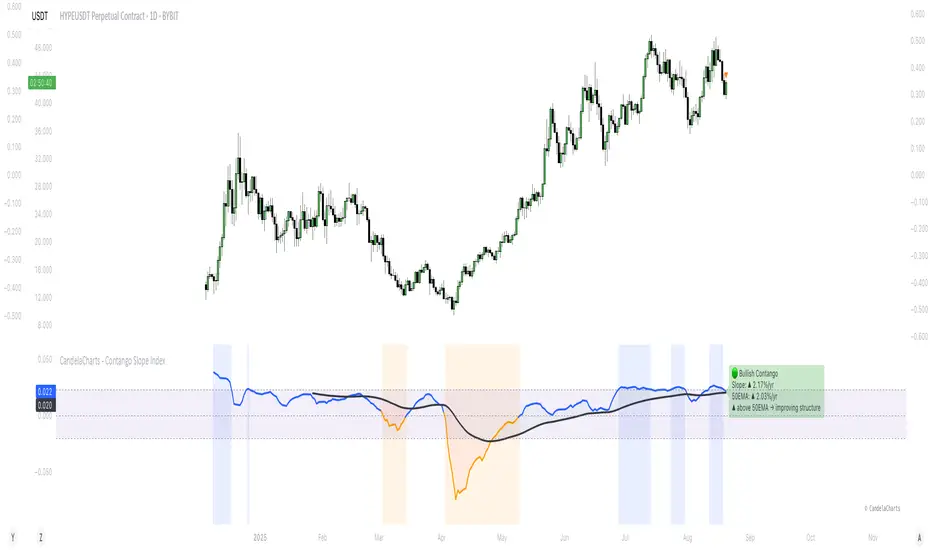
The Contango Slope Index (CSI) is a volatility term structure analysis tool designed to quantify the slope of the VIX futures curve over time.
By measuring the rate of change in implied volatility across multiple tenors—such as VIX1D, VIX (1M), VIX3M, VIX6M, and VIX1Y—the CSI provides traders and analysts with real-time insights into market sentiment, risk appetite, and potential turning points in equity markets.
Developed by CandelaCharts, the CSI draws from established financial research on volatility term structures, particularly focusing on how contango (upward-sloping curve) and backwardation (downward-sloping curve) regimes correlate with future market behavior.
The index computes a normalized slope using linear regression across available VIX futures, offering a dynamic view of evolving market expectations. The core output a slope value expressed in annualized percentage points per year (%/yr)—represents the steepness of the volatility curve:
Positive slope: Contango regime, typically associated with market stability and complacency.
Negative slope: Backwardation, historically linked to fear, near-term uncertainty, and often preceding market rallies.
Slope crossing zero or key thresholds: Generates regime shifts and alert conditions.
📦 Features
The Contango Slope Index offers a comprehensive set of features for analyzing volatility dynamics:
Multi-Tenor Volatility Input: Users can select which VIX futures contracts to include in the slope calculation: VIX, VIX1D, etc
Dynamic Slope Calculation: The indicator calculates the slope of the VIX term structure using linear regression on time-to-maturity (TTM) vs. volatility levels.
Moving Average Overlay: A configurable moving average (SMA, EMA, RMA, WMA, VWMA) is applied to the smoothed slope to identify trend direction and momentum shifts.
Regime Classification: Based on the slope value and its relationship to the moving average, the CSI classifies current market conditions into distinct regimes.
Visual Enhancements: Color-coded slope line, background shading, etc
Real-Time Label & Tooltip: On the last bar, a dynamic label displays: Current regime, Slope value and direction, etc
⚙️ Settings
VIX: Toggles use of spot VIX index (CBOE_DLY:VIX).
VIX1D: Toggles use of 1-day VIX futures (CBOE_DLY:VIX1D).
VIX3M: Toggles use of 3-month VIX futures (CBOE_DLY:VIX3M).
VIX6M: Toggles use of 6-month VIX futures (CBOE_DLY:VIX6M).
VIX1Y: Toggles use of 1-year VIX futures (CBOE_DLY:VIX1Y).
MA: Enables moving average filter; options include type (SMA, etc.) and period length.
Slope: Defines slope calculation line thickness and colors.
Bg: Enables background shading with customizable colors.
⚡️ Showcase
Slope Line
Customizable Moving Average
Regime Shift Zones
📒 Usage
The CSI is plotted as a standalone oscillator beneath the price chart (non-overlay mode). Key interpretation guidelines:
Slope Direction
Slope < 0 - Backwardation: Indicates near-term volatility is higher than long-term expectations. Historically, this has preceded equity market rallies, as panic subsides and fear peaks.
Slope > 0 - Contango: Reflects normal market conditions where longer-dated volatility is priced higher. Persistent high contango may signal complacency.
Magnitude of Slope
Slope > 0.0232 (%/yr) - Elevated complacency: The term structure is steeper than historical average—caution advised ahead of potential corrections.
Slope near 0 - Neutral or transitioning regime: Markets may be at inflection points.
Slope vs. MA Crossover
Slope crosses above MA: Improving confidence, potential upside acceleration
Slope crosses below MA: Deteriorating structure, rising stress
🚨 Alerts
Six pre-configured alerts are available for integration into trading systems:
🚨 Backwardation Detected – Slope turns negative
🔚 Exit Backwardation – Slope crosses above zero
⚠️ Elevated Complacency – Slope exceeds 2.32%/yr
📈 Potential Bullish Setup – Slope crosses below zero
✅ Slope Crosses Above MA – Momentum improves
⚠️ Slope Crosses Below MA – Momentum deteriorates
⚠️ Disclaimer
These tools are exclusively available on the TradingView platform.
Our charting tools are intended solely for informational and educational purposes and should not be regarded as financial, investment, or trading advice. They are not designed to predict market movements or offer specific recommendations. Users should be aware that past performance is not indicative of future results and should not rely on these tools for financial decisions. By using these charting tools, the purchaser agrees that the seller and creator hold no responsibility for any decisions made based on information provided by the tools. The purchaser assumes full responsibility and liability for any actions taken and their consequences, including potential financial losses or investment outcomes that may result from the use of these products.
By purchasing, the customer acknowledges and accepts that neither the seller nor the creator is liable for any undesired outcomes stemming from the development, sale, or use of these products. Additionally, the purchaser agrees to indemnify the seller from any liability. If invited through the Friends and Family Program, the purchaser understands that any provided discount code applies only to the initial purchase of Candela's subscription. The purchaser is responsible for canceling or requesting cancellation of their subscription if they choose not to continue at the full retail price. In the event the purchaser no longer wishes to use the products, they must unsubscribe from the membership service, if applicable.
We do not offer reimbursements, refunds, or chargebacks. Once these Terms are accepted at the time of purchase, no reimbursements, refunds, or chargebacks will be issued under any circumstances.
By continuing to use these charting tools, the user confirms their understanding and acceptance of these Terms as outlined in this disclaimer.
PulseMA OscillatorOverview
PulseMA Oscillator is a technical analysis tool that transforms the relationship between price and a base moving average (EMA) into an oscillator fluctuating around a zero line. It is based on counting consecutive candles closing above or below the EMA and factoring in the slope of the average to gauge trend momentum.
This indicator helps assess not only the direction of the market but also the strength of the movement and potential exhaustion, making it useful for identifying trade entry and exit points.
Key Features
PulseMA Oscillator: Calculates a value based on the number of consecutive candles above or below an EMA and the angle (slope) of that EMA. Positive values indicate bullish dominance; negative values indicate bearish pressure.
Smoothing (SMA): A moving average of the oscillator to highlight the broader trend and reduce noise.
Zero Line: Acts as a baseline to distinguish between bullish and bearish conditions.
Use Cases
PulseMA Oscillator is designed for technical traders who want to:
Determine the direction and strength of the trend based on candle positioning relative to an EMA.
Identify potential market reversals or exhaustion when the oscillator reaches extreme values.
Generate trade signals when:
The oscillator crosses above/below its smoothed version.
The oscillator crosses the zero line.
The smoothed line (PulseMA MA) crosses the zero line, confirming a shift in the longer-term trend.
Analyze trend momentum with a fresh perspective — different from traditional oscillators like RSI or MACD.
How to Use
Add the indicator to your chart: Search for "PulseMA Oscillator" in the indicators library.
Adjust parameters as needed:
EMA Length (PulseMA Length) – default: 50
SMA Length (Smoothing) – default: 20
Interpretation
Positive values: A series of candles are closing above the EMA — indicates bullish momentum.
Negative values: A series of candles are closing below the EMA — indicates bearish momentum.
Cross of PulseMA above SMA: Potential buy signal.
Cross of PulseMA below SMA: Potential sell signal.
Crossing the zero line by PulseMA: May indicate trend shift.
Crossing the zero line by PulseMA MA: May confirm a more sustained trend change.
Notes
Best used in trending markets. In sideways/consolidating conditions, consider combining with other filters.
Using a higher EMA length (e.g., 100) results in a smoother and more long-term trend representation.
Fine-tuning the parameters to your specific asset and timeframe can greatly improve effectiveness.
QuantumResearch MAs🧠 QuantumResearch MAs
Adaptive Moving Average Strategy
A forward-looking crossover system that blends RSI momentum with volume-adjusted precision.
🔍 What Is It?
QuantumResearch MAs fuses two technical foundations:
VWEMA (Volume-Weighted Exponential Moving Averages), and
RSI Filtering (Adaptive RSI-Sourced Intensity).
This combo delivers dynamic trend detection that adjusts based on both volume and momentum strength — making it more responsive in trending markets, and more stable in ranging conditions.
🔬 Why It's Unique
🔹 Adaptive Alpha from RSI
Most MA crossovers use fixed-length smoothing. Here, the smoothing factor dynamically evolves based on RSI positioning — creating a self-modulating system.
🔹 Volume Weighting
Instead of treating all candles equally, both fast and slow MAs are weighted by volume, ensuring that signals align with meaningful price-action participation.
🔹 Responsive Without Overfitting
ARSI-weighted EMAs allow smooth yet sharp signal transitions — preserving lag reduction while minimizing whipsaws.
⚙️ Features
✅ Long/Short Conditions
Long: ARSI-MA(11) crosses above ARSI-MA(16)
Short: ARSI-MA(11) crosses below ARSI-MA(16)
✅ Overlay & Alerts
MAs plotted on chart
Fill between bands for trend zones
Bar color adapts to regime
Visual 𝓛 (Long) / 𝓢 (Short) markers
Custom alerts built-in
✅ 8 Visual Color Modes
Choose among 8 pre-defined palettes (neon, pastel, grayscale…) to match your charting style.
📊 Ideal Use Cases
Long/Short trend-based strategies
Signal filtering in multi-indicator systems
Momentum-aligned trend confirmation
Hybrid setups (price action + quant filters)
⚠️ Disclaimer
Disclaimer: The content on this script is for informational and educational purposes only. Nothing contained within should be considered financial, investment, legal, or other professional advice. Past performance does not guarantee future results. Trading cryptocurrencies involves substantial risk of loss and is not suitable for every investor.
Simple Buy/Sell SignalsThe code works by continuously monitoring the relationship between two moving averages (MAs) on live price data — a fast MA (shorter period) and a slow MA (longer period). These MAs smooth out price action to help identify trends. Here's how it functions step-by-step:
Inputs: The user selects the MA type (SMA or EMA) and the lengths (periods) for the fast and slow MAs.
Calculation: The script calculates the chosen MAs using real-time closing prices.
Signal Logic: It detects a Buy signal when the fast MA crosses above the slow MA (crossover) and a Sell signal when the fast MA crosses below the slow MA (crossunder).
Plotting: When a signal occurs, the script plots a green "BUY" arrow below the candle or a red "SELL" arrow above it.
Alerts: It includes alert conditions so users can receive notifications when a buy or sell condition is met.
EMA Cloud with Custom MAs and RSI [deepakks444]This all-in-one technical analysis tool merges an EMA Cloud, customizable dual moving averages (MA1 & MA2), and an advanced RSI oscillator with divergence detection, smoothing, and alerts.
Designed for traders who rely on trend direction, momentum, and reversal confluence, this indicator helps filter high-probability setups and reduces the need to juggle multiple indicators on the chart.
🔍 Components and Features
🔸 1. EMA Cloud (Trend Filter)
A lightweight 3-period EMA manually calculated using exponential smoothing.
Two EMAs: One tracking highs and one tracking lows.
Creates a "cloud" between them to visually represent short-term trend direction.
Cloud color logic:
🟢 Green: Price is bullish, staying above the EMA cloud.
🔴 Red: Price is bearish, below the EMA cloud.
🟡 Yellow: Price is indecisive or in consolidation.
Why it's useful:
The EMA Cloud helps identify the immediate short-term bias of the market. It quickly reacts to price and gives a clear visual guide for trend-following or pullback trades.
🔸 2. Custom Moving Averages (MA1 & MA2)
Both MA1 and MA2 are user-configurable in type, length, and price source.
Supported types include:
SMA, EMA, WMA, HMA, RMA, VWMA.
Color logic:
🟩 Green: MA1 is below MA2 (bullish alignment).
🟥 Red: MA1 is above MA2 (bearish alignment).
Why include this?
MA crossovers are a classic way to determine medium/long-term trend shifts or confirm trend continuation. The flexibility allows users to tailor them to suit any strategy—from mean reversion to trend-following.
🔸 3. RSI Oscillator with Enhancements
This is more than a basic RSI—it's been expanded to become a momentum engine and divergence detector, complete with alerting and smoothing options.
Main features:
✅ Customizable RSI Source & Length
✅ Colored RSI Zones:
RSI > 60 → Overbought strength zone (green background).
RSI < 40 → Oversold weakness zone (red background).
Neutral background in between.
✅ Smoothing Options:
Apply additional MA smoothing to RSI: SMA, EMA, WMA, RMA, VWMA, or even SMA + Bollinger Bands.
Visualizes volatility around RSI for breakout/reversal analysis.
✅ RSI Alerts:
Alert when RSI crosses above 60 → potential bullish momentum.
Alert when RSI crosses below 40 → potential bearish momentum.
✅ Divergence Detection (Optional):
Bullish Divergence: Price makes lower low while RSI makes higher low → Possible reversal up.
Bearish Divergence: Price makes higher high while RSI makes lower high → Possible reversal down.
Marks divergence using “Bull” and “Bear” labels directly on the RSI pane.
Why enhance RSI?
The RSI is a cornerstone of momentum trading. By adding zone shading, volatility overlays, and divergence detection, traders can better assess:
Whether a trend is strong or weakening.
Whether to enter on continuation or wait for reversal.
Spot early signs of price turning points using divergence patterns.
🤝 Why Merge These Three Systems?
Combining EMA Cloud + MAs + RSI in a single tool allows traders to:
Avoid conflicting signals by seeing multiple confirmations in one view.
Reduce chart clutter by replacing multiple indicators with one efficient visual system.
Get trend, momentum, and reversal analysis all-in-one:
EMA Cloud = short-term trend.
MA1/MA2 = medium-term trend & crossover confirmation.
RSI = momentum extremes, breakout confirmation, or divergence reversal zones.
🔔 Built-in Alerts
RSI crosses above 60 → Potential buy signal.
RSI crosses below 40 → Potential sell signal.
These alerts can be used to automate notifications, integrate with webhook systems, or trigger manual reviews.
⚠️ Disclaimer
This script is provided for educational and informational purposes only. It is not financial advice, and past performance is not indicative of future results. Always use proper risk management and verify signals with your own analysis before trading.
MTF MAs and Crosses Nexus [DarkWaveAlgo]🧾 Description:
A nexus is a connection, link, or neuronal junction where signals and information are transmitted between different elements.
The MTF MAs and Crosses Nexus indicator serves as a nexus between MTF Moving Averages by facilitating the visualization and interaction of up to eight multi-timeframe moving averages, each with its own customizable timeframe, period, cross-over and cross-under alerts and plot markers, moving average calculation type, and price source.
It acts as a utility/control center that brings together multiple MTF moving averages (MTF MAs) and allows you to visualize the interactions between them with exceptional ease-of-use and customizability, helping to provide you with valuable insights into potential trend reversals, momentum shifts, and trading opportunities.
💡 Originality and Usefulness:
While there are other multi-timeframe moving average indicators available, MTF MAs and Crosses Nexus' customizable alert and signal settings offer intra-indicator MTF moving average cross markers and alerts not seen in other MTF MA indicators, allowing you to visualize the cross-over and cross-under relationships between the indicator's MAs with an 'all-in-one' experience. We also believe it stands above the rest with its sheer quantity and quality of settings, features, and usability.
✔️ Re-Published to Avoid Misleading Values
This script has been re-published to ensure that it does not use `request.security()` calls using lookahead_on to access future data when referencing moving averages from other timeframes. This decreases the likelihood that the indicator will provide deceiving values. This change has been made in accordance with the PineScript documentation: "Using barmerge.lookahead_on at timeframes higher than the chart's without offsetting the `expression` argument like in `close ` will introduce future leak in scripts, as the function will then return the `close` price before it is actually known in the current context" and the Publishing Rule: "Do not use `request.security()` calls using lookahead to access future data".
💠 Features:
8 toggleable MTF Moving Averages with customizable timeframes, periods, moving average calculation types, and price sources
Customizable cross-over and cross-under alert and chart signal options for each MTF MA (toggleable cross alerts and signals for crosses between intra-indicator MAs and bar price values)
Aesthetic and flexible coloring and color theme styling options
End-of chart labels and options for ease-of-use and legibility
⚙️ Settings:
Use a Color Theme: When this setting is enabled, all manual 'Bullish and Bearish Colors' are overridden. All plots will use the colors from your selected Color Theme - excepting those plots set to use the 'Single Color' coloring method.
Color Theme: When 'Use a Color Theme' is enabled, this setting allows you to select the color theme you wish to use.
Hide MAs on Timeframes Lower Than the Chart: When this setting is enabled, any MTF MA with a timeframe smaller than that of the chart the indicator is applied to will be hidden from view.
Enable: Show/hide a specific MTF MA.
Timeframe: Set the timeframe for a specific MTF MA.
Period: Set the lookback period for a specific MTF MA.
Type: Set the calculation type for a specific MTF MA. Options include: Exponential, Simple, Weighted, Volume-Weighted, and Hull.
Source Price: Set the source value used for a specific MTF MA's calculation.
Enable Cross Over Signals & Alerts: When enabled, cross-over chart signals (markers) and alerts are enabled for when this specific MTF MA crosses above its respective 'Cross Over Cross Source'.
Enable Cross Under Signals & Alerts: When enabled, cross-under chart signals (markers) and alerts are enabled for when this specific MTF MA crosses below its respective 'Cross Under Cross Source'.
Cross Source: Set the target plot which this specific MTF MA must cross (for either a cross-over or cross-under event) to trigger a chart signal and alert.
Marker Position: Set the position where this specific MTF MA's cross chart signal should appear. Options include: Above Bar, Below Bar, and On MA Line.
Coloring Method: Set the coloring method for this specific MA. The coloring method defines how the MA should be dynamically colored. Options include: Single Color, Increasing/Decreasing, and Over/Under Price.
Bullish Color: When 'Use a Color Theme' is disabled, this will set the 'bullish color' for this specific MTF MA.
Bearish Color: When 'Use a Color Theme' is disabled, this will set the 'bearish color' for this specific MTF MA.
Single Color: When the 'Coloring Method' is set to Single Color for this specific MA, this color option will set the MA's color.
Enable Label: When enabled, a label will show at the end of the chart displaying the timeframe, period, MA type, and current price value of this specific MTF MA.
Size: Sets the font size of this specific MTF MA's label.
Label Offset (in Bars): Sets the distance from the latest bar, in bars, at which this specific MTF MA's label is displayed.
Show Label Line: When enabled, this specific MTF MA's label will be accommodated by a dashed line connecting it to its plot.
📈 Chart:
The chart shown in this original publication displays the 15 minute chart on BTCUSDT. Displayed on the chart are 4 MTF MAs: the 15m 20 WMA, 30m 100 EMA, 1h 11 EMA, and 1D 7 VWMA - offering an exemplary view of how you can use these MTF MAs and crosses to your advantage in gauging trend relationships across multiple timeframes.
EMA/MA + Super Trend + BBHere is what this indicator does :
1. EMA+SMA moving average system
1. EMA moving average (five in total)
2. SMA moving average (five in total)
3. deduction price
4. EMA/SMA cross prompt: EMA 12//26 cross, or MA14/MA28 cross
5. EMA/SMA parallel prompt: prompt when EMA 12/26/52 is in parallel, or prompt when MA14/MA28/MA 60 is in parallel
Why use EMA 12/26 cross prompt, and MA14/MA28 cross prompt?
Because I backtested BTC based on the winning rate of EMA and MA crossover, its winning rate is higher.
Why use parallel prompt?
Because after the moving averages cross, they will start to be in parallel mode. If you don't see the moving averages be in parallel, it will be a warning sign.
2. Super Trend:
Super Trend is used to assist in judging the current trend.
3. BB Bollinger Bands:
Use the size of the opening to judge whether the major trend is coming.
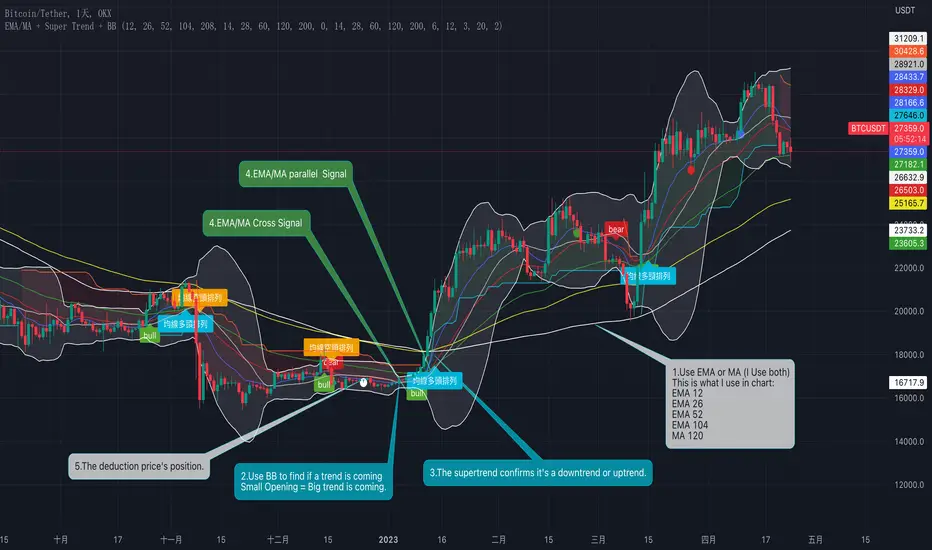
How to use this indicator? (see chart)
1. Choose EMA or MA, or mix them at the same time
2. Use the Bollinger Bands to find the potential big trend is coming
3. Confirm the trend with Supertrend
4. Use moving averages to confirm crossover and long or short moving average parallel signals
5. The deduction price is used to judge whether the moving average continues to go up or down
Why to do this, why mix them?
1. When the opening of the Bollinger band is very small, it means that the trend is coming
2. Supertrend can help us confirm whether it is an upward or downward trend
3. The crossing and parallel of moving averages can be used as entry trading signals
4. The deduction price is used to judge whether the moving average continues to go up or down
This's why there is a mix of Moving average, Supertrend and BB.
這是這個指標的功能(instructions in Chinese):
一、EMA+SMA 均線系統
1、EMA 均線(共五條)
2、SMA 均線(共五條)
3、抵扣價:可以五條均線的折扣價位置
4、EMA/SMA 交叉提示:EMA 12/EMA 26交叉 或 MA14/MA28 交叉
5、EMA/SMA 排列提示:EMA 12/26/52 呈排列時提示,或 MA14/MA28/MA 60 排列時提示
交叉定義:
二、Super Trend 超級趨勢:
Super Trend 用來輔助判斷當前趨勢。
三、BB 布林帶:
藉由開口大小判斷大趨勢是否即將來臨。
如何使用這個指標?(見圖表說明)
1、選擇EMA或MA均線,或同時混合使用它們
2、用布林帶尋找潛在大趨勢即將來臨
3、用Supertrend 確認趨勢
4、用均線確認交叉與多頭或空頭均線排列訊號
5、抵扣價用來判斷均線是否持續向上或向下
為什麼要這麼做?
1、當布林帶的開口很小時,說明趨勢即將來臨
2、Supertrend 可以幫助我們確認是向上還是向下趨勢
3、均線的交叉與排列可以作為進場交易訊號
4、抵扣價則用來判斷均線是否持續向上或向下
這就是為什麼要混合使用這幾個指標的原因。
SAR MACDSAR MACD is an idea of implementing Directional MACD with Parabolic SAR to exactly detect and confirm Trend. This p-SAR MACD consist of a HYBRID MACD which acts as MACD TREND oscillator, MACD Oscillator, PSAR Indicator combined with MA line. thus Fake MACD Signals can be eliminated using this SAR MACD. Sideways can be detected using Threshold Levels must be adjusted based on timeframe.
Indicators Hybrid model contains:
1.MACD (12,26,9) Standard with MA Crossovers
2.MACD Trend
3.Parabolic SAR with 0.02
4.Threshold level - indicates Sideways
How to use.
Histogram:
-> HIST MODE: normal MACD indicator
MA Line Color is based on PSAR Direction Blue-Up/ Pink -Down
A crossover upside with a Blue MA line denotes Up confirmation
A Crossover downwards with a red MA line denotes Down Confirmation
Additionally Histogram above zero line and below zero line are to be confirmed
-> MACD MODE: MACD Trend indicator
MA Line Color is based on PSAR Direction Blue-Up/ Pink -Down
A crossover upside with a Blue MA line denotes Up confirmation
A Crossover downwards with a red MA line denotes Down Confirmation
Additionally Histogram above zero line and below zero denotes long term Trend
-> Histogram Color: Indicates candles direction
Yellow indicates Unconfirmed Direction
Green Indicates up direction
Red Indicates Down Direction
Buy Condition:
MA Color - Blue
Histogram- Above Zero
Histogram/Candle -Green
MA Crossover is must
Sell Condition:
MA Color - Red
Histogram- Below Zero
Histogram/Candle -Red
MA Cross under is must
Warning: Must not be used as a standalone indicator. Use for confirmation of your Buy Sell Signals and Entry only.
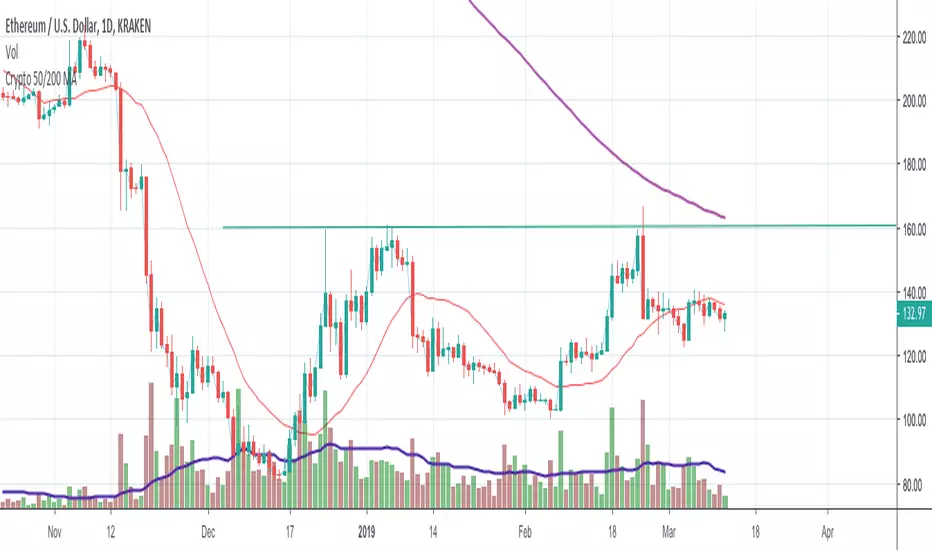
Crypto 50/200 MAMoving Averages:
Used to smooth data and identify a trend
Help in identifying S&R levels
Can be predicting indicators
Many bots use this for their trading strategy, follow their trades
MA Crosses are signals
Converging MAs = Consolidation. Expect volatility on resolution
Use of 50/200 MAs
50 crossing over 200 = Golden Cross
200 over 50 = Death cross
200 EMA is a high probability bid zone
Distance from 200 MA = sign of overbought
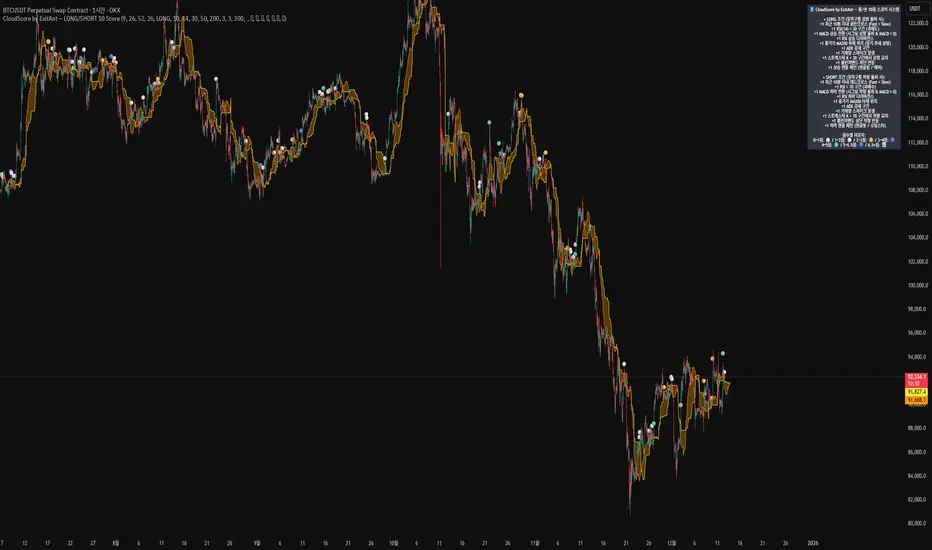
CloudScore by ExitAnt [Upgrade]📘 CloudScore PRO by ExitAnt (v13)
CloudScore PRO는 일목균형표(REAL Ichimoku Cloud)의 ‘진짜 상방 돌파’만을 감지하고,
여기에 총 10가지 추세·모멘텀·패턴·거래량 요소를 점수화하여 (0~9점)
현재 추세 전환의 강도를 직관적으로 알려주는 고급 추세 분석 지표입니다.
일목 구름은 본래 강력한 추세 전환 신호를 제공하지만
“위→안→위” 또는 “부분 돌파” 같은 왜곡 신호가 매우 많습니다.
v13은 이를 완전히 제거하고,
오직 아래→안→위 또는 아래→위(직통) 형태의 ‘진짜 돌파’에서만 점수를 계산합니다.
🎯 지표 목적
* 진짜 일목구름 돌파만 필터링하여 신뢰도 상승
* 10개 기술 요소의 점수화(0~9점)로 한눈에 추세 강도 판단
* 거짓 진입 신호(위→안→위) 완전 제거
* 점수 0일 때도 ‘🔴’로 명확하게 무효 신호 표시
* 초보자부터 숙련자까지 모두 활용 가능한 추세 진입 필터링 지표
🧠 점수 계산 방식 (가중치 기반)
구름 돌파가 유효하게 발생하면,
아래 10가지 조건을 체크하여 각 항목별 가중치 점수가 합산됩니다.
▶ 기존 +1 점 항목 (5개)
1. 골든 크로스 발생
Fast MA가 Slow MA를 최근 N봉 내 상향 돌파
2. RSI 과매도 구간
RSI < 설정값 → 반등 가능성 증가
3. MACD 강세 전환
MACD < 0 & 시그널 상향 돌파
4. RSI 상승 다이버전스
가격 하락, RSI 상승 → 바닥 가능성
5. 종가 > MA200
장기 추세와 일치하는 경우만 점수 강화
▶ 신규 +1 점 항목 (추가 5개)
6. ADX > 20 (추세 강도)
추세가 실제로 형성되고 있을 때
7. 거래량 스파이크 발생
거래량이 평균 대비 일정 배수 이상 증가 → 큰 매수 유입
8. Stochastic Oversold Cross
%K < 30에서 골든크로스 → 저점 반등 신호
9. Bollinger Band Rebound
이전 봉이 하단 밴드를 이탈하고, 현재 봉이 중심선을 회복한 경우
10. 강세 캔들 패턴 (Bullish Engulfing / Hammer 등)
강한 반전 패턴 발생 시
> 점수는 단순 +1 합산이 아니라
> 각 요소의 중요도에 따른 가중치 합산 방식으로 계산됩니다.
📊 점수별 이모지 (8단계)
| 점수 구간 | 이모지 | 의미 |
| -------- | ------ | -------------- |
| ≤ 0 | 🔴 | 무효 신호 |
| 0 ~ 1 | ⚪ | 매우 약함 |
| 1 ~ 2 | 🟡 | 약함 |
| 2 ~ 3 | 🟢 | 관찰 필요 |
| 3 ~ 4 | 🔵 | 양호 |
| 4 ~ 5 | 📈 | 추세 형성 |
| 5 ~ 6.5 | 🚀 | 매우 강함 |
| **6.5+** | **👑** | **최상급 고신뢰 구간** |
> 👑 이모지는 6.5점 초과에서만 표시되며,
> 여러 핵심 조건이 동시에 충족된 극소수 구간에서만 나타납니다.
🖥 차트 표시 요소
* REAL Ichimoku Cloud(미래 이동 없는 실제 구름)을 기반으로 계산
* TRUE breakout(아래 → 위 돌파) 시 캔들 위에 점수 이모지 표시
* 최근 N개의 캔들만 표시 가능
* 우측 상단에 현재 점수 요소 설명 패널 표시
* 점수 0점일 때도 🔴 표시하여 신호의 부재를 명확히 표현
* 위→안→위처럼 잘못된 돌파는 완전히 제외됨
🔧 사용자 설정
* Tenkan / Kijun / SenkouB 기간 설정
* 점수 요소 개별 활성화/비활성화
* 이모지 커스터마이즈
* 최근 몇 개의 캔들까지 표시할지 설정
* MA, RSI, MACD, ADX, Bollinger 등 점수 요소 사용자 정의 가능
⚠️ 유의사항
이 지표는 일목구름 돌파 기반의 확률적 보조 도구이며,
단독으로 매수·매도 결정을 내리는 용도로 사용해서는 안 됩니다.
* 시장 변동성
* 시간 프레임
* 거래량 환경
에 따라 신호 강도는 달라질 수 있습니다.
실제 매매 적용 전 반드시 백테스트 및 시뮬레이션을 권장합니다.
오케이. 그럼 **지금 네 코드(v13, 가중치 + 8단계 이모지 기준)** 와
**완전히 1:1로 맞는 영어 설명 최종본**을 줄게.
(퍼블릭 배포용으로 그대로 써도 되는 수준)
# 📘 **CloudScore PRO by ExitAnt (v13)**
CloudScore PRO is an advanced **Ichimoku-based trend scoring indicator**
that detects only **true, valid Ichimoku Cloud breakouts** and evaluates the
strength of the trend using a **weighted score system built from 10 technical components**.
Unlike standard Ichimoku signals — which often generate distorted breakouts such as
**“above → inside → above”** —
CloudScore PRO v13 **filters these out completely** and only accepts the following structures as valid breakouts:
* **below → inside → above**
* **below → above (direct breakout)**
This ensures that scoring is applied **only when a genuine trend transition occurs**.
## 🎯 Purpose of the Indicator
* Filter out false Ichimoku Cloud breakouts
* Evaluate trend strength using **10 weighted confirmation signals**
* Visualize trend quality instantly using **8-stage emoji scoring**
* Clearly mark invalid signals (score ≤ 0)
* Serve as a robust **entry filter** for both beginners and advanced traders
## 🧠 Scoring Logic (Weighted System)
When a valid cloud breakout occurs, CloudScore PRO evaluates the following
10 components and **adds weighted scores based on their importance**.
### ▶ Core Trend & Momentum Components (5)
1. **Golden Cross**
* Fast MA crosses above Slow MA within the defined lookback period
2. **RSI Oversold Condition**
* RSI below threshold, indicating potential reversal
3. **MACD Bullish Shift**
* MACD below zero with bullish signal-line crossover
4. **RSI Bullish Divergence**
* Price makes a lower low while RSI makes a higher low
5. **Close Above MA200**
* Price aligned with the long-term trend direction
### ▶ Additional Confirmation Components (5)
6. **ADX Trend Strength**
* Confirms that a real trend is forming
7. **Volume Spike**
* Significant increase in trading volume vs average
8. **Stochastic Oversold Cross**
* %K crosses upward below the 30 level
9. **Bollinger Band Rebound**
* Price recovers after breaking below the lower band
10. **Bullish Candlestick Pattern**
* Engulfing, Hammer, or similar reversal patterns
> Scores are **not simple +1 increments**.
> Each component contributes a **weighted value**, reflecting its real-world importance.
## 📊 Emoji Score System (8 Levels)
| Score Range | Emoji | Meaning |
| ----------- | ------ | ---------------------------------- |
| ≤ 0 | 🔴 | Invalid / no signal |
| 0 ~ 1 | ⚪ | Very weak |
| 1 ~ 2 | 🟡 | Weak |
| 2 ~ 3 | 🟢 | Moderate |
| 3 ~ 4 | 🔵 | Decent |
| 4 ~ 5 | 📈 | Trend forming |
| 5 ~ 6.5 | 🚀 | Very strong |
| **6.5+** | **👑** | **Premium, high-confidence setup** |
👑 **The crown emoji appears only when the total weighted score exceeds 6.5**,
meaning multiple high-importance conditions are aligned simultaneously.
This prevents “emoji inflation” and ensures that premium signals remain rare and meaningful.
## 🖥 Chart Features
* Uses **REAL Ichimoku Cloud** (no future displacement)
* Displays score emojis directly on breakout candles
* Supports LONG / SHORT / BOTH modes
* Optional display limited to the most recent N bars
* Top-right panel explains scoring structure and logic
* Completely ignores false breakouts (above → inside → above)
## 🔧 User Options
* Adjust Ichimoku, MA, RSI, MACD, ADX parameters
* Enable or disable individual scoring components
* Fully customize emoji symbols
* **Display only signals above a chosen minimum score**
* e.g. show only 👑 setups by setting minimum score to 6.5
## ⚠️ Disclaimer
CloudScore PRO is a **probability-based trend evaluation tool**,
not a standalone buy or sell signal.
Signal strength may vary depending on:
* Market volatility
* Timeframe
* Volume environment
Always perform proper backtesting and apply sound risk management
before using this indicator in live trading.
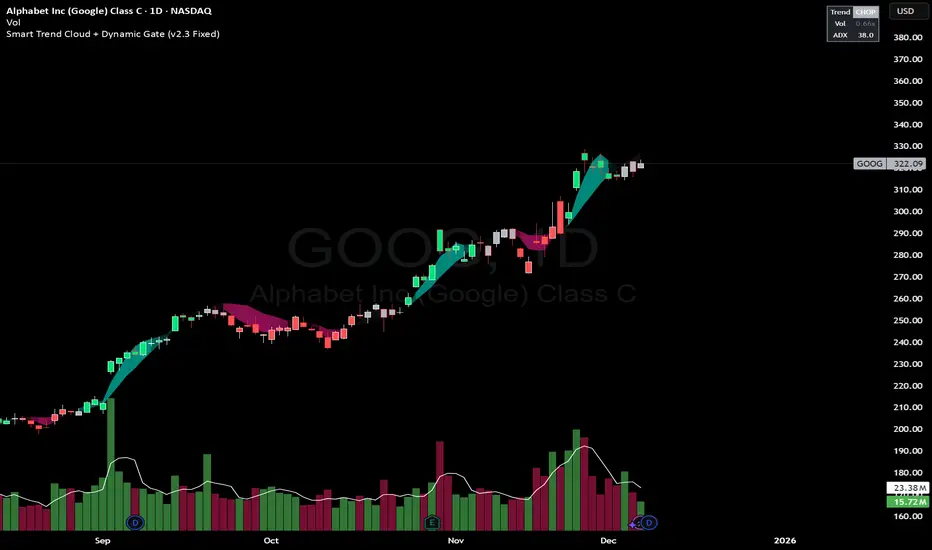
Smart Trend Cloud + Dynamic Gate (V 2.3)Smart Trend Cloud + Dynamic Gate
The Smart Trend Cloud + Dynamic Gate is a comprehensive trend-following system designed to filter out market noise and identify high-probability trend entries. Unlike simple Moving Average crossovers which often fail in ranging markets, this indicator employs a multi-stage validation system (The "Gate") combining Volume, Momentum, and Volatility filters to ensure you only trade when the market has conviction.
Key Features:
> Multi-Type Trend Cloud: Choose between HMA (Hull Moving Average), EMA, or ZeroLag EMA to define the trend baseline.
> The "Dynamic Gate" Filter: A crossover alone does not trigger a signal. The move must be validated by Relative Volume or MACD Histogram momentum within a specific window.
> Choppiness Suppression: Integrated ADX filter turns the candles gray during low-volatility consolidation zones to prevent over-trading.
> Stretch Bands: Optional ATR-based bands to highlight when price is over-extended from the mean.
> Live Dashboard: A table on the chart displaying current Trend State, Relative Volume strength, and ADX values.
How logic Works
1. Trend Definition & The Cloud The core trend is defined by the relationship between a Fast and Slow Moving Average.
Visuals: The space between these MA's forms the "Cloud". The cloud color transparency adjusts dynamically based on the strength of the trend (the spread between the MAs).
MA Options:
HMA: Best for scalping (1m/5m) due to low lag.
ZeroLag EMA: Custom calculation to reduce latency while retaining smoothness.
EMA: Standard trend following.
2. The Entry Gate (Validation) To avoid false signals during "whipsaw" price action, this script uses a logic gate. When a MA crossover occurs, it enters a "Pending" state. It only confirms a BULL or BEAR state if one of the following conditions is met within Gate Window bars:
Volume Spike: Relative Volume (Current Vol / Avg Vol) is greater than the defined threshold (default 1.2x).
Momentum Shift: The MACD Histogram confirms the direction of the trend.
3. Consolidation Filter The script calculates the ADX (Average Directional Index). If the ADX is below the Min ADX Strength threshold (default 20), the market is considered "Choppy."
Visual: Bars turn Gray.
Logic: Trend signals are suppressed until volatility expands.
4. Visual Dashboard A panel is located in the top-right corner providing real-time data:
Trend: Current State (Bull, Bear, or Chop).
Vol: Current Relative Volume (Green if > 1.0).
ADX: Current Trend Strength value.
Settings:
Trend Settings:
Adjust MA types and lengths to fit your timeframe.
Entry Gate: Toggle the Volume/Price gate on/off and adjust the Relative Volume requirement.
Consolidation: Enable/Disable the ADX filter to see all signals or only high-strength ones.
Visuals: Toggle the Cloud, Dashboard, or "Stretch Bands" (ATR bands) to declutter your chart.
Recommended Settings by Timeframe
Since different timeframes require different sensitivities to noise, here are the optimized settings for the Smart Trend Cloud:
⚡ 5 Minute Chart (Scalping)
Best for: Catching quick intraday momentum bursts while filtering chop.
MA Type: HMA (Hull Moving Average for speed)
Fast Length: 9
Slow Length: 21
Min Relative Volume: 1.3 (Requires higher volume to confirm entry)
Min ADX: 25 (Stricter chop filter)
⏱️ 15 Minute Chart (Intraday Swing)
Best for: Day trading with a balance of speed and stability.
MA Type: ZeroLag EMA (Reduces noise better than HMA)
Fast Length: 10
Slow Length: 30
Min Relative Volume: 1.2
Min ADX: 20
hrs 1 Hour Chart (Short-Term Swing)
Best for: Capturing the trend of the week.
MA Type: EMA or ZeroLag EMA
Fast Length: 12
Slow Length: 26 (Classic MACD correlation)
Min Relative Volume: 1.1
Min ADX: 20
📅 1 Day Chart (Position Trading)
Best for: Long-term trends and "Golden Cross" style entries.
MA Type: EMA (Standard Institutional Moving Average)
Fast Length: 20
Slow Length: 50
Min Relative Volume: 1.2
Min ADX: 15 (Allows for earlier entries on major trend shifts)
Alerts:
The script includes built-in alertcondition events for:
Trend Start: Bull (Valid trend detected after filtering).
Trend Start: Bear (Valid trend detected after filtering).
Access & Authorization
This is an Invite-Only script.
Trend Mastery:The Calzolaio Way🌕 Find the God Candle. Capture the gains. Create passive income.
Fellow F.I.R.E. Decibels, disciples of the Calzolaio Way—welcome to the sacred toolkit. This indicator, "SulLaLuna 💵 Trend Mastery:The Calzolaio Way🚀," is forged from the elite SulLaLuna stack, drawing wisdom from Market Wizards like Michael Marcus (who turned $30k into $80M through disciplined trend riding) and Oliver Velez's pristine strategies for profiting on every trade. It's not just lines on a chart—it's your architectural blueprint for financial sovereignty, where data meets divine timing to build the cathedral of Project Calzolaio.
We trade math, not emotion. We honor timeframes. Confluence is King. This indicator deploys the Zero-Lag SMA (ZLSMA), Hull-based M2 (global money supply as a macro trend oracle), ATR-smart stops, and multi-TF alignments to ritualize God Candle setups. Backtested across asset classes, it's modular for your playbooks—small risks, compounding gains, passive income streams.
Why This Indicator is Awesome: The Divine Confluence Engine
In the spirit of "Use Only the Best," this tool synthesizes proven SulLaLuna indicators like ZLSMA, Adaptive Trend Finder, and Momentum HUD with Velez's lessons on trend reversals, support/resistance, and psychology of fear. Here's why it reigns supreme:
1. Global M2 Hull: Macro Trend Oracle
Scaled M2 (summed from major economies like US, EU, JP) via Hull MA captures the "big picture" (Velez Ch. 2). It flips colors as S/R—green for support (bullish bounce zones), red for resistance (bearish ceilings), orange neutral. Like Marcus spotting commodity booms, it signals when liquidity sweeps ignite God Candles. Extend it for future price projections, honoring "How a Trend Ends" (Velez Ch. 5).
2. ZLSMA + ATR Smart Stops: Surgical Precision
Zero-Lag SMA (faster than standard MAs) crosses M2 for entries, with ATR bands for initial stops (2x mult) and trails (1x mult). This embodies "Trade Small. Lose Smaller."—risk ≤1-2% per trade, pre-planned exits. Flip markers (↑/↓) alert divine timing, filtering noise like Velez's "First Pullback" setups.
3. HTF & Multi-TF Dashboard: Timeframe Alignments are Sacred
Show HTF M2 (e.g., Daily) with custom styles/colors. Multi-TF lines (4H, D, W, M) dash across your chart, labeled right-edge with 🚀 (bull) or 🛸 (bear). A confluence table (top-right) scores alignments: Strong Bull (≥3 green), Strong Bear, or Mixed. This is "Confluence is King"—no single signal rules; seek 4+ star scores like Rogers buying value in hysteria.
4. Background & Ribbon: Visual Divine Guidance
Slope-based bgcolor (green bull, red bear) for at-a-glance bias. M2 Ribbon (EMA cloud) flips triangles for macro shifts, ritualizing climactic reversals (Velez Ch. 7).
5. Composite Probability: High-Prob God Candle Hunter
Scores (0-100%) blend 8 factors: price/ZLSMA vs M2, TF slopes, ribbon. Threshold (70%) + pivot zone (near M2/ATR) + optional cross filters for HP signals. Labels show "%" dynamically—alerts fire when confluence ≥4, echoing Schwartz's champion edge: "Everybody Gets What They Want" (Seykota wisdom).
6. Alerts & Rituals Built-In
M2 flips, entries/exits, HP longs/shorts—log them in your journal. Weekly reviews dissect anomalies, as per our Operational Framework.
This isn't hype—it's audited excellence. Backtest it: High confluence crushes drawdowns, compounding like Bielfeldt's T-bond mastery from Peoria. We build together; share wins in the F.I.R.E. Decibel forum.
Suggested Strategy: The SulLaLuna M2 Confluence Playbook
Honor the Risk Triad: Position ↓ if leverage/timeframe ↑; scale ↑ only on ≥4 confluence. Align with "God Candle" hunts—rare explosives reverse-engineered for passive streams.
1. Pre-Trade Checklist (Before Every Entry)
- Trend Alignment: D/4H/1H M2 slopes agree? Table shows Strong Bull/Bear?
- Signal on 15m: ZLSMA crosses M2 in confluence zone (near pivot/ATR bands).
- Volume + Divergence**: Supported by volume (use HUD if added); score ≥70%.
- SL/TP Setup: ATR-based stop; TP at structure/2-3R reward (Velez Reward:Risk).
- HTF Agrees: Monthly bull for longs; avoid counter-trend unless climactic (Ch. 7).
Confluence Score: Rate 1-5 stars. <3? Stand aside. Log emotional state—no adrenaline.
2. Execution Protocol
- Entry: On HP Long/Short triangle (e.g., ZLSMA > M2, score 80%+, monthly bull). Use limits; favor longs above M2 support.
- Position Size: ≤1-2% risk. Example: $10k account, 1% risk = $100 SL distance → size accordingly.
- Trail Stops: Move to trail band after 1R profit; let winners run like Kovner's world trades.
- Asset Classes**: Forex/stocks/crypto—test M2's macro edge on EURUSD or NASDAQ (Velez Ch. 6 reviews).
Ritualize: "When we find the God Candele, we don’t just ride it—we ritualize it." Screenshot + reason.
3. Post-Trade Ritual
- Document: Result, confluence score, lessons. Update journal.
- Exits: Hit stop/exit cross? Or trail locks gains.
- Weekly Audit: Wins/losses, anomalies. Adjust params (e.g., M2 length 55 default).
4. Risk Triad in Action
- Low TF (15m)? Smaller size.
- High Leverage? Tiny positions.
- Confluence ≥4 + HTF support? Scale hold for passive compounding.
Example Setup: God Candle Long
- Chart: 15m EURUSD.
- M2 Hull green (support), ZLSMA crossover, 4H/D/W bull (table: Strong Bull).
- HP Long (85% score) near pivot.
- Entry: Limit at cross; SL below ATR lower; TP at next resistance.
- Outcome: Capture 2R gain; trail for more if trend day (Velez Ch. 5).
Community > Ego: Test, share signals in Discord. Backtest in Pine Script for algo evolution.
We are architects of redemption. Each trade bricks the cathedral. Trade the micro, flow with the macro. When alignments converge, we act—with discipline, data, and divine purpose.
Institutional elite indicator
🎯 Overview
An institutional-grade technical analysis indicator that combines 10+ professional indicators into a unified, easy-to-read signal system. Designed for precision trading across all timeframes (1min to 1month) with Heikin Ashi compatibility.
📈 Signal Types
Breakout Signals: Early detection before major price movements
Divergence Detection: RSI and MACD bullish/bearish divergences
Bottom Fishing: Identification of lowest price points before rebounds
Reversal Signals: Trend reversal detection in overbought/oversold zones
MA Crossovers: Enhanced 50/200 MA cross detection with volume confirmation
⚙️ Technical Specifications
Compatible: Heikin Ashi candles, all timeframes
Configurable: 25+ adjustable parameters
Performance: Optimized for institutional-grade accuracy
Interface: Clean, non-cluttered visual design with compact signals
🚀 Use Cases
Day Trading: Precise entry/exit points on lower timeframes
Swing Trading: Trend identification and reversal detection
Institutional Analysis: Multi-indicator confirmation system
Risk Management: Volume-confirmed signals with ADX trend strength
Perfect for traders seeking institutional-level precision with simplified execution.
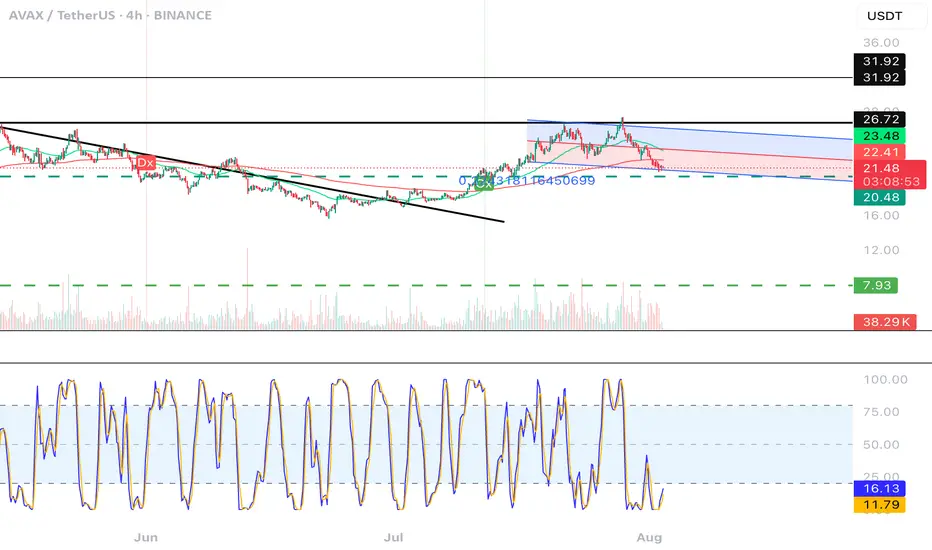
CGPT Golden Cross / Death Cross AlertThis custom indicator identifies Golden Cross (Gx) and Death Cross (Dx) events using either EMA or SMA moving averages. A Golden Cross occurs when a short-term MA (e.g., 50) crosses above a long-term MA (e.g., 200), signaling potential bullish momentum. A Death Cross signals potential bearish momentum, with the short-term MA crossing below the long-term MA.
It includes:
📈 Customizable MA types (EMA or SMA)
⚙️ Adjustable fast & slow MA lengths
🟢🔴 Chart labels for Gx (green) and Dx (red)
🎯 Background highlights for visual trend shifts
🔔 Built-in alert conditions for real-time notifications
Ideal for crypto, stocks, or forex swing and trend trading
MTF RSI MA System + Adaptive BandsMTF RSI MA System + Adaptive Bands
Overview
MTF RSI MA System + Adaptive Bands is a highly customizable Pine Script indicator for traders seeking a versatile tool for multi-timeframe (MTF) analysis. Unlike traditional RSI, it focuses on the Moving Average of RSI (RSI MA), delivering smoother and more flexible trading signals. The main screenshot displays the indicator in two panels to showcase its diverse capabilities.
Important: Timeframes do not adjust automatically – users must manually set them to match the chart’s timeframe.
Features
Core Component: Built around RSI MA, not raw RSI, for smoother trend signals.
Multi-Timeframe: Analyze RSI MA across three customizable timeframes (default: 4H, 8H, 12H).
Adaptive Bands: Three band calculation methods (Fixed, Percent, StdDev) for dynamic signals.
Flexible Signals: Generated via RSI MA crossovers, band interactions, or directional alignment across timeframes.
Background Coloring: Highlights when RSI MAs across timeframes move in the same direction, aiding trend confirmation.
Screenshot Panels Configuration
Upper Panel: Shows RSI, RSI MA, and fixed bands for reversal strategies (RSI crossing bands).
Lower Panel: Displays three RSI MAs (Alligator-style) for trend-following, with background coloring for directional alignment.
Band Calculation Methods
The indicator offers three ways to calculate bands around RSI MA, each with unique characteristics:
Fixed Bands
Set at a fixed point value (default: 10) above and below RSI MA.
Example: If RSI MA = 50, band value = 10 → upper band = 60, lower = 40.
Use Case: Best for stable markets or fixed-range preferences.
Tip: Adjust the band value to widen or narrow the range based on asset volatility.
Percent Bands
Calculated as a percentage of RSI MA (default: 10%).
Example: If RSI MA = 50, band value = 10% → upper band = 55, lower = 45.
Use Case: Ideal for assets with varying volatility, as bands scale with RSI MA.
Tip: Experiment with percentage values to match typical price swings.
Standard Deviation Bands (StdDev)
Based on RSI’s standard deviation over the MA period, multiplied by a user-defined factor (default: 10).
Example: If RSI MA = 50, standard deviation = 5, factor = 2 → upper band = 60, lower = 40.
Important: The default value (10) may produce wide bands. Reduce to 1–2 for tighter, practical bands.
Use Case: Best for dynamic markets with fluctuating volatility.
Configuration Options
RSI Length: Set RSI calculation period (default: 20).
MA Length: Set RSI MA period (default: 20).
MA Type: Choose SMA or EMA for RSI MA (default: EMA).
Timeframes: Configure three timeframes (default: 4H, 8H, 12H) for MTF analysis.
Overbought/Oversold Levels: Optionally display fixed levels (default: 70/30).
Background Coloring: Enable/disable for each timeframe to highlight directional alignment.
How to Use
Add Indicator: Load it onto your TradingView chart.
Setup:
Reversals: Configure like the upper panel (RSI, RSI MA, bands) and watch for RSI crossing bands.
Trends: Configure like the lower panel (three RSI MAs) and look for fastest MA crossovers and background coloring.
Adjust Timeframes: Manually set tf1, tf2, tf3 (e.g., 1H, 2H, 4H on a 1H chart) to suit your strategy.
Adjust Bands: Choose band type (Fixed, Percent, StdDev) and value. For StdDev, reduce to 1–2 for tighter bands.
Experiment: Test settings to match your trading style, whether scalping, swing trading, or long-term.
Notes
Timeframes: Always match tf1, tf2, tf3 to your chart’s needs, as they don’t auto-adjust.
StdDev Bands: Lower the default value (10) to avoid overly wide bands.
Versatility: Works across markets (stocks, forex, crypto).
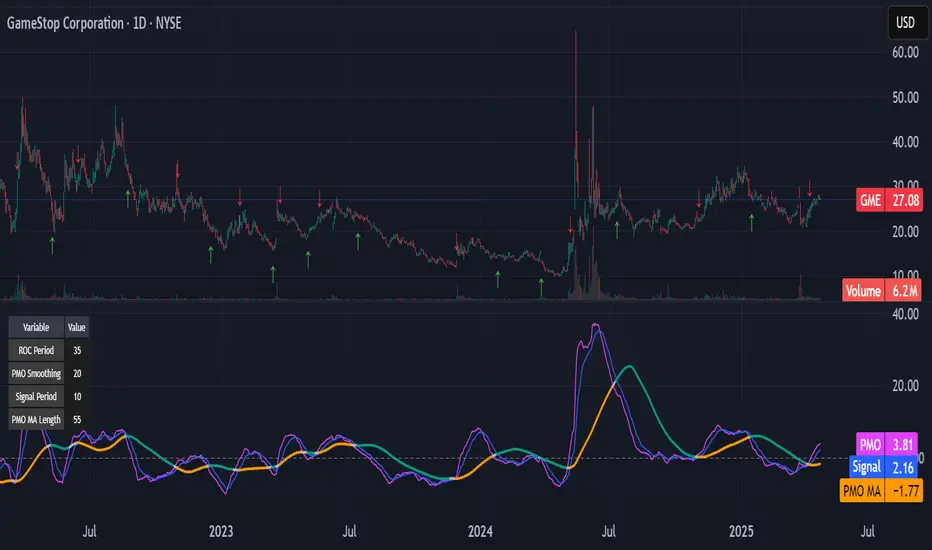
Kitty PMO [theUltimator5]Kitty PMO is a momentum analysis tool designed to visually track and interpret the Price Momentum Oscillator (PMO) — with stylistic influence inspired by the charting approach made popular by “theRoaringKitty.” It aims to offer clear, actionable momentum signals directly overlaid on the chart without clutter or ambiguity, making it ideal for traders who prioritize simplicity and signal clarity.
At its core, the indicator calculates the PMO by applying a custom recursive smoothing function to the rate of change (ROC) of price. This smoothed momentum measure is then:
Amplified by a scaling factor (×10),
Further smoothed using user-defined parameters,
Compared against a signal line (EMA of PMO),
And tracked with a secondary moving average (PMO MA) to capture medium-term trend inflections.
While the PMO and its associated signal lines can optionally be plotted, the indicator primarily emphasizes crossovers between the PMO MA and the other two components. When the PMO MA crosses above both the PMO and signal line, a green upward arrow (↑) is plotted below the price. When it crosses below both, a red downward arrow (↓) appears above the price — making it easy to spot potential turning points in momentum.
Additionally, a floating info table can be toggled on to display all current user-defined parameters in a clean, resizable format. This makes the script ideal not just for technical execution but also for real-time strategy tuning and tracking across multiple timeframes.
The script includes optional alerts so you can be notified the moment a key crossover signal is triggered, without needing to keep your eyes glued to the screen.
Multi-Timeframe MA DashboardThis indicator monitors 5 timeframes: 5min, 15min, 1hr, 4hr, and Daily. It displays fast and slow moving averages for each timeframe, along with the current price. The trend direction is color-coded: green for bullish (fast MA above slow MA) and red for bearish (fast MA below slow MA).
The dashboard also shows the last crossover signal (Buy/Sell) for each timeframe.
Visual arrows are plotted on the chart for the current timeframe. A green up arrow indicates a potential bullish crossover (Buy signal), while a red down arrow indicates a potential bearish crossover (Sell signal).
The dashboard is elegant and professional, with alternating row colors for better readability. It can be placed in any corner of the screen and customized with user-defined colors for bullish and bearish trends.
Alerts are triggered when a crossover occurs on any timeframe. These alerts include the timeframe and signal type (e.g., "5min: ↑ BUY").
How to Read the Indicator
The dashboard displays the following for each timeframe:
Fast MA: The value of the fast moving average.
Slow MA: The value of the slow moving average.
Price: The current price for the timeframe.
Trend: The current trend direction (Bullish or Bearish).
Signal: The last crossover signal (↑ BUY or ↓ SELL).
On the chart, green up arrows indicate a bullish crossover (Fast MA crosses above Slow MA), while red down arrows indicate a bearish crossover (Fast MA crosses below Slow MA).
Green text in the dashboard indicates a bullish trend or signal, while red text indicates a bearish trend or signal.
How to Use the Indicator
Use the dashboard to monitor the trend direction across multiple timeframes. Look for confluence (agreement) between timeframes to identify stronger trends. Observe the "Signal" column in the dashboard for the last crossover on each timeframe. Use the arrows on the chart to identify potential crossover points for the current timeframe.
Enable alerts to be notified of crossover signals on any timeframe. Alerts include the timeframe and signal type for easy reference.
Adjust the fast and slow moving average lengths to suit your trading style. Choose between EMA, SMA, or WMA for the moving average type. Customize the dashboard placement and colors for better visibility.
Important Notes
This indicator is not a buy or sell recommendation. It is a tool to assist traders in their analysis. Always use this indicator in conjunction with other tools, such as support/resistance levels, volume analysis, and price action. Past performance of moving averages does not guarantee future results.
How to Add the Indicator
Add the indicator to your chart from the TradingView library. Configure the inputs:
Fast MA Length: Default is 20.
Slow MA Length: Default is 50.
MA Type: Choose between EMA, SMA, or WMA.
Dashboard Placement: Select the corner of the screen where the dashboard will appear.
Colors: Customize the colors for bullish and bearish trends.
Monitor the dashboard and chart for trends and signals.
Disclaimer
This indicator is for educational and informational purposes only. It does not provide financial, investment, or trading advice. Always perform your own analysis and consult with a financial advisor before making trading decisions.
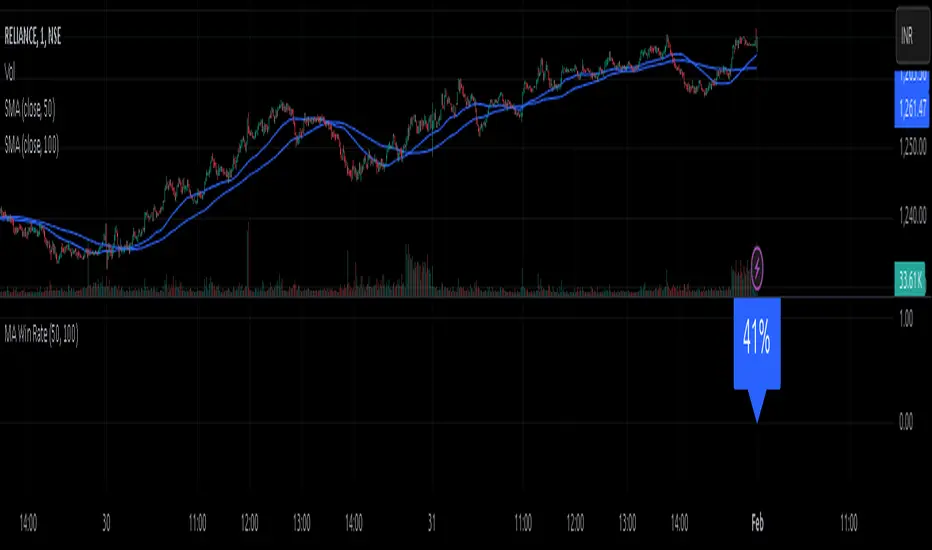
MA Win RateMoving Average Cross Win Rate
This simple yet useful script calculates the percentage of times a moving average crossover successfully predicts price movement.
Win Conditions:
1] A Golden Cross (fast MA crossing above slow MA) where the price moves up afterward.
2] A Death Cross (fast MA crossing below slow MA) where the price moves down afterward.
In this script, I have used a Simple Moving Average (SMA) for illustration.
You can modify the code to apply any type of moving average and test its accuracy.