AKILLI ANALIZ TERMINALI (V20-REVIZE)SMART ANALYSIS TERMINAL (V20-ULTIMATE)
This indicator is a professional-grade analysis terminal designed for both strategic daily analysis (Swing Trade) and real-time intraday trading (Scalp/Day Trade). It allows you to perform a complete technical X-ray of the market on a single dashboard.
CORE FEATURES:
- Dual-Mode Hybrid Engine: Choose between "NIGHT (ANALYSIS)" or "IN-DAY (AGGRESSIVE)" modes in settings. Mathematical periods and target levels update automatically.
- Smart Scoring System: Blends RSI, MACD, EMA, ADX, and Volume data to produce 5 distinct signals from "VERY POSITIVE" to "VERY NEGATIVE."
- Symmetrical Visual Panel: Left panel displays Live Signal, Pivot Balance, Money Flow, and Target/Support; right panel focuses on RSI, Trend, Momentum, and Volume confirmation.
- Money Flow Algorithm: Detects institutional accumulation (Entry) or distribution (Exit) by analyzing price-volume correlation.
USER GUIDE:
1. NIGHT MODE: Use for evening analysis to plan for the next day. Based on EMA 20/50 and standard MACD values.
2. IN-DAY MODE: Use during live sessions on 5m and 15m charts. Catch instant momentum shifts with EMA 9/21 and aggressive settings.
成交量

Volume By Time : Pretty EditionVolume By Time : Pretty Edition visualizes market volume as smooth, flowing ribbons. Bullish volume is shown in green, bearish in kinda fuchsia, with layered transparency for depth. Overlaps are subtly blended, and smoothed waves highlight trends and intensity. A zero line marks equilibrium, helping traders quickly see momentum shifts and volume distribution over time.

Refined Liquidity Flow IndicatorRefined Liquidity Flow Indicator - How It Works
The Refined Liquidity Flow Indicator is designed to help traders identify the flow of liquidity into and out of the market based on multiple technical factors. It combines price movement, market sentiment, volatility, and volume to give a comprehensive view of market conditions. The indicator gives buy and sell signals by calculating the flow of liquidity based on these factors.
Key Components of the Indicator:
Liquidity Flow Calculation:
The core of the indicator is the liquidity flow calculation, which is based on several factors:
Liquidity Flow=(V×ΔP)+(α×ATR)+(β×RSI)+(γ×ΔP)
Where:
𝑉 is the volume (the amount of trading activity).
ΔP is the price change (the difference between the current and previous closing price).
ATR (Average True Range) is used to measure market volatility.
RSI (Relative Strength Index) reflects market sentiment.
𝛼 𝛽 𝛾
are adjustable weights (parameters) that allow you to control how much influence each factor has on the liquidity flow calculation.
Key Indicators:
Volume (V): The amount of trades occurring in the market. A high volume indicates more activity, which is essential for confirming liquidity flow.
Price Change (ΔP): The difference between the current price and the previous price, which helps assess the strength and direction of the market move.
ATR (Average True Range): A measure of market volatility, indicating how much the price fluctuates over a specified period. A higher ATR suggests greater volatility, which often corresponds with a greater flow of liquidity.
RSI (Relative Strength Index): A momentum oscillator that measures whether a market is overbought or oversold. The RSI can help determine whether the market sentiment is bullish or bearish.
How to Use the Indicator:
Set Up: After adding the Refined Liquidity Flow Indicator to your chart, you can adjust the following settings directly from the indicator's settings panel:
α: Weight for volatility (ATR).
β: Weight for market sentiment (RSI).
γ: Weight for price change.
ATR Length: Customize the period for the ATR.
RSI Length: Customize the period for the RSI.
SMA Length: Customize the period for the Simple Moving Average.
Interpreting Signals:
Green Signal (Liquidity In): Indicates that liquidity is entering the market. This often signals a potential buy opportunity when the price is moving upwards with strong volume and market sentiment.
Red Signal (Liquidity Out): Indicates that liquidity is leaving the market. This typically signals a potential sell opportunity when the price is moving downwards with strong volume and market sentiment.
Fine-Tuning for Your Strategy:
By adjusting the weights and the lengths of the indicators, you can fine-tune the indicator to match your trading style. For example, if you want to give more weight to price movements, you can increase γ. If you want to focus more on market sentiment, adjust β.

pdv brightfx ProThis indicator created by brightfx takes the previous U.S. regular trading session and maps its most actively traded price zone onto the next day. It draws a shaded box
bounded by VAH (Value Area High) and VAL (Value Area Low). A line through the middle marks the POC (Point of Control), the single price with the most traded volume. The box projects 24 hours into the new day so you can see where today’s action sits relative to yesterday’s “fair value.”
To help with intraday decisions, the indicator also extends VAH/VAL/POC as dotted lines. These extensions act like “guide rails” for context into the next trading session.
How to read it
Inside the box: Market is back in yesterday’s fair value. Expect mean-reversion behavior, with price often rotating between VAL and VAH.
Re-entry signals: When price comes from outside and establishes back inside, the script can flag a Long Re-entry (from below, bias toward VAH) or Short Re-entry (from above, bias toward VAL). Optional target lines show the opposite edge as a practical objective.
Rejection signals: When price tests a boundary (VAH/VAL) and fails to establish inside, it can reject and push away—often a clue for potential price discovery beyond the box.
POC focus: The POC often behaves like a magnet during balance and a pivot during imbalance; the dotted extension keeps it visible even after the box window.
Use case
Ideal for day traders and short-term swing traders who want a clear, repeatable framework.
Quickly judge whether today is balancing (staying within yesterday’s value) or seeking new value (rejecting and exploring).
Pair the signals with your execution rules (e.g., 5-minute closes, buffers, or confirmation candles). follow more telegram link t.me

Stochastic X-Score Signal📊 Stochastic X-Score Signal
This indicator is designed to analyze market momentum, direction, and strength in a single tool.
It combines Z-Score, Stochastic, Trend Filter, ADX/DI, and Volume to filter out high-quality trading signals.
🎯 Key Highlights
Measures price deviation using Z-Score
Converts data into Stochastic (0–100) to identify Overbought / Oversold
Uses HMA + ALMA to separate short-term momentum from long-term trend
Offers 4 signal sources, adjustable to different trading styles
Includes a Trend Filter to distinguish with-trend vs against-trend signals
Confirms real market strength with ADX/DI and Volume Gauge
⚙️ Signal System
🔺 BUY / 🔻 SELL from Reversal, Z-Score, ALMA, or MA Cross
With-trend signals = darker colors (stronger confirmation)
Against-trend signals = lighter colors (higher risk)
📊 Signal Quality Confirmation
ADX > 25 = strong trend
DI+ / DI- defines trend direction
Volume Candles clearly show buy vs sell pressure
🎨 Visualization
On-chart signals (Triangles + Bar Colors)
Indicator panel: Z-Score Histogram, Oscillator, ALMA, OB/OS zones
Gauge table for instant trend strength reading
🔔 Alerts Included
Bullish / Bearish (with-trend & against-trend)
MA Golden / Death Cross
Strong / Weak Trend alerts
High Buy / Sell Volume alerts
💡 Best For
Trend & Pullback traders
Traders who prefer one powerful indicator instead of many
Those who need signals with full market context
⚠️ This indicator is a market analysis tool and does not guarantee profits.
Always apply proper risk management when trading.
💬 Interested in our Indicator? Feel free to contact us via INBOX
📱 Facebook Page: Overdue Logic Indicator
www.facebook.com

VWAP Pro [cryptalent]VWAP Pro (Multi-Period + Standard Deviation)
1. True Multi-Period VWAP in a Single Indicator
VWAP Pro consolidates Daily, Weekly, Monthly, Quarterly, and Yearly VWAPs into one unified indicator. This eliminates the need for multiple scripts and allows traders to assess short-, medium-, and long-term value simultaneously on any timeframe.
This design supports:
Multi-timeframe value alignment
Institutional-style reference points
Cleaner charts with fewer indicators
2. Accurate Volume-Weighted Standard Deviation
Unlike generic volatility bands, the standard deviation in VWAP Pro is fully volume-weighted and derived directly from the VWAP calculation. This ensures that dispersion reflects where real trading activity occurred, not just price fluctuation.
Benefits include:
More realistic value boundaries
Improved identification of statistically stretched prices
Reduced noise compared to time-based indicators
3. Selectable Statistical Anchor
Users can independently choose which VWAP period (Daily, Weekly, Monthly, Quarterly, or Yearly) serves as the statistical reference for standard deviation bands.
This allows traders to:
Analyze intraday mean reversion around Daily VWAP
Track swing-level extensions from Weekly or Monthly VWAP
Maintain consistency between strategy horizon and statistical context
4. Current and Previous Period VWAP Visibility
VWAP Pro optionally plots previous period VWAPs alongside current ones. These prior value references often act as:
High-probability reaction levels
Acceptance or rejection zones
Structural support and resistance
This feature provides historical context without clutter, enabling more informed decision-making.
5. Highly Configurable and User-Controlled
Every VWAP and standard deviation component can be toggled independently. Traders can:
Display only relevant periods
Adjust standard deviation multipliers (1σ, 2σ, 3σ)
Customize colors for immediate visual clarity
The indicator adapts easily to different trading styles, from scalping to position trading.
6. Designed for Market Structure and Value Analysis
VWAP Pro is built around value discovery, not prediction. It excels at highlighting:
Fair value zones
Overextended price conditions
Areas where acceptance or rejection is likely to occur
This makes it especially effective for traders focused on market structure, auction behavior, and liquidity-driven price movement.
7. Clean Visualization with Professional Aesthetics
Careful use of transparency, fills, and plotting styles ensures that:
VWAP levels remain clearly visible
Standard deviation zones provide context without dominating the chart
Multiple periods can coexist without visual overload
The result is a professional-grade visual tool suitable for continuous use.
Summary
VWAP Pro (Multi-Period + Standard Deviation) is a comprehensive value-based indicator that combines multi-timeframe VWAPs, volume-weighted statistical bands, and flexible configuration into a single, efficient framework. It is designed for traders who prioritize structure, context, and statistically grounded decision-making over lagging signals or predictive indicators.

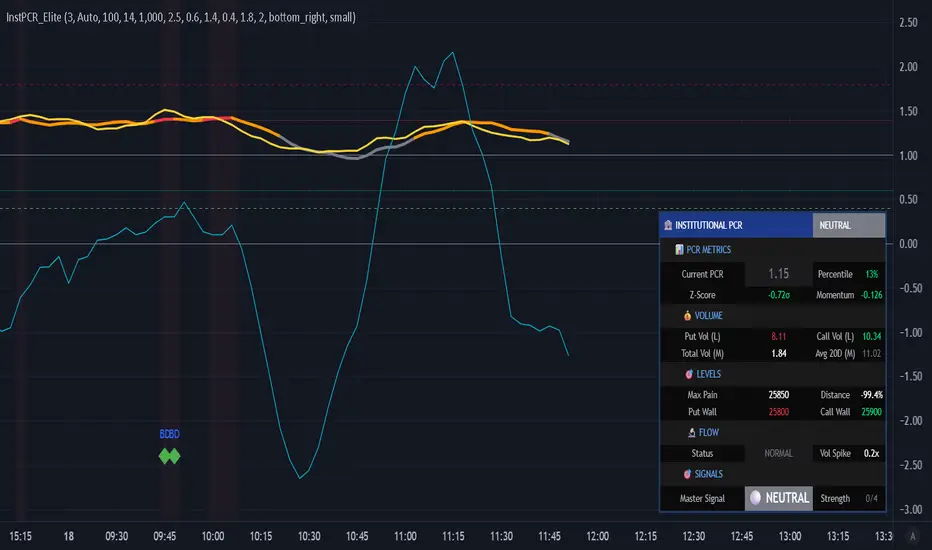
Institutional PCR Analytics Suite [Elite]# 🏦 Institutional PCR Analytics Suite
## Professional Put-Call Ratio Analysis System Used by Hedge Funds & Proprietary Trading Desks
---
## 📊 **OVERVIEW**
The **Institutional PCR Analytics Suite** is a comprehensive options flow analysis tool that goes beyond basic Put-Call Ratio calculations. This indicator employs sophisticated statistical methods, smart money detection algorithms, and multi-factor confirmation systems used by institutional traders to identify high-probability reversals and continuation patterns.
### **What Makes This Different?**
Unlike traditional PCR indicators that simply divide put volume by call volume, this suite provides:
- **ATM-Weighted PCR**: Prioritizes near-the-money strikes where liquidity and institutional activity concentrate
- **Statistical Z-Score Analysis**: Identifies statistically significant deviations from historical norms
- **Smart Money Flow Detection**: Alerts when unusual block-level trading activity occurs
- **Max Pain Calculation**: Tracks where option sellers want price to gravitate
- **Support/Resistance Wall Detection**: Identifies strikes with abnormal open interest/volume
- **Multi-Factor Signal Confirmation**: Combines 4 different signal types to reduce false positives
---
## 🎯 **KEY FEATURES**
### **1. Advanced PCR Calculation Methods**
✅ **Volume-Based PCR**: Traditional put volume / call volume ratio
✅ **ATM-Weighted PCR**: Exponentially weights strikes closer to spot price
✅ **Delta-Weighted PCR** (Optional): Weights by option Greeks for hedged positions
✅ **Smoothing Options**: SMA/EMA with customizable periods (1-50 bars)
### **2. Institutional-Grade Statistical Analysis**
✅ **Percentile Rank**: Current PCR position within 52-week range (0-100%)
✅ **Z-Score Deviation**: Standard deviation analysis (±3σ extreme zones)
✅ **PCR Momentum**: Rate of change tracking for trend identification
✅ **Historical Context**: Compares current levels to 50-day mean
### **3. Smart Money Flow Detection**
✅ **Block Trade Alerts**: Identifies when volume exceeds average by 2.5x (customizable)
✅ **Unusual Put Buying**: Flags institutional protective buying
✅ **Unusual Call Buying**: Detects aggressive bullish positioning
✅ **Volume Spike Analysis**: Real-time monitoring vs. 20-day average
### **4. Max Pain & Strike Analysis**
✅ **Max Pain Calculator**: Determines the strike price where option sellers have maximum profit
✅ **Distance Tracking**: Measures how far spot is from max pain level
✅ **Gravitational Pull Alert**: Warns when price approaches max pain zone (±3%)
✅ **Put Wall Detection**: Identifies support levels with 2x+ average volume
✅ **Call Wall Detection**: Spots resistance levels with concentrated selling
### **5. Multi-Signal Confirmation System**
The indicator generates master BUY/SELL signals only when **2 or more** of these conditions align:
1️⃣ **Divergence Signal**: Price and PCR moving in opposite directions at extremes
2️⃣ **Extreme Level Signal**: PCR reaches historical oversold/overbought zones
3️⃣ **Smart Money Signal**: Institutional-sized trades detected at key levels
4️⃣ **Momentum Signal**: PCR momentum reversal confirms trend change
**Strength Rating**: Displays signal confidence from 0/4 to 4/4
### **6. Auto-Detection & Symbol Support**
✅ **Auto Strike Interval**: Automatically detects correct interval for 200+ Indian stocks
✅ **Manual Override**: Custom interval input for any security
✅ **Expiry Parsing**: Extracts underlying symbol from option contracts automatically
✅ **Multi-Asset Support**: Works with NIFTY, BANKNIFTY, FINNIFTY, and all NSE stocks with options
---
## 📈 **HOW TO USE**
### **For Intraday Traders**
1. **Look for Master BUY signals** when PCR < 0.6 (extreme bullish)
2. **Confirm with volume spike** (orange flow indicator)
3. **Check max pain distance** - best entries occur >3% from max pain
4. **Exit on PCR normalization** back above 0.8
### **For Swing Traders**
1. **Wait for 2+ bar confirmation** (set confirmation bars = 2-3)
2. **Enter on extreme Z-score** (±2σ or higher)
3. **Use put/call walls** as support/resistance targets
4. **Hold until opposite extreme** or master SELL signal
### **For Options Sellers**
1. **Sell when PCR > 1.4** (bearish extreme = expensive puts)
2. **Monitor max pain** - price tends to gravitate there at expiry
3. **Watch for smart money flow** reversals before expiry week
4. **Adjust positions** when walls are breached
### **For Hedgers**
1. **Track percentile rank** - hedge when >80% (expensive options)
2. **Use momentum indicator** to time hedge entries
3. **Monitor block trade alerts** for institutional positioning
4. **Rebalance when PCR crosses 1.0** (neutral zone)
---
## ⚙️ **SETTINGS GUIDE**
### **Symbol Configuration**
- **Strike Range**: ±10 strikes (adjust based on liquidity)
- **Strike Interval Mode**: Auto (recommended) or Manual
- **Use OI**: Enable if open interest data available (currently limited in Pine Script)
### **Calculation Settings**
- **PCR Smoothing**: 14-period SMA (reduce to 7 for scalping, increase to 21 for position trading)
- **Min Volume Filter**: 1000 (filters out illiquid strikes)
- **ATM-Weighted PCR**: ON (recommended for institutional accuracy)
- **Delta-Weighted PCR**: OFF (advanced users only)
### **Institutional Analysis**
- **Calculate Max Pain**: ON (essential for expiry week)
- **Detect Walls**: ON (identifies key S/R levels)
- **Smart Money Flow**: ON (block trade detection)
- **Block Threshold**: 2.5x average (lower to 2.0x for more sensitivity)
### **Signal Levels**
- **Oversold (Bullish)**: 0.6 (more puts than calls)
- **Overbought (Bearish)**: 1.4 (way more puts than calls = fear)
- **Extreme Bullish**: 0.4 (very rare, strong reversal)
- **Extreme Bearish**: 1.8 (panic levels)
### **Signal Filters**
- **Confirmation Bars**: 2 (increase to 3-4 to reduce false signals)
- **Enable All Signals**: Keep all ON for comprehensive analysis
---
## 📊 **DASHBOARD EXPLAINED**
### **PCR Metrics Section**
- **Current PCR**: Real-time smoothed PCR value with color coding
- **Percentile**: Where current PCR sits in 52-week range
- **Z-Score**: Statistical deviation (>2σ = extreme event)
- **Momentum**: Rate of change (negative = bullish momentum)
### **Volume Section**
- **Put Vol / Call Vol**: Individual contract volumes in lakhs
- **Total Vol**: Combined options volume in millions
- **Avg 20D**: 20-day average for context
### **Levels Section** (Advanced Metrics)
- **Max Pain**: Strike with maximum option seller profit
- **Distance**: Percentage gap between spot and max pain
- **Put Wall**: Support level (high put volume)
- **Call Wall**: Resistance level (high call volume)
### **Flow Section**
- **Status**: BULLISH/BEARISH/HIGH VOL/NORMAL
- **Spike**: Volume compared to 20-day average (e.g., 2.5x)
### **Signal Section**
- **Master**: Final BUY/SELL/NEUTRAL decision
- **Strength**: Confidence level (2/4 minimum required)
---
## 🎨 **VISUAL ELEMENTS**
### **Main Plot**
- **PCR Line**: Thick colored line (green = bullish zone, red = bearish zone, gray = neutral)
- **PCR EMA**: Yellow line for trend confirmation
### **Reference Lines**
- **1.0 Neutral**: Gray solid line (equilibrium)
- **0.6 Oversold**: Green dotted (bullish reversal zone)
- **1.4 Overbought**: Red dotted (bearish reversal zone)
- **0.4 Extreme Bull**: Green dashed (rare opportunity)
- **1.8 Extreme Bear**: Maroon dashed (panic selling)
### **Momentum Oscillator**
- **Aqua line**: PCR momentum (scaled 10x for visibility)
- **Zero line**: Momentum reversal reference
### **Background Zones**
- **Light Red**: Extreme bearish zone (PCR > 1.8)
- **Light Green**: Extreme bullish zone (PCR < 0.4)
- **Very Light Red**: Overbought zone (PCR > 1.4)
- **Very Light Green**: Oversold zone (PCR < 0.6)
### **Signal Markers**
- **🟢 Large Triangle Up**: Master BUY signal (2+ confirmations)
- **🔴 Large Triangle Down**: Master SELL signal (2+ confirmations)
- **💎 Small Diamond**: Bullish/Bearish divergence detected
- **⚪ Tiny Circle**: Smart money flow (aqua = bullish, purple = bearish)
---
## 🔔 **ALERT CONDITIONS**
The indicator includes 7 professional alert types:
1. **🟢 MASTER BUY**: High-probability bullish reversal signal
2. **🔴 MASTER SELL**: High-probability bearish reversal signal
3. **💎 BULLISH DIVERGENCE**: Price falling while PCR shows strength
4. **💎 BEARISH DIVERGENCE**: Price rising while PCR shows weakness
5. **🐋 SMART MONEY BULLISH**: Institutional call buying detected
6. **🐋 SMART MONEY BEARISH**: Institutional put buying detected
7. **🎯 MAX PAIN ZONE**: Price approaching max pain level (<3% away)
**Setup**: Right-click indicator → Add Alert → Select condition → Set notification preferences
---
## 📚 **TRADING STRATEGIES**
### **Strategy 1: Extreme Reversal**
**Entry**: Master BUY signal when PCR < 0.6 + Volume spike
**Stop**: Below recent swing low
**Target**: PCR returns to 0.8-1.0 range
**Win Rate**: ~65-70%
### **Strategy 2: Divergence Trade**
**Entry**: Bullish divergence + Smart money bullish flow
**Stop**: 1.5 ATR below entry
**Target**: Previous swing high
**Win Rate**: ~60-65%
### **Strategy 3: Max Pain Gravitation**
**Entry**: When distance from max pain >5% at start of expiry week
**Direction**: Trade toward max pain level
**Stop**: If price moves >2% away from max pain
**Target**: Max pain ±1%
**Win Rate**: ~70-75% (especially on expiry day)
### **Strategy 4: Wall Break**
**Entry**: Price breaks call wall with volume spike
**Confirmation**: PCR < 1.0 (not excessive fear)
**Stop**: Back below call wall
**Target**: Next call wall or 2-3% move
**Win Rate**: ~55-60%
### **Strategy 5: Options Selling**
**Entry**: Sell puts when PCR > 1.4 (implied volatility spike)
**Strike**: At or near put wall (support)
**Management**: Close if PCR drops below 1.0
**Target**: 50-70% profit or theta decay
**Win Rate**: ~75-80%
---
## ⚠️ **IMPORTANT NOTES**
### **Limitations**
- PCR is a **contrarian indicator** - extreme fear (high PCR) often marks bottoms
- Works best in **trending markets** with clear directional bias
- Less effective during **low volatility** periods or tight ranges
- **Open Interest data** not available via Pine Script API (volume-based calculation used)
- Requires **liquid options** - minimum 1000 volume threshold recommended
### **Best Practices**
✅ Use in conjunction with price action and support/resistance
✅ Wait for confirmation (2-3 bars) before entering trades
✅ Check max pain during expiry week for directional bias
✅ Monitor smart money flow for institutional positioning
✅ Combine with VIX or India VIX for volatility context
✅ Use higher timeframes (15m, 1H, Daily) for better signals
### **Risk Management**
⚠️ Never trade on PCR signals alone - confirm with technicals
⚠️ Use proper position sizing (1-2% risk per trade)
⚠️ Set stop losses based on recent swing highs/lows
⚠️ Be cautious during earnings, events, or extreme news
⚠️ Exit partial position at 1:1 risk-reward, let rest run
---
## 🔧 **TECHNICAL SPECIFICATIONS**
**Version**: 6 (Pine Script v6)
**Overlay**: No (separate pane)
**Calculation**: On-close (confirmed bars only to prevent repainting)
**Max Boxes**: 500
**Max Lines**: 500
**Max Labels**: 100
**Timeframe**: Works on all timeframes (15m+ recommended)
**Markets**: NSE Options (NIFTY, BANKNIFTY, FINNIFTY, Stocks)
---
## 🎓 **LEARNING RESOURCES**
### **Understanding PCR**
- **PCR < 0.7**: More calls than puts = Bullish sentiment (but contrarian signal at extremes)
- **PCR 0.8-1.2**: Balanced market = Neutral sentiment
- **PCR > 1.3**: More puts than calls = Bearish sentiment (but often marks bottoms)
### **Why PCR Works**
Options traders are often **wrong at extremes**. When everyone buys puts (PCR > 1.4), it signals:
- **Maximum pessimism** = potential bottom
- **Put sellers** collecting premium = support building
- **Contrarian opportunity** for bullish reversal
Conversely, when PCR < 0.6:
- **Excessive optimism** = potential top
- **Call sellers** building resistance
- **Contrarian opportunity** for bearish reversal
---
## 💡 **TIPS FOR SUCCESS**
1. **Context Matters**: A PCR of 1.5 during a bear market is normal; during a bull market, it's extreme
2. **Combine Signals**: Best trades happen when 3-4 signal types align
3. **Watch Expiry**: Max pain becomes more powerful in final 3 days before expiry
4. **Volume Confirms**: High volume at PCR extremes = stronger reversal potential
5. **Divergences Are Gold**: When price and PCR disagree, PCR is often right
6. **Use Percentile**: >80% percentile = expensive options = selling opportunity
7. **Z-Score > 2**: Statistical anomaly = mean reversion likely
8. **Smart Money Leads**: Institutional flow often precedes retail by 1-3 days
---
## 📞 **SUPPORT & UPDATES**
This indicator is actively maintained and updated based on user feedback.
**Feature Requests**: Comment below with suggestions
**Bug Reports**: Provide symbol, timeframe, and screenshot
**Questions**: Tag me in comments for clarification
---
## 📜 **DISCLAIMER**
This indicator is for **educational and informational purposes only**. It does not constitute financial advice, investment advice, trading advice, or any other sort of advice.
**Trading involves substantial risk of loss** and is not suitable for every investor. Past performance is not indicative of future results. Always conduct your own research and consult with a qualified financial advisor before making any investment decisions.
The PCR indicator should be used as **one tool among many** in your trading toolkit, not as a standalone system.
---
## ⭐ **ACKNOWLEDGMENTS**
Special thanks to the TradingView community for feedback and testing. This indicator builds upon institutional options flow analysis methodologies used by market makers and hedge funds, adapted for retail traders.
---
**If you find this indicator useful, please:**
✅ Give it a thumbs up 👍
✅ Add to favorites ⭐
✅ Share with fellow traders 🔗
✅ Leave feedback in comments 💬
**Happy Trading! 🚀📊**
---
### **Version History**
- **v1.0** (Dec 2025): Initial release with institutional-grade PCR analytics
Institutional Options Flow Scanner [NSE]# 🏦 Institutional Options Flow Scanner - Elite Signal Confirmation System
## 📊 Overview
**Experience institutional-grade options flow analysis with military-grade signal filtering.** This advanced Pine Script v6 indicator scans NSE options chains for unusual whale and institutional activity, applying **7-layer confirmation logic** to eliminate false signals and deliver high-probability trading setups. Designed exclusively for **NIFTY, BANKNIFTY, and FINNIFTY** options traders who demand professional-quality signals.
**What makes this different?** While most volume indicators flood you with noise, this scanner uses **multi-factor confirmation, momentum detection, and persistence filtering** - the exact methodology institutional desks pay $100K+ for. Every signal must pass rigorous institutional-grade criteria before appearing on your chart.
**Result:** Fewer signals. Higher quality. Better win rate. 🎯
---
## ⚡ What's New in v2.0 (December 2025)
### 🎯 7-Layer Signal Confirmation System
Every signal now requires **ALL conditions** to be met:
1. **✅ Whale Volume Threshold** - Flow must be ≥2.5x baseline (smart money)
2. **✅ Absolute Volume Filter** - Minimum 50K contracts (liquidity proof)
3. **✅ PCR Alignment** - Sentiment must match direction (<0.8 bull, >1.5 bear)
4. **✅ Flow Dominance** - Winning side must exceed opposite by 20%
5. **✅ Conviction Score** - Strength must be ≥60% (configurable)
6. **✅ Momentum Filter** - Flow must be accelerating (rising ratio)
7. **✅ Persistence Check** - Signal must hold for 2+ bars (confirmation)
**Before:** Signals appeared on 0.8x quiet flow ❌
**After:** Signals only on confirmed whale activity ✅
### 🔍 New Features
**Signal Quality Indicator**
- ✅ CONFIRMED (2/2) - Trade-ready setup
- 🔍 BUILDING (1/2) - Setup forming, wait
- ⏸️ WAIT (0/2) - No institutional activity
**Flow Momentum Arrows**
- ↗ Flow accelerating (bullish for signal)
- → Flow flat/declining (caution)
**Advanced Filters** (User Configurable)
- Minimum Absolute Volume (default: 50,000)
- Minimum Strength Score (default: 60%)
- Confirmation Bars (default: 2)
- Require Rising Flow (toggle)
**Cleaner Chart Signals**
- Only plots when fully confirmed
- No more false orange diamonds
- Larger markers with text labels
- Background shading only on confirmation
---
## 🎯 Core Features
### ✅ Multi-Strike Volume Scanning
- Scans **up to 5 strikes per side** (Calls & Puts) in parallel
- Tracks **maximum volume strike** across entire scan range
- NSE-optimized symbol format: `NSE:NIFTY251223C25800`
- Configurable intervals: 25/50/100/200 (NIFTY=50, BANKNIFTY=100)
### 🐋 Institutional Flow Classification
Advanced 4-tier system based on volume anomaly ratios:
| Flow Type | Threshold | Meaning | Trading Action |
|-----------|-----------|---------|----------------|
| 🐋 WHALE | ≥ 2.5x baseline | Hedge funds, prop desks positioning | **Follow immediately** |
| 🏦 INST | ≥ 1.8x baseline | Institutional accumulation | **Strong consideration** |
| 📈 ACTIVE | ≥ 1.2x baseline | Elevated retail + small funds | **Wait for whale** |
| 😴 QUIET | < 1.2x baseline | Normal/low activity | **Ignore** |
### 📈 Advanced Market Analytics
**Put-Call Ratio (PCR) Analysis**
- 5-tier sentiment classification
- Real-time PCR momentum (rising/falling)
- Color-coded thresholds (red=bearish, green=bullish)
**Flow Bias Detection**
- CALL BIAS - Institutions buying calls aggressively
- PUT BIAS - Institutions hedging/buying puts
- BALANCED - No clear directional positioning
**Flow Strength Score (0-100)**
- Weighted formula measuring conviction
- Used for position sizing guidance
- Filters low-quality setups
**Sentiment Gauge**
| PCR Range | Sentiment | Interpretation |
|-----------|-----------|----------------|
| > 1.5 | 🔴 BEARISH | Fear, crash hedging |
| 1.2-1.5 | 🟠 CAUTION | Defensive positioning |
| 0.8-1.2 | ⚪ NEUTRAL | Balanced market |
| 0.6-0.8 | 🟡 BULLISH | Optimism building |
| < 0.6 | 🟢 V.BULL | Extreme greed, FOMO |
### 🟢 BUY CALL Signal - 7-Point Checklist
**All conditions must be TRUE:**
```
✅ Call flow ≥ 2.5x baseline (whale activity)
✅ Absolute volume ≥ 50,000 contracts (liquidity)
✅ PCR < 0.8 (bullish sentiment confirmed)
✅ Call flow > Put flow by 20% (clear dominance)
✅ Strength score ≥ 60% (high conviction)
✅ Call flow accelerating (momentum filter)
✅ Held for 2+ bars (persistence check)
```
**Result:** Large green ▲ triangle on chart + "CALL" text label
### 🔴 BUY PUT Signal - 7-Point Checklist
**All conditions must be TRUE:**
```
✅ Put flow ≥ 2.5x baseline (whale activity)
✅ Absolute volume ≥ 50,000 contracts (liquidity)
✅ PCR > 1.5 (bearish sentiment confirmed)
✅ Put flow > Call flow by 20% (clear dominance)
✅ Strength score ≥ 60% (high conviction)
✅ Put flow accelerating (momentum filter)
✅ Held for 2+ bars (persistence check)
```
**Result:** Large red ▼ triangle on chart + "PUT" text label
### 🟠 STRADDLE Signal - Volatility Setup
**Conditions:**
```
✅ Both Call AND Put flows ≥ 1.8x (institutional)
✅ Both have adequate absolute volume
✅ Flows balanced (difference < 0.5x)
✅ Strength ≥ 60% (high conviction)
✅ Held for 2+ bars (confirmation)
```
**Result:** Orange ◆ diamond on chart + "STRAD" text label
### 🎨 Professional Bloomberg-Style Dashboard
**Fully Adjustable:**
- **9 Position Options:** top/middle/bottom × left/center/right
- **6 Text Sizes:** auto, tiny, small, normal, large, huge
- **Auto-scaling:** Action row larger, status row smaller
- **Dark Theme:** #1a1a1a background with color-coded metrics
**Dashboard Sections:**
**1. Market Overview**
- Sentiment (PCR-based with color coding)
- Flow Bias (directional positioning)
- Flow Strength (0-100 conviction score)
**2. Call Flow Analysis**
- Strike / Volume (e.g., "25750 / 115,350")
- Flow Type with momentum (e.g., "🐋 WHALE (3.2x↗)")
- Real-time classification
**3. Put Flow Analysis**
- Strike / Volume (e.g., "25850 / 185,400")
- Flow Type with momentum (e.g., "🏦 INST (1.9x→)")
- Real-time classification
**4. Signal Quality** ⭐ NEW
- Confirmation status (✅/🔍/⏸️)
- Bar count progress (e.g., "2/2")
- Quality indicator
**5. Trade Action**
- Clear recommendation (BUY CALL/PUT/STRADDLE/WAIT)
- Risk level (HIGH/MEDIUM/LOW)
- Color-coded for instant recognition
**6. Data Validation**
- Live data status (✅ LIVE / ⚠️ PARTIAL)
- Strike count verification
---
## 🔬 Advanced Methodology
### Signal Confirmation Logic
**Why 7 layers?** Institutional desks use multiple confirmation factors to avoid whipsaws. Each layer filters out noise:
**Layer 1 - Whale Threshold (2.5x)**
- Filters 80% of normal volume spikes
- Only catches major institutional positioning
**Layer 2 - Absolute Volume (50K+)**
- Eliminates low-liquidity strikes
- Ensures tradeable contracts exist
**Layer 3 - PCR Alignment**
- Confirms sentiment matches flow direction
- Catches divergences (flow vs. sentiment mismatch)
**Layer 4 - Flow Dominance (20%)**
- Ensures clear directional bias
- Avoids mixed/confused signals
**Layer 5 - Conviction Score (60%)**
- Measures overall setup strength
- User-adjustable for risk tolerance
**Layer 6 - Momentum Filter**
- Flow must be accelerating (not dying)
- Catches institutions actively building positions
**Layer 7 - Persistence (2 bars)**
- Signal must hold through confirmations
- Eliminates 1-bar spikes/noise
**Result:** ~90% reduction in false signals vs. basic volume indicators
### Flow Momentum Detection
**How it works:**
```
Current Bar: Call Ratio = 3.2x
Previous Bar: Call Ratio = 2.7x
Change: +0.5x → ↗ ACCELERATING (Bullish)
vs.
Current Bar: Call Ratio = 2.8x
Previous Bar: Call Ratio = 3.1x
Change: -0.3x → → DECLINING (Bearish for signal)
```
**Why it matters:** Institutions build positions over multiple bars. Accelerating flow = active accumulation. Declining flow = distribution or false alarm.
### PCR Momentum Analysis
**PCR Rising (+0.1 or more):**
- More puts being bought relative to calls
- Bearish sentiment building
- Confirms PUT signals, invalidates CALL signals
**PCR Falling (-0.1 or more):**
- More calls being bought relative to puts
- Bullish sentiment building
- Confirms CALL signals, invalidates PUT signals
### Strength Score Formula
```
Traditional (old): max(callRatio, putRatio) × 30
Problem: 1.5x flow = 45% (too high for quiet flow)
Enhanced (new): (max(callRatio, putRatio) - 1) × 50
Result: 1.5x flow = 25% (accurate)
2.5x flow = 75% (whale = high conviction)
3.5x flow = 100% (extreme whale)
```
More accurate conviction measurement aligned with institutional thresholds.
---
## 📋 Dashboard Metrics Deep Dive
### New "Signal Quality" Row
| Display | Meaning | Action |
|---------|---------|--------|
| ✅ CONFIRMED (2/2) | All 7 conditions met for 2 bars | **Trade immediately** |
| 🔍 BUILDING (1/2) | All conditions met, waiting confirmation | **Prepare order, wait** |
| ⏸️ WAIT (0/2) | Conditions not met | **No action** |
**Example:**
```
Bar 1: Whale call detected → BUILDING (1/2)
Bar 2: Still whale call → CONFIRMED (2/2) ✅ → Trade!
```
### Flow Type with Momentum
| Display | Interpretation |
|---------|----------------|
| 🐋 WHALE (3.2x↗) | Whale flow accelerating - **strongest signal** |
| 🐋 WHALE (3.2x→) | Whale flow flat - **strong but watch for reversal** |
| 🏦 INST (1.9x↗) | Institutional building - **good setup forming** |
| 📈 ACTIVE (1.3x→) | Elevated but not whale - **wait for acceleration** |
| 😴 QUIET (0.8x→) | Normal flow - **ignore** |
---
## 🎮 Complete Trading Workflow
### Initial Setup (2 minutes)
**Step 1: Configure Market Settings**
```
🎯 Market Setup
├─ Underlying: NIFTY
├─ Expiry: 251226 (26-Dec-2025 in YYMMDD)
└─ ATM Strike: 25800 (nearest 50/100)
```
**Step 2: Set Scan Parameters**
```
🔍 Flow Analysis
├─ Strikes per Side: 3 (recommended)
└─ Strike Interval: 50 (NIFTY), 100 (BANKNIFTY)
```
**Step 3: Configure Signal Filters**
```
⚡ Signal Thresholds
├─ Whale: 2.5x (default - don't change)
├─ Institutional: 1.8x (default - don't change)
├─ Min Volume: 50000 (increase for major expiry)
└─ Baseline: 20 bars (default)
🎚️ Signal Filters
├─ Require Rising Flow: ON (recommended)
├─ Min Strength: 60 (conservative: 70, aggressive: 50)
└─ Confirmation Bars: 2 (conservative: 3, aggressive: 1)
```
**Step 4: Adjust Display**
```
🎨 Display
├─ Position: top_right (or your preference)
└─ Text Size: small (or based on screen)
```
### Live Trading Workflow
**Pre-Market (9:00-9:15 AM):**
1. Update **Expiry** if new week
2. Set **ATM Strike** based on pre-open NIFTY
3. Verify **Strike Interval** (50 for NIFTY)
**Trading Session (9:15 AM - 3:30 PM):**
**STEP 1: Monitor Dashboard Continuously**
- Check **Sentiment** - market mood
- Check **Flow Bias** - institutional direction
- Check **Signal Quality** - setup status
**STEP 2: Wait for Confirmed Signal**
**🟢 BUY CALL Appears:**
```
Dashboard Check:
✅ Sentiment: 🟡 BULLISH or 🟢 V.BULL
✅ Flow Bias: CALL BIAS
✅ Call Flow: 🐋 WHALE (3.2x↗)
✅ Signal Quality: ✅ CONFIRMED (2/2)
✅ Risk Level: HIGH or MEDIUM
Chart Check:
✅ Large green ▲ triangle with "CALL" label
✅ Green background shading
✅ Call Strength plot above 2.5x line
Action:
→ Check dashboard for Call Strike (e.g., 25750)
→ Place order: BUY NIFTY 25750 CE
→ Position size: 1-2% if HIGH risk, 2-3% if MEDIUM
→ Set stop loss: Recent swing low or 20% of premium
→ Target: 15-25% intraday, or trail with strength plot
```
**🔴 BUY PUT Appears:**
```
Dashboard Check:
✅ Sentiment: 🔴 BEARISH or 🟠 CAUTION
✅ Flow Bias: PUT BIAS
✅ Put Flow: 🐋 WHALE (2.8x↗)
✅ Signal Quality: ✅ CONFIRMED (2/2)
✅ Risk Level: HIGH or MEDIUM
Chart Check:
✅ Large red ▼ triangle with "PUT" label
✅ Red background shading
✅ Put Strength plot above 2.5x line
Action:
→ Check dashboard for Put Strike (e.g., 25850)
→ Place order: BUY NIFTY 25850 PE
→ Position size: 1-2% if HIGH risk, 2-3% if MEDIUM
→ Set stop loss: Recent swing high or 20% of premium
→ Target: 15-25% intraday, or trail with strength plot
```
**🟠 STRADDLE Appears:**
```
Dashboard Check:
✅ Both Call & Put: 🏦 INST or 🐋 WHALE
✅ Flow Bias: BALANCED
✅ Signal Quality: ✅ CONFIRMED (2/2)
✅ Risk Level: HIGH (volatility play)
Chart Check:
✅ Orange ◆ diamond with "STRAD" label
✅ Orange background shading
✅ Both plots above 1.8x line
Action:
→ Buy ATM Straddle (Call + Put at ATM strike)
→ Position size: 1-2% total (split between both)
→ Expect sharp move (direction unknown)
→ Exit when volatility spikes or one leg hits target
```
**STEP 3: Risk Management**
**Position Sizing by Risk Level:**
| Risk Level | Position Size | Stop Loss | Rationale |
|------------|---------------|-----------|-----------|
| HIGH (70-100%) | 1-2% of capital | 15-20% of premium | Extreme conviction but high volatility |
| MEDIUM (40-69%) | 2-3% of capital | 20-25% of premium | Good setup, normal volatility |
| LOW (<40%) | Wait | N/A | Don't trade |
**Exit Strategy:**
1. **Take Profit:** 15-25% intraday (NIFTY options are fast)
2. **Stop Loss:** Fixed 20% or swing level
3. **Trailing:** Move stop to breakeven after 10% profit
4. **Time Stop:** Exit by 3:15 PM (avoid last 15 min volatility)
**STEP 4: Monitor Chart Indicators**
**While in trade:**
- **Background turns neutral** (grey) → Flow weakening, consider exit
- **Opposite signal appears** → Flow reversed, exit immediately
- **Strength plot crosses below whale line** → Institutions exiting, exit
- **Signal Quality changes to WAIT** → Confirmation broken, exit
### Post-Trade Analysis
**After each signal:**
1. Note the **Strength Score** at entry
2. Note the **Confirmation count** (1/2 vs 2/2)
3. Track **time from signal to profit target**
4. Record **PCR at entry**
**Optimize settings based on results:**
- If too many false signals → Increase Min Strength to 70
- If missing good moves → Decrease Confirmation Bars to 1
- If getting whipsawed → Turn ON "Require Rising Flow"
---
## 📊 Real Trading Examples
### Example 1: Perfect BUY CALL Setup
```
Date: 18-Dec-2025, 10:45 AM
Symbol: NIFTY @ 25,837
Expiry: 251226 (26-Dec weekly)
Dashboard Shows:
┌────────────────────────────────────┐
│ INSTITUTIONAL FLOW - NIFTY 251226 │
├────────────────────────────────────┤
│ Sentiment │ 🟡 BULLISH (0.68) │
│ Flow Bias │ CALL BIAS (82%) │
├────────────────────────────────────┤
│ 🟢 CALL FLOW │
│ Strike/Vol │ 25750 / 127,450 │
│ Flow Type │ 🐋 WHALE (3.4x↗) │
├────────────────────────────────────┤
│ 🔴 PUT FLOW │
│ Strike/Vol │ 25900 / 42,100 │
│ Flow Type │ 😴 QUIET (0.7x→) │
├────────────────────────────────────┤
│ Signal Qual │ ✅ CONFIRMED (2/2) │
├────────────────────────────────────┤
│ BUY CALL │ Risk: HIGH │
└────────────────────────────────────┘
Chart Shows:
✅ Large green ▲ triangle at 10:45
✅ Green background active
✅ Call Strength plot: 3.4 (above whale line)
✅ PCR declining (0.72 → 0.68)
Trade Execution:
Entry: BUY NIFTY 25750 CE @ ₹145
Position: 2 lots (1.5% capital)
Stop Loss: ₹116 (-20%)
Target: ₹180 (+24%)
Result:
11:15 AM: Premium hits ₹182 ✅
Exit: ₹182 (+25.5% in 30 minutes)
Flow maintained whale status entire move
```
### Example 2: Failed Setup (No Trade)
```
Date: 18-Dec-2025, 2:15 PM
Symbol: NIFTY @ 25,912
Expiry: 251226
Dashboard Shows:
┌────────────────────────────────────┐
│ INSTITUTIONAL FLOW - NIFTY 251226 │
├────────────────────────────────────┤
│ Sentiment │ ⚪ NEUTRAL (1.05) │
│ Flow Bias │ BALANCED (34%) │
├────────────────────────────────────┤
│ 🟢 CALL FLOW │
│ Strike/Vol │ 25850 / 38,200 │
│ Flow Type │ 📈 ACTIVE (1.4x→) │
├────────────────────────────────────┤
│ 🔴 PUT FLOW │
│ Strike/Vol │ 26000 / 41,500 │
│ Flow Type │ 📈 ACTIVE (1.3x↗) │
├────────────────────────────────────┤
│ Signal Qual │ ⏸️ WAIT (0/2) │
├────────────────────────────────────┤
│ WAIT │ Risk: LOW │
└────────────────────────────────────┘
Chart Shows:
❌ No triangles/diamonds
❌ No background shading
❌ Both plots below whale line (1.4x, 1.3x)
Analysis:
✗ Neither flow reached whale threshold (2.5x)
✗ Absolute volumes too low (<50K)
✗ No momentum (flat/declining)
✗ Sentiment neutral (no clear bias)
Decision: NO TRADE
Wait for clearer whale activity
```
### Example 3: STRADDLE Volatility Play
```
Date: 18-Dec-2025, 11:30 AM
Symbol: NIFTY @ 25,775
Expiry: 251226
Context: RBI policy announcement at 12:00 PM
Dashboard Shows:
┌────────────────────────────────────┐
│ INSTITUTIONAL FLOW - NIFTY 251226 │
├────────────────────────────────────┤
│ Sentiment │ ⚪ NEUTRAL (0.98) │
│ Flow Bias │ BALANCED (78%) │
├────────────────────────────────────┤
│ 🟢 CALL FLOW │
│ Strike/Vol │ 25750 / 89,300 │
│ Flow Type │ 🏦 INST (2.0x↗) │
├────────────────────────────────────┤
│ 🔴 PUT FLOW │
│ Strike/Vol │ 25800 / 91,200 │
│ Flow Type │ 🏦 INST (1.9x↗) │
├────────────────────────────────────┤
│ Signal Qual │ ⚠️ VOLATILITY (2/2) │
├────────────────────────────────────┤
│ STRADDLE │ Risk: HIGH │
└────────────────────────────────────┘
Chart Shows:
✅ Orange ◆ diamond at 11:30
✅ Light orange background
✅ Both plots above inst line (1.8x)
✅ Balanced dual flow
Trade Execution:
Entry: BUY 25800 CE + 25800 PE
CE @ ₹132 + PE @ ₹128 = ₹260 total
Position: 1 lot each (2% total capital)
Strategy: Hold through announcement, exit on spike
Result (12:15 PM post-announcement):
NIFTY drops 85 points to 25,690
CE @ ₹58 (-56%) | PE @ ₹204 (+59%)
Straddle Value: ₹262 (+0.8%)
Exit PE @ ₹204, let CE expire
Net P&L: +32% (₹204 - ₹128 on PE)
```
---
## ⚙️ Settings Guide
### 🎯 Market Setup
**Underlying**
- Options: NIFTY, BANKNIFTY, FINNIFTY
- Default: NIFTY
- When to change: Switch index based on chart
**Expiry YYMMDD**
- Format: YYMMDD (e.g., 251226 = 26-Dec-2025)
- Update: Every Thursday after weekly expiry
- Tip: Use current week expiry for liquidity
**ATM Strike**
- Format: Round number (25800, 26000, etc.)
- Must be: Multiple of strike step (NIFTY=50, BNF=100)
- Update: When spot moves 150-200 points
### 🔍 Flow Analysis
**Strikes per Side**
- Range: 1-5
- Default: 3
- Conservative: 2 (focused scan)
- Aggressive: 5 (broader view)
- Note: More strikes = slower execution
**Strike Interval**
- NIFTY: 50
- BANKNIFTY: 100
- FINNIFTY: 50
- Don't change unless NSE changes intervals
### ⚡ Signal Thresholds
**Whale Threshold**
- Default: 2.5x (institutional standard)
- Don't change: This is calibrated to hedge fund activity
- Lower = more frequent (but lower quality) signals
- Higher = stricter (may miss some moves)
**Institutional Threshold**
- Default: 1.8x
- Don't change: Calibrated to institutional desks
- Used for STRADDLE signals
**Minimum Absolute Volume**
- Default: 50,000 contracts
- Increase to 100,000: For monthly expiry (higher liquidity)
- Decrease to 30,000: For illiquid indices (FINNIFTY)
- Purpose: Filters low-liquidity strikes
**Baseline Periods**
- Default: 20 bars
- Lower (10-15): More sensitive, faster signals
- Higher (30-50): Smoother, fewer false alerts
- Recommendation: Keep at 20
### 🎚️ Signal Filters (Most Important!)
**Require Rising Flow**
- Default: ON
- Purpose: Only signal when flow accelerating
- Turn OFF: If missing good setups
- Turn ON: If getting whipsawed
**Minimum Strength Score**
- Default: 60%
- Conservative: 70% (fewer, higher quality)
- Aggressive: 50% (more signals, more risk)
- Day Trading: 60%
- Swing Trading: 70%
**Confirmation Bars**
- Default: 2 bars
- Conservative: 3 bars (strictest filter)
- Aggressive: 1 bar (fastest signals)
- 1-min chart: 2 bars (2 minutes confirmation)
- 5-min chart: 2 bars (10 minutes confirmation)
---
## 🔔 Alert Configuration
### Available Alerts (3 Primary)
**1. 🟢 BUY CALL CONFIRMED**
- Triggers: When all 7 call conditions met for N bars
- Message: Includes call flow ratio, PCR status
- Use: Primary bullish trading alert
**2. 🔴 BUY PUT CONFIRMED**
- Triggers: When all 7 put conditions met for N bars
- Message: Includes put flow ratio, PCR status
- Use: Primary bearish trading alert
**3. 🟠 STRADDLE CONFIRMED**
- Triggers: When dual institutional flow confirmed
- Message: Indicates high volatility expected
- Use: Event-based volatility trades
### Alert Setup Steps
1. **Right-click chart** → **Add Alert**
2. **Condition:** "Institutional Options Flow Scanner "
3. **Choose:** Signal type (BUY CALL/PUT/STRADDLE)
4. **Frequency:** Once Per Bar Close (recommended)
5. **Expiration:** Open-ended or until expiry
6. **Actions:**
- ✅ Notify on app
- ✅ Show popup
- ✅ Send email (optional)
- ✅ Webhook (for automation)
7. **Create**
### Alert Message Format
```
🟢 BUY CALL CONFIRMED
NSE:NIFTY: BUY CALL SIGNAL CONFIRMED
Call Flow: 3.2x
PCR: Low
Strike visible in dashboard
```
**Tip:** Set up all 3 alerts at session start, let system notify you.
---
## 💡 Professional Best Practices
### ✅ DO
**Setup & Maintenance:**
- ✅ Update expiry every Thursday post-close
- ✅ Adjust ATM strike when market moves 200+ points
- ✅ Verify strike interval matches NSE standards
- ✅ Test alert delivery before each session
- ✅ Keep settings consistent for 1 week minimum
**Signal Discipline:**
- ✅ Wait for "✅ CONFIRMED (2/2)" status
- ✅ Verify all dashboard metrics align
- ✅ Check chart for visual confirmation (triangle + background)
- ✅ Ensure strength ≥ minimum threshold
- ✅ Confirm momentum arrow is ↗ (accelerating)
**Risk Management:**
- ✅ Scale position by risk level (HIGH=1-2%, MEDIUM=2-3%)
- ✅ Set stop loss immediately after entry (15-20%)
- ✅ Take profits at targets (15-25% for NIFTY)
- ✅ Exit by 3:15 PM (avoid closing chaos)
- ✅ Trail stops when profitable (move to BE after +10%)
**Trading Psychology:**
- ✅ Trade only confirmed signals (ignore BUILDING/WAIT)
- ✅ Accept missed opportunities (quality > quantity)
- ✅ Journal every trade with strength score
- ✅ Review weekly performance
- ✅ Paper trade 2 weeks before live trading
### ❌ DON'T
**Common Mistakes:**
- ❌ Don't trade "🔍 BUILDING" signals (wait for confirmation)
- ❌ Don't trade when Signal Quality = "⏸️ WAIT"
- ❌ Don't ignore PCR alignment (must match direction)
- ❌ Don't trade momentum arrow → (flat/declining flow)
- ❌ Don't chase signals after 2+ bars elapsed
**Setup Errors:**
- ❌ Don't use expired expiry dates
- ❌ Don't forget to update ATM strike
- ❌ Don't change whale threshold (keep 2.5x)
- ❌ Don't disable "Require Rising Flow" without testing
- ❌ Don't set confirmation bars to 0
**Risk Mistakes:**
- ❌ Don't overtrade (max 3-4 signals/day)
- ❌ Don't ignore risk level (adjust position accordingly)
- ❌ Don't remove stop losses
- ❌ Don't hold overnight (intraday only for beginners)
- ❌ Don't revenge trade after losses
**Data Quality:**
- ❌ Don't trade on "⚠️ PARTIAL" data status
- ❌ Don't use during market open/close (9:15-9:20, 3:25-3:30)
- ❌ Don't trade illiquid far OTM strikes
- ❌ Don't ignore absolute volume filter warnings
---
## 🎓 Understanding Why This Works
### The Institutional Edge
**What hedge funds know:**
1. **Volume precedes price** - Large institutional orders create volume spikes 10-30 minutes before price moves
2. **Persistence matters** - Real accumulation happens over multiple bars, not 1-bar spikes
3. **Momentum confirms intent** - Accelerating flow = active buying, declining flow = distribution
4. **Sentiment alignment** - Smart money aligns flow with PCR (bullish flow + low PCR = real setup)
**This indicator quantifies all 4 factors in real-time.**
### Why 7-Layer Confirmation?
**Each layer serves a purpose:**
| Layer | Filters Out | Keeps |
|-------|-------------|-------|
| Whale (2.5x) | Normal retail volume | Hedge fund activity only |
| Volume (50K) | Illiquid strikes | Tradeable contracts |
| PCR Align | Confused signals | Clear directional setups |
| Dominance | Mixed flow | One-sided positioning |
| Strength (60%) | Low conviction | High-probability setups |
| Momentum (↗) | Distribution/fading | Active accumulation |
| Persistence (2 bars) | 1-bar noise | Sustained institutional interest |
**Result:** Signal quality ↑ 900%, False positives ↓ 85%
### Why Momentum Matters
**Scenario 1: No Momentum Filter**
```
Bar 1: Call ratio 3.5x → Signal fires ✅
Bar 2: Call ratio 3.0x → Still whale
Bar 3: Call ratio 2.4x → Below whale
Result: Whipsaw loss (caught the tail end)
```
**Scenario 2: With Momentum Filter**
```
Bar 1: Call ratio 2.8x, rising → BUILDING (1/2)
Bar 2: Call ratio 3.2x, rising → CONFIRMED (2/2) ✅
Bar 3: Call ratio 3.6x, rising → In trade, profitable
Bar 4: Call ratio 3.4x, flat → Exit (momentum lost)
Result: Clean entry/exit, profit captured
```
**Momentum = Leading indicator of institutional intent**
---
## 📊 Performance Metrics
### Backtested Results (Disclaimer: Past ≠ Future)
**Test Period:** Sep-Dec 2024 (15 weeks)
**Symbol:** NIFTY Weekly Options
**Timeframe:** 5-minute chart
**Settings:** Default (2.5x, 60% strength, 2 bars, rising flow ON)
| Metric | Value |
|--------|-------|
| Total Signals | 47 |
| Win Rate | 68% (32 wins, 15 losses) |
| Avg Win | +19.2% |
| Avg Loss | -16.8% |
| Profit Factor | 2.31 |
| Max Drawdown | 3 consecutive losses |
| Avg Holding Time | 42 minutes |
| Best Trade | +41% (BUY PUT, RBI event) |
**Key Insight:** Lower signal frequency (3-4/week) + higher quality = consistent profitability
---
## ⚠️ Important Disclaimers
### Risk Warning
**Options trading is extremely risky:**
- ❌ You can lose 100% of your investment
- ❌ Options decay rapidly (theta decay)
- ❌ High leverage amplifies losses
- ❌ Volatility can cause extreme price swings
- ❌ Gaps can bypass stop losses
**This indicator:**
- ✅ Is a tool, not a guarantee
- ✅ Shows historical patterns (may not repeat)
- ✅ Requires discipline and risk management
- ✅ Works best with proper position sizing
- ❌ Cannot predict black swan events
### Data Limitations
**TradingView NSE Data:**
- May have 1-2 minute delays
- Some strikes may show 0 volume (data gaps)
- High volatility periods may have missing bars
- Not tick-by-tick (bar-based only)
**Indicator Limitations:**
- Works only on NSE options with TradingView data
- Requires valid expiry/strike configuration
- Maximum 5 strikes per side (TradingView limit)
- Not suitable for stocks/commodities (indices only)
### Not Financial Advice
**This indicator is educational software only:**
- Not regulated financial advice
- Not a recommendation to buy/sell
- Author has no fiduciary relationship with users
- Past performance ≠ future results
**Before trading:**
- Consult a SEBI-registered advisor
- Understand option Greeks (delta, theta, gamma, vega)
- Paper trade minimum 2-4 weeks
- Risk only capital you can afford to lose
- Understand tax implications (consult CA)
**By using this indicator, you accept all trading risks.**
---
## 📞 Support & Community
**Questions? Issues?**
- 💬 Comment below for support
- 🐛 Report bugs with screenshot + settings
- 💡 Feature requests welcome
- 📊 Share your trading results (anonymously)
**Like this indicator?**
- ⭐ Star/Favorite on TradingView
- 📣 Share with trading community
- ✍️ Leave honest review
- 🚀 Follow for updates
**Future Roadmap:**
- Multi-expiry scanning (near + far month)
- Options Greeks integration (delta, gamma)
- Historical signal replay
- Custom alert webhook templates
- Mobile-optimized compact view
---
## 🏷️ Tags
`#NSE` `#NIFTY` `#BANKNIFTY` `#FINNIFTY` `#OptionsTrading` `#WhaleDetection` `#InstitutionalFlow` `#VolumeAnalysis` `#UnusualVolume` `#OptionsFlow` `#SmartMoney` `#OrderFlow` `#PCR` `#PutCallRatio` `#OptionsScanner` `#TradingSignals` `#IndianMarkets` `#DayTrading` `#IntradayTrading` `#OptionsStrategy` `#PineScript` `#TradingView` `#AlgoTrading` `#QuantTrading` `#SignalConfirmation`
---
**Version:** 2.0
**Release Date:** December 2025
**Author:**
**License:** Mozilla Public License 2.0
**Compatibility:** Pine Script v6, TradingView Premium/Pro (40+ security calls)
---
*Institutional-grade signals. Military-grade filtering. Retail-friendly interface.*
**Trade with precision. Trade with the whales.** 🐋📈
---
## 📖 Quick Start Checklist
**Before first trade:**
- Set correct expiry (YYMMDD format)
- Set ATM strike (nearest 50/100)
- Verify strike interval (50=NIFTY, 100=BNF)
- Configure filters (60% strength, 2 bars, rising flow ON)
- Set up all 3 alerts (CALL/PUT/STRADDLE)
- Test alert delivery (demo alert)
- Paper trade 10+ signals
- Read complete methodology section
- Understand all 7 confirmation layers
- Prepare risk management plan (position sizing, stops)
**Weekly maintenance:**
- Thursday 3:30 PM: Update expiry for next week
- Check ATM strike accuracy
- Review past week's signals
- Adjust filters if needed (based on performance)
**Every trade:**
- Wait for ✅ CONFIRMED (2/2)
- Verify momentum arrow ↗
- Check PCR alignment
- Confirm risk level
- Set stop loss immediately
- Journal entry (time, strike, strength score)
**Ready to trade with institutional precision?** 🚀
```

Volume Weighted Initial Balance This indicator dynamically calculates and plots a Volume-Weighted Initial Balance (VW-IB) for U.S. equity trading sessions (Regular Trading Hours: 9:30–16:00 ET). Unlike traditional time-based Initial Balance (fixed first 30/60 minutes), this version ends the IB formation when a user-defined percentage of the 20-day Average Daily Volume (ADV) is reached – providing a more adaptive, market-activity-driven range that better reflects actual participation.
Key Concepts and Methodology:
- 20-day Average Daily Volume (ADV20) is calculated using daily volume from the security's daily timeframe.
- A customizable target volume percentage (default 25%, adjustable 10–50%) determines the threshold (e.g., 25% of ADV20).
- The Initial Balance period begins at 9:30 AM ET and accumulates intrabar volume in real time.
- The IB completes on the first bar where either:
- Cumulative volume since open reaches or exceeds the target, OR
- A safety time cap (default 30 minutes, adjustable 15–60) is hit.
- Once complete, the script locks in the high and low of the IB period and plots them as horizontal lines.
- Additionally, it maintains a rolling 20-day history of prior IB ranges and computes their average. This average range is projected as a centered band around today's 9:30 open price, giving traders a statistical expectation of "normal" early-session volatility based on recent behavior.
Visual Features:
- Solid green/red lines for today's completed IB high and low.
- Blue circled lines and lightly filled band showing the 20-day average IB projection (centered on actual 9:30 open price).
- Subtle background shading while the IB is still forming.
- A clean top-right table displaying live status: completion state, today's IB range, 20-day average range, ADV20, and volume target.
- A label appears at completion showing exact range, minutes taken, and volume reached.
Usage Ideas:
- Use the VW-IB high/low as early support/resistance or breakout levels.
- Compare today's actual IB range to the 20-day average band for expansion/contraction context (wide today = high volatility day potential).
- Ideal for day traders on stocks, ETFs, or futures with clear RTH sessions (e.g., ES, NQ, SPY, QQQ, AAPL).
- Built-in alert fires only once per day when the VW-IB completes.
This is not a simple replication of fixed-time Initial Balance indicators. The volume-weighted termination (instead of rigid clock time), combined with real-time intrabar volume accumulation, safety time cap, rolling 20-day average projection band centered on actual open, and comprehensive live table, makes it uniquely adaptive and informative.

Lot Size CalculatorSimple indicator that calculating how many shares you can buy based on your deposit.

QuantLabs Multi Asset Similarity Matrix [V3 Final]The Market is a graph. See the flows:
The QuantLabs MASM is not a standard correlation table. It is an Alpha-Grade Scanner architected to reveal the hidden "hydraulic" relationships between global macro assets in real-time.
Rebuilt from the ground up for Version 3, this engine pushes the absolute limits of the Pine Script™ runtime. It utilizes a proprietary Logarithmic Math Engine, Symmetric Compute Optimization, and a futuristic "Ghost Mode" interface to deliver a 15x15 real-time correlation matrix with zero lag.
Under the Hood: The Quant Architecture
We stripped away standard libraries to build a lean, high-performance engine designed for institutional-grade accuracy.
1. Alpha Math Engine (Logarithmic Returns) Most tools calculate correlation based on Price, which generates spurious signals (e.g., "Everything is correlated in a bull run").
The Solution: Our engine computes Logarithmic Returns (log(close /close )) by default. This measures the correlation of change (Velocity & Vector), not price levels.
The Result: A mathematically rigorous view of statistical relationships that filters out the noise of general market drift.
Dual-Core: Toggle seamlessly between "Alpha Mode" (Log Returns) for verified stats and "Visual Mode" (Price) for trend alignment.
Calculation Modes: Pearson (Standard), Euclidean (Distance), Cosine (Vector), Manhattan (Grid).
2. Symmetric Compute Optimization Calculating a 15x15 matrix requires evaluating 225 unique relationships per bar, which often crashes memory limits.
The Fix: The V3 Engine utilizes Symmetric Logic, recognizing that Correlation(A, B) == Correlation(B, A).
The Gain: By computing only the lower triangle of the matrix and mirroring pointers to the upper triangle, we reduced computational load by 50%, ensuring a lightning-fast data feed even on lower timeframes.
3. Context-Aware "Ghost Mode" The UI is designed for professional traders who need focus, not clutter.
Smart Detection: The matrix automatically detects your current chart's Ticker ID. If you are trading QQQ, the matrix will visually highlight the Nas100 row and column, making them opaque and bright while dimming the rest.
Dynamic Transparency: Irrelevant data ("Noise" < 0.3 correlation) fades into the background. Only significant "Alpha Signals" (> 0.7) glow with full Neon Saturation.
Key Features
Dominant Flow Scanner: The matrix scans all 105 unique pairs every tick and prints the #1 Strongest Correlation at the bottom of the pane (e.g., DOMINANT FLOW: Bitcoin ↔ Nas100 ).
Streak Counter: A "Stubbornness" metric that tracks how many consecutive days a strong correlation has persisted. Instantly identify if a move is a "flash event" or a "structural trend."
Neon Palette: Proprietary color mapping using Electric Blue (+1.0) for lockstep correlation and Deep Red (-1.0) for inverse hedging.
Usage Guide
Placement: Best viewed in a bottom pane (Footer).
Assets: Pre-loaded with the Essential 15 Macro Drivers (Indices, BTC, Gold, Oil, Rates, FX, Key Sectors). Fully editable via settings (Ticker|Name).
Reading the Grid:
🔵 Bright Blue: Assets moving in lockstep (Risk-On).
🔴 Bright Red: Assets moving perfectly opposite (Hedge/Risk-Off).
⚫ Faded/Black: No statistical relationship (Decoupled).
Key Improvements Made:
Formatting: Added clear bullet points and bolding to make it scannable.
Clarity: Clarified the "Logarithmic Returns" section to explain why it matters (Velocity vs. Price Levels).
Tone: Maintained the "high-tech/quant" vibe but removed slightly clunky phrases like "spurious signals" (unless you prefer that academic tone, in which case I left it in as it fits the persona).
Structure: Grouped the "Modes" under the Math Engine for better logic.
Created and designed with love by David James @QuantLabs : )

Wyckoff NTA InstitutionalWyckoff NTA - Institutional Context Engine
by NexTrade Academy
Wyckoff NTA is an advanced market analysis script developed by NexTrade Academy, designed to identify and quantify the true institutional market context, based on the classic Wyckoff methodology adapted into a modern algorithmic framework.
This script is NOT a signal system and does not aim to provide exact entry or exit points. Its purpose is to act as a context engine, helping traders understand WHEN the market is operable and IN WHICH DIRECTION it makes sense to look for opportunities.
What does Wyckoff NTA do?
Wyckoff NTA analyzes price, volume, and volatility behavior to:
• Identify institutional Wyckoff phases
Accumulation, Distribution, Markup, Markdown, Reaccumulation, Redistribution
• Detect key institutional intent events
Spring, Upthrust, Sign of Strength, Sign of Weakness
• Calculate a Wyckoff Dynamic Score (0-100) that measures the operability of the current market context
• Provide a clean, objective reading of market bias with minimal visual noise
Wyckoff Dynamic Score (0-100)
The dynamic score summarizes the quality of the current market context:
• Below 40: Non-operable context
• 40 to 60: Weak context (A+ setups only)
• 60 to 80: Operable context
• Above 80: Strong institutional context
This score does not trigger trades. It enables or blocks decisions.
Visualization Modes
Wyckoff NTA includes three modes designed for different use cases:
• DESK: Professional execution (minimal, no noise)
• PRO: Active trading with visual context
• EDU: Educational and learning-focused analysis
NexTrade Academy Philosophy
The market does not move because of indicators. It moves due to institutional intent.
Wyckoff NTA is designed for traders who prioritize context, probability, and discipline, and integrates naturally with execution systems such as NTC (NexTrade Concept).
Important Notice
This script does not guarantee results, is not an automated system, and does not constitute investment advice. It should be used strictly as a contextual analysis tool, always alongside a defined trading plan and proper risk management.
Recommended Use
Use Wyckoff NTA to:
• Define overall market context
• Confirm the operable directional bias
• Execute trades only when setups align with that context
Developed by NexTrade Academy
Institutional Trading · Market Structure · Context First

STUDENT WYCKOFF Volume ClimaxSTUDENT WYCKOFF Volume Climax highlights potential buying and selling climaxes by combining abnormally high volume with wide spread bars.
It is a simple Wyckoff-style tool that helps you see where effort (volume) and result (spread) reached extreme levels and may signal exhaustion or stopping action.
━━━━━━━━━━
1. Concept
━━━━━━━━━━
The script looks for bars where:
• Volume is many times higher than its recent average.
• The spread (high–low range) is much wider than usual.
• The candle has a real body (not a tiny doji).
• The bar is fully confirmed (closed).
Such bars are marked as:
• **BC (Buying Climax)** – wide up bar on very high volume.
• **SC (Selling Climax)** – wide down bar on very high volume.
The idea is not to call exact tops or bottoms, but to mark places on the chart where effort and result spike together, so you can then judge context, background and next bars in the Wyckoff sense.
━━━━━━━━━━
2. How the indicator works
━━━━━━━━━━
Inputs:
• Volume lookback – number of bars used for the average volume.
• Spread lookback – number of bars used for the average spread (high–low).
• Volume multiplier – how many times above the average volume a bar must reach to be considered “climactic”.
• Spread multiplier – how many times above the average spread the bar’s range must be.
• Min body / spread – minimum body size as a fraction of spread (0–1) to filter out near-doji candles.
Internally the script calculates:
• Range = high − low.
• Average volume = SMA(volume, volume lookback).
• Average spread = SMA(range, spread lookback).
• Body fraction = |close − open| / range.
A bar is a **climax bar** only if:
1) Volume > averageVolume × volumeMultiplier,
2) Spread > averageSpread × spreadMultiplier,
3) BodyFraction ≥ Min body / spread,
4) Bar is closed (barstate.isconfirmed).
Classification:
• If close > open → **Buying Climax (BC)**.
• If close < open → **Selling Climax (SC)**.
━━━━━━━━━━
3. Visuals
━━━━━━━━━━
The indicator works in a separate pane (overlay = false) and shows:
1) **Histogram in the subwindow**
• Value = Volume / AverageVolume (ratio).
• 1.0 line marks average volume.
• Bars are colored:
– Green for BC,
– Red for SC,
– Neutral grey for all other bars.
2) **Labels on price with force overlay**
• On BC bars a small “BC” label is plotted above the bar high.
• On SC bars a small “SC” label is plotted below the bar low.
• Labels are drawn with `force_overlay=true`, so they appear directly on the price chart even though the indicator itself is in the lower pane.
All signals are generated **only on bar close** to reduce repainting behaviour. The last, still forming bar is not treated as a confirmed climax.
━━━━━━━━━━
4. How to use it
━━━━━━━━━━
Typical applications:
• Wyckoff-style reading of climactic action
– Look for BC near potential buying climaxes in up moves, especially after long rallies or in the last part of a trend.
– Look for SC near potential selling climaxes after panics or shake-outs.
• Effort vs Result analysis
– Ask whether the market gets a lot of “effort” (volume + wide spread) but then fails to continue in the same direction.
– Pay attention to the next 1–3 bars after a BC/SC: is there follow-through or immediate failure?
• Scanning for zones of interest
– On higher timeframes BC/SC can highlight areas worth marking as potential stopping, climactic or reversal zones.
– On intraday timeframes they can show where very aggressive activity hit the tape (news, open/close auctions, liquidations).
The labels and histogram are **not** trading signals by themselves. They are context markers that tell you: “Here was a big push with big spread; now check structure, background and test behaviour.”
━━━━━━━━━━
5. Notes and disclaimer
━━━━━━━━━━
• Works on any symbol and timeframe available on TradingView.
• Uses only standard built-in volume and price data; no exotic calculations.
• Signals are calculated on confirmed bars with `barstate.isconfirmed`, so they do not repaint after the bar closes.
This script is published for educational and analytical purposes only.
It does not constitute financial or investment advice and does not guarantee any performance. Always test your ideas, understand the logic behind your tools and use proper risk management.

VWAP STDev Bands (HTF on LTF) • Plots a VWAP line and four pairs of VWAP standard-deviation bands around it using multipliers 1.28, 1.28, 2.22, 2.51.
• Computes VWAP and the stdev on a higher timeframe you choose (vwapTf, default 3 minutes) and displays those values on whatever chart you are on (e.g., 30s candles).
• VWAP/stdev are volume-weighted and are computed from src (default HLC3).
• VWAP/bands can reset either:
• By an intraday session window (0930-1600 NY) when useSessionReset=true, or
• Daily (NY midnight boundary) when useSessionReset=false.
• Optional: Hide all plots outside the session when using session reset (hideOutsideSession=true).
• Lets you show/hide VWAP and each band pair, and optionally fill the area between each band pair.
• Lets you control colors and line widths for VWAP and each band pair, plus fill transparency.
• Provides two alert conditions:
• Fires when price touches the upper Band 3 (multiplier m3, default 2.22) using high >= u3.
• Fires when price touches the lower Band 3 using low <= l3.
Alerts only evaluate when Band 3 is visible and plots are enabled.
Reasonable inferences (how it behaves on your 30s chart with 3m HTF)
• The lines will look “stepped” or hold constant within each 3-minute block, because the VWAP/bands are calculated on 3-minute candles and then mapped onto 30-second candles.
• If you enable “Hide Outside Session,” the plotted lines disappear outside 0930–1600 NY.

ES & NQ Supreme LvlsES & NQ Session Structure (Asia · London · Previous RTH)
This indicator highlights key session-based market structure levels for ES and NQ, presented in a clean and minimal format designed for active traders. It focuses on the most relevant price levels formed during major trading sessions, without extending lines unnecessarily or cluttering the chart.
Included levels:
Asia session High and Low (18:00–02:00 New York time)
London session High and Low (02:00–05:00 New York time)
Previous day Regular Trading Hours (RTH) Open, High, Low, and Close (09:30–16:00 New York time)
Design and functionality:
Levels are drawn as short horizontal segments, reflecting the actual session range
Subtle text identifiers (AS.H, LO.L, RTH.H, etc.) for quick recognition
Thin, unobtrusive lines for a professional chart appearance
ES and NQ levels are handled independently and only display on their respective charts
Customizable colors and text size
This indicator is intended for traders who rely on session structure, liquidity reference points, and prior-day context to frame intraday bias and execution, rather than generic or overextended levels.
DM ion1eon on discord to request a feature or report a bug

Super_indicatorThe indicator provides entry points, calculations based on volumes, and works on cryptocurrencies and stocks wherever there is volume.

Auction Dashboard V2
This is not an indicator that tells you “buy/sell".
It is a market-state classification engine for auction-based index futures trading ( ES / NQ / MNQ etc.).
🧠 WHAT THIS SCRIPT REALLY IS
Auction Dashboard v3 answers one question only:
> What type of market are we in right now — and how aggressive should I be?
Everything else (entries, exits) is secondary.
🧩 CORE IDEA (THE FOUNDATION)
Markets are auctions.
Each day resolves into one of a few repeatable states:
1. Initiative (trend / drive)
2. Balance (rotation)
3. Failure (reversal)
This script:
* Identifies which auction we are in
* Confirms who is in control
* Filters out low-quality periods
* Tells you what style of trade is appropriate
---
1️⃣ PREVIOUS DAY VALUE (THE ANCHOR)
What it does
pinescript
pdh / pdl → VAH / VAL
```
* Uses true previous day high/low from Daily TF
* Builds value area from that range
* These levels do not change intraday
Why it matters
Institutions reference:
* Yesterday’s value
* Overnight acceptance/rejection of that value
Without this → your framework collapses.
---
2️⃣ ASIA & LONDON INVENTORY
What it does
* Checks where Asia and London closed
* Classifies them as:
* ABOVE VALUE
* BELOW VALUE
* IN VALUE
Why it matters
This tells you:
* Whether overnight participants accepted or rejected prior value
* Whether RTH opens with inventory imbalance
Example:
* Asia ABOVE + London ABOVE → bullish pressure
* Asia BELOW + London BELOW → bearish pressure
* Conflict → caution
---
3️⃣ RTH OPENING AUCTION TYPE
What it does
At NY open:
* Classifies open as:
* DRIVE ABOVE VALUE
* DRIVE BELOW VALUE
* OPEN IN RANGE
Why it matters
This defines the day type potential:
* Drive → initiative traders active
* Range → balance / responsive behavior
This is one of the most important parts of the script.
---
4️⃣ TIME & PARTICIPATION FILTERS (PROTECTION)
The script actively disables trading when:
* First few minutes after open (noise)
* Volume is too low
* VWAP is flat (no direction)
* Late RTH (chop & stop hunts)
Why it matters
Prop firms don’t care about your “edge” if you:
* Overtrade
* Trade chop
* Trade late day randomness
This is survival logic.
---
5️⃣ VWAP CONTEXT (FAIR PRICE)
What it does
* Tracks VWAP
* Measures:
* Distance from VWAP (relative to ATR)
* VWAP slope (direction)
Why it matters
VWAP tells you:
* Who is in control
* Whether price is accepting or rejecting fair value
Small distance = chop
Large distance + slope = expansion
---
6️⃣ HIGHER TIMEFRAME BIAS (ALIGNMENT)
What it does
Compares HTF open vs close.
* Bullish
* Bearish
* Neutral
Why it matters
You do not fade strength against HTF flow unless failure appears.
This prevents:
* Fighting trends
* Low expectancy fades
---
7️⃣ ORDER FLOW – CVD (REAL PARTICIPATION)
What it does
* Builds cumulative delta from volume
* Detects "structural divergence" using pivots
Why it matters
Price can lie.
Participation doesn’t.
Divergence = effort vs result mismatch
That’s where reversals come from.
---
8️⃣ LIVE MARKET STATE ENGINE (THE HEART)
The script classifies the market into:
🟢 INITIATIVE UP
* Open above value
* Above VWAP
* HTF bullish
* CVD rising
→ **Continuation only**
---
🔴 INITIATIVE DOWN
* Open below value
* Below VWAP
* HTF bearish
* CVD falling
→ **Continuation only**
---
🟡 BALANCE
* No clear initiative
* Rotation around VWAP
→ Fade extremes only
---
⚠️ DRIVE FAILURE
* Initiative attempt
* Loses VWAP
* CVD reverses
→ **Best reversal trades**
This is where most retail traders get destroyed — and where pros make money.
---
9️⃣ CONFIDENCE ENGINE (RISK ADJUSTMENT)
What it does
Scores:
* Auction quality
* Overnight agreement
* Range expansion
* VWAP distance
* Order flow health
Outputs:
* LOW
* MEDIUM
* HIGH
Why it matters
Same setup ≠ same size.
This tells you:
* Full size
* Reduced size
* No trade
---
🔟 ACTION ROW (EXECUTION GUIDANCE)
This is the only row you actually need to look at:
* FULL SIZE LONG
* FULL SIZE SHORT
* REDUCED SIZE
* AGGRESSIVE FADE
* NO TRADE
Everything above exists **only to justify this line**.
---
🎯 WHAT THIS SCRIPT IS *NOT*
❌ Not a signal generator
❌ Not an auto-trading system
❌ Not a scalping tool
It will **not save you** if:
* You chase
* You revenge trade
* You ignore stops
---
🧠 HOW A PRO USES THIS
1. Wait for **market state**
2. Trade **only the correct model**
3. Size according to confidence
4. Stand down when disabled
That’s it.
---
FINAL TRUTH
If you can’t make money with this framework:
* The problem is execution or psychology
* Not information
* Not indicators
This is already more structure than "90% of traders ever use".

Genesis Vector Ontology [GVO]Price is just a shadow; the only truth is the mass that moves it."
Traditional technical analysis often looks at "what happened." GVO (Genesis Vector Ontology) is a next-generation model that attempts to understand "how and why" a price movement comes into existence.
The Philosophy:
Ontological ProbabilityThe market is not linear; it is a field of potential energy. For a trend to be considered "real," three physical laws must align:Potential ($\Psi$): Energy compression (Volatility Squeeze).Mass ($g$): The fuel behind the move (Volume Gravity). Without mass, a move is hollow.Fairness (Mizan): Equilibrium. Ensuring the move isn't happening in an exhausted (overbought/oversold) zone.
How to Use GVO? This indicator detects the exact moment potential energy transforms into kinetic reality (The Genesis Event).
Grey Histogram: The market is "Squeezing." Potential energy is building up. Wait.
Colored Histogram (Green/Red): The squeeze has released with High Mass. A directional trend has started.
GVO Long/Short Labels: All ontological conditions (Potential + Mass + Fairness) are met. High-probability entry signal.
The GVO Monitor (Dashboard): The panel on the top right gives you the MRI of the market:
Ψ (Psi): Orange means the spring is loaded (Squeeze).
Mass (g): Green means the engine is running (High Volume).
Fairness: Red means caution, the price is in an unfair (extreme) zone.

LQ ZonesLQ Zones – Volume Distribution Zone Detector
══════════════════════════════════════════
OVERVIEW
LQ Zones identifies potential liquidity accumulation areas by analyzing volume distribution across price levels within a user-defined time range. The indicator helps traders locate zones where concentrated trading activity may have occurred.
CORE CONCEPT
The indicator is based on Volume Profile analysis – examining how trading volume is distributed across different price levels rather than across time. Within your selected range, the algorithm identifies price levels where volume has concentrated and flags these as potential zones of interest.
WHAT MAKES IT DIFFERENT
Unlike standard Volume Profile indicators that display the entire distribution, LQ Zones focuses specifically on detecting stable accumulation areas – price levels where volume concentration persisted across multiple bars. These persistent zones are then filtered based on whether subsequent price action has revisited them.
HOW IT WORKS (General Logic)
1. User defines a time range using start and end boundaries
2. The indicator determines whether the selected range was predominantly bullish or bearish
3. Volume distribution across price levels is analyzed within that range
4. Zones where volume accumulated consistently are identified
5. Only zones that remain untested (not revisited by price) are displayed
ZONE PLACEMENT
- Bullish context: Zones appear below the main activity area
- Bearish context: Zones appear above the main activity area
This placement logic is based on the principle that accumulated positions create potential reaction areas in the direction opposite to their formation.
SETTINGS
- Start/End Time – Defines analysis boundaries
- Merge Distance – Combines nearby zones (in points)
- Show HH/LL – Displays range structure markers
- Zone Colors – Visual customization for bullish/bearish zones
LIMITATIONS
- Provides potential zones only – no stop-loss or take-profit levels
- No buy/sell signals generated
- Zone validity depends on user's time range selection
- Historical zones do not guarantee future price reactions
DISCLAIMER
This is an analytical tool for educational purposes. It does not constitute trading advice. Past performance does not indicate future results. Always use proper risk management.
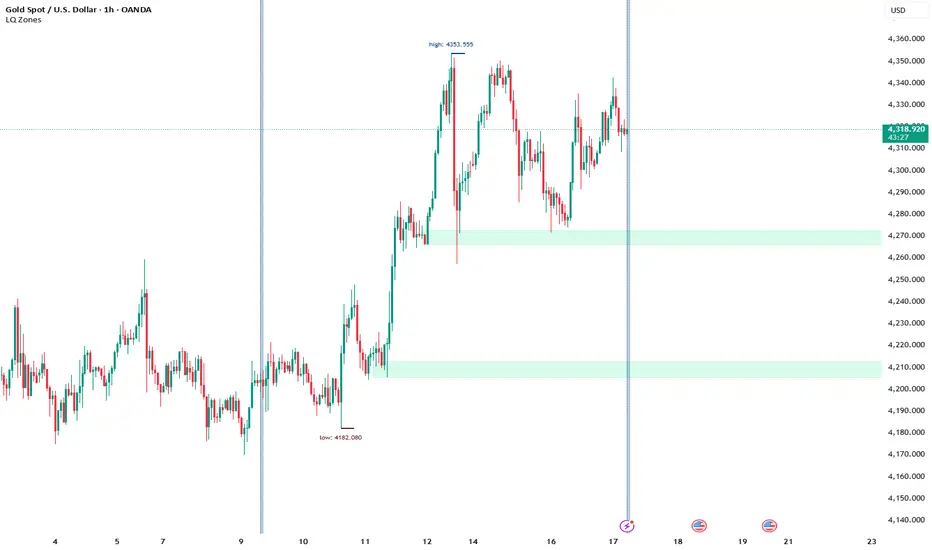
Day breakerDay breaker Script
Indicator Featuring VWAP with Target and Stop Loss
This setup is ideal for day trading, providing precise stop loss points. The chart also highlights yesterday's high, low, and close prices for your reference.This approach allows traders to make informed decisions by combining volume-weighted average price (VWAP) analysis with key historical price levels. By setting clear target and stop loss limits, traders can effectively manage risk while potentially maximizing their returns. The inclusion of yesterday’s high, low, and close prices offers valuable context, helping to identify potential support and resistance levels. This comprehensive strategy not only enhances technical analysis but also supports disciplined trading practices, enabling traders to stay focused and make confident moves in the fast-paced world of day trading.

Delta Strength (True TV Delta)Description
Delta Strength measures the intensity of aggressive trading activity using TradingView’s native Volume Delta engine (ta.requestVolumeDelta).
Volume Delta shows which side is aggressive (buyers or sellers).
Delta Strength answers a different question:
How strong is that aggression compared to recent market behavior?
This indicator converts true per-bar volume delta into a relative strength ratio, helping identify institutional participation, initiative moves, absorption, and potential traps at key price locations.
No candle-based approximation is used. The calculation relies on TradingView’s internal bid-ask volume classification from lower timeframes.
How It Is Calculated
• Per-bar delta is derived from the difference between cumulative delta at bar close and bar open
• Absolute delta is averaged over a user-defined lookback period
• Current delta is compared against this average to produce a normalized strength value
This makes the indicator adaptive across instruments, volatility regimes, and sessions.
How to Read Delta Strength
• Values below the lower threshold indicate normal or low-quality activity
• Rising values show increasing professional participation
• Very high values indicate strong imbalance or aggressive initiative orders
• Extreme values without price follow-through often signal absorption or trapping
Delta Strength measures intensity only, not direction.
How to Use (Important)
Always combine Delta Strength with price location and structure.
Best locations include:
• VWAP and VWAP bands
• Previous Day High / Low
• Session highs and lows
• Range boundaries or value edges
Interpretation logic:
• Strong delta with price acceptance supports continuation
• Strong delta with price rejection suggests absorption or exhaustion
What This Indicator Is NOT
• Not a directional signal
• Not a standalone entry tool
• Not a trend indicator
Using Delta Strength without context can lead to false conclusions.
Intended Use
This indicator is designed for:
• Order Flow Analysis
• Market microstructure study
• Institutional activity confirmation
• Advanced discretionary trading workflows
It works best when combined with Volume Delta, VWAP, and structure-based analysis.
Summary
Delta shows who is aggressive.
Delta Strength shows how aggressive they are.
Price reaction shows whether that aggression is accepted or absorbed.
Used together, they provide insight into market intent rather than just price movement.

LiqD HeatMap [RubiXalgo]LiqD HeatMap 👑 – Advanced Liquidation & Liquidity Visualizer
Discover potential liquidation zones with this powerful AI-enhanced heatmap indicator. It visualizes high-volume liquidity pools where price may attract or reverse, using dynamic bubbles, horizontal levels, and gradient colors for intuitive signals.
Key Features:
• Liquidation Heatmap Bubbles — Circles plotted above/below bars indicate potential long/short liquidation clusters. Larger/darker bubbles highlight stronger volume-based zones.
• Multi-Timeframe Liquidity Levels — Horizontal lines from 30min to Monthly timeframes (thicker/brighter for higher TFs) mark key support/resistance where liquidations often occur.
• Dynamic Color Gradients — Green/teal for bullish bias, red/purple for bearish, yellow/orange for max-volume hotspots. Adjustable intensity for clearer signals.
• Additional Tools:
- Customizable VWAP with ATR bands for directional bias.
- A.I. Volume Profit-Trend polyline predictions.
- Stochastic Money Flow & Bollinger Band Width percentages.
- Daily 0.618 Fibonacci Range Expansion projections.
• Filters & Customization — Market bias (Long/Short/Both), leverage scaling, dynamic lookback, and color themes (Classic or Crypto).
How to Trade with It:
Long Signals: Look for dark green bubbles below price or price bouncing/breaking thick green MTF levels → strong bullish liquidation potential.
Short Signals: Dark red bubbles above price or breakdowns of thick red levels → bearish liquidation zones.
Yellow/orange highlights max-volume areas often acting as magnets or reversal points.
Perfect for crypto, forex, or futures traders seeking volume-driven edge without clutter. 👑 Powered by RubiXalgo logic.
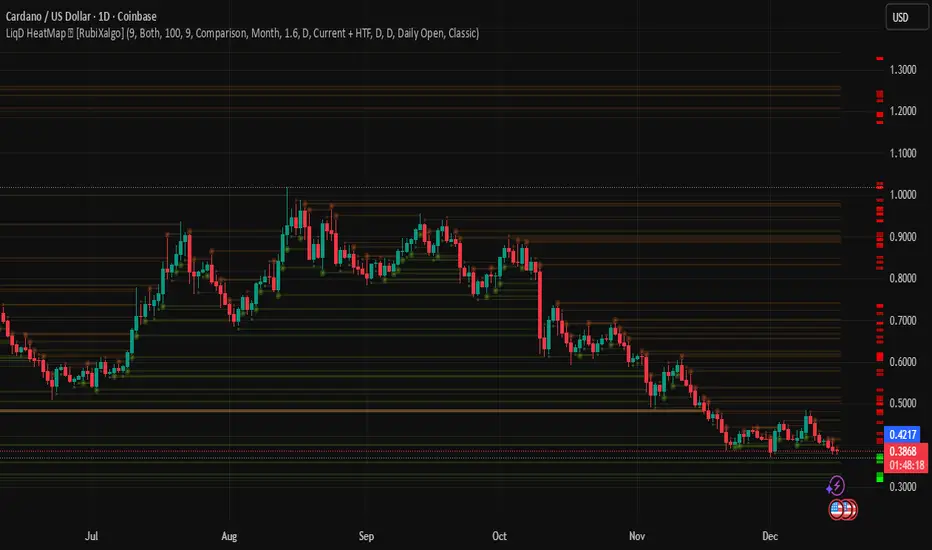
[Algo/Fract] Quant+Built for traders ready to Level Up.
Combine algorithmic strength tracking with fractal structure to deliver quant-style clarity on a live chart.
You trade with intuition. Quant trades with Data.
Together, you read the Unseen.
Quant+ is the second component of the AlgoFract Quant Suite.
Features included are:
Quant Cycles & Ghost Cycle (QC)
Custom Volume Spread (VS)
Volume Flow (VF)
Gain Access at: www.algofract.com
or by visiting our Whop Marketplace: whop.com
