VWAP MTF (Multi Timeframe)VWAP that can be be plotted from different timeframes. Ex if you chose 60 min, it will plot a new vwap line at the start of every hour. Intraday: Used code from SandroTurriate to create this.Pine Script®指标由TheYangGuizi提供4040 5 K
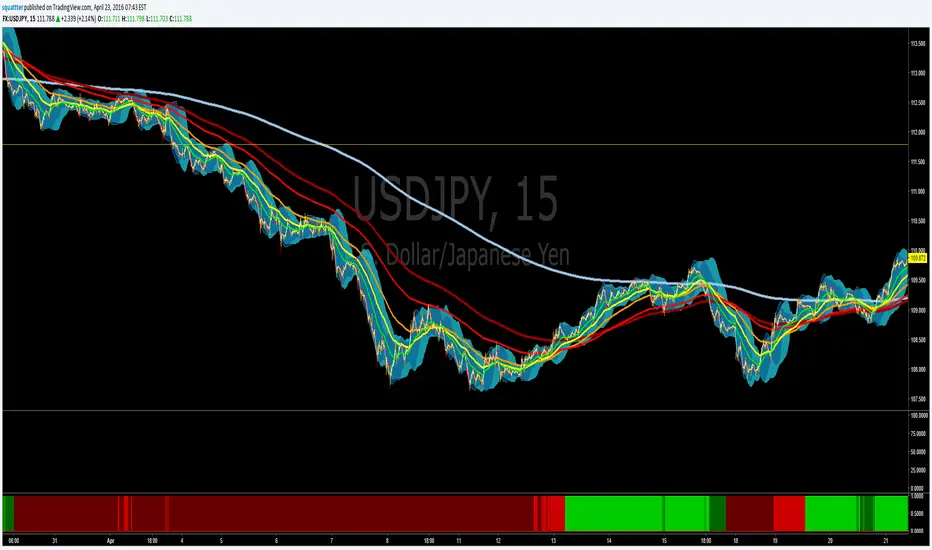
EMA bullish/bearish dashboard - MTFThis is a good reminder for which way you should be placing orders. It's best to not ignore these signals!!! lime = full bull - 100ema above 200ema and price is above 200ema green = hallf bull - price now below 200ema but 100ema is still above the 200 maroon = full bear - opposite of full bull red = half bear - opposite of half bull Also with multi timeframe option - so I guess you could stack several of these on a single framed chart if you wanted.Pine Script®指标由squattter提供11585
[RS]MTF Intraday Dayly Range V0calculation to display a dayly donchian channel at any intraday timeframe.Pine Script®指标由RicardoSantos提供125
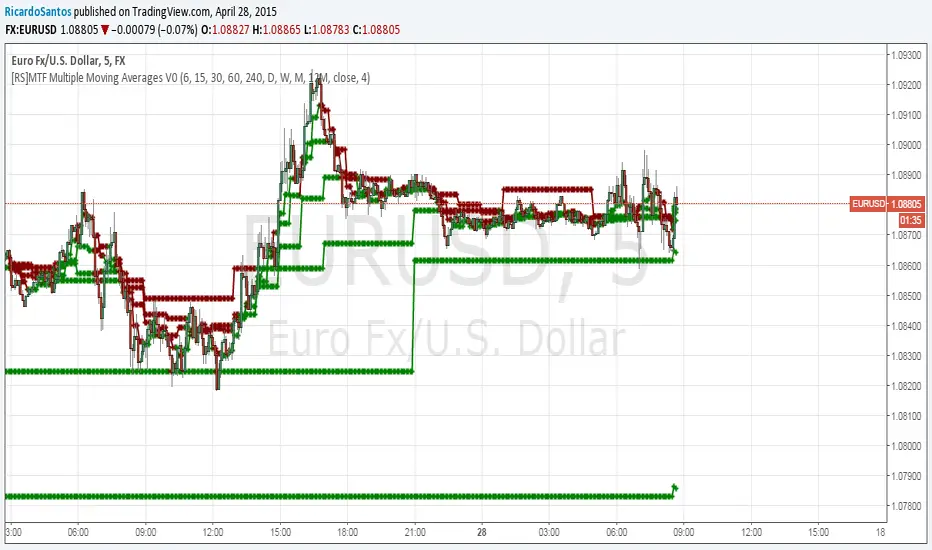
[RS]MTF Multiple Moving Averages V0Multiple moving averages with same interval in candle bar smoothness over multiple time frames. option to show/hide the level of resolution for the mtf's default shows 1 ma can go up to 8th resolution. option for manual input timeframes and configure ma.Pine Script®指标由RicardoSantos提供已更新 55862
Multi-Functional Fisher Transform MTF with MACDL TRIGGERWhat this indicator gives you is a true signal when price is exhausted and ready for a fast turnaround. Fisher Transform is set for multi-time frame and also allows the user to change the length. This way a user can compare two or more time spans and lengths to look for these MACDL divergent triggers after a Fisher exhaustion. With so many indicators, it's probably best to merge these indicators and change the Fisher and Trigger colors so you can still have a look at price action (remember to scale right after merger). I've noticed from time to time when you have Fisher 34 100 and 300 up and running on two different time frames such as 5 and 15 min charts, with MACDL triggers on the 100/300 or 34/100 you get a high probability trade trigger. However, there are rare exceptions such as when price moves in a parabolic state up or down for a long period where this indication does not work. Ideally this indicator works best in a sideways market or slow rising/descending moving market. This indicator was worked on by Glaz, nmike and myself LazyBear also introduced the MACDL indicator Pine Script®指标由QuantitativeExhaustion提供1818 1.4 K
MTF Std Dev Regression ChannelsMulti-Timeframe Linear Regression Channel with Price Labels Displays linear regression channels from a higher timeframe (default 1-hour) on your current chart. Uses the same calculation method as thinkorswim's standard deviation channels. Features: Smooth diagonal channel lines (not stepped) from HTF data Configurable lookback length and source timeframe Shows ±0.5σ, ±1σ, ±1.5σ, ±2σ, ±2.5σ, and ±3σ levels Price axis labels for whole number sigma levels (±1σ, ±2σ, ±3σ) Chart labels for all levels with 5-bar offset Line extension options (Right, Left, Both, None) Fully customizable colors Perfect for traders who want to monitor higher timeframe regression channels while trading on lower timeframes.Pine Script®指标由backflip89提供0
MTF Fractal Model those who wanna use fractal model trading ,use it for best usePine Script®指标由CandidCandle提供6
MTF Countdown (tablouh)it simple just showing all timeframes countdown it simple just showing all timeframes countdown it simple just showing all timeframes countdown Pine Script®指标由amazighin提供4
MTF Candle Average Priceaverage of all time frames , give all time average at one place Pine Script®指标由Kartik22j提供4
MTF StochRSI Confluence + Box (1m/3m/9m signals, +1H/3H display)This indicator is a multi-timeframe Stochastic RSI confluence tool designed to help identify high-probability BUY and SELL zones using short-term momentum alignment, while also providing higher-timeframe context at a glance. Multi-timeframe StochRSI confluence indicator that triggers BUY/SELL signals only when 1m, 3m, and 9m align, with 1H and 3H shown for higher-timeframe context at a glance.Pine Script®指标由robt21提供已更新 9
MTF Auto Fibs [Cove Special]original fib indicator, brought it back just for CovetraderPine Script®指标由thefittrader91提供15
MTF EMA + MACD Single Signal Line (Enhanced)zerodha intraday trading strategy with 3 inbuilt indicators like ema, macd. 25 ema in 1 hour timeframe and 25 ema in 5 min timeframe and 15 min macd for better direction forecastPine Script®指标由tilaksahu提供8
MTF Dual Supertrend with Bands and PivotSUPERTREND WITH UPPER AND LOWER BANDS + PIVOT POINTS + MULTI-TIMEFRAME - INDICATOR DESCRIPTION OVERVIEW: This Pine Script indicator combines the SuperTrend technical analysis tool with visible upper and lower bands, standard daily pivot points, AND a second SuperTrend from a different timeframe. SuperTrend is a trend-following indicator that helps traders identify the current market direction and potential entry/exit points, while pivot points provide key support and resistance levels. The multi-timeframe feature allows you to see trends from different time perspectives simultaneously. HOW IT WORKS: The indicator uses the Average True Range (ATR) to calculate dynamic support and resistance bands around the price: 1. BASIC BANDS CALCULATION: - Upper Band = HL2 + (ATR × Multiplier) - Lower Band = HL2 - (ATR × Multiplier) - HL2 = (High + Low) / 2 2. FINAL BANDS ADJUSTMENT: - Bands are adjusted based on price movement to create a trailing stop mechanism - Upper band only moves down or stays flat when price is above it - Lower band only moves up or stays flat when price is below it 3. SUPERTREND LINE: - Switches between upper and lower bands based on price crossovers - When price is above the SuperTrend line = UPTREND (green) - When price is below the SuperTrend line = DOWNTREND (red) 4. STANDARD PIVOT POINTS: - Calculated based on previous day's High, Low, and Close - Pivot Point (PP) = (High + Low + Close) / 3 - Resistance levels: R1, R2, R3 (calculated above PP) - Support levels: S1, S2, S3 (calculated below PP) - These levels act as potential support/resistance zones 5. SECOND SUPERTREND (MULTI-TIMEFRAME): - Displays a second SuperTrend from a different timeframe (default: 60 minutes/1 hour) - Customizable timeframe - choose from 1min, 5min, 15min, 30min, 60min, 240min, Daily, Weekly, etc. - Independent ATR period and multiplier settings - Shows its own upper and lower bands (purple color) - Color-coded SuperTrend line (lime for uptrend, orange for downtrend) - Helps identify alignment between different timeframes - Can be enabled/disabled via settings - Bands can be toggled separately KEY FEATURES: ✓ Visual upper and lower bands showing the ATR-based zones (blue) ✓ Color-coded SuperTrend line (green for uptrend, red for downtrend) ✓ Second SuperTrend from custom timeframe with its own bands (purple) ✓ Second SuperTrend line (lime/orange colors) ✓ Buy/Sell signals when trend changes ✓ Optional signals for second SuperTrend (small triangles) ✓ Daily Pivot Points with 3 resistance and 3 support levels ✓ Customizable ATR period and multiplier for both SuperTrends ✓ Background color indication of current trend ✓ Built-in alerts for both SuperTrend trend changes ✓ Toggle options for all bands, signals, pivot lines, and second SuperTrend DEFAULT PARAMETERS: - ATR Period: 10 - ATR Multiplier: 3.0 - Second SuperTrend: Enabled - Second SuperTrend Timeframe: 60 minutes (1 hour) - Second SuperTrend ATR Period: 10 - Second SuperTrend ATR Multiplier: 3.0 USAGE: - Lower multiplier (1.5-2.5) = More sensitive, more signals, more noise - Higher multiplier (3.5-5.0) = Less sensitive, fewer signals, filters noise - Use pivot points as additional confirmation for entries/exits - When price approaches R1/R2/R3, expect potential resistance - When price approaches S1/S2/S3, expect potential support - MULTI-TIMEFRAME STRATEGY: Best signals occur when both SuperTrends align * Both green (uptrend) = Strong bullish confirmation * Both red (downtrend) = Strong bearish confirmation * Conflicting trends = Caution, potential consolidation or reversal - Combine SuperTrend signals with pivot levels for high-probability trades - Best suited for trending markets TRADING SIGNALS: - BUY: When price closes above the upper band (trend changes from down to up) * Extra confirmation if near a support level (S1, S2, S3) * STRONGEST SIGNAL: When both SuperTrends are green AND price is above PP - SELL: When price closes below the lower band (trend changes from up to down) * Extra confirmation if near a resistance level (R1, R2, R3) * STRONGEST SIGNAL: When both SuperTrends are red AND price is below PP MULTI-TIMEFRAME EXAMPLES: - Chart timeframe: 5min, Second SuperTrend: 1 hour * Enter long when 5min shows buy signal AND 1hr is already in uptrend * This filters out counter-trend trades - Chart timeframe: 15min, Second SuperTrend: 4 hour * Higher timeframe provides overall trend direction * Lower timeframe provides precise entry timing - Recommended combinations: * Scalping: 1min chart + 15min second ST * Day trading: 5min chart + 1hr second ST * Swing trading: 1hr chart + Daily second ST PIVOT POINT STRATEGY: - PP (Pivot Point) = Main level, acts as support in uptrend, resistance in downtrend - Price above PP = Bullish bias, look for longs near S1/S2 - Price below PP = Bearish bias, look for shorts near R1/R2 - Breakout of R3 or S3 indicates strong momentum Note: This indicator is based on the classic SuperTrend algorithm and should be used as part of a comprehensive trading strategy, not as a standalone signal.Pine Script®指标由maravinthkumar提供11118
MTF Confluence Reporter - Trend & Momentum AlignmentThis indicator is a multi-timeframe confluence dashboard designed to answer one question clearly: “Across my key timeframes, is the market leaning Bullish, Bearish, or Mixed—and how strong is that lean?” It combines two separate “votes” per timeframe: 4MA Direction (trend alignment / slope bias) StochRSI State (momentum bias) Those votes are then blended into a single Confluence result, shown as a clean readout with a 0–100 Strength score, plus hysteresis to reduce flicker near the decision boundary. What you see in the table 1) 4MA This is the trend component. It summarizes whether the selected timeframes are generally Bull or Bear based on the moving-average direction logic (your 4MA engine). 2) Stoch This is the momentum component. It summarizes whether StochRSI across the selected timeframes is leaning Bull or Bear. 3) Qualified (YES/NO) A safety gate. “Qualified = YES” means the internal conditions required for a valid confluence read are met (i.e., enough alignment/consistency to treat the output as actionable). If it’s NO, treat the market as mixed / transitional and tighten risk. 4) Strength (0–100) Your blended score (trend + momentum). Higher = stronger agreement across timeframes. A simple way to interpret it: 80–100: Strong alignment (clean regime) 60–79: Moderate alignment (tradable, but expect chop) 50–59: Weak / transitioning (be cautious) < 50: Bearish side of the regime logic (or mixed turning down) 5) Strength Bar A visual “battery meter” for the Strength score. This is meant to be read at a glance during fast decision-making. 6) Confluence (BULL/BEAR) The actual regime output. This is the “final answer” based on the Strength score and hysteresis rules. 7) Hysteresis (Enter / Exit thresholds) This is the anti-flicker system. Example shown on the chart: Enter > 60 Exit < 50 Meaning: The script only “flips ON” a Bull regime when strength becomes convincingly Bullish (above 60). It won’t “flip OFF” until strength meaningfully weakens (below 50). This reduces rapid flipping during 50/50 conditions. How to use it (practical workflow) Step 1 — Use Confluence as your “market mode” BULL: Favor longs, trend-following entries, buying pullbacks. BEAR: Favor defense, shorts/hedges (if you trade them), or wait for reset. Qualified = NO: Reduce size, tighten stops, or wait—conditions are not clean. Step 2 — Use Strength to time aggressiveness Strength rising: Momentum is joining trend → entries tend to have better follow-through. Strength falling: Alignment is fading → take profit quicker or tighten risk. Step 3 — Use hysteresis as your “noise filter” If you’re a swing trader, hysteresis is your friend: Don’t overreact to a single bar change. Let the regime confirm and stay confirmed. Best use-cases Swing trading / position bias (daily/weekly context) Hedge decisions (when alignment flips and stays flipped) Filtering entries from other tools (only take signals that match the regime) Settings notes: This script is designed to be flexible: You can choose which timeframes matter most to you (commonly 1H / 4H / 1D / 1W / 1M). If your version includes weighting, you can tune weights to match your trading style (short-term vs swing). Thresholds (Enter/Exit) can be tightened for faster flips or widened for smoother regimes. Important notes / disclaimer (TradingView-safe) This tool is an informational confluence dashboard, not financial advice. No indicator can predict the future. Always confirm with market structure, risk management, and your own plan. Past behavior on a chart does not guarantee future results. How I Use This Indicator (Example Workflow) I use this tool primarily as a market-bias and risk-filter, not as a standalone entry signal. Establish the regime first I start by checking the Confluence row: BULL: I focus on long-side ideas and bullish continuation setups. BEAR: I become defensive, avoid counter-trend trades, or look for short/hedge opportunities where applicable. Qualified = NO: I treat the market as transitional and reduce risk. Use Strength to adjust aggressiveness When Strength is elevated and rising, I am more comfortable holding positions and allowing trades more room to develop. When Strength is declining, I tighten stops, reduce position size, or manage trades more actively. Let hysteresis do the work I do not react to every minor fluctuation near the midpoint. The built-in hysteresis thresholds help me stay aligned with the prevailing regime instead of over-trading during indecision. Entries come from other tools Actual entries are taken using price structure, support/resistance, or other indicators. This dashboard simply tells me whether the broader environment supports that idea or not. In short, I treat this indicator as a context and confirmation layer—it helps answer when to be aggressive, cautious, or patient.Pine Script®指标由Dinjin提供19
MTF Indicator DashboardMulti-Timeframe Indicator Dashboard A comprehensive multi-timeframe dashboard that displays the status of key technical indicators across 8 different timeframes in a compact, color-coded table. Features: Monitors 8 timeframes simultaneously: 3m, 5m, 15m, 30m, 1H, 2H, 4H, and Daily Tracks 5 key indicators: RSI (2-period with 6-period smoothing): Green when above 50, Red when below 50 ADX/DI (2-period): Green when +DI > 20 and dominant, Red when -DI > 20 and dominant MACD (2, 3, 6): Green when MACD line above signal line, Red when below EMAs (9, 20, 50, 100, 200, 400): Green when price above all EMAs, Red when below all EMAs Overall: Combined signal requiring 2+ indicators to agree for bullish/bearish confirmation Display: Clean, compact table positioned in top-right corner Color-coded boxes: Green (bullish), Red (bearish), Gray (neutral) Minimal visual clutter for quick analysis Updates in real-time Use Case: Perfect for traders who want to quickly identify timeframe alignment and confluence across multiple technical indicators. Ideal for scalping, day trading, and swing trading to spot high-probability setups when multiple timeframes align. Settings: All indicator parameters match the calculations used and can be viewed in the source code.Pine Script®指标由matthaletrading提供已更新 15
MTF MACD( TF0 cross 0 ) MULTI TIMEFRAME MACD Checking with OSMA TF+1 Momentum check and TF+2 Trend Check to clarify the clean signalPine Script®指标由tradingtomars1122提供12
MTF Volume Weighted Average PriceSame Orignal VWAP Now you can set it to any Time Frame, and see it on that Time Frame While on your current Time Frame.Pine Script®指标由SergBurg提供4
MTF Dynamic MA TrackerThis indicator allows you to track the behavior of price relative to a key Moving Average across up to 9 different timeframes simultaneously. The idea behind this tool is to see what your favourite MA is doing at various TFs while solving the problem of "chart clutter." Plotting 9 different Moving Averages on a single chart usually results in a messy interface that is hard to read. This script solves that using Dynamic Dimming. Default Settings: By default, the script is configured to track the EMA 200 (Exponential Moving Average). However, this is for illustration purposes only. You can fully customize the indicator to track your preferred Moving Average Type (EMA, SMA, HMA, WMA, or RMA) and your preferred Length (e.g., 50, 100, 200) in the settings menu. Key Features: Multi-Timeframe Tracking: Monitor your chosen Moving Average across 9 user-defined timeframes (e.g., 1m, 5m, 15m, 1H, 4H, Daily, etc.) directly on your current chart. Dynamic Visibility (Dimming): By default, the MA lines remain transparent (dimmed) to keep your chart clean. The lines automatically brighten (light up) only when the price comes within a specific proximity of the MA. This highlights immediate Support or Resistance levels without visual noise. You can customize the "Proximity Method" using either a Percentage of price or an ATR multiplier. Tag Detection & Alerts: The script detects "Tags"—moments where price interacts with a Moving Average (e.g., wicks into it and closes back above/below). Bull Tag (Support): Price dips into the MA but closes above it. Bear Tag (Resistance): Price spikes into the MA but closes below it. You can set alerts to trigger whenever these interactions occur on any monitored timeframe. Dashboard (Nexus): A status table displays "Clusters" (when price is near multiple MAs simultaneously) and lists any active Bull/Bear tags occurring on the current bar. Customization: MA Type: Choose between EMA, SMA, HMA, WMA, or RMA. MA Length: Input any length (Default: 200). Timeframes: Individually enable/disable and select up to 9 specific timeframes. Dimming: Adjust the transparency for "dimmed" vs "bright" states. Pine Script®指标由ChiragPatnaik提供8
MTF EMAs: 200 EMA (1hr & 15m), 8 EMA (5m)Using the 200 ema on 1hr and 15 min timeframe to ID entry points for scalping.Pine Script®指标由ejkotewa提供1
MTF EMA50/200 // ADX (Auto TF Pairing) with SL/TP // v6Strategy overview (EMA50/EMA200 + ADX, multi-timeframe): This system trades only in the direction of the higher-timeframe trend and uses the current chart timeframe for precise entries. Trend filter (Higher TF): Bull trend: EMA50 > EMA200 and ADX ≥ threshold → only LONGs allowed Bear trend: EMA50 < EMA200 and ADX ≥ threshold → only SHORTs allowed If ADX is below the “no-trend” threshold, the market is considered choppy and trades are avoided. Entry (Lower TF / chart TF): Enter only when the chart timeframe confirms momentum in the HTF direction using one of: Touch: price pulls back to EMA50 and closes back on the trend side Rejection: stricter “touch + reject” near EMA50 Cross: close crosses EMA50 in the trend direction Stop Loss (structure + volatility): LONG: below the safer of last swing low or EMA50, minus an ATR buffer SHORT: above the safer of last swing high or EMA50, plus an ATR buffer Take Profit (risk-based): Targets are set as multiples of risk (R) from entry: TP1 = 2R (default) TP2 = 3R (optional) The indicator plots only the latest trade’s Entry (black line), Stop (red dashed), and TP (green dashed), and it auto-pairs the chart timeframe with a “next level up” higher timeframe for the trend filter.Pine Script®指标由Corbu33提供9
MTF MomentumThis script identifies momentum for the following three timeframes: 1 minute, 5 minutes, and 15 minutes. Pine Script®指标由johanne_slight1提供4
MTF Auto Fibs + All Levels [Clean]auto fib off whatever higher time frame you want! Helps you seen levels faster and with out switch time frames Pine Script®指标由thefittrader91提供已更新 2260
MTF RSI TableIt shows a table with the RSI values of multiple timeframes, customizable positionPine Script®指标由c0dew1zard提供10