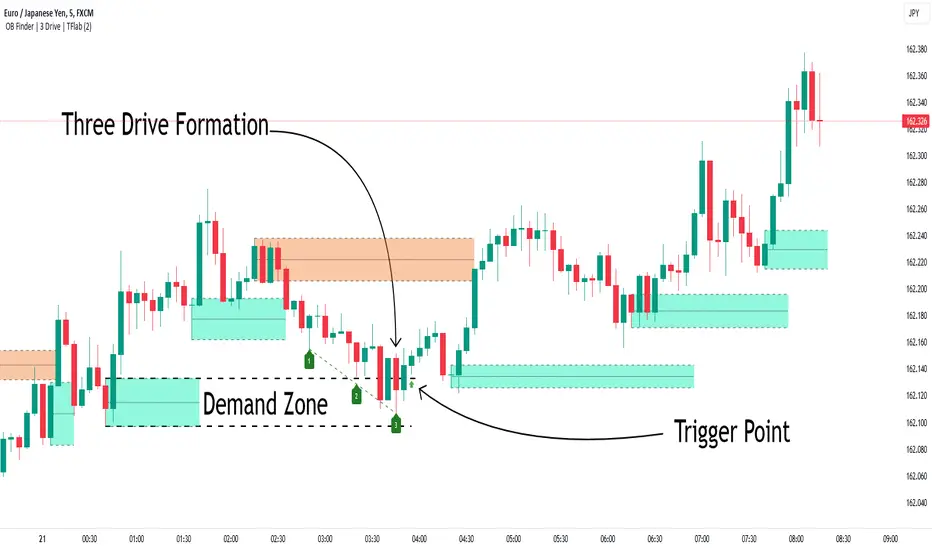
Simplified Wave Trend Overbought/OversoldThis is just a variation of the popular wave trend that I find to be nicer to look at.
在脚本中搜索"wave"
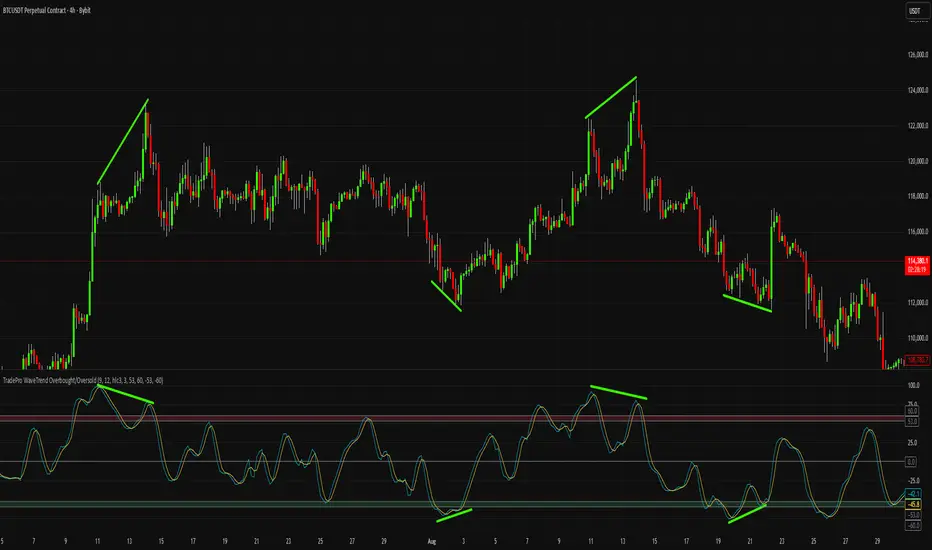
xTrader 20/200 EMA Wave Ribbon🔹 20/200 EMA Wave Ribbon
This indicator expands on the classic 20/200 moving average crossover by turning it into a momentum-aware ribbon. Instead of only showing where two lines cross, it highlights trend bias and momentum strength together in a visual form that adapts across timeframes.
🔑 How It Works
Fast / Slow MAs: Calculates a fast MA (default 20) and a slow MA (default 200). Traders can choose the MA type (EMA, SMA, WMA, RMA).
Bias: When the fast MA is above the slow MA, the ribbon turns 🟢 green (bullish). When it is below, the ribbon turns 🔴 red (bearish).
Wave Ribbon: A band is plotted around the fast MA. Its width comes from a user-defined percent of price, optionally scaled by ATR volatility so the ribbon stays meaningful on both 5m and 1D charts.
MACD-style intensity: Ribbon color adjusts with the separation between fast and slow MAs. Strong expansion makes the ribbon brighter and thicker; contraction makes it softer and thinner. This gives the same “growing and fading” feel traders know from MACD histograms.
Noise Control: Persistence settings can require several bars of agreement before a bias flip is confirmed, reducing whipsaws.
Signals: Optional markers and alerts trigger on bullish and bearish crosses.
📈 Practical Use
Bright, widening ribbon → trend is accelerating; continuation bias is strong.
Dimming ribbon → momentum is weakening; consider scaling out or tightening risk.
Color flip → regime change; possible entry/exit depending on confirmation settings.
Timeframe scaling → ensures ribbon width adapts to volatility, so interpretation is consistent across intraday and higher-timeframe charts.
⚡ What Makes It Different
Unlike open-source EMA cross scripts that only mark crosses:
✅ Plots a dynamic ribbon around the fast MA instead of shading the whole chart.
✅ Uses ATR-based auto-scaling to stay useful on all timeframes.
✅ Applies MACD-style intensity mapping to show not just bias, but trend strength and momentum shifts.
✅ Includes MA type selection (EMA, SMA, WMA, RMA) and persistence logic for confirmation.
⚠️ Disclaimer: This script is for educational and analytical purposes only. It is not financial advice. Always do your own research and use proper risk management before trading.
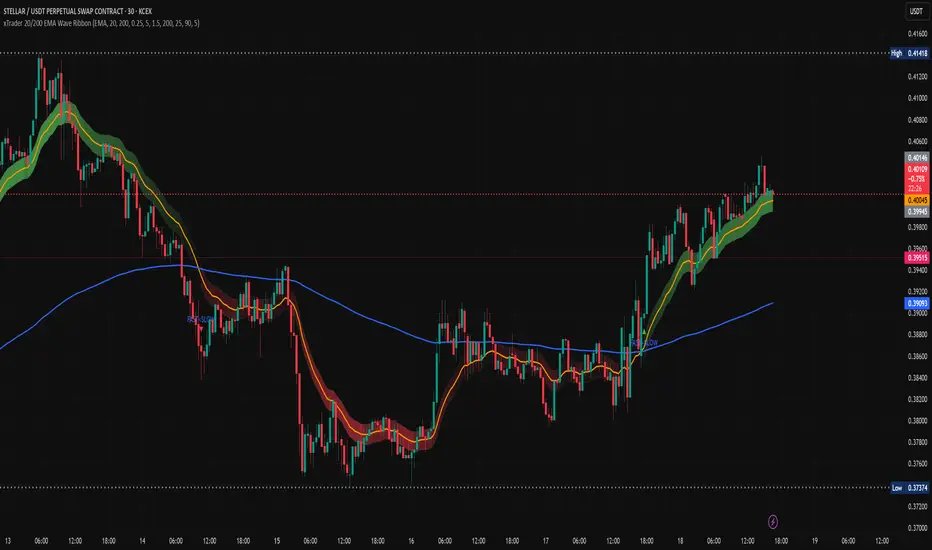
Gann Swings with Weis Wave VolumeThis indicator combines two powerful market analysis techniques into a single, comprehensive tool: swing analysis based on the theories of W.D. Gann and volume analysis popularized by David Weis (Weis Wave). By visualizing the market's wave structure and the volume that drives each move, this indicator helps traders gauge the strength of a trend and identify potential reversals.
Key Features
Gann Swing Lines:
The indicator automatically identifies and plots market swings by connecting significant highs and lows. This provides a clean, intuitive view of the market's structure and the prevailing trend direction.
Upward swings are colored green, and downward swings are colored red (by default), making it easy to see the market's flow at a glance. A real-time line is also drawn to track the current, developing swing.
Weis Wave Volume Display:
At the conclusion of each swing, the indicator calculates the total cumulative volume for that entire price wave and displays it at the swing's peak or trough. This is the core of the Weis Wave concept, linking volume directly to price swings rather than individual candles.
This feature allows traders to analyze the "effort vs. result." For example, a long upward price swing that occurs on low cumulative volume may suggest a lack of conviction and a higher probability of reversal. Conversely, a breakout past a previous swing high accompanied by significant volume confirms the strength of the move.
The cumulative volume for the current, unfinished wave is also displayed in real-time with an underscore (_) suffix.
Volume-Based Candle Coloring:
This optional feature colors the price bars based on their volume relative to a moving average (EMA) of volume.
Candles with significantly higher-than-average volume are painted in darker, more intense shades of green (for up-candles) or red (for down-candles).
This helps to instantly spot high-interest areas, such as climactic buying or selling, which often occur at key support and resistance levels or turning points.
Settings (Inputs) Explained
Gann Swing Settings:
Show Gann Swing Lines: Toggles the visibility of the swing lines.
Line Width: Adjusts the thickness of the swing lines.
Up Swing/Down Swing: Allows for full customization of the colors for up and down swing lines.
Volume Numbers Settings:
Show Volume Numbers: Toggles the visibility of the cumulative Weis Wave volume labels.
Up Volume/Down Volume: Customizes the text color for the volume numbers on up and down swings.
Size: Changes the font size of the volume labels ("Tiny" to "Huge").
Volume Unit: Formats the volume display. Choose "None" for the raw number, "K" for thousands, "M" for millions, or "B" for billions to keep the chart clean.
Additional Visual Settings:
Show Volume Candles: Enables or disables the volume-based bar coloring.
Volume EMA Period: Sets the lookback period for the Exponential Moving Average used to calculate average volume for the bar coloring feature.
How to Use
This indicator can be a valuable addition to various trading strategies.
Trend Confirmation: A healthy trend will typically show increasing cumulative volume on swings in the direction of the trend. For instance, in a strong uptrend, each new upswing should ideally be accompanied by volume that is equal to or greater than the previous upswing.
Divergence and Reversal Signals: A classic signal of a weakening trend is divergence. If the price makes a new higher high, but the cumulative volume on that upswing is significantly lower than the previous one, it indicates that the buying pressure is fading and a reversal may be imminent.
Identifying Key Levels: The points where swings reverse, especially when accompanied by high cumulative volume, often become critical support or resistance levels for future price action. The volume-colored candles can further highlight specific bars where institutional activity is likely occurring.
このインジケーターは、W.D.ギャンの理論に基づいたスイング分析と、デビッド・ワイスが普及させた出来高分析(ワイスウェーブ)を組み合わせたテクニカル分析ツールです。相場の波動(スイング)とそのスイングを形成するためにどれだけの出来高が投入されたかを視覚的に捉えることで、トレンドの強弱や転換の可能性を評価するのに役立ちます。
主な機能
ギャンスイングの描画:
相場の高値と安値を基に、上昇スイングと下降スイングを自動で識別し、ラインで結んで表示します。
これにより、市場の基本的な構造やトレンドの方向性を直感的に把握できます。
上昇スイングは緑色、下降スイングは赤色(デフォルト設定)で表示され、現在進行中のスイングはリアルタイムで描画され続けます。
ワイスウェーブ出来高の表示:
一つのスイング(波)が完了するごとに、そのスイングの始点から終点までの累計出来高を計算し、スイングの頂点(高値・安値)に表示します。
大きな価格変動(スイング)が出来高を伴っているか、あるいは出来高が乏しい中で価格だけが動いているかを判断する材料となります。
例1: 上昇スイングの価格幅が大きいにも関わらず出来高数値が小さい場合、その上昇の勢いが弱い可能性を示唆します。
例2: 価格の動きは小さいのに出来高数値が非常に大きい場合、強い抵抗や支持、あるいは市場の意見が対立している状況を示唆します。
現在進行中のスイングの累計出来高も、末尾に「_」を付けてリアルタイムで表示します。
出来高ローソク足の色付け:
オプションを有効にすると、各ローソク足の出来高を移動平均線(EMA)と比較し、その出来高の大きさに応じてローソク足を色付けします。
出来高が平均よりも大幅に大きい足は濃い色で表示され、市場の注目が集まっている価格帯(重要な高値・安値など)を特定するのに役立ちます。
設定項目(インプット)の解説
ギャンスイング設定:
ギャンスイングラインを表示: スイングラインの表示/非表示を切り替えます。
線の太さ: ラインの太さを調整します。
上昇スイング/下降スイング: 各スイングラインの色を自由に設定できます。
出来高数値の設定:
出来高数値を表示: スイングごとの累計出来高の表示/非表示を切り替えます。
上昇出来高/下降出来高: 出来高数値のテキスト色を自由に設定できます。
サイズ: 出来高数値の文字サイズを選択できます。
出来高の単位: 出来高の数値をそのまま表示するか、「K」(千)、「M」(百万)、「B」(十億)単位に変換して表示するかを選択できます。
追加の視覚設定:
出来高ローソク足を表示: 出来高に応じたローソク足の色付け機能の有効/無効を切り替えます。
出来高EMA期間: ローソク足の色付けの基準となる出来高移動平均線の期間を設定します。
活用方法
このインジケーターは、単独で使うだけでなく、他のテクニカル指標と組み合わせることで、より精度の高い分析が可能になります。
トレンドの確認: 価格が上昇スイングを続けており、かつ各上昇スイングの出来高が増加傾向にあれば、強い上昇トレンドと判断できます。
トレンド転換の察知: 価格は新高値を更新しているのに、上昇スイングの出来高が前回よりも著しく減少している場合(ダイバージェンス)、上昇の勢いが尽きかけており、トレンド転換が近い可能性を示唆します。
重要な価格帯の特定: 出来高ローソク足機能で色が濃くなっている価格帯は、多くの市場参加者が取引したことを意味し、将来的にサポート(支持)やレジスタンス(抵抗)として機能する可能性があります。
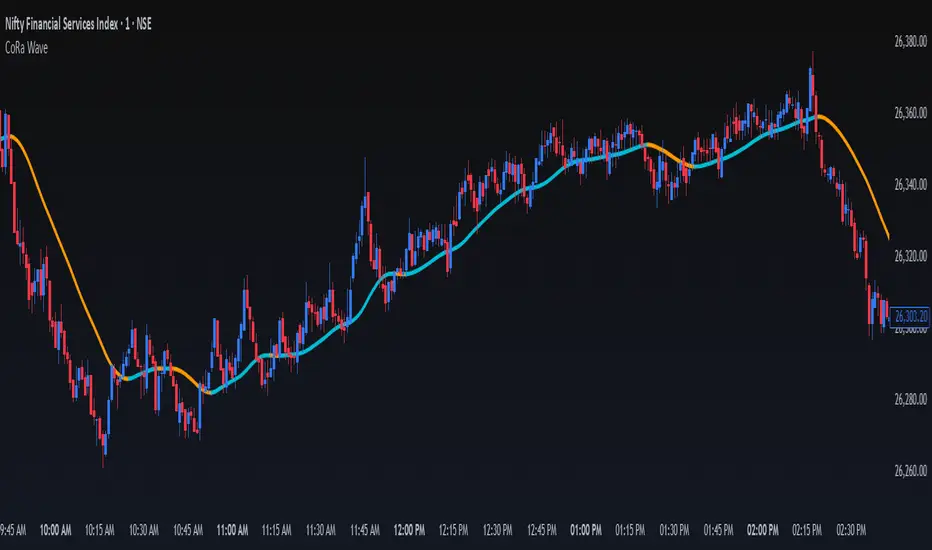
ConeWave MACoRa Wave is a custom-weighted moving average designed to adapt intelligently to market dynamics. It builds upon the foundational logic of the Comp_Ratio_MA by @redktrader, incorporating a compound ratio-based weighting curve that emphasizes recent price action while preserving smoothness and structure with pinescript version 6.
This version introduces modular enhancements, including:
A Comp Ratio Multiplier for fine-tuned responsiveness
Optional Auto Smoothing based on wave length
Streamlined plotting for clarity and performance
Whether you're confirming market structure, identifying trend shifts, or seeking a cleaner alternative to noisy indicators, CoRa Wave offers a visually intuitive and mathematically elegant solution.
🛠 Reimagined by @atulgalande75 — optimized for traders who value precision, adaptability, and clean charting. Original concept by @redktrader.
Elliott Wave Oscillator + PSAR + VolumeStrategy Logic
1. Indicators
Elliott Wave Oscillator (EWO): This oscillator measures the difference between a 5-period and a 35-period exponential moving average (EMA). It's used to identify momentum shifts and potential wave structures. A buy signal is triggered when the EWO crosses above its signal line (a 5-period simple moving average). A sell signal is triggered when it crosses below.
Parabolic SAR (PSAR): This indicator shows potential reversals in price direction. A buy signal requires the PSAR to be below the current price, indicating an uptrend. A sell signal requires the PSAR to be above the current price, indicating a downtrend.
Volume: The strategy checks for significant changes in volume compared to its 20-period simple moving average (SMA). A buy signal requires a volume increase of at least 20% above the SMA. A sell signal requires a volume decrease of at least 20% below the SMA.
EMA 200: This long-term moving average is used to determine the overall market trend. A buy signal is only considered when the EMA 200 is rising (uptrend). A sell signal is only considered when the EMA 200 is falling (downtrend).
2. Entry and Exit Conditions
Long (Buy) Entry: A long position is entered if all of the following conditions are met:
EWO crosses its signal line upwards.
PSAR is below the price.
Volume has increased significantly.
The EMA 200 is rising.
The current candle is a bullish candle (close > open).
Short (Sell) Entry: A short position is entered if all of the following conditions are met:
EWO crosses its signal line downwards.
PSAR is above the price.
Volume has decreased significantly.
The EMA 200 is falling.
The current candle is a bearish candle (close < open).
Exit Conditions: Both long and short positions have a fixed 1% take profit and a 1% stop loss to manage risk.
In summary, the strategy only enters trades when a combination of momentum (EWO), trend (PSAR, EMA 200), and volume indicators align in the same direction, with strict risk management in place.

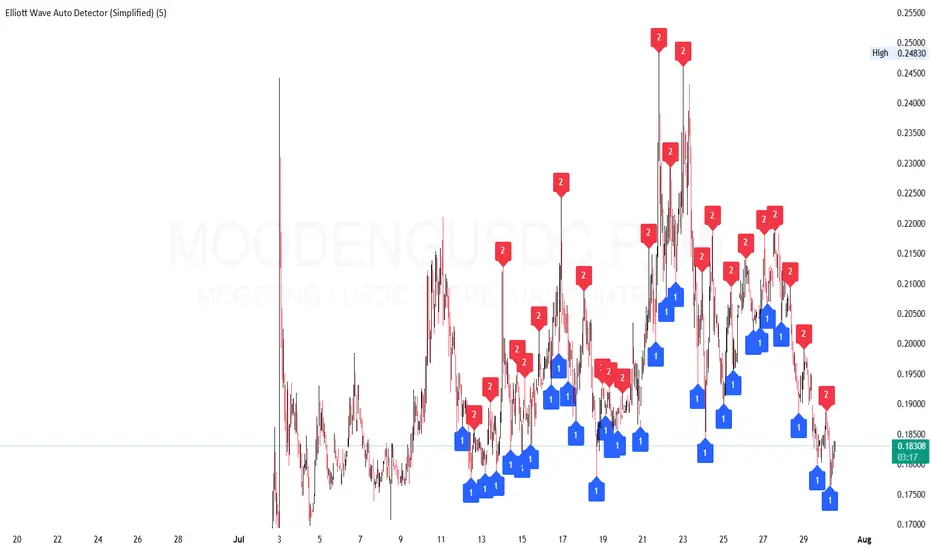
Elliott Wave Auto Detector (Simplified)How to Use the Detector
Identify Structure: Look for sequences like 1-2-1-2...
These may show a forming or ongoing Elliott wave pattern.
Validate Trend: Multiple red 2’s at lower highs suggests a bearish trend; the reverse with blue 1’s at higher lows is bullish.
Trading Zones:
Consider buying near clusters of blue 1’s (support zones).
Consider selling or shorting near clusters of red 2’s (resistance zones).
Look for Breakouts: If price breaks out of the descending channel, trend may reverse or accelerate.
SMA WAVE // SUNIL SETHI // V1.0This TradingView indicator visualizes the relationship between two simple moving averages (SMAs) of your choice — default 10-period and 20-period — to help traders quickly identify short-term trend shifts and momentum through color-coded wave fills and line trends.
✅ Dual SMA Calculation
Calculates two SMAs: SMA 1 (default 10) and SMA 2 (default 20).
Option to use any custom timeframe for both SMAs via the SMA Timeframe input.
🎨 Dynamic Visual Feedback
SMA lines change color based on direction:
Rising = Green (or custom)
Falling = Red (or custom)
Optional toggle to use static colors instead.
Wave area between SMA1 and SMA2 is filled with color to show crossovers and divergence.
👁️🗨️ Visibility Controls
Toggle visibility for:
SMA 1 line
SMA 2 line
The wave fill between SMAs
⚙️ Customization Options
Adjust:
SMA lengths
Wave fill transparency
Colors when rising or falling
Manual override colors for SMA lines
📈 How It Works
When SMA 1 > SMA 2, the wave fill shows a rising trend (e.g., green).
When SMA 1 < SMA 2, the fill switches to a falling trend (e.g., red).
The lines themselves also reflect momentum (rising/falling) based on current vs previous value unless overridden.
🧠 Use Cases
Spot short-term trend reversals or momentum shifts
Confirm entries/exits based on SMA crossovers
Visualize trend strength through color intensity and divergence

Advanced Hurst Cycle + VTL + Turning Points| Timeframe | Cycle Base | Use Case | Notes |
| ------------ | ---------- | ------------------ | ------------------------- |
| 5-min | 16–20 bars | Intraday scalping | Tight SL, fast moves |
| 15-min / 1hr | 20–40 bars | Intraday to swing | Good for options intraday |
| Daily | 20–40 bars | Multi-day swings | Ideal for Futures/ST BTST |
| Weekly | 13–26 bars | Position/Investing | For macro turns |
Guide to Trading with JM Hurst Cycles in TradingView
1. What is JM Hurst Cycle Theory?
JM Hurst proposed that financial markets move in harmonically related cycles. These cycles can help traders
forecast turning points in markets using time-based analysis rather than just price.
Key Concepts:
- Cycle Nesting: Smaller cycles exist within larger ones.
- Harmonic Ratios: Each cycle is typically double the length of the smaller one (e.g., 20, 40, 80).
- Turning Points: When multiple cycles bottom together, strong reversals occur.
- Tools: FLD (Future Line of Demarcation), VTL (Valid Trend Lines).
2. TradingView Script Features
The provided Pine Script v5 implements:
- FLDs (shifted SMAs) for base and harmonic cycles.
- VTLs: Drawn between major pivot highs/lows to confirm trend reversals.
- Cycle Turning Points: Detected using pivot logic and cycle phase.
- Optional: Sine wave to visualize cycle rhythm.
Inputs:
- Base Cycle Length: Set the expected cycle duration (e.g., 20 bars).
- FLD/VTL/Turn toggles to customize chart view.
3. How to Trade with This Script
1. Set 'Base Cycle Length' to 20, 40, or 80 depending on your market and timeframe.
2. Watch for price crossing the FLD:
- Bullish Signal: Price crosses above FLD near cycle bottom.
- Bearish Signal: Price breaks below FLD near cycle top.
3. Use VTL for confirmation:
Guide to Trading with JM Hurst Cycles in TradingView
- Break of upward VTL from cycle lows = bearish shift.
- Break of downward VTL from cycle highs = bullish shift.
4. Use turning point markers:
- Triangle up (green): Probable cycle bottom - watch for long.
- Triangle down (red): Probable cycle top - prepare for exit or short.
Tips:
- Align multiple cycle lengths for stronger confirmation.
- Use with other technical indicators like RSI/MACD for confluence.
- Avoid trading just before major news events - cycles can distort.
4. Example Strategy
If base cycle is 20 bars:
- Wait for triangle up (cycle low) near FLD.
- Confirm price crosses above FLD.
- Ensure VTL from prior lows is intact or just broken upward.
- Enter long; set stop below recent low.
Opposite for shorts at triangle down + FLD break down + VTL break.
5. Final Notes
This script offers a time-based visual trading method inspired by JM Hurst. It's most powerful when used with
patience, confirmation, and alignment across cycles.
You can adjust cycle lengths or refine pivots based on your trading timeframe and asset class.
For best results, backtest cycle behavior on your instrument before live trading.

Global M2 Money Supply Top20 + Offset & WaveThe M2 Top20 is a global aggregation of the M2 money supply from the 20 largest economies in the world , providing a comprehensive view of the total liquidity in the global financial system. It is expressed in trillions of USD.
This script calculates and visualizes the M2 Money Supply of the Top 20 Global Economies, adjusted to various timeframes (4H, 1D, 1W, 1M) with customizable offset adjustments (in days) from -1000 days to +1000 days. This indicator includes data from the Americas, Europe, Africa, and the Asia Middle East , offering a diverse and balanced representation of major economic regions. The M2 of each country has been converted to USD.
Additionally, the user can set a minimum and maximum offset to create a wave around the main offset and expand the comparison.
Combining these options, this indicator enables users to visualize a range of the global money supply, making it useful for market analysis, economic forecasting, and understanding macroeconomic trends. This indicator is particularly valuable for traders and analysts interested in understanding the dynamics of global monetary systems and their potential impact on financial markets.
Key Features:
Global M2 Money Supply calculation from the Top 20 Economies.
Adjustable Offset: Adjust the offset to align the indicator with the best bar. Adjustment in days, usable on different timeframes (1D, 1W, 4H, 1M).
Wave Projection: Displays a "probability cloud"—a smoothed area that shows the probable path of Bitcoin, derived from shifts in global liquidity.
Min/Max Offset Adjustments: Customizable offsets allow you to determine the range of future windows, helping to shape the wave and better identify liquidity-driven turning points.
Use Cases:
Economic Forecasting: Identify trends in global money supply and their potential market impact (e.g., historically leads Bitcoin price by +/- 78 days to +/-108 days).
Market Analysis: Track the growth or contraction of money supply across key economies.
Macro-Economic Analysis: Understand the relationship between monetary policies and market performance.
How to use:
Add the indicator to your chart.
Set the timeframe to 1D to customize the offset.
Set the Offset (in days).
Set the Offset Range Minimum and Maximum.
Show/Hide the Range Wave
.
Use offset = 0 to have the indicator align directly with the current data, without any shift, providing a baseline for comparison with the most recent market conditions.
Countries included in the M2 Top20:
China (CN), Japan (JP), South Korea (KR), Hong Kong (HK), Taiwan (TW), India (IN), Saudi Arabia (SA), Thailand (TH), Vietnam (VN), United Arab Emirates (AE), Malawi (MW) – Africa, United States (US), Canada (CA), Brazil (BR), Mexico (MX), Eurozone (EU), United Kingdom (GB), Russia (RU), Poland (PL), Switzerland (CH).
These countries were selected from the ranking of the World Economy Indicator of Trading View .

Momentum Wave Oscillator📈 Momentum Wave Oscillator (MWO) 📈
The Momentum Wave Oscillator (MWO) is a precision-designed tool for traders who want early, reliable insight into market shifts — before they fully appear on price charts.
Instead of reacting late to moves, MWO is engineered to anticipate changes in momentum by tracking market pressure within a dynamic range.
Its built-in bands and visual cues make it simple to spot key moments where momentum exhaustion, reversals, or fresh breakouts are most likely to occur.
How to Use:
Buy Zones: When the oscillator moves up from lower regions (typically below 20), it may indicate momentum building to the upside.
Sell Zones: When the oscillator moves down from upper regions (typically above 80), it may suggest momentum starting to weaken.
Dynamic Bands:
Unlike conventional fixed levels like 20 and 80, MWO features dynamic adaptive bands that better reflect real-time changes in market behavior.
Markets are fluid — volatility and momentum strength vary from cycle to cycle. Static zones can miss important shifts or produce false signals.
The dynamic bands allow the indicator to adapt naturally to changing conditions, offering more precise context for overbought, oversold, or breakout environments.
Background Colors and Labels:
Automatic highlights appear when potential turning points are detected, allowing traders to act quickly without chart clutter.
Best Practices:
Use the MWO as a confirmation tool alongside your existing strategy (trendlines, support/resistance, volume spikes, etc.).
Look for agreement between the MWO and price action for higher probability entries.
Avoid relying on it in isolation during extremely low-volume periods, where momentum may appear artificially weak or strong.
Adjust sensitivity settings depending on your trading style (scalping vs swing trading).
Important Note:
The MWO is designed for educational and informational purposes. No indicator can predict the future with certainty. Always combine it with proper risk management and your personal trading plan.

M2 Liqudity WaveGlobal Liquidity Wave Indicator (M2-Based)
The Global Liquidity Wave Indicator is designed to track and visualize the impact of global M2 liquidity on risk assets—especially those highly correlated to monetary expansion, like Bitcoin, MSTR, and other macro-sensitive equities.
Key features include:
Leading Signal: Historically leads Bitcoin price action by approximately 70 days, offering traders and analysts a forward-looking edge.
Wave-Based Projection: Visualizes a "probability cloud"—a smoothed band representing the most likely trajectory for Bitcoin based on changes in global liquidity.
Min/Max Offset Controls: Adjustable offsets let you define the range of lookahead windows to shape the wave and better capture liquidity-driven inflection points.
Explicit Offset Visualization: Option to manually specify an exact offset to fine-tune the overlay, ideal for testing hypotheses or aligning with macro narratives.
Macro Alignment: Particularly effective for assets with high sensitivity to global monetary policy and liquidity cycles.
This tool is not just a chart overlay—it's a lens into the liquidity engine behind the market, helping anticipate directional bias in advance of price moves.
How to use?
- Enable the indicator for BTCUSD.
- Set Offset Range Start and End to 70 and 115 days
- Set Specific Offset to 78 days (this can change so you'll need to play around)
FAQ
Why a global liquidity wave?
The global liquidity wave accounts for variability in how much global liquidity affects an underlying asset. Think of the Global Liquidity Wave as an area that tracks the most probable path of Bitcoin, MSTR, etc. based on the total global liquidity.
Why the offset?
Global liquidity takes time to make its way into assets such as #Bitcoin, Strategy, etc. and there can be many reasons for that. It's never a specific number of days of offset, which is why a global liquidity wave is helpful in tracking probable paths for highly correlated risk assets.

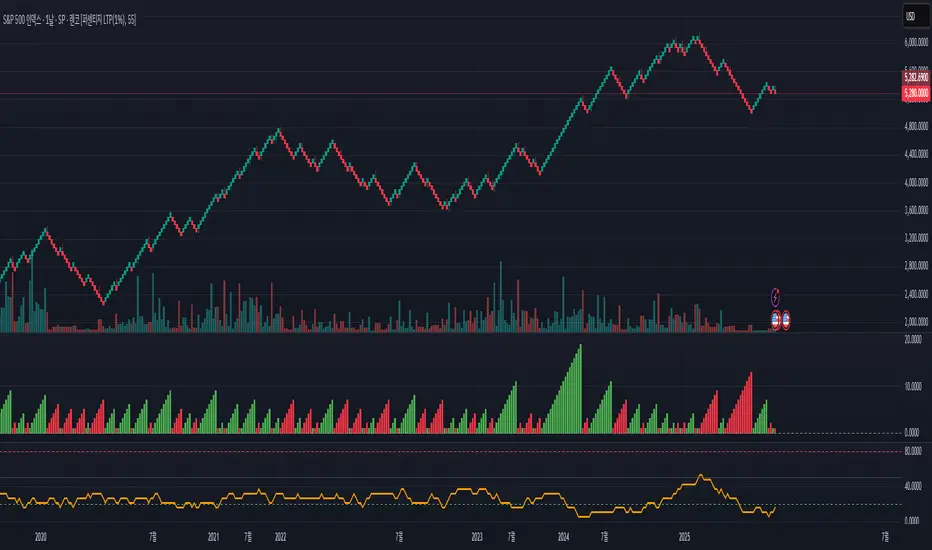
Renko Momentum Wave (RMW)Renko Momentum Wave
The Renko Momentum Wave (RMW) is a custom momentum oscillator specifically designed for Renko-based price action analysis. Unlike traditional oscillators that rely on time-based data, the RMW focuses on the directional consistency of Renko bricks, measuring the strength of trend momentum purely based on price movement.
Alpha Wave System @DaviddTechAlpha Wave DaviddTech System by DaviddTech is an advanced, meticulously engineered trading indicator adhering strictly to the DaviddTech methodology. Rather than simply combining popular indicators, Alpha Wave strategically integrates specially-selected technical components—each optimized to enhance their combined strengths while neutralizing individual weaknesses, providing traders with clear, consistent, and high-probability trading signals.
Valid Setup:
🎯 Why This Combination Matters:
Quantum Adaptive Moving Average (Baseline):
This advanced adaptive MA provides superior responsiveness to market shifts by dynamically adjusting its sensitivity, clearly indicating the primary market direction and reducing lag compared to standard moving averages.
WavePulse Indicator (CoralChannel-based Confirmation #1):
Precisely detects shifts in momentum and price acceleration, allowing traders to anticipate trend continuation or reversals effectively, significantly enhancing trade accuracy.
Quantum Channel (G-Channel-based Confirmation #2):
Dynamically captures price volatility ranges, offering reliable trend structure validation and clear support/resistance channels, further increasing signal reliability.
Momentum Density (Volatility Filter):
Ensures traders enter only during optimal volatility conditions by quantifying momentum intensity, effectively filtering out low-quality, low-momentum scenarios.
Dynamic ATR-based Trailing Stop (Exit System):
Automatically manages trade exits with optimized ATR-based stop levels, systematically securing profits while effectively managing risk.
These meticulously integrated components reinforce each other's strengths, providing traders with a robust, disciplined, and clearly structured approach aligned with the DaviddTech methodology.
🔥 Latest Update – Enhanced BUY & SELL Signals:
Alpha Wave now clearly displays automated BUY and SELL signals directly on your chart, coupled with a comprehensive dashboard table for immediate signal validation. Signals appear only when all components—including baseline, confirmations, and volatility—are in alignment, significantly improving trade accuracy and confidence.
📌 How Traders Benefit from the New Signals:
BUY Signal: Execute long trades when Quantum Adaptive MA signals bullish, confirmed by bullish WavePulse momentum, bullish Quantum Channel structure, and strong Momentum Density readings.
SELL Signal: Clearly marked for entering short positions under bearish market conditions verified through Quantum Adaptive MA, WavePulse bearish momentum, Quantum Channel confirmation, and sufficient Momentum Density.
Signal Validation: A dedicated dashboard provides immediate visual strength metrics, allowing traders to quickly validate signals before execution, significantly enhancing trading discipline and consistency.
📊 Recommended DaviddTech Trading Plan:
Baseline: Determine overall market direction using Quantum Adaptive MA. Only trade in the indicated baseline direction.
Confirmations: Validate potential entries with WavePulse and Quantum Channel alignment.
Volatility Filter: Confirm sufficient market volatility with Momentum Density before entry.
Trailing Stop Loss: Manage risk and secure profits using the dynamic ATR-based trailing stop system.
Entries & Exits: Only execute trades when signals and dashboard components unanimously align.
🖼️ Visual Examples:
Alpha Wave by DaviddTech clearly demonstrates how an intelligently integrated system provides significantly superior trading insights compared to standalone indicators, ensuring precise, disciplined, and profitable market entries and exits across all trading environments.

[blackcat] L2 Wave Base CampOVERVIEW
The L2 Wave Base Camp indicator is a technical analysis tool designed to identify trends and potential trading signals by visualizing price and volume data through moving averages and relative strength calculations. It operates in its own panel on the trading chart, providing traders with a clear and color-coded representation of market conditions.
FEATURES
Customizable Base Camp Level: Users can set a horizontal line at a specific level to mark significant price points.
Color-Coded Histograms: Different colors indicate various market conditions, such as price position relative to moving averages.
Labeled Signals: The indicator labels potential "Valley" and "Top" points, suggesting buying and selling opportunities.
Volume Analysis: Incorporates volume data to identify potential trend reversals based on volume trends.
HOW TO USE
Set the Base Camp Level: Adjust the input parameter to define a significant price level.
Interpret Histogram Colors: Use the color-coded histograms to understand the current market condition.
Look for Labeled Signals: Pay attention to "Valley" and "Top" labels for potential trading opportunities.
Analyze Volume Trends: Monitor volume data for signs of trend reversals.
LIMITATIONS
Not a Standalone Tool: Should be used in conjunction with other indicators and analysis methods.
Backtesting Required: Essential to understand historical performance before live trading.
NOTES
The indicator uses moving averages (SMA) and relative strength calculations to smooth data and identify trends.
Crossover events between different moving averages generate buy and sell signals.
THANKS
Special thanks to the original author for developing this insightful trading tool.

[blackat] L1 Funding Bottom Wave█ OVERVIEW
The script "Funding Bottom Wave" is an indicator designed to analyze market conditions based on multiple smoothed price calculations and specific thresholds. It calculates several values such as B-value, VAR2-value, and additional signals like SK and SD to identify buy/sell levels and reversals, aiding traders in making informed decisions.
█ LOGICAL FRAMEWORK
The script consists of several main components:
• Input parameters that allow customization of calculation periods and thresholds.
• A custom function funding_wave that computes various financial metrics and conditions.
• Plotting commands to visualize different aspects of those computations.
Data flows from input parameters into the funding_wave function where calculations are performed. These results are then plotted according to specified conditions. The script uses conditional expressions to define when certain plots should appear based on the computed values.
█ CUSTOM FUNCTIONS
funding_wave Function:
This function takes six arguments: close_price, high_price, low_price, open_price, period_b, and period_var2. It performs several calculations including:
• Price range percentage normalized between lowest and highest prices over 60 bars.
• SMA of this value over periods defined by period_b and period_var2.
• Several moving averages (MA), EMAs, and extreme point markers (highest/lowest).
• Multiple condition checks involving these metrics leading to buy/high signal flags.
Returns: An array containing B-value, VAR2-value, SK-value, SD-value, along with various conditional signal indicators.
█ KEY POINTS AND TECHNIQUES
• Utilizes built-in TA functions (ta.highest, ta.lowest, ta.sma, ta.ema) for smoothing and normalization purposes.
• Implements extensive use of ternary operators and boolean logic to determine plot visibility based on specific criteria.
• Employs column-style plotting which highlights significant transitions in calculated metric levels visually.
• No explicit loops; computations utilize vectorized operations inherent to Pine Script's nature.
█ EXTENDED KNOWLEDGE AND APPLICATIONS
Potential modifications/extensions include:
• Adding alerts for key threshold crossovers or meeting certain conditions.
• Customizing more sophisticated alert messages incorporating current time and symbol details.
• Incorporating stop-loss/take-profit strategies dynamically adjusted by indicator outputs.
Similar techniques can be applied in:
• Developing robust trend-following systems combining momentum oscillators.
• Enhancing basic price action rulesets with statistical filters derived from historical data behaviors.
• Exploring intraday breakout strategies predicated upon sudden changes in market sentiment captured via volatility spikes.
Related concepts/features:
• Using arrays to encapsulate complex return structures for reusability across scripts/functions.
• Leveraging na effectively within plotting constructs ensures cleaner chart presentation avoiding clutter from irrelevant points.
█ MARKET MEANING OF DIFFERENT COLORED COLUMNS
Red Columns ("B above Var2"):
• Market Interpretation: When the red columns appear, it indicates that the B-value is higher than the VAR2-value. This suggests a strengthening upward trend or consolidation phase where the market might be experiencing buying pressure relative to recent trends.
• Trading Implication: Traders may consider this as a potentially bullish sign, indicating strength in the underlying asset.
Green Columns ("B below Var2"):
• Market Interpretation: Green columns indicate that the B-value is lower than the VAR2-value. This could suggest downward trend acceleration or weakening buying pressure compared to recent trends.
• Trading Implication: Traders might interpret this as a bearish signal, suggesting a possible decline in the market.
Aqua Columns ("SK below SD"):
• Market Interpretation: Aqua columns show instances where the SK-value is below the SD-value. This typically signifies that the short-term stochastic oscillator (or similar measure) is signaling oversold conditions but not yet reaching extremes.
• Trading Implication: While not necessarily a strong sell signal, aqua columns might prompt traders to look for further confirmation before entering long positions.
Fuchsia Columns ("SK above SD"):
• Market Interpretation: Fuchsia columns represent situations where the SK-value exceeds the SD-value. This usually indicates overbought conditions in the near term.
• Trading Implication: Traders often view fuchsia columns as cautionary signs, possibly prompting them to exit existing long positions or refrain from adding new ones without further analysis.
Yellow Columns ("High Condition" and "High Condition Both"):
• Market Interpretation: Yellow columns occur when either the SK-value or B-value crosses above predefined high thresholds (e.g., 90). If both cross simultaneously, they form "High Condition Both."
• Trading Implication: Strongly bullish signals indicating overheated markets prone to corrections. Traders may see this as a good opportunity to take profits or prepare for a pullback/corrective move.
Blue Columns ("Low Condition" and "Low Condition Both"):
• Market Interpretation: Blue columns emerge when either the SK-value or B-value drops below predefined low thresholds (e.g., 10). Simultaneous crossing forms "Low Condition Both."
• Trading Implication: Potentially bullish reversal setups once the market starts showing signs of bottoming out after being significantly oversold. Traders might use blue columns as entry points for establishing long positions or hedging against anticipated rebounds.
Light Purple Columns ("Low Condition with Reversal" and "Low Condition Both with Reversal"):
• Market Interpretation: Light purple columns signify moments when the SK-value or B-value falls below their respective thresholds but has started reversing upwards immediately afterward. If both fall and reverse together, it's denoted as "Low Condition Both with Reversal."
• Trading Implication: Suggests a possible early-stage rebound from an extended downtrend or sideways movement. This could be seen as a highly reliable bulls' flag formation setup.
White Columns ("High Condition with Reversal" and "High Condition Both with Reversal"):
• Market Interpretation: White columns denote scenarios where the SK-value or B-value breaches high thresholds (e.g., 90) but begins descending shortly thereafter. Both simultaneously crossing leads to "High Condition Both with Reversal."
• Trading Implication: Indicative of peak overbought conditions followed quickly by exhaustion in buying interest. This warns traders about potential imminent retracements or pullbacks, prompting exits or short positions.
█ SUMMARY TABLE OF COLUMN COLORS AND THEIR MEANINGS
Color Type Market Interpretation Trading Implication
Red B above Var2 Strengthening upward trend/consolidation Bullish sign
Green B below Var2 Downward trend acceleration/weakening buying pressure Bearish sign
Aqua SK below SD Oversold conditions but not extreme Cautionary signal
Fuchsia SK above SD Overbought conditions Take profit/precaution
Yellow High Condition / High Condition Both Overheated market, likely correction coming Good time to exit/additional selling
Blue Low Condition / Low Condition Both Possible bull/rebound setup Entry point/hedging
Light Purple Low Condition with Reversal / Low Condition Both with Reversal Early-stage rebound from downtrend Reliable bulls' flag formation
White High Condition with Reversal / High Condition Both with Reversal Peak overbought with imminent retracement Exit positions/warning
Understanding these color-coded signals can help traders make more informed decisions, whether for entry, exit, or risk management in trading strategies. Each set of colors provides distinct insights into market dynamics and trends, aiding in effective execution of trade plans.

[blackcat]L3 Strong Power Wave █ OVERVIEW
The script is an indicator named ' L3 Strong Power Wave' (SPW) designed to identify buy and sell signals based on the contraction and expansion of candlestick patterns. It calculates various indicators and plots them on a separate chart panel. The main purpose is to detect when candlestick patterns transition from contracting to expanding (buy signal) and from expanding to contracting (sell signal).
█ LOGICAL FRAMEWORK
The script is structured into several key sections:
Input Parameters and Initialization: The script uses indicator() to define the title, short title, and other properties.
Custom Functions: Several custom functions are defined for calculations, including calculate_weighted_moving_average, calculate_spw_variation, and calculate_strong_power_wave.
Calculations: The script performs complex calculations for the SPW indicators using multiple ta.alma and ta.sma functions.
Plotting: The indicators are plotted on the chart using plot().
Signal Detection: The script detects buy and sell signals based on changes in candlestick sizes.
Labeling: Buy and sell signals are indicated on the chart using label.new().
The flow of data and logic involves first calculating the SPW indicators, then plotting them, and finally detecting and labeling the buy and sell signals based on candlestick pattern changes.
█ CUSTOM FUNCTIONS
1 — calculate_weighted_moving_average(src, length, weight) :
• Purpose: Calculates a weighted moving average of the source data.
• Parameters: src (source data), length (period length), weight (weighting factor).
• Return Value: Weighted moving average value.
2 — calculate_spw_variation(base, multiplier) :
• Purpose: Computes a variation of the base value using a simple moving average and a multiplier.
• Parameters: base (base value), multiplier (multiplier factor).
• Return Value: Calculated variation value.
3 — calculate_strong_power_wave(src) :
• Purpose: Calculates multiple SPW indicators including various ta.alma and ta.sma values.
• Parameters: src (source data, typically close).
• Return Value: A tuple containing calculated SPW indicators.
█ KEY POINTS AND TECHNIQUES
• Weighted Moving Average: The script uses a custom function to calculate a weighted moving average, which can provide more emphasis on recent data points.
• Exponential Moving Averages (ALMA): The script uses ta.alma to smooth data, which is useful for identifying trends.
• Custom Indicators: The script defines and uses multiple custom indicators, demonstrating how to create and integrate complex calculations.
• Signal Detection: The script uses logical conditions to detect buy and sell signals based on candlestick pattern changes, showcasing practical application of technical analysis concepts.
• Labeling: The use of label.new() to mark buy and sell signals provides clear visual cues on the chart.
█ EXTENDED KNOWLEDGE AND APPLICATIONS
• Enhancements: The script could be enhanced by adding additional filters or parameters to refine signal accuracy.
• Backtesting: Implementing backtesting to evaluate the effectiveness of the buy and sell signals.
• Optimization: Optimizing the parameters of the moving averages and multipliers to better suit different market conditions.
• Alternative Indicators: Exploring other indicators that could complement or replace the SPW indicators.
• Related Concepts: Understanding the principles of candlestick pattern analysis and how they can be integrated into Pine Script.

Dynamic Fibonacci Retracement 3d / TradingArt3dDynamic Fibonacci Retracement - TradingArt3d.
The Dynamic Fibonacci Retracement is an advanced indicator based on the classic Fibonacci concept, adapted to the dynamic movements of the market. Unlike traditional retracements that remain static, this indicator adjusts Fibonacci levels based on the most relevant moving averages for each market condition, providing more accurate support and resistance levels.
Key Features:
• Fibonacci Moving Averages: Choose Fibonacci moving averages ranging from 1 to 4181.
• Dynamic Recursiveness: Automatically adjusts moving averages through a dynamic algorithm to identify the most representative support and resistance levels on the chart.
• Full Customization: Modify the colors, thickness, and resolution of moving average lines to suit your preferences.
• Mamut Wave Viewer: Intuitive RSI-based visualization to support decision-making in your analysis.
• Visualization Optimization: Options to enhance visualization, including enabling or disabling even or odd recursive moving averages.
Usage Tips:
• Use multiple instances of the indicator to overlay different moving average configurations, obtaining a more precise representation of Fibonacci levels.
• Experiment with different combinations of colors and resolutions to tailor the visualization to your analytical needs.
Archiving Your Analysis:
To preserve your technical analysis and keep a record of your configurations, follow these steps to archive them in TradingView:
1. Adjust the chart and indicator settings as desired.
2. Set your browser zoom to 25% to achieve the best possible resolution and maximize CPU efficiency.
3. Click the "capture image" icon at the top of the screen, or use the keyboard shortcut Alt + Ctrl + S (on PC) or Option + Command + S (on Mac).
4. Save the analysis image in your TradingArt Library for future reference or to share with others.
This functionality allows you to maintain a visual record of your analyses and track your strategies more effectively over time.
Support and Questions:
If you have any questions about using the indicator, feel free to leave a comment in the Comments section of this post or contact me through my TradingView profile. I’ll be happy to help resolve any issues and provide further details about its functionality

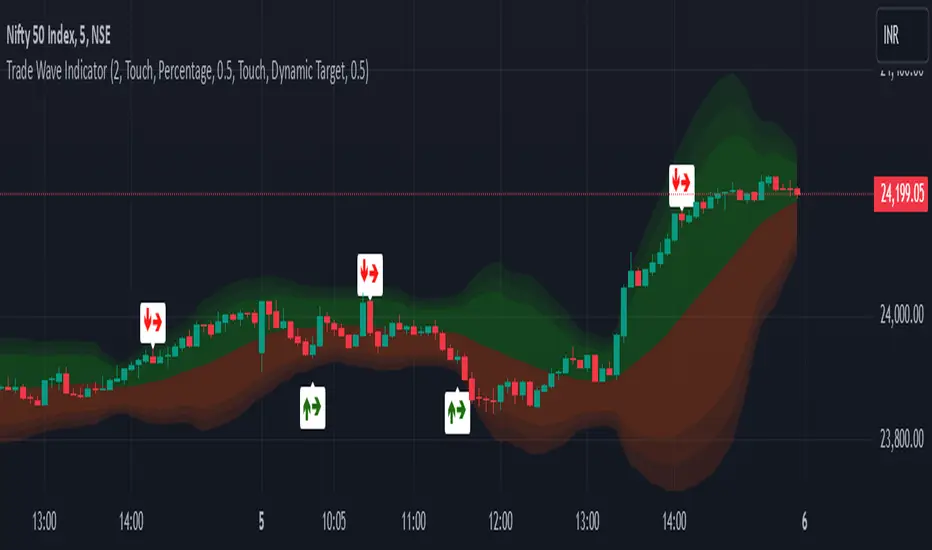
Trade Wave [Bluechip Algos]Trade Wave is a momentum-based indicator designed to show reversal signals. Most of the time, markets are in range bound and this indicator tries to show you the overbought and oversold zone of the time frame you select. It works well during range bound market giving you reversal signals at highs and lows of the range. One can make use of "Momentum tuning" in inputs section to pick the level of momentum aggressiveness. If value is higher, signals will be lesser and if value is low signals will be more. One can also choose different types of stop-losses and targets.
Stop Loss Types:
Fixed SL: Set a fixed stop loss value for consistent risk management.
Dynamic SL: Adjusts with the market, providing a flexible stop loss that moves with price changes.
Previous Candle SL: Stop losses based on the recent low (for sell signals) or high (for buy signals) of the last few candles.
Target Types:
Fixed Target: Set a fixed target value for consistent profit goals.
Dynamic Target: Adjusts with market movements to maximize potential gains.
Risk:Reward Target: Define targets based on SL risk:reward ratios (e.g., 1:2), allowing for personalized risk management strategies.
Suggestion: It's better to take reversal confirmation from multiple time frames instead of relying on just one.
Prometheus Fractal WaveThe Fractal Wave is an indicator that uses a fractal analysis to determine where reversals may happen. This is done through a Fractal process, making sure a price point is in a certain set and then getting a Distance metric.
Calculation:
A bullish Fractal is defined by the current bar’s high being less than the last bar’s high, and the last bar’s high being greater than the second to last bar’s high, and the last bar’s high being greater than the third to last bar’s high.
A bearish Fractal is defined by the current low being greater than the last bar’s low, and the last bar’s low being less than the second to last bar’s low, and the last bar’s low being less than the third to last bar’s low.
When there is that bullish or bearish fractal the value we store is either the last bar’s high or low respective to bullish or bearish fractal.
Once we have that value stored we either subtract the last bar’s low from the bullish Fractal value, and subtract the last bar’s high from the bearish Fractal value. Those are our Distances.
Code:
isBullishFractal() =>
high > high and high < high and high > high
isBearishFractal() =>
low < low and low > low and low < low
var float lastBullishFractal = na
var float lastBearishFractal = na
if isBullishFractal() and barstate.isconfirmed
lastBullishFractal := high
if isBearishFractal() and barstate.isconfirmed
lastBearishFractal := low
//------------------------------
//-------CACLULATION------------
//------------------------------
bullWaveDistance = na(lastBullishFractal) ? na : lastBullishFractal - low
bearWaveDistance = na(lastBearishFractal) ? na : high - lastBearishFractal
We then plot the bullish distance and the negative bearish distance.
The trade scenarios come from when one breaks the zero line and then goes back above or below. So if the last bullish distance was below 0 and is now above, or if the last negative bearish distance was above 0 and now below. We plot a green label below a candle for a bullish scenario, or a red label above a candle for a bearish one, you can turn them on or off.
Code:
plot(bullWaveDistance, color=color.green, title="Bull Wave Distance", linewidth=2)
plot(-bearWaveDistance, color=color.red, title="Bear Wave Distance", linewidth=2)
plot(0, "Zero Line", color=color.gray, display = display.pane)
bearish_reversal = plot_labels ? bullWaveDistance < 0 and bullWaveDistance > 0 : na
bullish_reversal = plot_labels ? -bearWaveDistance > 0 and -bearWaveDistance < 0 : na
plotshape(bullish_reversal, location=location.belowbar, color=color.green, style=shape.labelup, title="Bullish Fractal", text="↑", display = display.all - display.status_line, force_overlay = true)
plotshape(bearish_reversal, location=location.abovebar, color=color.red, style=shape.labeldown, title="Bearish Fractal", text="↓", display = display.all - display.status_line, force_overlay = true)
We can see in this daily NASDAQ:QQQ chart that the indicator gives us marks that can either be used as Reversal signals or as breathers in the trend.
Since it is designed to provide reversals, on something like Gold where the uptrend has been strong, the signals may be just short breathers, not full blown strong reversal signs.
The indicator works just as well intra day as it does on larger timeframes.
We encourage traders to not follow indicators blindly, none are 100% accurate. Please comment on any desired updates, all criticism is welcome!

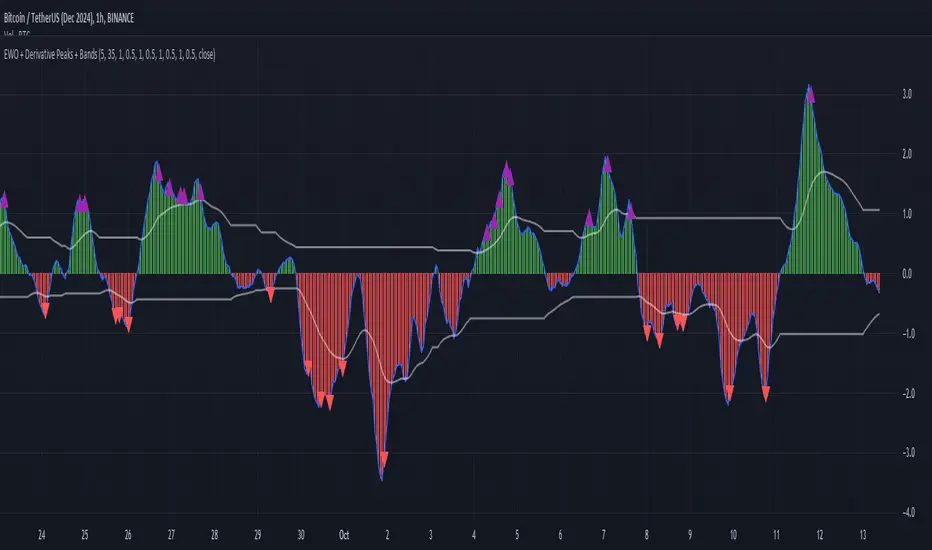
Elliott Wave Oscillator with Peak DetectionThe Elliott Wave Oscillator with Derivative Peak Detection and Breakout Bands is a technical indicator that blends traditional Elliott Wave theory with modern derivative-based peak detection and breakout bands for a clearer view of market trends.
Key Components:
Elliott Wave Oscillator (EWO):
The core of the indicator is based on the difference between two simple moving averages (SMA): a short-term SMA (default length: 5) and a long-term SMA (default length: 35).
This difference is expressed either as an absolute value or a percentage of the current price, depending on the user’s input.
Smoothing:
The EWO is smoothed using an Exponential Moving Average (EMA) to filter out noise and provide a clearer trend direction.
The smoothing length is adaptive based on the current chart's timeframe (e.g., longer smoothing for daily charts).
Derivative Peak Detection:
The smoothed EWO is analyzed for peaks (positive) and troughs (negative) by calculating the derivative (rate of change) between consecutive values.
Peaks are detected when the derivative transitions from positive to negative, while troughs are identified when the derivative switches from negative to positive.
Tolerance levels are adjustable and vary by timeframe to avoid false signals.
Breakout Bands:
Upper and lower breakout bands are dynamically generated based on the smoothed EWO.
The bands help to filter significant peaks and troughs, only highlighting those that occur beyond the breakout levels.
Users can choose to display these bands and use them to filter out less significant peaks and troughs.
Visualization:
The original, unsmoothed EWO is plotted as a histogram, with positive values in green and negative values in red.
The smoothed EWO is plotted as a blue line, providing a clearer view of the underlying trend.
The breakout bands, if enabled, are plotted as white lines to visualize the upper and lower bounds of the oscillator's movement.
Positive peaks and negative troughs that meet the filtering criteria are marked with purple triangles (for peaks) and red triangles (for troughs) on the chart.
Customization Options:
Timeframe-based Smoothing and Tolerance: Different smoothing lengths and tolerance levels can be set for daily, hourly, and 5-minute charts.
Breakout Bands: Users can toggle the display of breakout bands and adjust their visual properties.
Peak Filtering: Peaks and troughs can be filtered based on whether they break out beyond the bands, or all peaks can be shown.
This indicator provides a unique blend of trend detection through the Elliott Wave Oscillator and derivative analysis to highlight significant market reversals while offering breakout bands as a filtering mechanism for false signals.
T-Wave Pattern IdentifierA T-wave might describe a pattern where the price movement forms a "T" shape on the chart, which could involve:
Strong Vertical Movement (The Stem of the T):
This could represent a sharp, decisive move in one direction (up or down), often occurring in a single candle or a few candles. This movement could be seen as the "stem" of the T.
For example, a sudden spike up in price followed by a horizontal consolidation.
Horizontal Movement (The Cross of the T):
Following the sharp move, the price might consolidate sideways, forming a horizontal base or resistance/support level, which creates the top cross of the "T."
This could indicate a pause or a consolidation phase after a significant move, where the price moves within a narrow range.
Contexts Where a T-Wave Pattern Might Be Useful:
Breakout Scenarios: If a T-wave forms after a significant upward or downward movement, it could suggest a potential continuation in the direction of the initial move, especially if the price breaks out of the consolidation range.
Reversal Signals: Alternatively, the T-wave could act as a reversal pattern if the price fails to continue in the direction of the initial move and instead breaks out in the opposite direction.
T-Wave Logic Example:
Stem (Vertical Movement):
Identify a candle or series of candles with a significant price move (e.g., a large-bodied candle with a relatively small wick). This shows momentum in one direction.
Cross (Horizontal Movement):
Following the vertical move, identify a consolidation phase where the price moves sideways in a relatively tight range. This could be visualized as a series of small candles with overlapping highs and lows.

Bitcoin Wave RainbowThis Bitcoin Wave Rainbow model is a powerful tool designed to help traders of all levels understand and navigate the Bitcoin market. It works only with BTC in any timeframe, but better looks in dayly or weekly timeframes. It provides valuable insights into historical price behavior and offers forecasts for the next decade, making it an essential asset for both short-term and long-term strategies.
How the Model Works
The model is built on a logarithmic trend, also known as a power law, represented by the green line on the chart. This line illustrates the expected price trajectory of Bitcoin over time. The model also incorporates a range of price fluctuations around this trend, represented by colored bands.
The width of these bands narrows over time, indicating that the model becomes increasingly accurate as it progresses. This is due to the exponential decrease in the range of price fluctuations, making the model a reliable tool for predicting future price movements.
Understanding the Zones
Blue Zone: This zone signifies that the price is below its trend, making it a recommended area for buying Bitcoin. It represents a level where the price is unlikely to fall further, providing a potential opportunity for accumulation.
Green Zone: This zone represents a fair price range, where the price is relatively close to its trend. In this zone, the price may continue to go up or down, depending on the halving season. ransiting up around any halving and transiting down around 2 years after each halving.
Yellow Zone: This zone indicates that the price is somewhat overheated, often due to the hype following a halving event. While there may still be room for the price to rise, traders should exercise caution in this zone, as a price correction could occur.
Red Zone: This zone represents a strong overbought condition, where the price is significantly above its trend. Traders should be extremely cautious in this zone and consider reducing their positions, as the price is likely to revert back towards the trend or even lower.
Using the Model in Your Trading Strategy
This indicator can be used in conjunction with the Bitcoin Wave Model, which complements it by showing harmonic price fluctuations associated with halving events. Together, these indicators provide a comprehensive view of the Bitcoin market, allowing traders to make informed decisions based on both historical data and future projections.
Benefits for Traders
This Bitcoin price model offers numerous benefits for traders, including:
Clear Visualization: The model provides a clear and concise visual representation of Bitcoin's price behavior, making it easy to understand and interpret.
Accurate Forecasting: The model's accuracy increases over time, providing reliable forecasts for future price movements.
Risk Management: The model helps traders identify overbought and oversold conditions, allowing them to manage their risk more effectively.
Strategic Decision-Making: By understanding the different zones and their implications, traders can make more informed decisions about when to buy, sell, or hold Bitcoin.
By incorporating this Bitcoin price model into your trading strategy, you can gain a deeper understanding of the market dynamics and improve your chances of success.

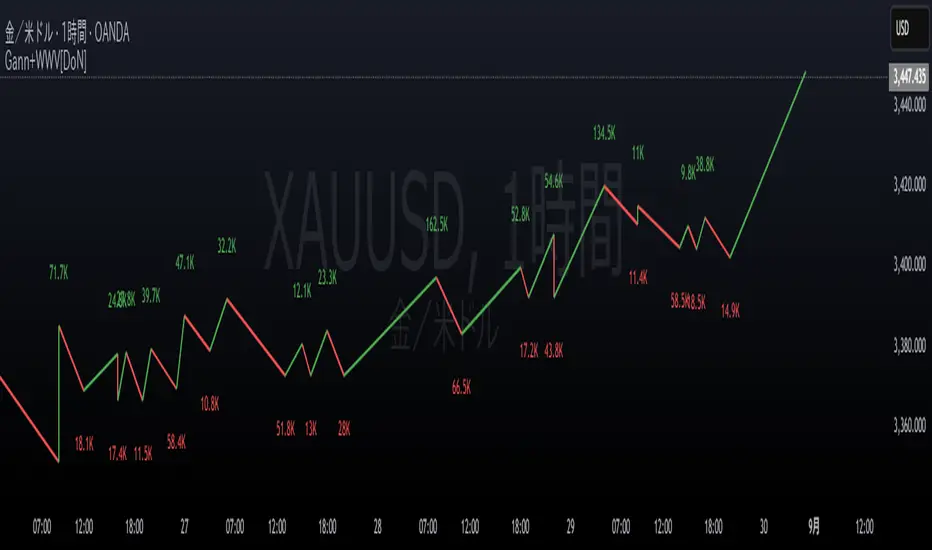
Smart Money Setup 04 [TradingFinder] Three Drive (Harmonic) + OB🔵 Introduction
The "Three Drive" pattern is a well-known formation in technical analysis, recognized for its ability to signal potential trend reversals in price action. Within the realm of trading, particularly in the context of "Reversal Patterns," the Three Drive pattern holds significance as a reliable indicator of shifts in market sentiment.
🟣 Bullish 3 Drive
This pattern typically manifests at a price bottom, where a sequence of lower lows suggests a prevailing negative trend. However, within the structure of the Three Drive pattern, a notable occurrence unfolds.
The second low breaches the range of the first low, followed by the third low surpassing the range of the second low. These penetrations signify a diminishing selling pressure and an emerging buying interest.
Traders often await the confirmation of the third low surpassing the second low as an entry point, with price targets set at the highs formed within the Three Drive pattern.
🟣 Bearish 3 Drive
Conversely, the Bearish Three Drive pattern emerges at a price top, characterized by a sequence of higher highs indicating an upward trend. Yet, amidst this apparent bullish momentum, a shift occurs.
The second high breaks beyond the range of the first high, succeeded by the third high exceeding the range of the second high. These breaches signify a waning buying strength and a resurgence in selling pressure.
Entry into a trade is often executed after the confirmation of the third high surpassing the second high, with targets set at the lows formed within the Three Drive pattern.
Importance :
Understanding the Three Drive pattern's significance extends beyond mere technical analysis. It bears resemblance to other established patterns, such as the Harmonic Pattern and Ending Diagonal within the Elliott Wave Theory.
Recognizing these parallels aids traders in comprehending broader market dynamics and potential price movements.
🔵 Formation of 3 Drive in Order Block Zone
The convergence of the Three Drive pattern with the concept of the Order Block Zone introduces a nuanced layer to traders' analytical approach.
In "Price Action" methodology, Order Blocks represent areas on the price chart where significant market players, such as institutional traders, have executed notable orders.
These zones often act as barriers, with price encountering resistance or support upon reaching them.
When the Three Drive pattern forms within an Order Block Zone, it signifies a confluence of market dynamics.
The completion of the pattern within this zone suggests a potential reversal in the prevailing trend, augmented by the presence of significant institutional orders.
Traders incorporate these Order Blocks into their analysis to identify probable levels where price may change direction, enhancing the reliability of their trading decisions.
🔵 How to Use :
To effectively utilize the Three Drive pattern within the Order Block Zone, traders seek alignment between the completion of the pattern and the presence of significant Order Blocks.
This convergence enhances the reliability of the pattern's signals, increasing the likelihood of successful trade outcomes.
Bullish Three Drive in Demand Zone :
Bearish Three Drive in Supply Zone :
Settings :
You can set your desired "Pivot Period" via settings for the indicator to identify setups based on it.